

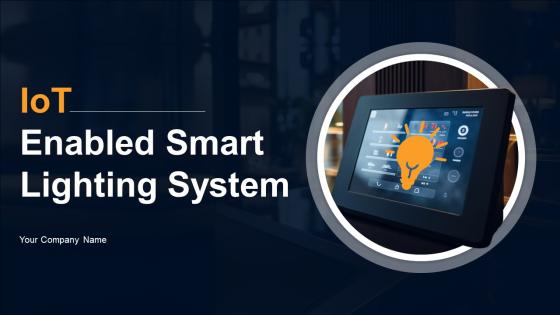
IoT Enabled Smart Lighting System Powerpoint Ppt Template Bundles IoT MM




Try Before you Buy Download Free Sample Product
 Impress Your
 Audience
 100%
100% Editable
 Save Hours
 of Time


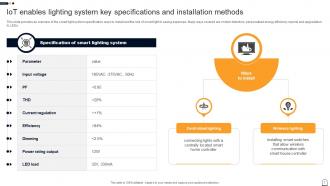
IoT smart lighting system is the use of technology to control and monitor IoT enable bulbs, sensors and adapters remotely. IoT enabled lighting system is controlled through smart phones and assistants. The deck includes overview of smart lighting, its market size, need of installation in homes, key specification, installation methods, technologies used, factors to consider while selecting lighting system. It further includes types, benefits to users, challenges faced while integration, solutions to overcome the issues, etc. Lastly, it covers case study to increase energy efficiency.
People who downloaded this PowerPoint presentation also viewed the following :
IoT Enabled Smart Lighting System Powerpoint Ppt Template Bundles IoT MM with all 33 slides:
Use our IoT Enabled Smart Lighting System Powerpoint Ppt Template Bundles IoT MM to effectively help you save your valuable time. They are readymade to fit into any presentation structure.












FAQs for IoT Enabled Smart Lighting System Powerpoint Ppt Template
So you'll need smart LED bulbs, a hub to run everything, and motion/light sensors. Wi-Fi's gotta be solid though - trust me, connectivity problems will drive you nuts. The sensors handle dimming based on who's around and how much daylight you're getting. Your phone app lets you schedule stuff and check energy use remotely. Honestly just start with your living room or whatever. See how it works before you go crazy and do the whole house - way easier to troubleshoot one room first.
Smart lighting is honestly a game-changer for energy bills. The sensors pick up when you're home and adjust brightness automatically - mine even learned that I stay up late on weekends. They sync with natural light too, so no more blazing overhead lights at noon. I love checking the app to see which rooms are energy hogs (spoiler: it's always the kitchen). Most people save 40-60% on lighting costs. Start with your busiest rooms first since that's where you'll notice the biggest difference. Oh, and they completely shut off in empty areas, which is clutch.
Think of automation as what actually makes your "smart" lights worth the money - otherwise you're just paying extra for app-controlled bulbs. Start with basic scheduling, that's where you'll see real energy savings right away. Motion sensors are pretty sweet too, lights come on when you walk in. My favorite though? Geofencing - your house knows when you're heading home. You can even sync everything to sunrise/sunset times. Honestly, without some kind of automation setup, you're missing the whole point of smart lighting.
Honestly, smart lights are a game changer for security. You can control them from anywhere and set random schedules so it looks like someone's home. Way better than those obvious timer switches from the 90s that fooled nobody. Motion sensors work great too - they'll scare off anyone lurking around your door or garage. I love that you get alerts on your phone when motion triggers unexpectedly. The cool part is everything connects with your cameras and alarm system now, so it all talks to each other instead of being separate random gadgets.
Most smart lights use Zigbee, WiFi, or Bluetooth - that's like 90% of them right there. For bigger setups, I'd go with Zigbee since the devices create this mesh network and talk to each other. Way more reliable. WiFi's cool if you want everything connected to the internet directly, but honestly it can slow down your router if you go crazy with devices. Bluetooth works fine for smaller rooms or quick setup stuff. Oh, and Z-Wave and Thread are getting more popular too. Just check what smart home stuff you already have first - no point mixing protocols if you don't have to.
User feedback is honestly everything when you're designing smart lighting. People always complain about overly complex apps - voice controls win every single time. You'll start noticing patterns pretty quickly: simpler scheduling, better brightness controls, that kind of stuff. But here's what caught me off guard - so many people don't realize certain color temperatures totally screw with their sleep cycles. Motion sensors are another big complaint since they go off way too much. Oh, and connectivity issues? Those complaints usually reveal your worst design problems, so fix those first.
Yeah, smart lights are sneaky about collecting data. They track when you turn lights on/off, figure out your daily routines, and basically know when you're home or not. Motion sensors make it even worse - now they're building this whole profile of how you live. Most companies store everything in the cloud too, which honestly bugs me. They'll share it with random third parties and call it "making your experience better" or whatever. Definitely read those privacy policies before you buy anything. Some brands let you keep data local instead of sending it off to their servers, which is way better if you can find those options.
So basically your smart lights hook up to whatever hub you've got - SmartThings, Alexa, whatever. They talk to other stuff through Zigbee, Z-Wave, or just regular WiFi. Motion sensors can flip them on automatically. Your thermostat kicks in? Lights adjust the mood. TV turns on and they'll dim by themselves - which is actually pretty sweet once you get used to it. Door sensors make them welcome you home, and they work with security cameras too for that whole deterrent thing. Just make sure everything speaks the same language protocol-wise, or you'll have a bunch of gadgets ignoring each other.
Dude, the protocol mess is real - nothing talks to each other properly. Security's probably the worst part though, every device becomes another way for hackers to get in. Costs are brutal too since IoT components aren't cheap, but people still expect reasonable prices. Oh, and customers want everything to work with Alexa, Google, whatever they've already got at home. Honestly kinda crazy how complicated it gets. I'd say pick protocols that are already proven and bake security into the design from the start. Way easier than trying to patch holes later.
So these smart streetlights are pretty cool - they collect data on traffic, air quality, pedestrian movement, all that stuff. Real-time info helps cities figure out which intersections are crazy busy and can even spot accidents quicker. They're way more energy efficient too, which saves money (always a plus). The sensors connect with other city systems, so traffic management and emergency response get better data. Oh and urban planning benefits too. I'd probably start by figuring out which neighborhoods need the most help with monitoring first.
Dude, IoT lighting is actually insane - you can cut energy use by like 50-80%. The sensors pick up movement and adjust brightness automatically, plus they dim when there's enough natural light coming in. No more lights blazing in empty rooms all day, which honestly was driving me crazy at my old office. Smart scheduling means everything turns off when it should. Your LED bulbs last forever too, so less waste from constantly replacing them. The upfront cost seems steep but your electric bill will drop enough to make it worth it. Carbon footprint goes way down too.
Honestly, UI can make or break the whole thing. Too many menus and people just bail - they'll literally walk over to flip the regular switch instead. I've watched friends do this with their "smart" homes lol. Quick access to dimming and scenes is key. Clear icons help too, nothing worse than guessing what some random symbol does. Keep the main stuff simple and obvious. You can always bury the fancy features in a settings menu or whatever. If someone has to think hard about turning on their lights, you've already lost them.
Honestly, smart lights have been a game changer for my mood. They automatically shift color temperature throughout the day - cooler/brighter when you're working, warmer/dimmer at night to help you wind down. Mine does this gradual sunrise thing in the morning that I'm obsessed with. You can set up different scenes too, like "focus mode" or whatever for different vibes. I'd start with just the main rooms you spend time in - no need to go crazy with the whole house right away. The programmable color temp bulbs make the biggest difference.
Honestly, microwave and mmWave sensors are game-changers - they'll detect people through walls and even pick up breathing patterns. Computer vision with AI can tell the difference between your dog and an actual person, which is pretty sick. PIR sensors respond way faster now too. Oh, and ambient light sensors do this cool thing where they adjust color temperature throughout the day, not just brightness. I got sidetracked there, but yeah - start with microwave sensors. They're such a huge step up from basic motion stuff it's not even close.
So basically these smart lights watch what you do and learn your routine over time. They'll figure out when you wake up, when you're working, bedtime - all that stuff. Then they automatically adjust the brightness and color temp to match. Pretty cool how they even catch on to seasonal changes! You can always override it manually though, and honestly that just helps train the system better. Give it like 3-4 weeks to really dial in your habits. The more data it gets, the less you'll need to mess with the switches yourself.
-
Great work on designing the presentation. I just loved it!
-
Very unique, user-friendly presentation interface.