

IoT Smart Homes Automation Powerpoint Presentation Slides IoT CD




Try Before you Buy Download Free Sample Product
 Impress Your
 Audience
 100%
100% Editable
 Save Hours
 of Time


Installing smart devices in homes helps to maximize security, increase energy efficiency, enhance appliance applications, and provide home insights. Check out our professionally designed IoT Smart Homes Automation template. This HVAC System deck offers an overview of intelligent houses needs, features, benefits, elements, steps, positive impact, and threats. Further, the Motion Sensors presentation includes IoT devices, lighting automation systems, smart thermostats, locks, doorbells, security systems, speakers, displays, and many more. Also, the Internet of Things IoT PPT include the factors to consider while selecting these appliances and their working. Lastly, Home AI PowerPoint covers installation costs, technologies Z wave, ZigBee, Thread, Wi Fi, and home assistants that are Alexa, Siri, and Microsoft Cortona. Get access to this powerful template now.
People who downloaded this PowerPoint presentation also viewed the following :
Content of this Powerpoint Presentation
Slide 1: The slide introdues IoT Smart Homes Automation.
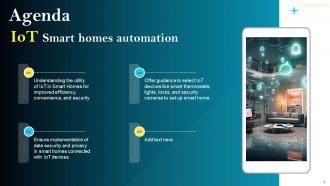
Slide 2: This is an Agenda slide. State your agendas here.
Slide 3: The slide displays Table of contents for presentation.
Slide 4: The slide continues Table of contents.
Slide 5: The slide shows another Table of contents.
Slide 6: This slide provides an overview of the smart homes.
Slide 7: This slide provides an overview of the need for installing smart home systems and technologies.
Slide 8: This slide provides an overview of the steps to follow for installing smart home systems.
Slide 9: This slide provides an overview of the features of smart homes that assist in automating tasks.
Slide 10: This slide provides an overview of the smart home technology advantages to automate everyday tasks.
Slide 11: This slide provides an overview of the various smart systems used in homes and their benefits.
Slide 12: This slide provides an overview of the factors to keep in mind while building smart homes.
Slide 13: This slide provides an overview of the various smart house system components.
Slide 14: This slide provides an overview of the threats to smart house systems and their solution.
Slide 15: The slide highlights another Table of contents.
Slide 16: This slide provides an overview of smart houses’ future that will allow conducting functions more conveniently, efficiently and quickly.
Slide 17: This slide provides an overview of the developments in the smart home industry.
Slide 18: The slide renders Title of contents further.
Slide 19: This slide provides an overview of the smart home devices used globally by people.
Slide 20: This slide provides an overview of the smart home market.
Slide 21: This slide provides an overview of the products and key players of smart home market.
Slide 22: This slide provides an overview of the survey conducted regarding the usage of smart home products.
Slide 23: This slide provides an overview of the key statistics related to technology growth, security, video assistant and smart speaker.
Slide 24: The slide contains Table of contents which is to be discussed further.
Slide 25: This slide provides an overview of IoT appliances in smart homes.
Slide 26: This slide provides an overview of the working of an IOT-based automation system.
Slide 27: The slide displays another Title of contents.
Slide 28: This slide provides an overview of the smart lighting automation system used in homes to enhance user experience.
Slide 29: This slide provides an overview of the smart light system specification, ways to install and the role of smart light in saving expenses.
Slide 30: This slide provides an overview of the technologies needed for smart home lighting systems that are central hub, sensors and smart switches.
Slide 31: This slide provides an overview of the lighting technology for smart homes.
Slide 32: This slide provides an overview of the essential factors to be considered while choosing a lighting design.
Slide 33: The slide shows Title of contents further.
Slide 34: This slide provides an overview of the overview of smart thermostat system used to manage and control the temperature automatically.
Slide 35: This slide provides an overview of the comparison between smart and programmable thermostats.
Slide 36: This slide provides an overview of the advantages of installing a smart thermostat system to monitor and control the temperature automatically.
Slide 37: This slide provides an overview of the comparison among various thermostats.
Slide 38: The slide highlights Title of contents for presentation.
Slide 39: This slide provides an overview of the smart lock system used for increased security.
Slide 40: This slide provides an overview of the essential components of a smart lock system.
Slide 41: This slide provides an overview of the consideration factors before purchasing smart locks for homes.
Slide 42: This slide provides an overview of the various types of smart lock systems.
Slide 43: The slide contains title of contents further.
Slide 44: This slide provides an overview of the video doorbells used to enhance security.
Slide 45: This slide provides an overview of the advantages of smart doorbells to the home owners.
Slide 46: This slide provides an overview of the smart doorbell working.
Slide 47: This slide provides an overview of the various factor consideration before choosing smart doorbells.
Slide 48: This slide provides an overview of the comparison between various smart doorbells.
Slide 49: The slide displays Title of contents further.
Slide 50: This slide provides an overview of the smart security systems used in houses to enhance safety.
Slide 51: This slide provides an overview of the process to be followed by smart homeowners to increase security.
Slide 52: This slide provides an overview of the structure of a smart security system.
Slide 53: This slide provides an overview of the various smart home systems used to enhance safety.
Slide 54: The slide continues title of contents.
Slide 55: This slide provides an overview of the motion sensor technology used by house owners.
Slide 56: This slide provides an overview of the various motion sensors installed and used by smart home owners.
Slide 57: This slide provides an overview of the factors to consider before purchasing smart motion sensors.
Slide 58: This slide provides an overview of the ZigBee motion sensor example.
Slide 59: The slide displays another Title of contents.
Slide 60: This slide provides an overview of the smoke detection system used in smart houses.
Slide 61: This slide provides an overview of the example of a smoke detector system.
Slide 62: The slide contains title of contents for presentation.
Slide 63: This slide provides an overview of the smart home water sensors used to avoid leakage and prevent damage to property.
Slide 64: This slide provides an overview of the working and suitable places in homes to install water sensors.
Slide 65: The slide showases title of contents further.
Slide 66: This slide provides an overview of the smart alarm system installed in homes to increase security.
Slide 67: This slide provides an overview of the various types of smart alarms used in homes.
Slide 68: The slide also displays Table of contents for presentation.
Slide 69: This slide provides an overview of the smart video surveillance systems installed by smart homeowners.
Slide 70: This slide provides an overview of the various types of security cameras installed in smart homes.
Slide 71: This slide provides an overview of the consideration factors for purchasing security cameras.
Slide 72: This slide provides an overview of the various security cameras for smart homes.
Slide 73: The slide contains title of contents further.
Slide 74: This slide provides an overview of the smart speaker systems used in homes that provides assistance in house tasks by following voice commands.
Slide 75: This slide provides an overview of the comparison among various smart speakers.
Slide 76: The slide shows another Title of contents.
Slide 77: This slide provides an overview of the smart displays used in smart homes to monitor home activities.
Slide 78: The slide continues title of contents.
Slide 79: This slide provides an overview of the smart plugs used to control applications in home automation.
Slide 80: This slide provides an overview of the smart plug working in homes with other smart devices.
Slide 81: This slide provides an overview of the various firm’s smart plugs comparison.
Slide 82: The slide depicts title of contents further.
Slide 83: This slide provides an overview of the automatic vacuums used in smart homes to reduce workload.
Slide 84: This slide provides an overview of the factors to acknowledge while buying automatic vacuums.
Slide 85: This slide provides an overview of the sensors in automatic vacuums.
Slide 86: The slide highlights another title of contents.
Slide 87: This slide provides an overview of the HVAC system installed in smart homes to manage the heating and cooling of the house.
Slide 88: This slide provides an overview of the HVAC system need in homes to enhance comfort.
Slide 89: This slide provides an overview of the working of the HVAC system.
Slide 90: This slide provides an overview of the IOT applications for HVAC systems.
Slide 91: The slide also renders title of contents.
Slide 92: This slide provides an overview of the smart alert system used to get help in medical emergencies.
Slide 93: This slide provides an overview of the panic rooms build in smart homes that track and monitors the health of people.
Slide 94: The slide demonstrates title of contents further.
Slide 95: This slide provides an overview of the various systems installed in smart homes.
Slide 96: The slide exhibits another Title of contents.
Slide 97: This slide provides an overview of home automation technology types.
Slide 98: This slide provides an overview of the technology used to connect smart appliances in homes.
Slide 99: This slide provides an overview of the technology used to interlink devices at home.
Slide 100: This slide provides an overview of the required elements for the network.
Slide 101: This slide displays an overview of the technology used to control smart home devices.
Slide 102: This slide provides an overview of the technology used to wirelessly transmit data.
Slide 103: This slide presents an overview of the thread network used for seamless communication among smart devices.
Slide 104: This slide provides an overview of the Wi-Fi network used to connect with devices and transfer data.
Slide 105: This slide provides an overview of Bluetooth technology used to transmit and receive data.
Slide 106: The slide also contains title of contents for IoT Smart Homes Automation
Slide 107: This slide provides an overview of the smart home assistants that act as the controller.
Slide 108: This slide provides an overview of the Alexa virtual assistant that streamlines the work.
Slide 109: This slide provides an overview of the tips to manage Alexa smart home.
Slide 110: This slide provides an overview of the key statistics related to Alexa.
Slide 111: The slide describes title of contents further.
Slide 112: This slide provides an overview of the AI-based voice command service that helps to perform various tasks.
Slide 113: This slide provides an overview of the Google Assistant working through smartphone.
Slide 114: The slide continues title of contents.
Slide 115: This slide provides an overview of Apple company virtual assistant used to get assistant for daily operations.
Slide 116: This slide provides an overview of the functions performed by Siri (smart assistant).
Slide 117: The slide displays another title of contents.
Slide 118: This slide provides an overview of Microsoft Cortona that focuses on increasing the productivity of users.
Slide 119: This slide shows all the icons included in the presentation.
Slide 120: This is a Thank You slide with address, contact numbers and email address.
IoT Smart Homes Automation Powerpoint Presentation Slides IoT CD with all 125 slides:
Use our IoT Smart Homes Automation Powerpoint Presentation Slides IoT CD to effectively help you save your valuable time. They are readymade to fit into any presentation structure.
-
IoT Smart Homes Automation
-
Agenda IoT Smart homes automation
-
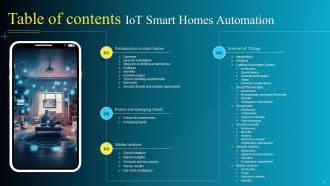
Table of contents IoT Smart Homes Automation
-
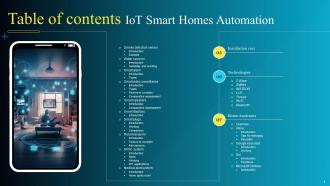
Table of Contents IoT Smart Homes Automation
-
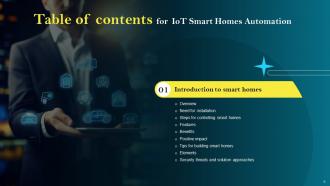
Table of contents for IoT Smart Homes Automation
-
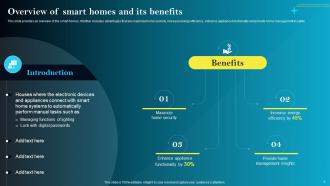
Overview of smart homes and its benefits
-
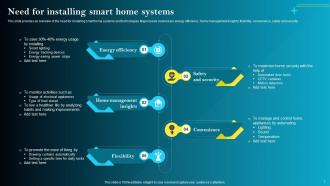
Need for installing smart home systems
-
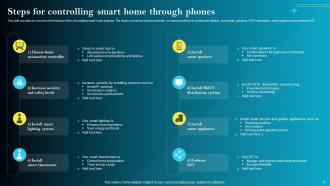
Steps for controlling smart home through phones
-
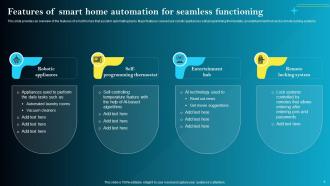
Features of smart home automation for seamless functioning
-
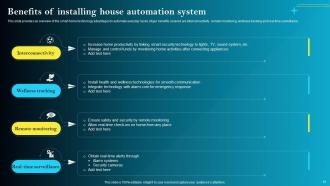
Benefits of installing house automation system
-
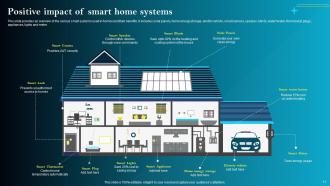
Positive impact of smart home systems
-
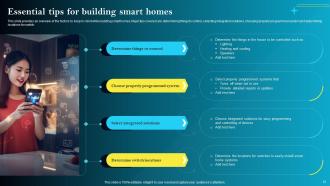
Essential tips for building smart homes
-
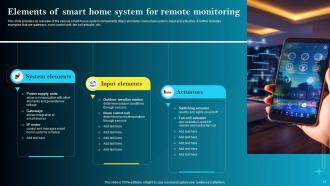
Elements of smart home system for remote monitoring
-
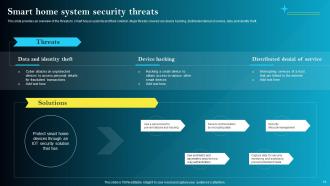
Smart home system security threats
-
Table of contents for IoT Smart Homes Automation
-
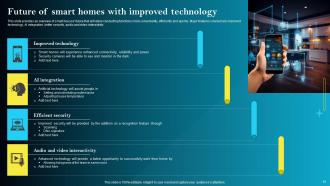
Future of smart homes with improved technology
-
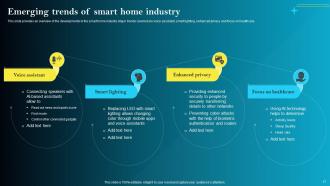
Emerging trends of smart home industry
-
Table of contents for IoT Smart Homes Automation
-
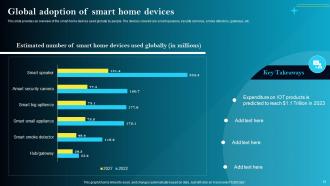
Global adoption of smart home devices
-
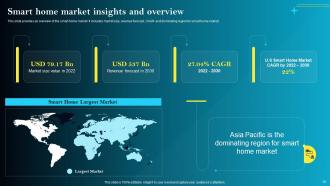
Smart home market insights and overview
-
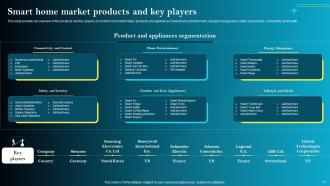
Smart home market products and key players
-
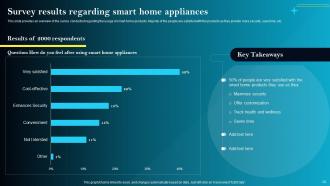
Survey results regarding smart home appliances
-
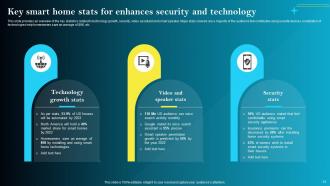
Key smart home stats for enhancing security and technology
-
Table of contents for IoT Smart Homes Automation
-
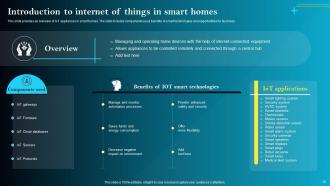
Introduction to internet of things in smart homes
-
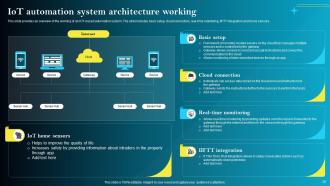
IoT automation system architecture working
-
Table of contents for IoT Smart Homes Automation
-
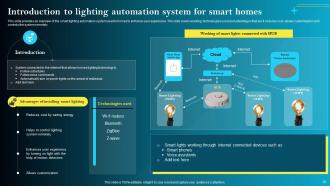
Introduction to lighting automation system for smart homes
-
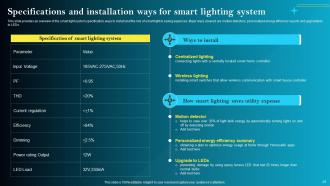
Specifications and installation ways for smart lighting system
-
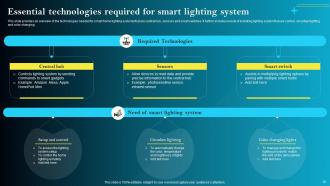
Essential technologies required for smart lighting system
-
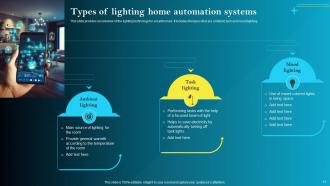
Types of lighting home automation systems
-
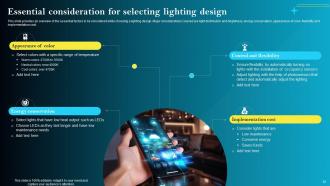
Essential consideration for selecting lighting design
-
Table of contents for IoT Smart Homes Automation
-
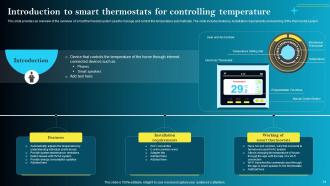
Introduction to smart thermostats for controlling temperature
-
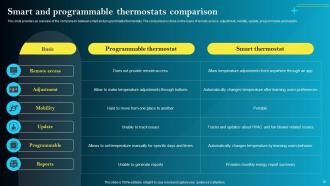
Smart and programmable thermostats comparison
-
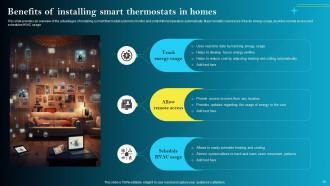
Benefits of installing smart thermostats in homes
-
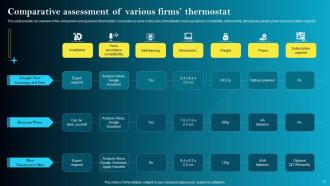
Comparative assessment of various firms thermostat
-
Table of contents for IoT Smart Homes Automation
-
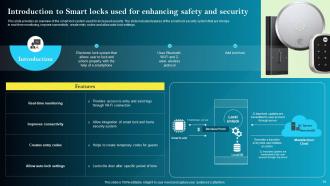
Introduction to Smart locks used for enhancing safety and security
-
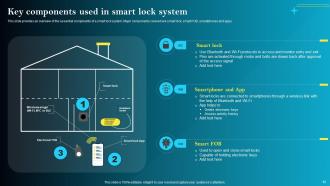
Key components used in smart lock system
-
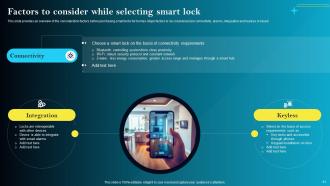
Factors to consider while selecting smart lock
-
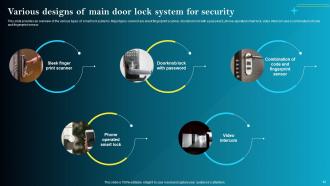
Various designs of main door lock system for security
-
Table of contents for IoT Smart Homes Automation
-
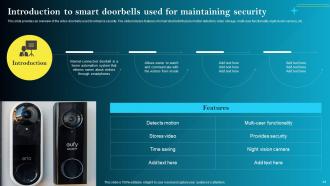
Introduction to smart doorbells used for maintaining security
-
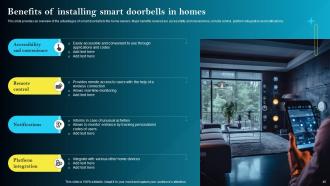
Benefits of installing smart doorbells in homes
-
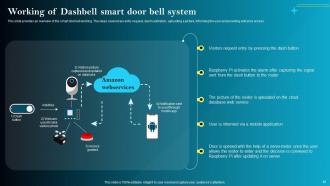
Working of Dashbell smart door bell system
-
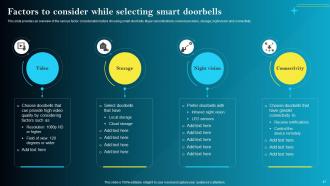
Factors to consider while selecting smart doorbells
-
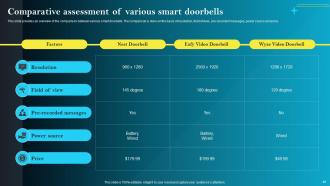
Comparative assessment of various smart doorbells
-
Table of contents for IoT Smart Homes Automation
-
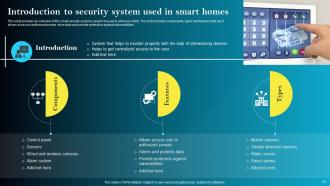
Introduction to security system used in smart homes
-
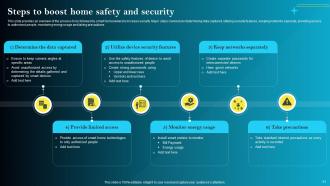
Steps to boost home safety and security
-
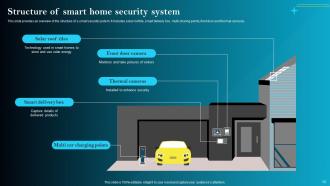
Structure of smart home security system
-
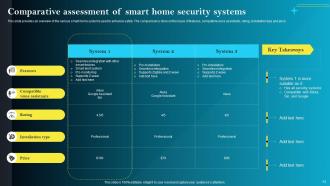
Comparative assessment of smart home security systems
-

Table of contents for IoT Smart Homes Automation
-
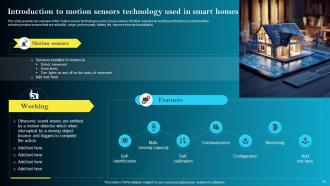
Introduction to motion sensors technology used in smart homes
-
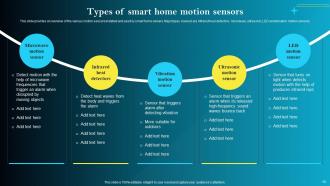
Types of smart home motion sensors
-
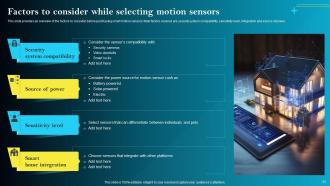
Factors to consider while selecting motion sensors
-
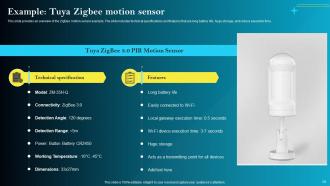
Tuya Zigbee motion sensor example slide
-
Table of contents for IoT Smart Homes Automation
-
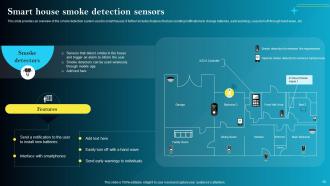
Smart house smoke detection sensors
-
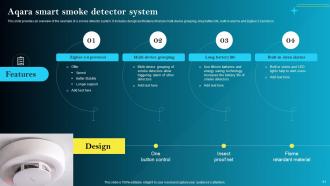
Aqara smart smoke detector system
-
Table of contents for IoT Smart Homes Automation
-
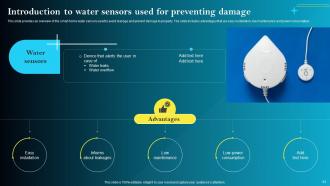
Introduction to water sensors used for preventing damage
-
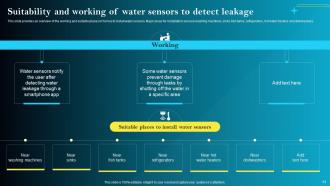
Suitability and working of water sensors to detect leakage
-
Table of contents for IoT Smart Homes Automation
-
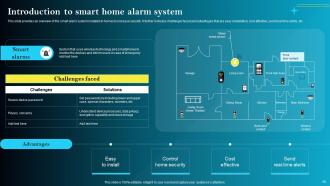
Introduction to smart home alarm system
-
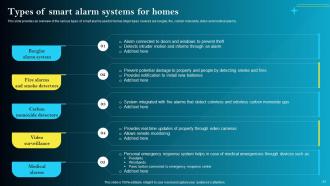
Types of smart alarm systems for homes
-
Table of contents for IoT Smart Homes Automation
-
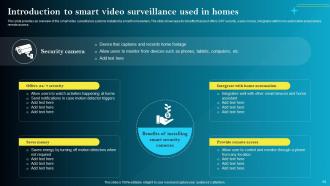
Introduction to smart video surveillance used in homes
-
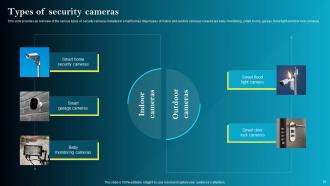
Types of security cameras
-
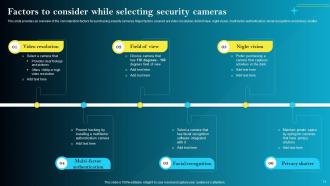
Factors to consider while selecting security cameras
-
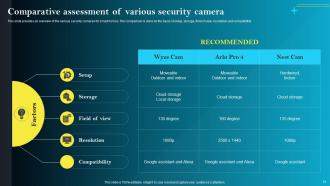
Comparative assessment of various security camera
-
Table of contents for IoT Smart Homes Automation
-
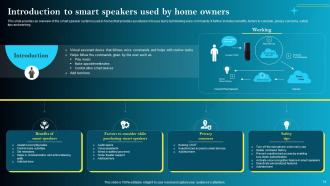
Introduction to smart speakers used by home owners
-
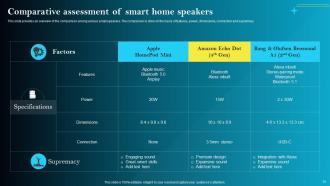
Comparative assessment of smart home speakers
-
Table of contents for IoT Smart Homes Automation
-
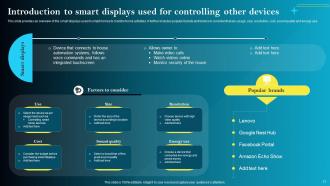
Introduction to smart displays used for controlling other devices
-
Table of contents for IoT Smart Homes Automation
-
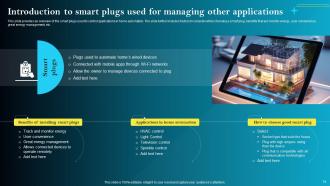
Introduction to smart plugs used for managing other applications
-
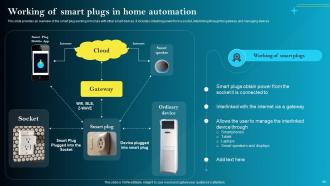
Working of smart plugs in home automation
-
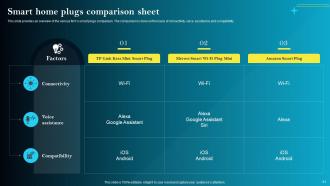
Smart home plugs comparison sheet
-
Table of contents for IoT Smart Homes Automation
-
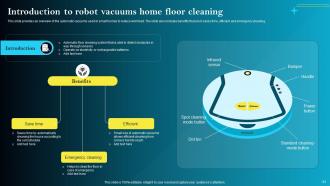
Introduction to robot vacuums home floor cleaning
-
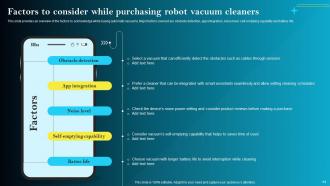
Factors to consider while purchasing robot vacuum cleaners
-
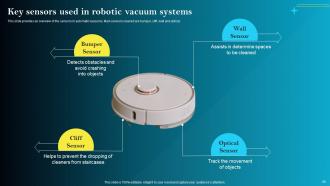
Key sensors used in robotic vacuum systems
-
Table of contents for IoT Smart Homes Automation
-
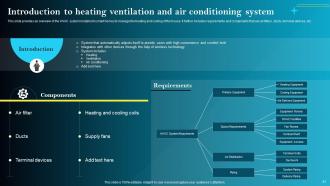
Introduction to heating ventilation and air conditioning system
-
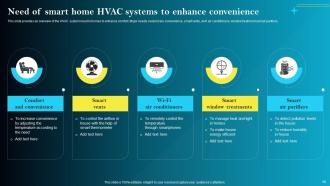
Need of smart home HVAC systems to enhance convenience
-
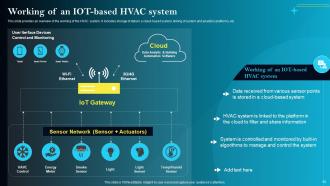
Working of an IoT based HVAC system
-
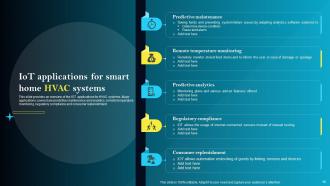
IoT applications for smart home HVAC systems
-
Table of contents for IoT Smart Homes Automation
-
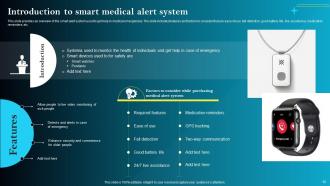
Introduction to smart medical alert system
-
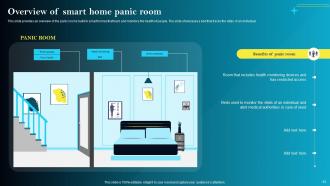
Overview of smart home panic room
-
Table of contents for IoT Smart Homes Automation
-
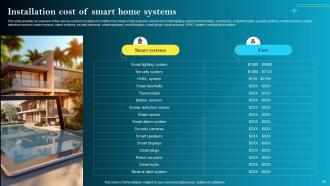
Installation cost of smart home systems
-
Table of contents for IoT Smart Homes Automation
-
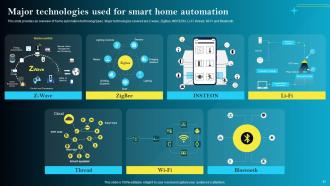
Major technologies used for smart home automation
-
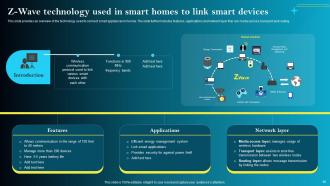
Z Wave technology used in smart homes to link smart devices
-
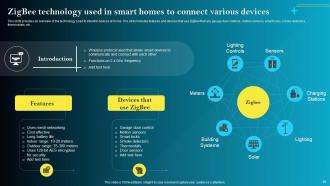
ZigBee technology used in smart homes to connect various devices
-
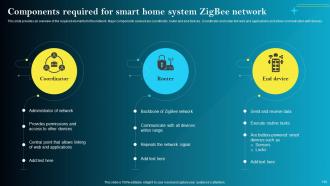
Components required for smart home system ZigBee network
-
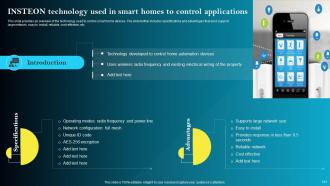
INSTEON technology used in smart homes to control applications
-
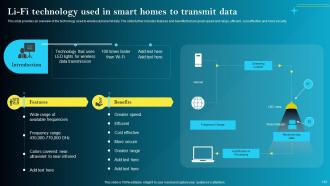
Li Fi technology used in smart homes to transmit data
-
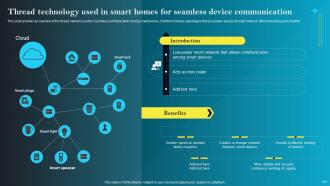
Thread technology used in smart homes for seamless device communication
-
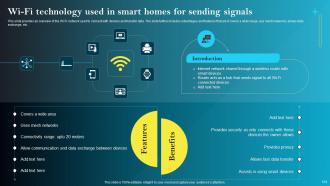
Wi Fi technology used in smart homes for sending signals
-
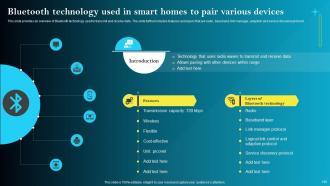
Bluetooth technology used in smart homes to pair various devices
-
Table of contents for IoT Smart Homes Automation
-
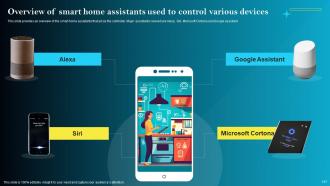
Overview of smart home assistants used to control various devices
-
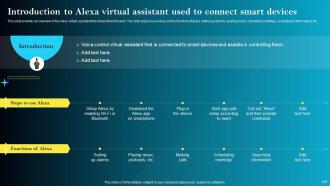
Introduction to Alexa virtual assistant used to connect smart devices
-
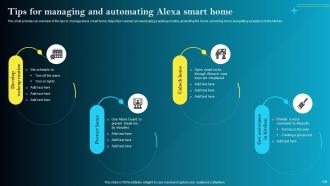
Tips for managing and automating Alexa smart home
-
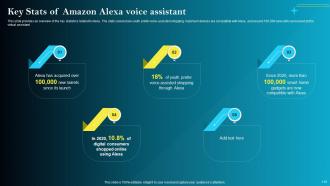
Key Stats of Amazon Alexa voice assistant
-
Table of contents for IoT Smart Homes Automation
-
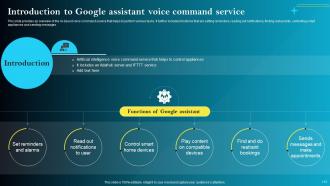
Introduction to Google assistant voice command service
-
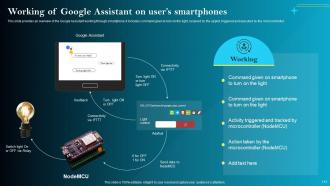
Working of Google Assistant on user s smartphones
-

Table of contents for IoT Smart Homes Automation
-
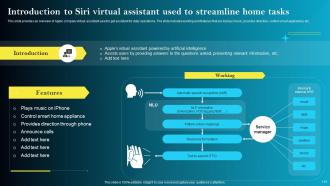
Introduction to Siri virtual assistant used to streamline home tasks
-
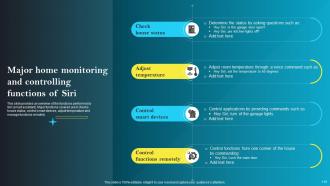
Major home monitoring and controlling functions of Siri
-
Table of contents for IoT Smart Homes Automation
-
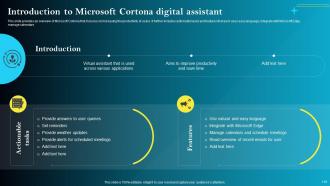
Introduction to Microsoft Cortana digital assistant
-
Icons slide IoT Smart Homes Automation
-

Thank You
-

-

-

-

-

FAQs for IoT Smart Homes Automation Powerpoint Presentation
Honestly, it's pretty sweet once you get into it. You can control lights, thermostat, locks - basically everything from your phone. Makes you feel like you're living in the future or whatever. But here's the thing - you'll actually save on your electric bill since smart thermostats are crazy efficient. Security is huge too. Real-time alerts when someone's at your door, and you can check cameras from anywhere. Oh, and the devices start learning your habits after a while, which is kinda creepy but useful. Don't go overboard at first though - pick one thing like lighting and build from there.
So basically these smart home gadgets learn your routine and adjust everything automatically. My thermostat now knows I'm usually gone by 8am and doesn't waste energy heating an empty house. Smart plugs kill that vampire power draw from stuff just sitting there - you know how your TV still uses power when it's "off"? Game changer. The lighting adjusts based on how bright it is outside and whether anyone's actually in the room. I'll be honest, I thought it was all hype until my bill dropped 20%. Start with your thermostat and water heater since those are the biggest energy hogs. Most people notice savings pretty quickly.
Start with your router - ditch that default password and switch to WPA3 if you can. Next, tackle each smart device one by one. Update firmware religiously and please, for the love of god, change those garbage default passwords. Create a separate network just for IoT stuff so hackers can't jump from your smart lightbulb to your laptop (yeah, that's actually a thing). Turn on two-factor auth wherever it's available. Also disable remote access features you don't use - why leave extra doors open? Focus on the scary stuff first like cameras and smart locks.
So basically, if your devices can't talk to each other, you're just managing a bunch of random gadgets instead of an actual smart home. Super annoying when you want everything automated but your thermostat won't work with your security system - even from the same company sometimes! Standards like Zigbee, Z-Wave, and Matter let different brands play nice together. I'd honestly go with devices that support multiple protocols or Matter since it's the newest thing. That way you won't get stuck replacing everything later when standards change.
So basically AI turns your regular connected gadgets into something that actually thinks ahead. Your thermostat learns you like it cooler at night. Lights dim when you're winding down. That kind of stuff - all happening without you touching an app. The energy savings are pretty solid too since everything talks to each other. Instead of you controlling everything manually, your house starts figuring out what you want before you even think about it. Honestly, I'd grab a smart thermostat first and just see how it goes.
Hey! So IoT stuff is actually perfect for accessibility issues. Voice commands mean no more fumbling with light switches - just tell them what to do. Smart locks unlock with your phone, thermostats adjust themselves, and you can even get medication reminders. The doorbell cameras are clutch too since you can see who's there without getting up. I'll be honest, some of the voice tech still glitches on me sometimes, but when it works it's amazing. Smart appliances work remotely too. I'd say figure out what physical stuff is hardest first, then find the tech to fix those specific problems.
You'll see smart speakers everywhere - Alexa, Google Home, all that stuff. Nest thermostats are pretty standard now. Smart lights though? Game changer, seriously can't deal with regular switches anymore. Ring doorbells and security cameras are everywhere too, makes sense I guess. Smart locks are becoming more common, plus those little door/window sensors for security. Oh and motion detectors. Most people just pick one thing that annoys them and start there. Like don't try to automate your whole house day one - that's expensive and kinda overwhelming. Just fix whatever actually bugs you first.
Yeah, people are definitely freaking out about IoT privacy stuff. Like 70% of folks surveyed say they're worried about data collection and hacking. Smart speakers and security cameras make them especially nervous - nobody wants some creep accessing their home feeds or Amazon tracking when they're around. But here's the weird part: they buy the devices anyway because convenience wins. It's like we can't help ourselves lol. If you're building something in this space, just be super transparent about data use and don't skimp on security. That's honestly what builds trust.
Honestly, smart homes are kinda complicated environmentally. Yeah, you'll save energy with smart thermostats and automated lighting - that stuff actually works. But then there's all the manufacturing and e-waste from buying tons of gadgets you probably don't need (guilty as charged lol). The energy savings usually win out in the end though. Just don't go crazy buying every smart device that exists. Stick to the basics first - smart thermostat and LED systems give you the most impact. Your carbon footprint should drop if you're strategic about it.
So basically your smart home learns your routine and starts doing stuff before you even think about it. Like it'll heat up the house right before you get home from work, or notice you're almost out of milk and add it to your shopping list. Honestly it's kinda weird how spot-on it gets after a few months of watching you! All your devices - thermostat, sensors, whatever - feed data to these algorithms that pick up on patterns. I'd start with just your thermostat's predictive mode first though, see how you like it before going crazy with other stuff.
Dude, the compatibility thing is brutal - you've got Amazon, Google, Apple all doing their own thing, so picking wrong basically kills your product. Security's massive too since nobody wants hackable door locks. Battery life on sensors? Total pain. When stuff goes offline customers freak out and never trust you again. Honestly I'd probably focus on nailing the boring basics first instead of cramming in cool features. Oh and build for multiple ecosystems from the start or you'll hate yourself later.
So edge computing processes data right on your smart home devices instead of sending it all to the cloud. Your thermostat can make decisions instantly in your house rather than waiting for some server miles away - honestly makes such a difference. We're talking milliseconds instead of seconds here. Privacy's better too since your data isn't bouncing around the internet constantly. Oh, and devices keep working even when your internet craps out, which is clutch. When you're buying new smart stuff, definitely look for edge processing support if you want things to feel snappy.
Smart homes are getting way better at learning your actual routines instead of just following basic schedules. AI integration is huge right now - voice assistants that don't suck at understanding context, plus health monitoring that's built into the house itself. 5G is finally making everything respond instantly. Honestly, the coolest part is you won't need a million apps anymore. Everything's moving toward invisible automation that just works. Oh, and energy management is becoming standard, not optional. When you're shopping around, stick with systems that connect to everything rather than those locked-down proprietary ones.
Honestly, smart homes can do way more for your health than you'd think. Those air quality sensors will kick your ventilation into gear when pollution gets bad. Your thermostat keeps temps perfect for sleeping better. Motion sensors are clutch for older relatives - they'll catch falls or weird movement patterns that could signal problems. The lighting thing is pretty cool too, syncing with your natural sleep cycle. Plus all those fitness trackers work throughout the house now, monitoring heart rate and sleep quality. My advice? Don't go crazy buying everything at once. Start with maybe two health-focused gadgets and see how it goes.
Okay so voice assistants are basically what make smart homes actually work well together. You can just say "turn off the lights" instead of opening like 5 different apps - way less annoying. They pick up on your daily habits too and start doing stuff automatically, which is honestly kind of creepy but also convenient? The main thing is sticking with one system though. Don't mix Alexa with Google stuff or you'll hate your life. Just pick one ecosystem and check compatibility before buying anything new.
-
“The presentation template I got from you was a very useful one.My presentation went very well and the comments were positive.Thank you for the support. Kudos to the team!”
-
Excellent template with unique design.