

It infrastructure playbook powerpoint presentation slides




Try Before you Buy Download Free Sample Product
 Impress Your
 Audience
 100%
100% Editable
 Save Hours
 of Time


IT Infrastructure playbook serves as a guideline for streamlining IT infrastructure and automating existing IT infrastructure through various techniques. It will assist IT teams and professionals in understanding IT infrastructure services and tracking costs. The playbook will benefit infrastructure managers, service level managers, ITSM managers, and process owners. It covers details about IT infrastructure overview in terms of IT infrastructure management framework, strengthens IT infrastructure to enhance service delivery, IT infrastructure core areas assessment checklist, and strategic IT infrastructure enhancement roadmap. It also covers various IT infrastructure automation techniques such as DevOps containerization, DevOps orchestration, infrastructure as code for overall process automation, and infrastructure automation through infrastructure provisioning. Moreover, it presents details about the IT infrastructure management team with key people involved and additional roles pivotal for successful infrastructure management. IT infrastructure cost management includes an on-premise service rate sheet, off-premise service rate sheet, and selecting suitable infrastructure monitoring tools. IT infrastructure management is done through dashboards to track incidents, and IT costs. Download our 100 percent editable and customizable template, which is also compatible with Google slides. Book a free demo now.
People who downloaded this PowerPoint presentation also viewed the following :
Content of this Powerpoint Presentation
Slide 1: This slide introduces IT Infrastructure Playbook. State Your Company Name and begin.
Slide 2: This slide presents Agenda for IT Infrastructure Playbook.
Slide 3: This slide presents Table of Content for the presentation.
Slide 4: This slide highlights title for topics that are to be covered next in the template.
Slide 5: This slide provides information regarding IT infrastructure management framework.
Slide 6: This slide displays Strengthen IT Infrastructure to Enhance Service Delivery.
Slide 7: This slide provides information regarding IT infrastructure core areas assessment checklist.
Slide 8: This slide represents information regarding IT infrastructure enhancement roadmap.
Slide 9: This slide highlights title for topics that are to be covered next in the template.
Slide 10: This slide provides information regarding infrastructure service catalog mind map.
Slide 11: This slide represents consolidation of IT infrastructure services.
Slide 12: This slide highlights title for topics that are to be covered next in the template.
Slide 13: This slide provides information regarding IT infrastructure management through monitoring and capacity planning.
Slide 14: This slide represents Estimated Incident Management Handling Duration.
Slide 15: This slide highlights title for topics that are to be covered next in the template.
Slide 16: This slide showcases IT Systems Automation through Infrastructure Provisioning.
Slide 17: This is another slide continuing IT Systems Automation Through Infrastructure Provisioning.
Slide 18: This slide provides information regarding infrastructure as a code for overall process automation.
Slide 19: This slide displays Devops containerization in it infrastructure automation.
Slide 20: This slide represents DevOps orchestration for overall infrastructure automation.
Slide 21: This slide showcases various DevOps tools for IT infrastructure automation by addressing toolset.
Slide 22: This slide highlights title for topics that are to be covered next in the template.
Slide 23: This slide displays Information Technology Infrastructure Library (ITIL) process in terms of principles and key elements of ITIL.
Slide 24: This slide showcases ITIL process areas in terms of service strategy and service design.
Slide 25: This slide presents ITIL process areas in terms of service strategy and service design.
Slide 26: This slide displays RACI for Essential ITIL Tasks Assigned to Infrastructure Management Team.
Slide 27: This slide highlights title for topics that are to be covered next in the template.
Slide 28: This slide represents Key Roles Associated with Infrastructure Management Team.
Slide 29: This slide showcases Additional Roles Pivotal for Successful Infrastructure Management.
Slide 30: This slide highlights title for topics that are to be covered next in the template.
Slide 31: This slide provides information regarding the on-premise service rate sheet for cost assessment.
Slide 32: This slide presents Off Premise Service Rate Sheet for Cost Assessment.
Slide 33: This slide shows Selecting Suitable IT Infrastructure Monitoring Tool.
Slide 34: This slide highlights title for topics that are to be covered next in the template.
Slide 35: This slide displays IT Infrastructure Management Dashboard to Track Incidents.
Slide 36: This slide represents IT cost management dashboard to track IT Costs Breakdown, return on investment, etc.
Slide 37: This slide showcases Icons for IT Infrastructure Playbook.
Slide 38: This slide is titled as Additional Slides for moving forward.
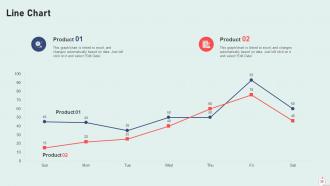
Slide 39: This slide describes Line chart with two products comparison.
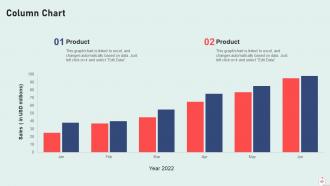
Slide 40: This slide displays Column chart with two products comparison.
Slide 41: This slide contains Puzzle with related icons and text.
Slide 42: This slide shows Post It Notes. Post your important notes here.
Slide 43: This slide provides 30 60 90 Days Plan with text boxes.
Slide 44: This slide presents Roadmap with additional textboxes.
Slide 45: This is a Timeline slide. Show data related to time intervals here.
Slide 46: This is a Thank You slide with address, contact numbers and email address.
It infrastructure playbook powerpoint presentation slides with all 51 slides:
Use our IT Infrastructure Playbook Powerpoint Presentation Slides to effectively help you save your valuable time. They are readymade to fit into any presentation structure.
-

IT Infrastructure Playbook
-
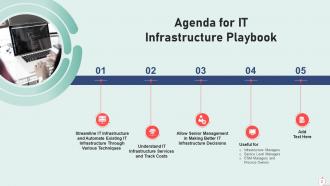
Agenda for IT Infrastructure Playbook
-
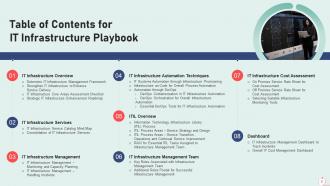
Table of Contents for IT Infrastructure Playbook
-

Table of Contents for IT Infrastructure Playbook
-
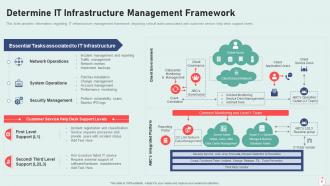
Determine IT Infrastructure Management Framework
-
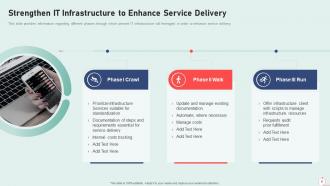
Strengthen IT Infrastructure to Enhance Service Delivery
-
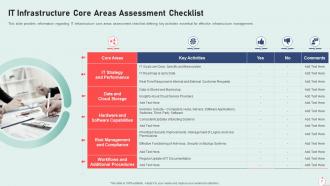
IT Infrastructure Core Areas Assessment Checklist
-
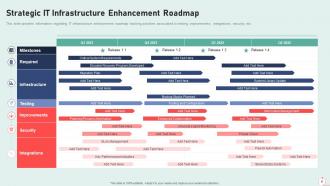
Strategic IT Infrastructure Enhancement Roadmap
-
Table of Contents for IT Infrastructure Playbook
-
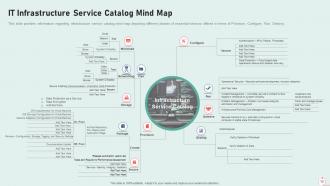
IT Infrastructure Service Catalog Mind Map
-
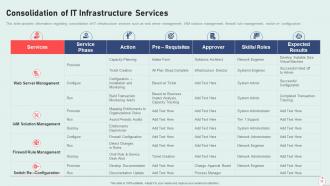
Consolidation of IT Infrastructure Services
-
Table of Contents for IT Infrastructure Playbook
-
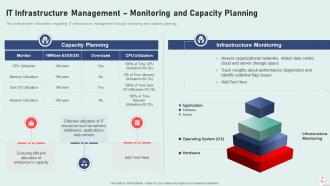
IT Infrastructure Management Monitoring and Capacity Planning
-
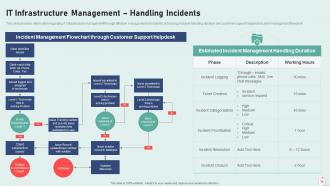
IT Infrastructure Management Handling Incidents
-
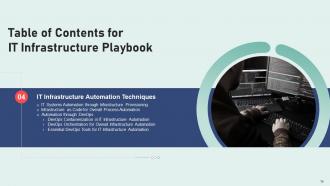
Table of Contents for IT Infrastructure Playbook
-

IT Systems Automation through Infrastructure Provisioning
-
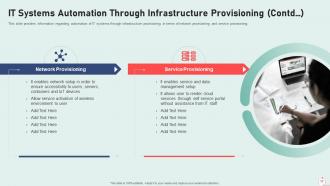
IT Systems Automation Through Infrastructure Provisioning Contd
-
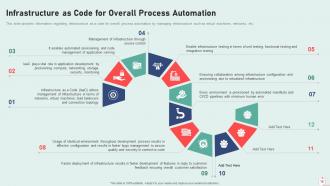
Infrastructure as Code for Overall Process Automation
-

DevOps Containerization in IT Infrastructure Automation
-
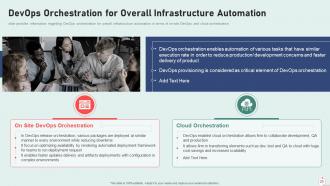
DevOps Orchestration for Overall Infrastructure Automation
-
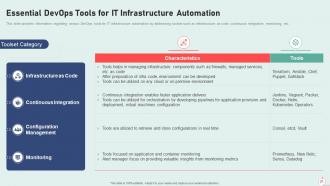
Essential DevOps Tools for IT Infrastructure Automation
-

IT Infrastructure Playbook Table of Contents Slide
-
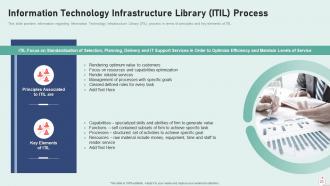
Information Technology Infrastructure Library ITIL Process
-
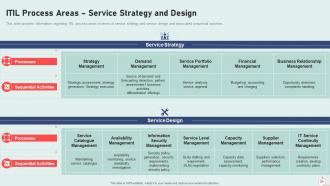
ITIL Process Areas Service Strategy and Design
-
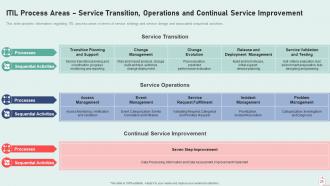
ITIL Process Areas Service Transition Operations and Continual Service Improvement
-

RACI for Essential ITIL Tasks Assigned to Infrastructure Management Team
-
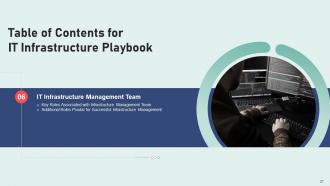
Table of Contents for IT Infrastructure Playbook
-
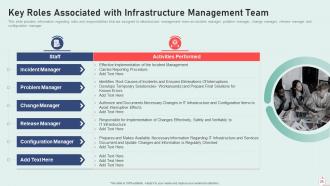
Key Roles Associated with Infrastructure Management Team
-
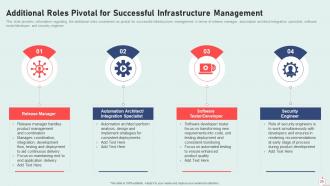
Additional Roles Pivotal for Successful Infrastructure Management
-
Table of Contents for IT Infrastructure Playbook
-

On Premise Service Rate Sheet for Cost Assessment
-
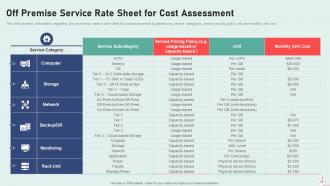
Off Premise Service Rate Sheet for Cost Assessment
-
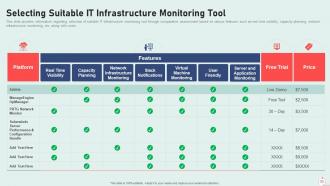
Selecting Suitable IT Infrastructure Monitoring Tool
-
Table of Contents for IT Infrastructure Playbook
-

IT Infrastructure Management Dashboard to Track Incidents
-

Overall IT Cost Management Dashboard
-
Icons Slide for IT Infrastructure Playbook
-

Additional Slides
-
Line Chart
-
Column Chart
-

Puzzle
-
Post it Notes
-
30 60 90 Day Plan
-

Roadmap
-
Timeline
-
Thanks for Watching
-

-

-

-

-

FAQs for It infrastructure playbook
So you'll need five main things for decent IT setup: network connectivity that actually works, secure servers/storage, the usual endpoint stuff (laptops, phones, whatever your team uses), cybersecurity tools, and - this is where most places mess up - a solid backup plan. Seriously, I've seen too many businesses learn this the hard way when their systems crash. Your network connects everything together. Security keeps the bad guys out. Storage holds your data, endpoints are what people work on daily. Best approach? Figure out what you have now, then fix the biggest problems first.
Start with an audit of your performance metrics, security gaps, and costs. Check system uptime, response times - basically how well everything's actually working for your business. User satisfaction surveys are huge too since they catch stuff the data misses. Also look at scalability and disaster recovery (boring but necessary). Make sure your tech stack actually fits your goals instead of just existing. Honestly, I'd create some kind of scoring system to compare everything objectively. Then prioritize fixes based on what'll impact business most vs. your budget. Getting both hard data and real user feedback is what matters.
Dude, cloud computing is basically running everything now. You get instant scalability and only pay for what you actually use - way better than those old physical servers gathering dust somewhere. The flexibility is insane too. Work from anywhere, spin things up in minutes. Honestly, I don't miss dealing with hardware failures at 2am. Plus most cloud providers handle backups and disaster recovery better than we ever could in-house. Just make sure you figure out the right balance between performance and costs for whatever you're doing. Security's obviously important but don't overthink it.
Honestly, you've gotta think about scaling from the very beginning - don't make the mistake of going super cheap upfront. Cloud infrastructure is clutch because you can bump resources up or down without buying a bunch of expensive hardware. Build your network with some redundancy and extra room to grow. Standardizing everything makes life way easier down the road too. Oh, and automate what you can - saves so much headache later. I'd start by looking at your current setup and figuring out where things might get bottlenecked. Trust me, I've watched companies totally screw themselves by cutting corners early on.
Definitely start with network segmentation and get multi-factor authentication on everything. Patching is boring but critical - automate it if you can. Zero-trust is the way to go now, treat every device like it's already infected. Ransomware's everywhere so your backup game needs to be solid. Oh and honestly? Employee training matters more than most tech solutions since people click on stupid stuff all the time. Regular security audits will catch gaps you missed. Don't forget to update your incident response plan - half the companies I know have plans from 2019 that are useless now.
Honestly, your network setup makes or breaks everything performance-wise. Good segmentation and bandwidth planning? Your apps will purr even when everyone's hammering them. But mess up the architecture and you'll get those soul-crushing bottlenecks that ruin everyone's week. Topology impacts latency, security, scalability - basically everything that matters. I always tell people to map their traffic flows first, then design around that. Don't just randomly connect switches and pray it works (learned that the hard way). Plan for growth too, not just what you need today.
Track these four things: uptime, response times, resource usage (CPU/memory), and security issues. Honestly, most teams go overboard and monitor like 20 metrics nobody looks at. Start with what hits users directly - slow apps or downtime will have them calling you fast. Also watch costs per service and how long fixes take when stuff breaks. Pick maybe 5-7 metrics your team actually checks weekly. Set clear alerts and thresholds. Way better to nail a few important things than half-ass everything. Oh and automate the alerts so you're not constantly babysitting dashboards.
Honestly, start with any centralized system - ServiceNow, Lansweeper, or hell, even a decent spreadsheet works for smaller places. Tag everything with unique IDs and set up automated discovery because there's always some department going rogue with random purchases. Do regular audits quarterly for your critical stuff, yearly for the rest. Track warranty dates, software licenses, lifecycle status - basically plan replacements before everything dies on you at once (learned that one the hard way). First step though? Just figure out what you actually own. The amount of ghost inventory sitting around will blow your mind.
So the big ones right now are cloud-first and edge computing - basically pushing everything to multi-cloud while getting compute closer to users. AI's literally automating everything these days, from monitoring to predicting when stuff breaks. Zero-trust security isn't optional anymore either. Oh, and infrastructure-as-code is killing off manual configs, which honestly makes life way easier. Sustainability's driving a lot of hardware decisions too since energy costs are insane. I'd start by auditing where you're at compared to this stuff - you'll probably find some gaps pretty quick.
Dude, start with the annoying stuff that eats up everyone's time - patch management, backups, that kind of thing. Once you automate those repetitive tasks, your team can actually work on cool projects instead of babysitting servers. Infrastructure as code is a game changer for deploying environments consistently. Automated testing will catch bugs before they become your problem in production. Honestly? Don't try to automate everything at once - you'll just stress yourself out. Pick one workflow that's driving everyone crazy and tackle that first. The time savings are pretty wild once it's running smoothly.
Honestly, the worst thing you can do is rush in without a real plan. You'll get hit with compatibility nightmares and random downtime that was totally preventable. Testing in staging first isn't optional - I learned that the hard way once. Migrations always take way longer than you expect, so pad your timeline. Oh, and start telling users what's coming early, because nobody likes surprise outages. The sales team will absolutely lose their minds if they can't access their stuff. Have a rollback ready before you touch anything. Trust me on that one.
Dude, virtualization is a game changer - you can run like 5-10 virtual machines on one physical server instead of having a bunch sitting around barely doing anything. I've seen places go from 20 servers at 10% usage to maybe 4-5 running at 70%. Way less power bills, less space needed, fewer headaches when something breaks. The best part? You can fire up new VMs instantly instead of waiting forever for procurement to order hardware (ugh, that process). Start with your most underused servers first - they're basically begging to be virtualized. Honestly wish more companies would just bite the bullet and do this already.
Dude, 5G is gonna mess with your whole network setup. Processing has to happen way closer to users now because of that crazy low latency - your centralized data centers won't cut it anymore. The bandwidth jumps are insane too, like 100x faster than 4G (which honestly still blows my mind). Security becomes a nightmare since there's suddenly way more attack vectors everywhere. Oh and your current hardware? Probably can't handle any of this. I'd start checking what edge infrastructure you have now and save up some serious cash for upgrades in the next couple years.
First thing - map out what systems you absolutely can't lose and how long you can realistically stay offline. Document recovery steps for everything (I know, boring as hell but you'll thank yourself later). Assign people specific jobs so nobody's standing around confused during an actual emergency. Set up your backups somewhere offsite or in the cloud. Run through the whole thing regularly - tabletop scenarios work, but actually testing failovers is way better. Everyone needs to know their part without freaking out. Oh, and review it every few months because stuff changes constantly.
So DevOps is basically getting your dev and ops teams to actually work together instead of being at each other's throats all the time. No more devs just dumping code and running away while ops freaks out about deployments. You get automated testing, push-button deployments, infrastructure that's managed through code - the whole nine yards. Honestly, teams resist it at first but then wonder how they lived without it. Fewer 3am emergency calls, way faster releases, less repetitive garbage work. My advice? Don't try to boil the ocean right away. Pick one annoying manual process and automate that first.
-
Excellent design and quick turnaround.
-
Awesomely designed templates, Easy to understand.