

Key Components For SAP Build Process Automation




Try Before you Buy Download Free Sample Product
 Impress Your
 Audience
 100%
100% Editable
 Save Hours
 of Time


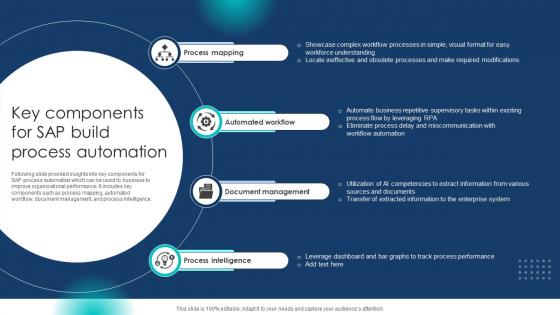
Following slide provided insights into key components for SAP process automation which can be used by business to improve organisational performance. It includes key components such as process mapping, automated workflow, document management, and process intelligence.
People who downloaded this PowerPoint presentation also viewed the following :
Key Components For SAP Build Process Automation with all 6 slides:
Use our Key Components For SAP Build Process Automation to effectively help you save your valuable time. They are readymade to fit into any presentation structure.





FAQs for Key Components For SAP
Here's what makes SAP Build different - you get everything in one spot instead of juggling separate tools for bots and workflows. Visual design, decision logic, integrations - it's all there. Being low-code is nice too, though honestly you'll still want some tech skills to do anything interesting. What I really like is how it plays nice with your existing SAP stuff and scales up when you need it to. Just don't go crazy on your first project - pick something simple to get your feet wet first.
Honestly, SAP Build Process Automation is pretty solid for breaking down those team silos. Everyone gets this shared workspace where you can actually see what's going on instead of guessing. No more endless email threads - you can comment directly on tasks and track everything in real time. The drag-and-drop tools are simple enough that business teams don't need IT to translate everything anymore. Automated notifications keep everyone in the loop too, which is clutch. I'd say start small though - pick one process that involves multiple teams and test it out. You'll probably be surprised how much smoother things get.
Definitely map out your process flow first - saves so much pain down the road. Break complex stuff into smaller, reusable pieces and use names that actually make sense for your activities. Exception handling is huge, so build in error paths and notifications. Test with real data, not just the perfect scenarios. The drag-and-drop thing is pretty slick but don't get carried away making it overly complicated. Honestly, I've seen people go nuts with features they don't need. Keep it simple, start small, get user feedback, then build from there. Oh and use meaningful input/output parameters - future you will thank you.
Honestly, start small and build up gradually - SAP Build's modular setup makes this pretty straightforward. Get your processes standardized first because copying them across departments becomes so much easier. The cloud architecture scales automatically, which is nice since you won't hit infrastructure walls. What I'd do is map your roadmap early and go after high-impact stuff first. The visual tools are great too - more people can jump in without being coding wizards. Oh, and set up some governance rules from the start or things get messy fast. Trust me on that one.
So ML in SAP Build Process Automation is pretty solid for document stuff and workflow decisions. It'll automatically pull data from invoices, contracts, whatever - saves you from doing it manually which is a godsend. You can also use it for predictive analytics to spot bottlenecks early and optimize your processes. There's sentiment analysis too for customer feedback. Best part? You don't need to be some ML expert to use it. I'd honestly start with the document extraction features first if you're drowning in paperwork.
So SAP Build Process Automation actually plays nice with your existing SAP stuff - S/4HANA, SuccessFactors, Ariba, all that. Third-party connections work through REST APIs, SOAP, or OData. Pretty solid API catalog these days, honestly. The drag-and-drop thing is surprisingly decent for mapping data without much coding (though I still miss the old days sometimes). If you need fancy integration patterns, SAP Integration Suite is there too. My advice? Start with whatever repetitive cross-system stuff is driving everyone crazy - you'll see wins fast.
Start with the stuff that's driving everyone crazy - data entry, processing invoices, those endless approval chains. Basically anything where you're doing the exact same steps over and over. High volume but brain-dead simple works best. Document processing is actually pretty solid since it can pull info automatically. Honestly, I'd just look at what's sucking up the most time first. You want clear if/then rules you can map out beforehand. Oh, and make sure you can handle the weird edge cases that'll definitely pop up later.
So SAP Build basically tracks everything automatically - total game changer for audits. It routes stuff through the right approvers and stops processes when compliance rules get broken. Pretty smart actually. You can map out who needs to approve what and build in documentation requirements. Works for different regulations too, like SOX or GDPR. The audit trail thing is probably the biggest win since manual tracking is such a pain. I'd start by looking at your current checkpoints and see where you're spending too much time on manual oversight - that's usually where it helps most.
Oh man, people hate change - that's gonna be your biggest headache. Users will fight you on new workflows every step of the way. Your systems probably won't talk to each other well either, which makes integration a nightmare. And here's what nobody warns you about: automation basically puts a spotlight on all your crappy data quality issues. Suddenly all those inconsistencies come crawling out. Don't even get me started on compliance stuff that most places totally ignore until it bites them. Honestly? Run a small pilot first, clean up your data mess, and train people properly from day one.
Honestly, just pick 2-3 processes first - don't go crazy trying to track everything. Look at hours saved, lower labor costs, fewer screw-ups. The math's simple once you know your baseline numbers. I'd also watch the softer stuff like happier employees and faster turnaround times. That adds up too, even if it's harder to put a dollar sign on. Set up monthly dashboards so you can actually see progress happening. Otherwise you'll forget what things were like before and wonder if automation was even worth it.
Look, start with your user permissions - seriously, half the companies I've worked with just give everyone admin access because it's "simpler." Bad idea. Set up proper role-based controls and encrypt any sensitive data moving through your processes. You'll need regular security audits since automation can expose stuff you'd catch manually. Also make sure you're actually following whatever data governance rules your company has (assuming they have any). Check your current permissions and audit logs first - that'll show you the biggest gaps pretty quickly.
So basically, SAP Build's UI tools let you drag and drop forms instead of writing code - which is honestly a game changer. Your users get actual intuitive screens that walk them through processes step by step. Way better than those confusing old system interfaces nobody could figure out. The forms work on mobile too and you can add validation rules, conditional fields, all that good stuff. Fewer frustrated emails in your inbox, trust me. I'd start by looking at where people get stuck most often, then build forms that fix exactly those headaches. Makes everyone's life easier.
Yeah, SAP Build Process Automation is totally designed for low-code/no-code stuff. Drag and drop workflows, automate processes, build forms - no traditional coding required. The visual interface is pretty solid once you figure it out. Your business users can actually create their own automations instead of bugging IT constantly, which is honestly a game changer. Most standard workflows are straightforward to build using their templates and connectors. Complex integrations might need some technical know-how though. I'd definitely try their guided tutorials first - they'll show you how user-friendly it actually is.
So SAP has their official training on the Learning Hub - covers basics through advanced stuff. Honestly though? The hands-on practice beats just watching videos every time. You'll want to check out their Build certification track too, it's pretty thorough. OpenSAP has some free courses that are actually decent for getting started with real examples. My advice - start with fundamentals first, mess around building a few workflows yourself, then go for the cert prep. Oh and the openSAP ones won't cost you anything, which is nice.
Oh this is actually pretty cool - SAP Build has this monitoring stuff built right in that shows you what's happening in real-time. No more guessing why things are slow or broken. It automatically flags bottlenecks and you can see exactly where processes get stuck. The best part? Since it's low-code, you don't have to wait forever for IT to make changes. You can just tweak things yourself and test them out. All the execution data gets captured too, so you're making decisions based on real patterns instead of hunches. I'd start with your most important processes first, honestly.
-
SlideTeam’s pool of 2Million+ PPTs has really benefited my team, everyone from the IT department to HR. We are lucky to have crossed ways with them.
-
Happy to incorporate such stunning templates in my presentation. Made my presentation look professional and engaging.