

Business Process Automation Powerpoint Presentation Slides





Try Before you Buy Download Free Sample Product
 Impress Your
 Audience
 100%
100% Editable
 Save Hours
 of Time


Now you don't have to worry about your displaying your company's profile through, business process automation PowerPoint presentation slides. This presentation shows an original and productive manner to add value to your idea and make the audience enthusiastic about your approach. Showing your creatively designed set of twenty-four PPT slides to plan, prepare, document and analyses the topic with a bright approach. Explain your agendas and write on the robotic process automation process. Absorb benefits and increase your reliability, improved employee morale, consistency, productivity, non-invasive technology, compliance and accuracy. We have included predesigned templated with all sorts of relevant topics subtopics templates, charts and graphs, overviews, analysis PPT decks. Concepts are best represented, and a great impact is created on the viewer easily with the help of these PPT business Templates. Acquire the guts with our Business Process Automation Powerpoint Presentation Slides. They allow you to aim for glory.
People who downloaded this PowerPoint presentation also viewed the following :
Content of this Powerpoint Presentation
Slide 1: This slide introduces Business Process Automation. State your company name and begin.
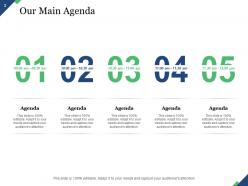
Slide 2: This is Our main Agenda slide. Note down your agendas here.
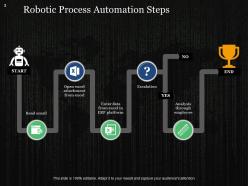
Slide 3: This slide presents Robotic Process Automation Steps starting from- Read Email, Open Excel Attachment From Excel, Enter Data From Excel In ERP Platform, Escalation to Analysis Through Employee.
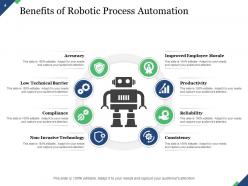
Slide 4: This slide presents Benefits of Robotic Process Automation such as- Improved Employee Morale, Productivity, Reliability, Consistency, Accuracy, Low Technical Barrier, Compliance, Non-Invasive Technology.
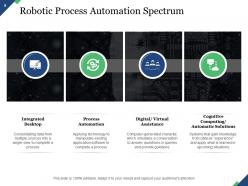
Slide 5: This slide shows Robotic Process Automation Spectrum with- Integrated Desktop: Consolidating data from multiple sources into a single view to complete a process. Process Automation: Applying technology to manipulate existing application software to complete a process. Digital/ Virtual Assistance: Computer-generated character, which simulates a conversation to answer questions or queries and provide guidance. Cognitive Computing/ Automatic Solutions: Systems that gain knowledge from data as “experience” and apply what is learned in upcoming situations.
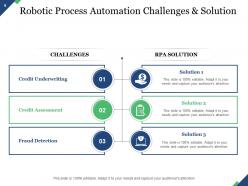
Slide 6: This slide shows Robotic Process Automation Challenges & Solution displaying- Credit Underwriting, Credit Assessment, Fraud Detection with RPA Solutions.
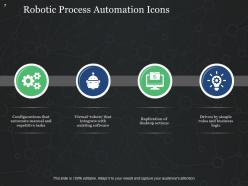
Slide 7: This slide presents Robotic Process Automation Icons showing- Configurations That Automate Manual and Repetitive Tasks, Virtual ‘Robots’ That Integrate With Existing Software, Replication Of Desktop Actions, Driven By Simple Rules And Business Logic.
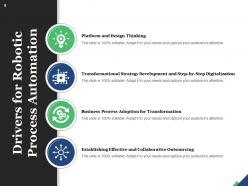
Slide 8: This slide shows Drivers for Robotic Process Automation such as- Platform and Design Thinking, Transformational Strategy Development and Step-by-step Digitalization, Business Process Adoption For Transformation, Establishing Effective and Collaborative Outsourcing.
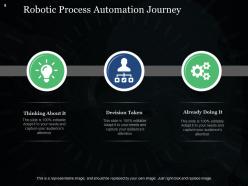
Slide 9: This slide shows Robotic Process Automation Journey consisting of- Thinking About It, Decision Taken, Already Doing It.
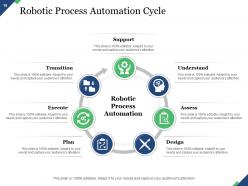
Slide 10: This slide presents Robotic Process Automation Cycle showcasing- Plan, Understand, Support, Assess, Transition, Design, Execute.
Slide 11: This slide shows Business Process Automation Icons.
Slide 12: This slide is titled as Additional Slides for moving forward.
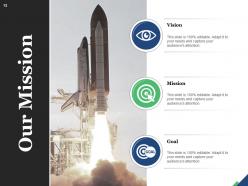
Slide 13: This is Our Mission slide with imagery and text boxes.
Slide 14: This is Meet Our Team slide with names and designation.
Slide 15: This is About Us slide to show company specifications etc.
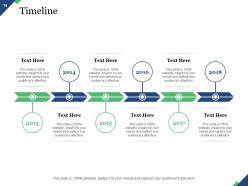
Slide 16: This is a Timeline slide. Show data related with time period here.
Slide 17: This slide shows Post it notes. Post your important notes here.
Slide 18: This slide shows Puzzle with text boxes to show information.
Slide 19: This is a Bulb or Idea slide to state a new idea or highlight specifications, information etc.
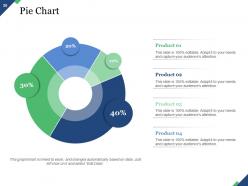
Slide 20: This slide shows Pie Chart with four products comparison.
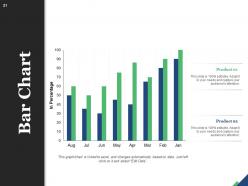
Slide 21: This slide presents Bar Chart with two products comparison.
Slide 22: This slide displays Line Chart with two products comparison.
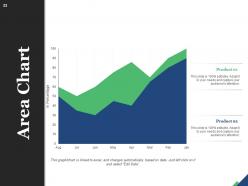
Slide 23: This slide represents Area Chart with two products comparison in percentage.
Slide 24: This is a Thank You slide with address, contact numbers and email address.
Business Process Automation Powerpoint Presentation Slides with all 24 slides:
Use our Business Process Automation Powerpoint Presentation Slides to effectively help you save your valuable time. They are readymade to fit into any presentation structure.




FAQs for Business Process Automation
Honestly, the biggest thing you'll notice is how much faster stuff gets done - no more human errors on repetitive tasks. Your team will actually love you because they won't be stuck doing boring data entry all day. Everything becomes way more consistent too since the system does the exact same steps each time. Money-wise, you should see savings pretty quick, maybe within a few months. Oh and tracking becomes so much easier with automatic reporting built in. I'd start with whatever processes make you want to bang your head against the wall - usually the super repetitive, rules-based stuff works best first.
Honestly, just pick one thing that's driving you crazy - like those endless invoicing headaches or typing the same welcome emails over and over. Don't go nuts trying to automate your entire business day one. Most of these tools are actually pretty simple to use (way easier than figuring out why Netflix keeps logging me out). I'd mess around with something free like Zapier first. Once your team sees it actually works and saves time, you can add more stuff. The whole point is quick wins without spending a fortune or freaking everyone out.
Manufacturing and healthcare are getting hit hard by automation right now. Quality control, inventory management - it's crazy how fast things are changing. Healthcare's doing patient scheduling, billing, diagnostic stuff. Financial services is right there too with loan processing and fraud detection. Oh, and retail - supply chain optimization is huge there, plus all those customer service bots (which honestly can be pretty annoying sometimes). If you're thinking about this for your company, I'd definitely peek at what your competitors are already doing. That's usually the best place to start figuring out where you stand.
So AI basically turns your automation from dumb robots into something that can actually think. Regular automation just follows the same steps forever - pretty limiting tbh. But with AI, your systems can read messy invoices in weird formats, spot problems before they blow up, and make smart decisions on their own. Like, it'll handle all those annoying exceptions that usually break everything. You can automate way more complex stuff that normally needs a human to figure out what's going on. I'd start by looking at your most tedious tasks that require some judgment calls.
Definitely track the obvious stuff first - time saved, costs cut, fewer mistakes. Like if invoice processing drops from 3 days to 3 hours, boom, you've got proof it works. But here's the thing - don't ignore how your team feels about it. Happy employees usually means the automation is actually helping, not just creating new headaches. Oh, and measure how consistent your processes become afterward. Pro tip though: get your baseline numbers before you change anything, then check monthly for like 6 months. That's when you'll really see if it was worth it.
Oh man, the classic mistake? Automating stuff that's already broken - you'll just screw up faster lol. Start small with one thing that actually works instead of trying to fix your entire company overnight. People totally sleep on the human side though, like getting everyone on board is honestly harder than the tech part. Your coworkers know where the real problems are, so talk to them first. Also figure out how you'll measure success before you start, otherwise you're just guessing if it worked.
Figure out what regulations hit your industry first, then bake compliance straight into your workflows. Don't try adding it later - learned that the hard way on a project last year, what a nightmare. Set up approval gates, audit logs, and data checks as core parts of the automation. Encrypt anything sensitive and lock down user access properly. Document everything thoroughly and run regular tests. Short ones work fine. The goal is catching problems before auditors show up asking questions you can't answer.
So it totally depends on what you're automating, but Zapier and Microsoft Power Automate are solid for connecting apps together. UiPath works great for document stuff and repetitive data entry - though honestly, I've watched companies blow way too much money on fancy enterprise tools when they could've just used something simple. Monday.com and Asana have decent built-in automation if you don't need anything crazy. My advice? Map out your process first, then find something that won't break your budget.
Honestly, most people end up way happier after automation kicks in. Instead of doing boring data entry all day, they get to tackle actual problems and think creatively. The rough part is those first few weeks when everyone's freaking out about change. I'd definitely get your team involved in picking which processes to automate first - makes them feel like partners, not victims. Communication is huge here too. Show them how this makes their jobs better, not obsolete. Oh, and budget for training because they'll need new skills. Once they see they're doing meaningful work instead of mindless tasks, the complaints usually stop pretty quick.
Oh man, you're gonna hit some real pain points. Those old APIs are brutal - half of them don't even have proper documentation. Plus your data formats probably won't match up at all with newer tools. Legacy systems are honestly just stubborn that way. Security's another nightmare since a lot of older infrastructure has gaps everywhere. Performance gets weird too when you suddenly push way more data through systems that weren't designed for it. I'd definitely audit everything first and budget for some custom integration work - that stuff always takes longer than you think it will.
Look for stuff that's super repetitive first - data entry, processing invoices, basic customer setup workflows. High volume but simple tasks work best. Honestly, I'd skip anything requiring real judgment calls or creativity until you get the hang of it. Time how long these processes take now so you can actually see the savings later. Also think about where small mistakes cause big headaches, since bots don't have off days like we do. Pick one or two things to start with, see how it goes, then expand. Don't try to automate everything at once - that's a recipe for chaos.
Dude, get your team on board from the start or you're screwed. Find those people who naturally get excited about new stuff - they'll sell it for you. Don't sugarcoat the job security thing either, just be straight up about what's happening. Training is massive here. People need to feel like they're learning cool skills, not getting kicked to the curb. Oh, and when something goes right? Make a big deal about it. Show everyone how this thing actually makes their day easier, not some corporate BS about "efficiency gains." Trust me on this one.
So real-time analytics is pretty much like giving your automated stuff superpowers - they can actually see what's going down and pivot instantly. No more waiting around for those boring weekly reports while problems pile up. Your systems spot issues right away and either handle it themselves or ping you immediately. Honestly, the continuous optimization part is what gets me excited - your automation actually learns and improves instead of just being a dumb robot doing the same thing forever. I'd start with whatever processes touch customers first, since those usually hurt the most when they break.
Dude, this stuff is moving crazy fast right now. We're talking AI that actually learns your business patterns and adapts without you having to reprogram everything constantly. Low-code platforms mean you don't need an entire dev team anymore either. What's really wild is this "intelligent automation" that can handle weird exceptions and make actual decisions - not just follow basic rules like before. Honestly feels like we're living in the future sometimes. My take? Start small with whatever tools you've got now. Everything's getting easier to integrate anyway, so you can always scale up later when the tech gets even better.
Build flexibility right into your automation from day one. Break complex workflows into smaller pieces you can easily swap out later - trust me, you'll thank yourself when things need updates. Add decision points so the system can handle different scenarios without you babysitting it. Most companies screw this up by creating one giant rigid chain that breaks constantly. Don't be those guys. Set up quarterly reviews to see what's actually working. Your business evolves, so your automation should too. Also, maybe start small with one process instead of automating everything at once - learned that one the hard way.
-
Excellent design and quick turnaround.