

Business Process Optimization Powerpoint Presentation Slides






Try Before you Buy Download Free Sample Product
 Impress Your
 Audience
 100%
100% Editable
 Save Hours
 of Time


Analyse and improve business processes, execute business processes in different scenarios, monitor improvements and continuously optimize it using content-ready Business Process Optimization PowerPoint Presentation Slides. Use business process optimization PPT presentation templates to accomplish organizational goals. Ensure workflows go smooth, reduce chaos, eliminate adhoc workflow management with the help of ready-made business process optimization PowerPoint presentation slideshow. This deck comprises of templates such as business process management model, business process management framework, business process management tools, process management maturity model, etc. These templates are editable. Customize templates if needed. Edit color, text, icon and font size of the templates as per your convenience. Apply business process optimization PPT templates for improved processes and to keep all the aspects of operations running smoothly. Incorporate business process optimization PowerPoint templates to create efficient organization capable of delivering better products and services. Download business process management complete PowerPoint presentation to create, map, analyse and improve business processes. Intensify tangled operations with business process management. Our Business Process Optimization Powerpoint Presentation Slides are an example of divine beauty. They will appease the gods in heaven.
People who downloaded this PowerPoint presentation also viewed the following :
Content of this Powerpoint Presentation
Slide 1: This slide introduces Business Process Optimization. State Your Company Name and get started.
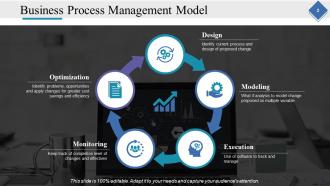
Slide 2: This slide presents Business Process Management Model with the following points- Design: Identify current process and design of proposed change Modeling: What if analysis to model change proposed on multiple variable Execution: Use of software to track and manage Monitoring: Keep track of completion level of changes and effectives Optimization: Identify problems, opportunities and apply changes for greater cost savings and efficiency
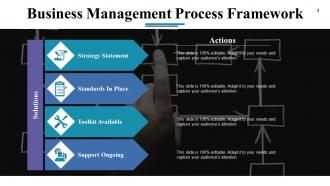
Slide 3: This slide presents Business Management Process Framework showcasing- Actions, Solutions, Strategy Statement, Support Ongoing, Toolkit Available, Standards In Place.
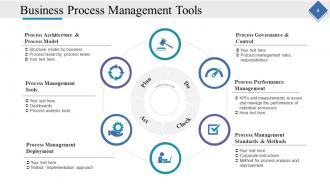
Slide 4: This slide shows Business Process Management Tools with the following points- Process Performance Management: KPI’s and measurements to asses and manage the performance of individual processes. Process Management Standards & Methods: Corporate instructions, Method for process analysis and improvement. Process Management Tools: Dashboards. Process analysis tools: Process Architecture & Process Model, Structural model for business, Process hierarchy, process levels. Process Management Deployment: Rollout / Implementation approach, Process Governance & Control. Process management roles, responsibilities: Continuous Improvement as Do, Check, Act, Plan.
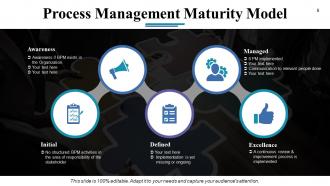
Slide 5: This slide showcases Process Management Maturity Model showing- Defined: Implementation is yet missing or ongoing. Excellence: A continuous review & improvement process is implemented. Awareness: Awareness if BPM exists in the Organization. Managed: 8 PM implemented, Communication to relevant people done. Initial: No structured BPM activities in the area of responsibility of the stakeholder.
Slide 6: This slide present Business Process Management Icon Slide. Use them as per requirement.
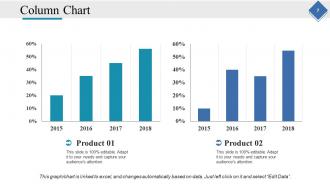
Slide 7: This slide shows a Column Chart for two product comparison, information, specifications etc.
Slide 8: This slide contains Our Mission with Vision and Goals. State it here.
Slide 9: This slide shows Our Team with image boxes to fill information
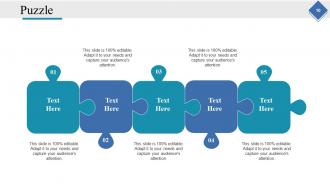
Slide 10: This is a Puzzle image slide with text boxes to state information, specifications etc.
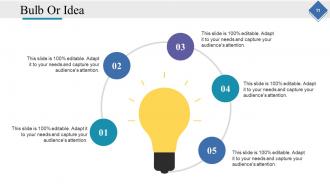
Slide 11: This is a Bulb Or Idea slide. Present any new information, data here.
Slide 12: This is a Thank You slide with Address # street number, city, state, Contact Numbers, Email Address to be put and displayed.
Business Process Optimization Powerpoint Presentation Slides with all 12 slides:
Keep all eyes in the boardroom on you. Stunning Business Process Optimization Powerpoint Presentation Slides present your work in its best light.


FAQs for Business Process Optimization
Honestly, the worst thing is when everything takes forever because there are like 8 approval steps for something simple. You'll spot constant bottlenecks and people getting stuck waiting around. High error rates are another dead giveaway - plus employees who seem confused about what comes next. Customers start complaining about wait times too. Duplicate work makes me want to scream because it's so pointless. Also watch for people doing manual stuff that should obviously be automated. I'd map out your whole process first and time each part to see where it's breaking down.
Start with whatever process is making your team want to scream - automate those repetitive tasks first. Process mapping tools are actually pretty cool for spotting bottlenecks; you'll be shocked how obvious problems become when mapped out visually. Cloud platforms help teams collaborate way better since everyone can access real-time data from anywhere (game changer, honestly). AI's getting good at predicting issues before they cost you money. Don't forget data analytics to analyze your current workflows - sometimes the biggest wins come from connecting systems that barely talk to each other. Scale up whatever works.
Your frontline people are gold mines for this stuff - they're living with these broken processes daily while management has no clue what's actually happening. They see where everything gets jammed up, which steps are totally pointless, and all the weird workarounds everyone's doing. Honestly, some companies blow their budget on fancy consultants when Karen from accounting could've told them the same thing for free! Set up ways for honest feedback - anonymous surveys work great. Just make sure you actually DO something with what they tell you, or they'll stop bothering to help.
Honestly, data is what stops you from wasting time on the wrong stuff. I've watched teams spend forever "fixing" things that weren't even broken while the real issues sat there ignored. Track your key metrics for a couple weeks first - seriously, you'll be shocked at what's actually slowing things down versus what you think is the problem. Numbers help you catch stuff before it breaks too, which is way better than scrambling to fix fires. Plus when you make changes, you can actually see if they worked instead of just hoping. The gut feeling approach? Yeah, that rarely pans out well.
Honestly, the worst mistake is automating processes that are already broken - fix them first or you're just making bad stuff happen faster. Also, get your actual workers on board from the start because I've watched so many "brilliant" changes crash and burn when leadership skips this step. Projects tend to snowball too. You think you're tweaking one workflow and suddenly someone's redesigning your entire org chart. Start with small pilot tests instead. Oh, and figure out what success looks like beforehand - you'll need those numbers later to prove it actually worked. Change management sounds boring but it's huge.
Honestly? Make it daily, not some quarterly thing everyone dreads. Get people comfortable calling out stupid processes - I can't tell you how many brilliant ideas get buried because someone's afraid to speak up. Do regular team check-ins where you actually DO something with the feedback (not just nod and file it away). Give them small budgets to mess around with new ideas. When someone fails trying something smart, celebrate that too. Ask "how can we do this better?" about your own stuff first - they'll follow your lead. Yeah, productivity might dip short-term, but that's the price of progress.
Look, value stream mapping and process flowcharts are your best bet here. Start with simple flowcharts though - way easier to get people on board. Once everyone's comfortable, then you can dive into value stream mapping if you need to spot waste and bottlenecks. SIPOC diagrams are solid for big-picture stuff, and swimlane diagrams work when you've got multiple departments stepping on each other's toes (which, let's be honest, happens constantly). Here's the thing - just pick whatever method your team will actually stick with and keep updated. I've seen too many gorgeous maps collecting dust because nobody wanted to maintain them.
Honestly, customer feedback is like having a cheat sheet for fixing your processes. They'll tell you exactly what's broken that you can't see from the inside. Look, you're too close to your own stuff - customers experience it fresh every time and they're not shy about pointing out problems. Sometimes they even suggest fixes you'd never think of. Just collect feedback through surveys, support calls, whatever works. Then map those complaints back to your actual process steps. Oh and definitely start with your top 3 complaints first - don't try to fix everything at once or you'll go crazy.
So from what I've seen, you're looking at like 20-50% efficiency gains with automation - which is pretty solid. The best part? Your team stops doing mind-numbing stuff like data entry and can actually work on interesting projects. Machines don't get tired or make stupid mistakes either, so everything stays consistent. Honestly, the biggest win is just getting those boring, repetitive tasks off everyone's plate. I'd start by writing down your current process and spotting the most rule-based, tedious parts first. That's where you'll see the biggest impact.
Think of compliance as the boundaries you can't cross when optimizing stuff. First thing - map out what regulations actually apply to you. Then hunt for ways to streamline that won't get you in trouble. Honestly, sometimes having those limits makes you more creative with solutions (sounds backwards but it's true). Build your compliance checks right into the new workflow instead of tacking them on later - way smoother that way. Start with auditing what you're doing now against the rules, then work your magic around those fixed requirements. Can't argue with what's legally required, you know?
Honestly, start by tracking your baseline numbers before changing anything - otherwise you're flying blind. Measure the obvious stuff like cycle time and error rates, but don't forget employee satisfaction too. We once "fixed" a process that technically worked better but everyone hated it lol. Check your metrics regularly, not just once after launch. Here's what most people miss though - see how your changes mess with other processes up and down the chain. Set up some kind of dashboard so you catch problems early. Oh and mixing hard numbers with actual feedback from people using the system gives you the full picture.
Honestly, you'll get way better results when different teams work together on this stuff. Sales sees where customers hit roadblocks. IT knows the tech issues slowing everything down. Operations deals with the daily workflow headaches. Without all these voices, you're basically optimizing blind - which just moves problems around instead of fixing them. Teams also buy into solutions more when they help create them, which makes sense if you think about it. I'd start by figuring out which departments actually touch your process, then grab someone from each team for your meetings.
ProcessMiner and Celonis are solid if you want to dig into actual system data - they'll show where bottlenecks really are vs where you think they are. But honestly? Start with something basic first. Lucidchart's my go-to for flowcharts, though Visio works too if you've got it. Draw.io is free and pretty decent. I always end up spending forever making mine look perfect when a simple whiteboard sketch would probably work just as well. Once you've mapped your current process, then you can get fancy with the analytics tools if needed.
Dude, change management can make or break your whole project. I've watched amazing process improvements crash and burn because nobody bothered getting people on board first. Start by explaining the "why" - what's actually in it for them? Get your key players involved early so they feel like they own it instead of fighting it. Proper training is huge, and people need time to adjust. Oh, and find those natural influencers on your team who'll help sell the changes. Address pushback directly and celebrate wins along the way, even small ones. Trust me on this.
Honestly, the payoff is huge. You'll cut costs by like 20-30% in a couple years, which is wild. Teams get way more efficient and aren't constantly annoyed by broken processes. Customer satisfaction goes up too. Here's the thing - start with whatever's driving everyone crazy first. That's where you see quick wins. Better data quality comes with it, so decisions get easier across the company. Oh, and scaling becomes so much smoother later when you've got solid foundations. I mean, people actually start enjoying work more when stuff just... works, you know?
-
Great designs, Easily Editable.
-
Good research work and creative work done on every template.