

Introducing Business Process Management Methodology Powerpoint Presentation Slides





Try Before you Buy Download Free Sample Product
 Impress Your
 Audience
 100%
100% Editable
 Save Hours
 of Time


Business process management BPM assists organizations in aligning their business functions as per customer requirements. In order to gain a competitive advantage, businesses are introducing BPM software to enhance their overall operational efficiency. Here is an efficiently designed PowerPoint presentation on Introducing Business Process Management Methodology. It will assist the banking organizations that want to deploy business process management tools to enhance efficiency and customer experience. At first, organizations can use the industry overview section to showcase factual data about BPM, industry drivers, and applications. After the industry overview section, businesses can use slides such as major issues faced, risks encountered, expectations of shareholders, and how we will meet the expectations to address current challenges the organization faces. It also describes details of encountered threats, shareholders expectations, and measures to meet them. In order to successfully meet the expectations, organizations can use sections, namely transforming workflow by introducing BPM, BPM selection, and quality assurance checklists along with slides such as implementation roadmap, customer journey map, and sales projections post implementing BPM. Lastly, a performance measuring dashboard will assist the businesses in monitoring the new leads, revenue generation, loans, and deposit information. Get access to this powerful template now.
People who downloaded this PowerPoint presentation also viewed the following :
Content of this Powerpoint Presentation
Slide 1: This slide introduces Introducing Business Process Management Methodology. State Your Company Name and begin.
Slide 2: This slide states Agenda of the presentation.
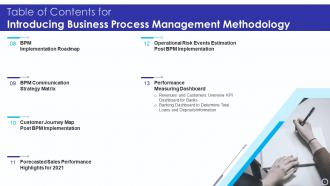
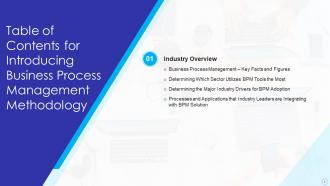
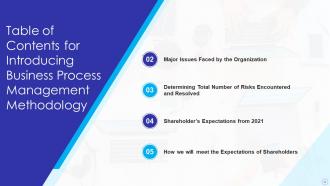
Slide 3: This slide presents Table of Content for the presentation.
Slide 4: This is another slide continuing Table of Content for the presentation.
Slide 5: This slide highlights title for topics that are to be covered next in the template.
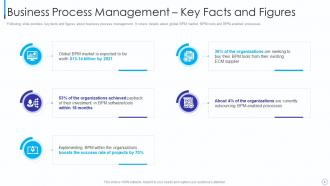
Slide 6: This slide displays Business Process Management – Key Facts and Figures.
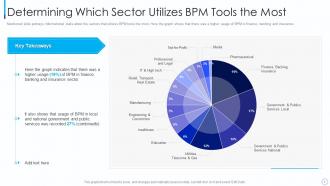
Slide 7: This slide represents Determining Which Sector Utilizes BPM Tools the Most.
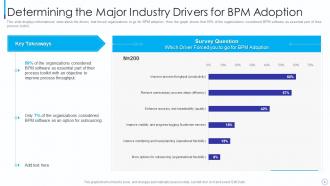
Slide 8: This slide showcases Determining the Major Industry Drivers for BPM Adoption.
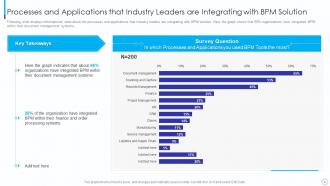
Slide 9: This slide shows Processes and Applications that Industry Leaders are Integrating with BPM Solution.
Slide 10: This slide highlights title for topics that are to be covered next in the template.
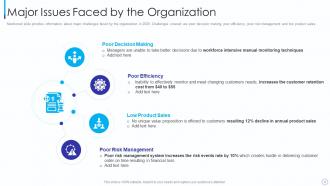
Slide 11: This slide presents Major Issues Faced by the Organization.
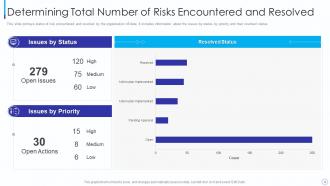
Slide 12: This slide displays Determining Total Number of Risks Encountered and Resolved.
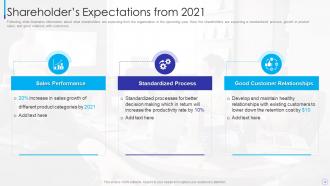
Slide 13: This slide represents illustrates information about what shareholders are expecting from the organization.
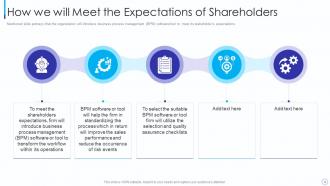
Slide 14: This slide showcases How we will Meet the Expectations of Shareholders.
Slide 15: This slide highlights title for topics that are to be covered next in the template.
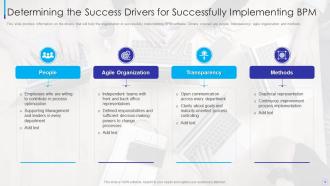
Slide 16: This slide shows Determining the Success Drivers for Successfully Implementing BPM.
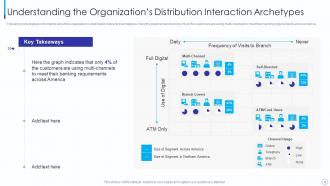
Slide 17: This slide presents Understanding the Organization’s Distribution Interaction Archetypes.
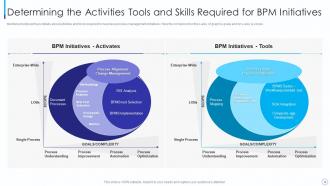
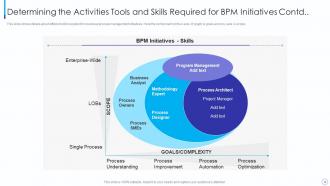
Slide 18: This slide displays Determining the Activities Tools and Skills Required for BPM Initiatives.
Slide 19: This is another slide continuing Determining the Activities Tools and Skills Required for BPM Initiatives.
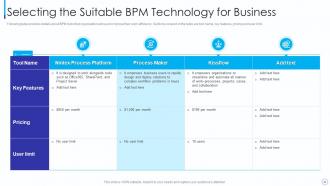
Slide 20: This slide represents Selecting the Suitable BPM Technology for Business.
Slide 21: This slide highlights title for topics that are to be covered next in the template.
Slide 22: This slide showcases Defining the Flowchart of BPM Initiative Process.
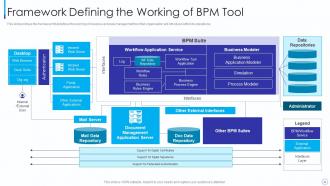
Slide 23: This slide shows Framework Defining the Working of BPM Tool.
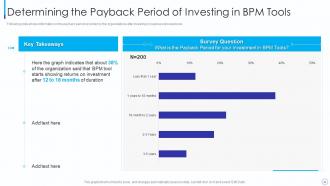
Slide 24: This slide presents Determining the Payback Period of Investing in BPM Tools.
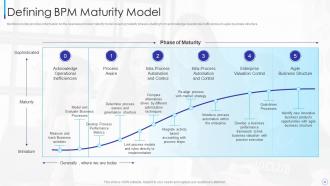
Slide 25: This slide displays information on the business process maturity model.
Slide 26: This slide presents Table of Content for the presentation.
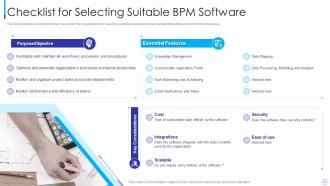
Slide 27: This slide displays Checklist for Selecting Suitable BPM Software.
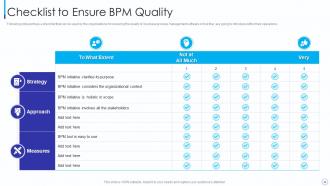
Slide 28: This slide represents checklist for ensuring the quality of business process management software.
Slide 29: This slide highlights title for topics that are to be covered next in the template.
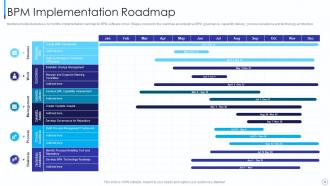
Slide 30: This slide illustrates a 12 months implementation roadmap for BPM software or tool.
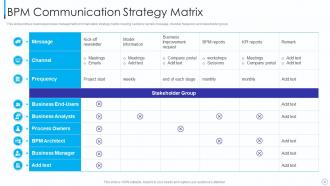
Slide 31: This slide portrays business process management communication strategy matrix.
Slide 32: This slide highlights title for topics that are to be covered next in the template.
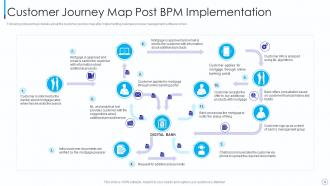
Slide 33: This slide displays Customer Journey Map Post BPM Implementation.
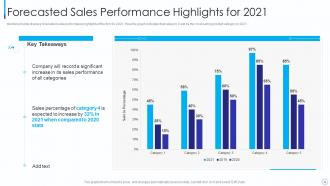
Slide 34: This slide represents Forecasted Sales Performance Highlights for 2021.
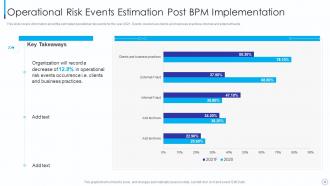
Slide 35: This slide showcases Operational Risk Events Estimation Post BPM Implementation.
Slide 36: This slide highlights title for topics that are to be covered next in the template.
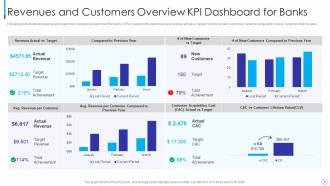
Slide 37: This slide shows Revenues and Customers Overview KPI Dashboard for Banks.
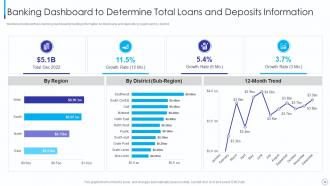
Slide 38: This slide presents Banking Dashboard to Determine Total Loans and Deposits Information.
Slide 39: This slide displays Icons for Introducing Business Process Management Methodology.
Slide 40: This slide is titled as Additional Slides for moving forward.
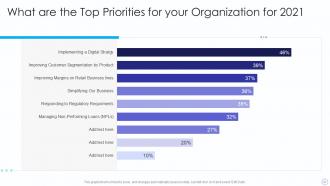
Slide 41: This slide represents What are the Top Priorities for your Organization for 2021.
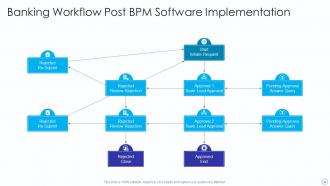
Slide 42: This slide showcases Banking Workflow Post BPM Software Implementation.
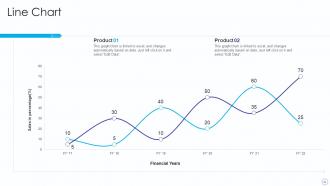
Slide 43: This slide describes Line chart with two products comparison.
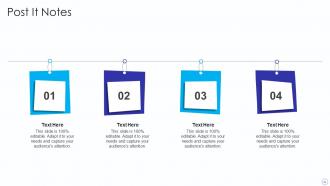
Slide 44: This slide shows Post It Notes. Post your important notes here.
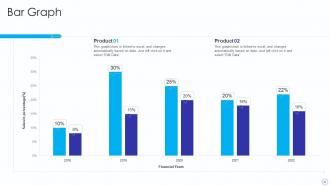
Slide 45: This slide presents Bar chart with two products comparison.
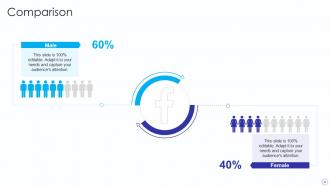
Slide 46: This is a Comparison slide to state comparison between commodities, entities etc.
Slide 47: This is Our Target slide. State your targets here.
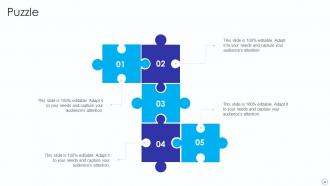
Slide 48: This slide contains Puzzle with related icons and text.
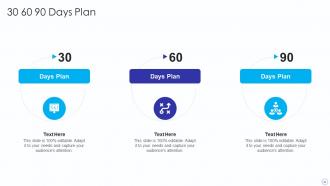
Slide 49: This slide provides 30 60 90 Days Plan with text boxes.
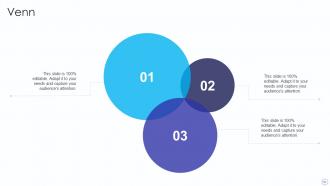
Slide 50: This slide depicts Venn diagram with text boxes.
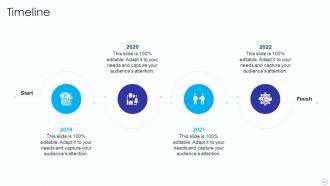
Slide 51: This is a Timeline slide. Show data related to time intervals here.
Slide 52: This is a Thank You slide with address, contact numbers and email address.
Introducing Business Process Management Methodology Powerpoint Presentation Slides with all 57 slides:
Use our Introducing Business Process Management Methodology Powerpoint Presentation Slides to effectively help you save your valuable time. They are readymade to fit into any presentation structure.










FAQs for Introducing Business Process Management Methodology
You need five main pieces for BPM: process mapping, performance tracking, continuous improvement, clear ownership, and tech that plays nice together. Most people hate the mapping part - I get it, it's boring as hell - but that's where you find all the problems. Pick one process that's driving everyone crazy and map every single step. Trust me, you'll spot the bottlenecks immediately. Make sure someone actually owns each process too, otherwise nothing gets fixed. Oh, and your tools need to share data properly instead of being locked in their own little worlds.
So automation just cuts out all the boring repetitive crap - data entry, approvals, that kind of stuff. You set up workflows that handle document routing and notifications automatically, even basic customer stuff without anyone touching it. Honestly it's pretty wild once you see it working. Your people stop doing mindless tasks and can actually focus on things that matter. Way fewer mistakes too since computers don't get tired or have bad days (unlike me before coffee lol). I'd say start with just one annoying process you hate doing and automate that first.
Dude, data analytics is like having x-ray vision for your processes. You'll see exactly where things get stuck and which steps are total time-wasters. Track your cycle times, spot delay patterns - stuff that's impossible to catch just by watching. I swear, trying to fix processes without data is basically guessing in the dark. The cool part? You can measure before and after your changes to see if they actually helped or just made things worse. Pick one process that drives everyone crazy and track it for a week. Trust me, the results will blow your mind.
Honestly, the biggest mistake I see is leaders just dropping changes on people without any heads up. Get your team involved in designing the process from the start - they'll actually know what works and what doesn't. Explain why you're doing this whole BPM thing and how it makes their daily grind easier. Find a few people in each department who are excited about it and let them be your cheerleaders. Training is huge too, obviously. Oh, and when something goes right early on? Make a big deal about it. People need to feel like their input matters or they'll just resist everything.
Honestly, the biggest pain points are usually people fighting change, executives who talk a big game but don't actually back you up, and - this one's huge - trying to automate garbage processes. Like, don't just make broken stuff run faster, you know? Get your team involved from day one or they'll sabotage everything. Leadership needs to actually care, not just nod along in meetings. Clean up messy workflows before you touch automation. Oh, and start with small wins that people can see working - builds trust way faster than some massive overhaul nobody understands.
So BPM basically gives you x-ray vision into how work actually moves through your company. You'll spot bottlenecks instantly, which means pivoting gets way easier when the market shifts or opportunities come up. Think of it like GPS for your processes - you know where you are and can change course fast. Honestly, the standardized processes are a game-changer when you need to scale up or down without everything falling apart. My advice? Start by mapping out your most critical stuff first, then expand from there. Don't try to boil the ocean right away.
Dude, start with Lean Six Sigma if you want something data-heavy that actually cuts waste. Kaizen's my personal favorite though - just tiny tweaks instead of blowing everything up at once. Way less stressful. PDCA cycles keep you from getting stuck because you're always testing stuff out. Value Stream Mapping helps you see where things get jammed up (super visual). Agile works if your team moves fast. Honestly? Just pick whichever one doesn't make your team's eyes glaze over. I've seen people jump between methods too much and never get anywhere. Commit to one for like 6 months minimum.
Honestly, don't try to fix everything at once - that's where most companies screw up. Pick the processes that actually connect to your big goals. Like if you want faster customer service, start there with support workflows. Set KPIs that tie back to those strategic targets so people can see the connection. Your process owners need to get how their daily work impacts the bigger picture. I've watched too many teams spin their wheels because they couldn't prioritize. Keep asking yourself: will improving this specific thing actually get us closer to where we're trying to go? Stay focused.
Talk to the people actually doing the work first - they'll tell you where things really get stuck, not some outdated manual. Map out what's happening now (mess and all) before you start planning changes. Your process maps should be simple and visual... honestly, if people need to squint to read it, you've overcomplicated things. Stick with the same symbols so everyone gets it. Then walk through real examples with your team to double-check everything. I've seen too many "perfect" process maps that completely miss how work actually flows day-to-day.
Honestly, these tools are game-changers for cutting out all that repetitive stuff you hate doing. They'll map your processes visually (which actually looks pretty cool) and show you exactly where things get stuck. You can automate approvals, track requests moving between departments, plus get pinged when something's sitting too long. The dashboards are weirdly satisfying to stare at too. But here's the thing - you'll discover inefficiencies you never even realized were there. Just start with one workflow you do all the time. I bet you'll find like 3-4 steps that are totally pointless.
So you need to measure both the money stuff and how things actually run day-to-day. Cycle time, error rates, customer happiness scores, cost per process - that's your core set right there. Don't sleep on employee satisfaction either because miserable teams = busted processes (trust me on this one). Process compliance and throughput matter too, but honestly? Pick like 3-4 metrics that actually connect to what your business cares about. Otherwise you'll drown in data. Oh and measure everything BEFORE you change anything - you need that baseline or you're just guessing if stuff worked.
So BPM basically bakes compliance rules right into your workflows. You can automate approval steps and create audit trails that catch violations before they become problems. Manual processes are honestly a nightmare for this stuff - too many things fall through the cracks. When regulations change, you just update the system instead of retraining your whole team. The software generates reports automatically and keeps detailed records for auditors. I'd start by figuring out which compliance steps you're doing manually right now, then pick the easiest ones to automate first.
BPM fixes those annoying bottlenecks that make customers want to scream. You know how people hate repeating their info to five different departments? Well, streamlined processes fix that mess. Customers get faster responses and way more consistent service when your teams actually talk to each other properly. Fewer errors too, which is honestly a game-changer. The cool thing is you can track satisfaction better once everything's mapped out clearly. I'd start with whatever processes customers see most - figure out where things usually get stuck or confusing. That's where the magic happens.
Honestly, BPM actually frees up headspace for innovation instead of killing it. Map out your processes and you'll suddenly spot all these redundancies and bottlenecks you never noticed - they're like lightbulbs going off for creative fixes. Your team stops putting out fires constantly and can think bigger picture. The cool part? You get real data to test new ideas and see what actually works. I'd say pick one chaotic process this week and just map it out - you'll be surprised what improvement ideas pop up. Way better than staying stuck in the daily grind.
Oh man, culture is huge for BPM stuff. Your team loves hierarchy? Go top-down, it'll work great. More collaborative vibe? You better get everyone involved or they'll push back hard. Some places eat up change, others need like six months of convincing first - it's wild how different organizations can be. I've watched perfectly good processes crash and burn just because they didn't match how people actually collaborate. Quick tip though: figure out your culture situation before you do anything else, then build around that.
-
Informative presentations that are easily editable.
-
“Ample and amazing variety of templates available, really helpful for making professional PPT for day to day workings.”