


Knowledge Management Cycle Powerpoint Ppt Template Bundles





Try Before you Buy Download Free Sample Product
 Impress Your
Audience
 100%
Editable
 Save Hours
of Time


Our Knowledge Management Cycle Powerpoint Ppt Template Bundles are topically designed to provide an attractive backdrop to any subject. Use them to look like a presentation pro.
People who downloaded this PowerPoint presentation also viewed the following :
Knowledge Management Cycle Powerpoint Ppt Template Bundles with all 21 slides:
Use our Knowledge Management Cycle Powerpoint Ppt Template Bundles to effectively help you save your valuable time. They are readymade to fit into any presentation structure.





FAQs for Knowledge Management Cycle Powerpoint
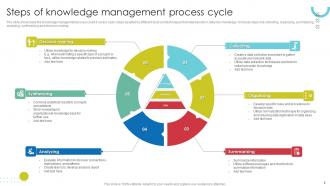
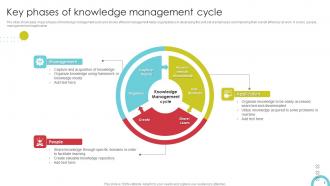
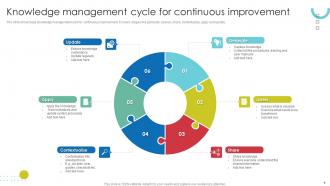
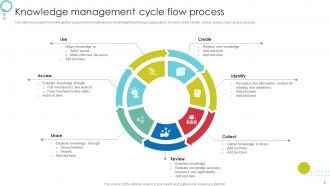
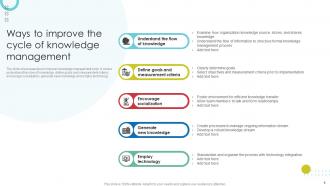
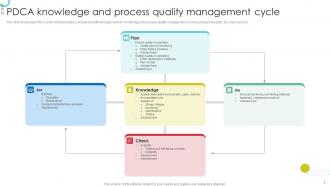
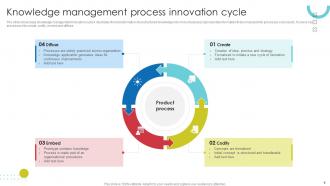
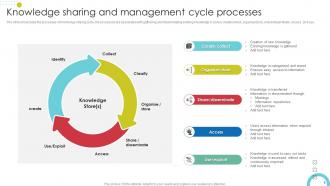
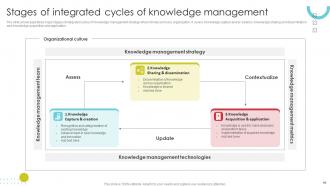
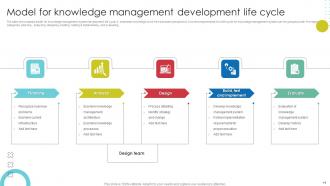
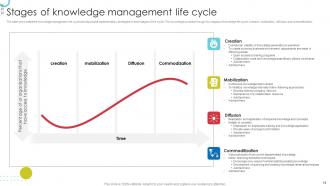
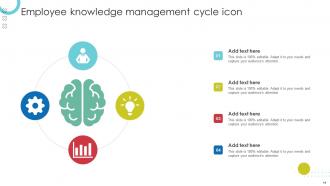
So there are basically four stages: capture, organize, share, and apply. First you grab knowledge from wherever - departing employees, project wrap-ups, or those processes that live only in Bob's brain (why is it always Bob?). Organizing comes next so people can actually find stuff later. Sharing means getting the right info to whoever needs it. Then you apply it to solve real problems. Here's the thing though - most companies skip the measuring part. You'll end up with this beautiful knowledge base that nobody touches. Total waste.
Honestly, just get people talking more - that's where the magic happens. Set up regular sessions where your experienced folks can share war stories and walk through how they make decisions. Document everything they say! Mentoring programs work great too. I'd also try those casual "lunch and learn" things, maybe some storytelling sessions. The whole thing has to feel natural though, not like another boring meeting. Start with whoever's already eager to share stuff and build from there. Once people see it's actually useful (and not just busywork), they'll want to jump in.
Honestly depends what kind of knowledge you're trying to wrangle. Document stuff works best with SharePoint or Confluence - basic but solid. Everyone's obsessed with AI search tools now, and yeah, they're pretty decent for finding buried info. Wikis are weirdly underrated though, like my old team used one for everything and it actually worked great. For the more conversational knowledge sharing, Notion or Teams does the job. Oh, and chatbots if your people will actually use them. Real talk - just map out what you need first, then grab whatever fits how your team already works. Don't make them learn some fancy new system.
Honestly? Culture will make or break your knowledge management project. I've seen this so many times - people hoard info like it's gold, especially in toxic workplaces. You need folks to feel safe sharing their screwups and wins without getting thrown under the bus later. Hierarchical companies are the worst for this since junior people won't speak up to leadership. Here's what I'd do: survey everyone anonymously first about why they don't share knowledge. Maybe it's fear, maybe it's just habit. Fix those root problems before you waste money on some fancy software that nobody will actually use.
So tech is basically your company's highway for moving info around. Intranets, wikis, Slack, SharePoint - whatever works for your team. Makes everything searchable and available 24/7, which beats digging through old email threads (ugh). The main thing is cutting out friction so people can actually find what they need. Oh, and don't pick tools just because they look fancy in demos. Your team won't use something that's a pain to navigate. Go with what they'll actually open without groaning.
Honestly, I'd focus on the stuff that actually moves the needle - like how fast people find info or how quickly new hires get up to speed. Those metrics tell you way more than page views or whatever. Employee surveys are gold here because people totally know when knowledge sharing sucks at their company. Track participation on your platforms too, plus whether content gets reused (not just created once and forgotten). Don't go crazy measuring everything though - pick 2-3 things that tie to your business goals. Way easier to act on.
So here's what actually works - set up those quarterly check-ins where someone goes through and verifies stuff is still right. Get alerts when content sits untouched for 6+ months (trust me, it adds up fast). Each topic needs an owner who keeps their section fresh. The biggest mistake? People treat updates like this separate chore instead of building it into what they already do. Oh, and make it stupidly easy for users to report when something's wrong. Most systems crash and burn because maintenance becomes this thing everyone avoids.
Honestly, these tools are game-changers for getting info out of people's heads and into one place. Slack, Teams, Notion - whatever works for your team. The best part? You can actually *find* stuff later instead of asking "didn't someone already solve this?" Pick one platform and start with just your current project docs. Once people see how easy it is to search old conversations and find answers, they'll get hooked. I swear, half our problems come from redoing work that Sarah figured out months ago but never wrote down anywhere. Short version: shared spaces where knowledge doesn't die when someone goes on vacation.
Honestly, the hardest part is getting people to stop hoarding info like it's gold. Everyone thinks sharing knowledge makes them replaceable - which, fair enough, I get it. Your tech systems probably hate each other too, so finding anything becomes this whole ordeal. Then there's the constant battle between keeping stuff updated vs drowning in ancient documents nobody's touched since 2019. Leadership says they want it but rarely commits real resources. Oh, and you'll definitely have that one department that swears their process is "too complex" to document. Start with just one team that's actually eager to try it.
Honestly, just make it worth people's time. Give shoutouts when someone shares something useful - team meetings, slack, whatever. People need to see that sharing knowledge actually gets them recognized, not buried under more work. Set up easy ways to contribute too. Lunch sessions work great, or dead simple templates they can fill out quickly. Your managers better be doing this first though - nobody's sharing if leadership hoards everything. Oh, and actually put it in job descriptions. Can't expect people to do it for free on top of everything else. Knowledge hoarding is so toxic for teams.
Honestly, just start simple with categories that make sense to your team - don't get fancy. Good search tags are everything though. I wasted forever last month hunting down a doc because nobody labeled it properly! Templates save so much time for stuff people create repeatedly. Here's the thing - someone needs to own each piece of content or it'll just rot there with wrong info. We learned that one the hard way. Set up review reminders too, maybe quarterly? The whole system falls apart if half your knowledge base is outdated garbage that nobody trusts anymore.
Honestly, good knowledge management is a game-changer for onboarding. New people can actually find answers instead of bugging everyone with the same basic questions. You capture info from people before they leave, keep everything updated, and - this part's huge - everyone gets the same experience instead of random managers doing whatever. Quick reality check though: start by looking at what onboarding stuff you currently have. It's probably scattered everywhere and full of gaps. Once you organize it properly, new hires can walk through processes on their own timeline. Way less chaos for everyone involved.
Start by figuring out what you don't know, then work backwards from there. Universities and research places are obvious picks. Industry conferences too, though honestly the hallway conversations are usually better than the actual sessions. Set up ways to actually capture customer feedback - not just collect it and forget about it. Your vendors can be surprisingly helpful since they see what works at other companies. Don't sleep on competitive intel either. The tricky part isn't finding external sources - it's filtering through all that noise to get the useful stuff to people who'll actually use it.
Honestly, just start with regular check-ins at each stage where people can actually say what's working. Send out quick surveys after knowledge sessions. Track what resources people use (not just what gets made - big difference there). Set up review cycles so teams can dump outdated stuff. I've watched so many systems turn into total wastelands because no one bothered checking if content was helpful! Make the feedback automatic instead of scrambling for it later. Pick one stage first and add something simple. Don't overcomplicate it right out the gate.
Honestly, leadership can make or break your whole KM thing. I've watched so many initiatives just die because management didn't really commit - they'd launch it then basically forget about it. Your leaders have to actually show they care about knowledge sharing, not just talk about it once during kickoff. They need to put money behind it and reward people who participate. Otherwise everyone just goes back to hoarding info or finding workarounds. It's kind of annoying but true - without real buy-in from the top, you'll end up with another unused system collecting digital dust. Get leadership committed first or don't bother.
-
Editable, diversified, compatible with MS PPT and Google Slides, and on top of that finest graphics!! I mean in the words of the famous Ross Geller, “What more do you want!”
-
I am not the best at presentations but using SlideTeam’s PPT template made it easier for me. Thank you SlideTeam!