

Knowledge Management Powerpoint PPT Template Bundles




Try Before you Buy Download Free Sample Product
 Impress Your
 Audience
 100%
100% Editable
 Save Hours
 of Time


Our Knowledge Management Powerpoint PPT Template Bundles are topically designed to provide an attractive backdrop to any subject. Use them to look like a presentation pro.
People who downloaded this PowerPoint presentation also viewed the following :
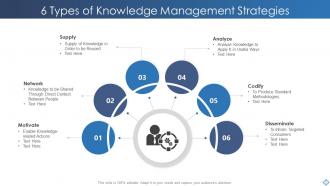
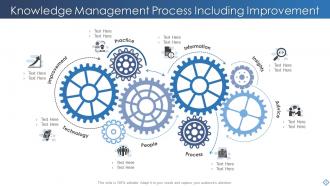
Knowledge Management Powerpoint PPT Template Bundles with all 16 slides:
Use our Knowledge Management Powerpoint PPT Template Bundles to effectively help you save your valuable time. They are readymade to fit into any presentation structure.

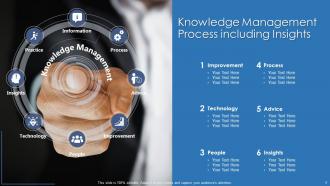
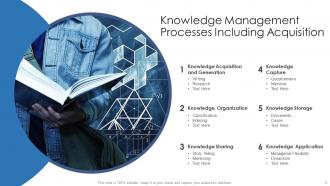
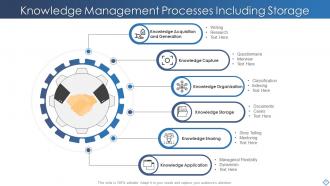
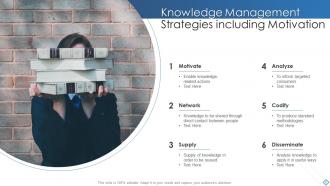






FAQs for Knowledge Management Powerpoint
Honestly, start with figuring out what knowledge your team creates most - that's your base. You need somewhere central to dump everything, plus search that doesn't suck (seriously, bad search is the worst). Set up clear ways to capture stuff as it happens and update it later. Make the interface dead simple or people won't touch it. Tag things properly so you can find them again. Oh, and build in some review process - outdated info is almost worse than no info. Access controls matter too, obviously. Track what people actually use with basic analytics. That whole "if you build it they will come" thing? Total myth with knowledge systems.
Track both hard numbers and employee feedback - that's where the real insights are. Start with baselines before rolling anything out. Time-to-completion for routine tasks is huge, plus how fast new people get up to speed. I'd definitely survey your team about finding info easily - you'll be shocked at what comes up. Also look at whether people are still recreating stuff that already exists (happens more than you'd think). Knowledge retention after training sessions matters too. Pick maybe 3-4 metrics that actually fit your workflow and check them regularly. Don't go overboard initially.
Honestly, just pick one platform everyone will actually use - Slack, Notion, whatever. The key is getting all that knowledge out of people's heads and email threads. I've seen teams try to use like three different systems and it's a mess. Make it dead simple for people to share stuff there. Wikis work great because multiple people can jump in and add their two cents. The best part? Everything becomes searchable so you're not constantly asking "wait, who knows how to do X again?" Just don't overthink the tool choice - focus on actually using it.
Honestly, just bake it into your regular work routine instead of treating it like some extra thing. Get teams doing monthly show-and-tells about what they learned - failures are actually the best stories, trust me. Set up simple ways to capture stuff, maybe an internal wiki or those quick screen recordings people love now. Here's the thing though: you've gotta reward the sharing behavior. Make it obvious that knowledge hoarding is career suicide while sharing gets you promoted. I'd start with just one team doing "lessons learned" sessions monthly, see what sticks, then copy it everywhere else.
Ugh, honestly the worst part is people hoarding info because they think it protects their jobs. Can't blame them but it's so annoying. Leadership buy-in is another nightmare - they want results but won't give you resources. Your data's probably a mess too, scattered everywhere with outdated stuff mixed in. Finding tech that people actually USE instead of complain about? Good luck with that. Oh and don't forget constantly updating everything so it doesn't become useless. Start with just one team though. Prove it works there first instead of trying to fix the whole company at once.
Honestly, just match whatever system to your team size. Small companies? Stick with basic stuff - shared drives, maybe a wiki. I've seen teams waste months on fancy platforms when Google Drive would've worked fine. Medium-sized orgs can go for Confluence or Notion, that kind of thing. Big enterprises need the heavy-duty systems with all the bells and whistles. But here's the thing - don't overthink it at the start. Pick something dead simple that people will actually use. You can always upgrade later. I've watched too many knowledge bases turn into ghost towns because they were too complicated from day one.
Honestly, the best approach is setting up spaces where people actually want to share stuff. Retrospectives work great, plus those lunch-and-learn sessions (though good luck getting people to show up consistently lol). Get your team documenting their thinking process, not just final answers - that's where the real gold is. War story sessions are amazing for this. People love sharing their disaster stories way more than sitting through formal interviews. Make it feel fun, not like homework. I'd start with just one team first - once they see how helpful it is, other teams usually jump on board pretty quick.
Honestly, AI's pretty solid for this stuff. You can set up chatbots that actually know where everything lives, plus auto-tagging saves tons of time. Smart search is a game-changer too - it gets context instead of just hunting for exact keywords. What's really neat is how it spots knowledge gaps by tracking what people search for but come up empty on. Then it starts suggesting relevant content before you even ask. I'd start with an AI search tool first (baby steps, right?), then move to automated categorization once your team's comfortable with the whole thing.
Honestly, the biggest headaches are gonna be around privacy and consent stuff. People don't always want their hard-earned expertise just documented and passed around - especially the knowledge they've spent years building up. Getting explicit permission before you capture anything is non-negotiable. Then there's the whole access thing - who gets to see what, and are you accidentally giving some people unfair advantages? Also gotta protect sensitive info while still making knowledge actually useful. It's kinda like walking a tightrope sometimes. Just be upfront about how you'll use everything.
So knowledge management is basically your company's way of not losing all the smart stuff when people quit. Document everything - wins, fails, weird experiments that didn't work. Your team can build on what's already been tried instead of starting from scratch every time. The cool part? It connects people from different departments who'd never talk otherwise. Marketing might solve engineering's problem without even realizing it. Honestly, most companies are terrible at this. Start small though - just write down what you learned from your current projects, including the messy mistakes.
So there are a few good frameworks for checking your KM maturity. APQC has this Knowledge Management Capability Assessment Model that's probably your best starting point - it's free and breaks everything into five levels. There's also KM3 which looks at people, processes, and tech. Infosys has one too but honestly it's way more complicated than you need right now. I'd just go with the APQC tool since you can actually download it and see how you stack up against other companies in your space. Pretty solid stuff.
Quarterly content reviews are your best bet - have teams flag outdated stuff for updates or deletion. Set up automatic expiration dates in your system too, so documents get review alerts after X months. Someone needs to actually own this process though, or it'll never happen. I learned this the hard way when our knowledge base became a total mess. Short bursts work better than marathon cleanup sessions. It's tedious but you'll thank yourself later when people can actually find what they need.
Honestly, just pick tools your team will actually stick with - that's way more important than finding the "perfect" setup. I'd start with something like Notion or Confluence for your main knowledge base. Slack works great for quick questions and sharing stuff on the fly. Google Drive or SharePoint handles your file storage needs pretty well. Oh, and Loom is clutch for recording quick videos when explaining something complex - way easier than typing it all out sometimes. Don't go crazy adding tons of tools at once though. Start simple, see what works.
Honestly, knowledge management is a lifesaver for onboarding. Your new hires can just search through one central hub instead of bugging five different people for basic stuff. All your procedures, training docs, FAQs - everything's right there. The consistency is huge too since everyone gets the same info. I've seen companies where new people spend half their first week just trying to figure out who to ask what. You can even see what they're searching for most and beef up those sections. Start by gathering all that random stuff you have floating around - spreadsheets, old emails, whatever - and dump it into something searchable.
Track both usage stuff and actual outcomes if you want to see what's working. Search success rates, how much people use content, time to find info - that's your usage side. Outcomes are more interesting though - less duplicate work, faster onboarding, fewer support tickets, quicker decisions. Honestly, employee satisfaction surveys are gold because people will straight up tell you if your system sucks or actually helps. Don't go crazy measuring everything at once. Pick 3-4 metrics that actually matter for your main business goals and start there.
-
Wow! The design and quality of templates on SlideTeam are simply the best.
-
The customer care of SlideTeam is very responsive. I was having a payment issue and they fixed it for me in no time.