


Post it notes style 1 powerpoint presentation slides





Try Before you Buy Download Free Sample Product
 Impress Your
 Audience
 100%
100% Editable
 Save Hours
 of Time


Bell the cat with our Post It Notes Style 1 Powerpoint Presentation Slides. Let them know you have what it takes.
People who downloaded this PowerPoint presentation also viewed the following :
Post it notes style 1 powerpoint presentation slides with all 19 slides:
Accelerate your growth with our Post It Notes Style 1 Powerpoint Presentation Slides. They will rev up your ideas right to top gear.
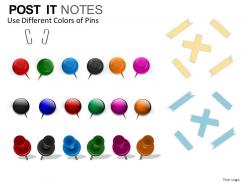
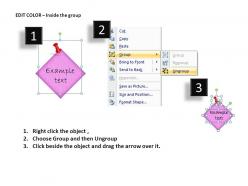
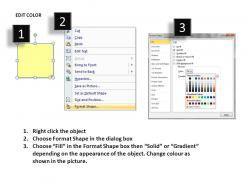
FAQs for Post it notes style 1
One idea per Post-it, and make them readable from across the room. Have everyone write silently first - maybe 5-10 minutes? Otherwise loud people just hijack everything right away. Stick them all on a wall and start grouping similar stuff together. Honestly, moving ideas around physically is so much better than just talking in circles. Different colored Post-its help if you've got them. You'll start seeing patterns that weren't obvious before. The visual clustering thing really works - way clearer than trying to keep track of everything in your head.
Honestly, Post-it Notes are a game changer for presentations. Instead of everyone just sitting there like bumps on a log, have people jot down questions or ideas on stickies throughout your talk. Way less scary than raising your hand in front of 20 people – I've seen grown adults completely clam up in meetings. Give everyone different colored notes so you can track who said what later (super helpful for follow-ups). The best part? You'll spot patterns when you group similar ideas together afterward. Makes people feel heard without putting anyone on the spot.
Honestly just pick one color per category and keep it simple. Red for urgent stuff, yellow for random ideas, green when you finish something - whatever makes sense to you. I always use pink for those weird tangent thoughts that don't fit anywhere else lol. But seriously, don't go crazy with colors or you'll forget what half of them mean. Maybe stick to like 4 colors max? Write down what each color means somewhere your team can see it. Trust me, too many colors just turns into a rainbow mess that nobody can follow.
Dude, Post-its are amazing for agile - way better than any fancy software honestly. Just stick different colored ones on a wall for your user stories and tasks. Moving them between "To Do," "In Progress," and "Done" columns feels so much more satisfying than clicking around some app. Your whole team can see everything during standups without staring at screens. Need to change priorities? Just peel and stick somewhere else. No crashes, no loading times. I always forget how simple the best solutions are. Start with basic colors for different story types and you're golden.
Oh, Post-it Notes are perfect for this! I color-code mine - red for urgent stuff, yellow for today, blue for this week. Stick them right on your monitor where you can't ignore them (honestly, apps just get forgotten). Try making a simple kanban board on your wall with "To Do," "Doing," and "Done" columns. Moving those little notes around is weirdly addictive and keeps you going. Also write time estimates on each one - helps you figure out what you can actually handle without going crazy. Way better than overcommitting yourself again.
Oh totally! Miro and Mural are perfect for this - you can make virtual sticky note boards where everyone adds ideas at the same time. I'm weirdly obsessed with color-coding by person or priority. Here's something that works surprisingly well: have people write updates on actual Post-its, then snap photos for Slack. It feels way more personal than just typing. Works great for retrospectives and daily standups too. Honestly, the camera thing sounds dumb but people love it. Start with basic brainstorming to see what clicks with your team.
Post-it Notes are honestly a game-changer for presentations! I always have students write questions on them during my talk, then we do a quick Q&A at the end. Exit tickets work great too - just slap one on each desk and kids write their main takeaway before bolting out the door. Different colors let you sort responses, which is pretty neat. Oh, and collaborative word walls are fun - students can add vocab terms throughout the unit. They're seriously like the classroom Swiss Army knife. Maybe try just one method next week and see what happens?
Dude, Post-it notes are seriously underrated for data stuff. Different colors work great for categories or priority levels - stick them on a whiteboard and suddenly you've got flow charts or timelines. Moving them around physically just hits different than staring at a screen, you know? Your brain processes it better when you can actually touch things. I always grab them during brainstorming when I need the big picture view. Oh and start simple - one data point per note or you'll end up with tiny handwriting nobody can read. Trust me, next time you're stuck visualizing something complex, try it out.
Okay so this might sound weird but grab some Post-it Notes before you even open PowerPoint. Write one main idea per sticky note, then stick them all over your wall or desk. Moving physical pieces around is way easier than dragging slides around digitally – trust me on this one. You can spot gaps in your logic super quickly and try different sequences without going crazy. Color-coding helps too if you're into that. I started doing this after watching a coworker struggle for hours reordering slides. Sketch your whole deck on stickies first, then build the actual presentation.
Honestly, Post-its are a game changer for presentation feedback. I can scribble notes about timing or content gaps without losing my train of thought. The best part? You can physically move them around - there's something so satisfying about that. Stick them right on printed slides or use different colors for each feedback type. Like blue for content issues, yellow for design stuff. Way better than typing everything out digitally. You'll actually see patterns when you can spread them all out on a table. Trust me, try it next time you're tearing apart someone's deck.
Grab some Post-it Notes and write one key scene or point per sticky. Slap them all on a wall so you can see your whole story laid out. Game changer, honestly - no more scrolling through slides wondering what the hell comes next. Different colors work great for themes, or use bigger notes for main points. When something feels off, just move the stickies around until it flows better. Way easier than rewriting everything from scratch. The whole thing sounds kinda low-tech but it actually works really well for getting your narrative to make sense.
Honestly, speed is everything - catch those thoughts before they vanish into thin air. Good lighting makes a huge difference when photographing notes, or just use Google Keep to snap and sort instantly. Can't tell you how many genius 3am ideas I've lost on random napkins lol. Categories are your friend - tag by project, date, whatever works. But here's the real trick: spend like 10 minutes each week digitizing your pile of scribbles, then toss the originals. Trust me on this one. Otherwise you'll just have twice the mess to deal with later.
Okay so Post-it Notes are actually genius for memory stuff. Writing things down by hand hits different parts of your brain than typing - there's real studies on this. You're not just reading passively, you're actively summarizing and that helps everything stick better. I always put them where I'll naturally look during presentations, like on my laptop edge. Color-coding works too if you're not lazy about it (I usually am lol). The whole physical writing thing plus having visual reminders scattered around just makes your brain work harder to process everything, which is annoying but totally worth it.
Oh man, Post-its are perfect for marketing workshops! Everyone can jot down ideas super fast during brainstorming sessions. Customer journey mapping works great too - just move the sticky notes around different touchpoints. I honestly don't know why some people still use whiteboards for everything. You can build quick persona profiles, map out competitor positioning, or do those affinity exercises where you group similar insights. Different colors help tons for categorizing stuff. The magic happens when you need to reorganize mid-session - just peel and stick somewhere else instead of erasing everything.
Honestly, Post-it notes are a game changer for design thinking. Everyone can write ideas at once instead of that awkward waiting-your-turn thing. Different colors work great for separating user types or pain points during brainstorms. When you're doing affinity mapping, just stick related ideas together on the wall - super satisfying actually. Journey mapping gets way easier too since you can write one step per note and shuffle things around when you realize the flow's wrong. I swear they make everything more hands-on and collaborative. Give your whole team a stack next time.
-
Best way of representation of the topic.
-
Designs have enough space to add content.