

Principles Templates And Activities For Writing Business Emails Memos And Letters Training Ppt




Try Before you Buy Download Free Sample Product
 Impress Your
 Audience
 100%
100% Editable
 Save Hours
 of Time


This set of slides includes the guidelines on how to write effective formal emails, memos, and letters. It also covers the Problem-Agitate-Solve PAS and Attention-Interest-Desire-Action AIDA writing approaches for cold emails to increase response probability. It also includes examples and activities for hands-on learning.
People who downloaded this PowerPoint presentation also viewed the following :
Content of this Powerpoint Presentation
Slide 1
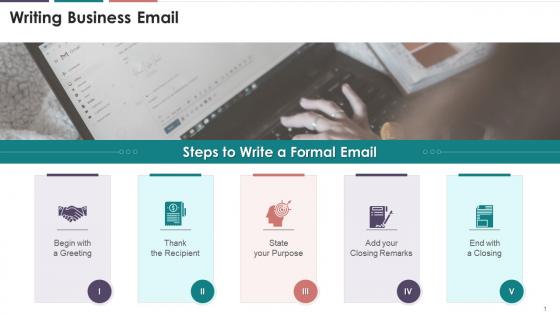
This slide depicts the steps to write a formal email. The steps are: to begin with a greeting, thanking the recipient, stating your purpose, adding closing remarks, and ending with a closing.
Instructor’s Notes:
The steps to write formal email are as follows:
- Begin with a Greeting: Always begin your email with a salutation, such as "Dear Liza." If you have a formal relationship with the reader, use their surname (for example, "Dear Mrs. Pete"). If your relationship is more casual, say, "Hi Kelly." If you don't know who you're writing to, use "To whom it may concern" or "Dear Sir/Madam“
- Thank the recipient: If you're responding to a client's request, you should start by thanking them. "Thank you for contacting ABC Company,". If someone responds to one of your emails, be sure to thank them by saying "Thank you for your prompt response" or "Thank you for getting back to me"
- State your purpose: Make your email's purpose evident from the start, and then continue to the email's main text. For example: "I am writing to inform you about..." or "I am writing about...",
- Add your closing remarks: It's good to thank your reader once more and add some polite ending notes before closing your email. For example: "Thank you for your assistance" could be an excellent place to start, followed by "Please reach out to me in case of any doubts" and "I look forward to hearing from you“
- End with a Closing: The next step is to add an appropriate closure that includes your name. "Best wishes," "Sincerely," and "Thank you" are all formal phrases. Finally, before hitting the send button, double-check and spell-check your email to ensure it's flawless
Slide 2
This slide depicts techniques to write an effective email. The techniques are making good use of subject lines, keeping messages clear and brief, checking the tone, proofreading, etc.
Slide 3
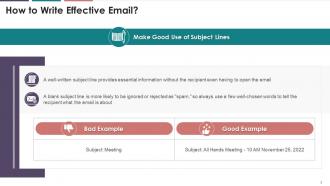
This slide illustrates information regarding the importance of subject line in an email. It highlights that a well-written subject line in an email provides essential information without the recipient even having to open the email. It also highlights a bad and good example of writing a good subject line.
Slide 4
This slide depicts the significance of keeping emails concise and clear. The email's body should be direct and informative, and it should include all relevant information. It also gives an example of a how a bad mail can be turned around into a good one.
Slide 5
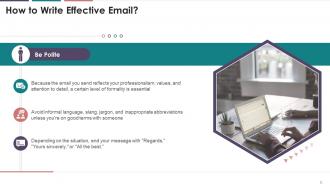
This slide showcases the importance of being polite while writing emails. Since the email reflects professionalism, values, and attention to detail, a certain level of formality is essential.
Slide 6
This slide depicts the prominence of checking the tone while writing the email. While writing an email, the word choice, sentence length, punctuation, and capitalization can all be misinterpreted without visual and auditory cues.
Slide 7
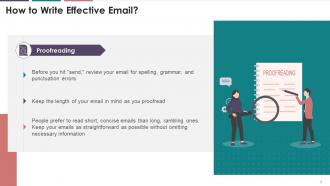
This slide illustrates that before sending an email, it must be reviewed for spelling, grammar, and punctuation errors. It also mentions that people prefer to read short, concise emails than long, rambling ones.
Slide 8
This slide depicts the information regarding basic email etiquette in business communication. The etiquette are: drafting clear subject lines, addressing the recipients formally, structuring the message, providing a call to action, and a professional closing, proofreading, etc.
Instructor’s Notes:
Email etiquette that helps in drafting a polite and professional email for workplace are:
- Draft a Clear, Simple Subject Line: The subject line should not be left blank and it should be short but descriptive
- Not to Use All Uppercase: Not only does this appear like you're shouting at the reader, but it's also much harder to read
- Address your Recipients Formally: “Mr.,” “Ms.” or “Mrs.” must be used to address the recipients unless you know them very well
- Structure the Message Clearly: In case of a long message, use short paragraphs and bulleted or numbered lists to highlight important information
- Provide a Call to Action at the End: An email should be concluded with a clear call to action, informing the recipient what you want them to do next
- Include a Professional Closing: Conclude the email with a short closing, such as “Thank you,” “Best regards,” or “Sincerely.” Include your full name at the bottom, along with your title and essential contact information, such as your phone number
- Proofread your Email: Reread your message before sending. Look for proper punctuation, spelling, and grammar
Slide 9
This slide illustrates information regarding the dos and don'ts of business email etiquette. The dos are paying attention to the subject line, using proper salutation, using an introduction, double checking the attachments, proof reading hitting send etc., and the don'ts are using humor and sarcasm, acronyms, emojis, not using conversation closer etc.
Slide 10
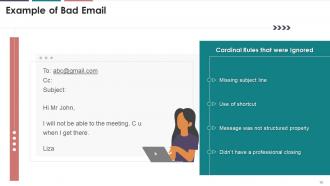
This slide depicts an example of a bad email. It highlights the rules that were broken. The broken rules were missing subject lines, usage of shortcuts, improper structuring of the message, and missing professional closing.
Slide 11
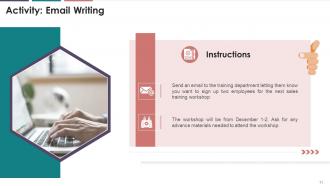
This slide illustrates an exercise for the trainees. A situation has been presented, and the trainees are required to draft an email on the situation.
Slide 12
This slide illustrates information related to cold email. It mentions that a cold email is a message you deliver to someone who has probably never heard of your company or knows very little about it.
Slide 13
This slide depicts the steps the steps to write cold emails. The steps can be categorized as the opening line, proposing the unique value you offer, and ending with a call-to-action.
Instructor’s Notes:
Steps to Write the Perfect Cold Email are as follows:
- Write an Intriguing Subject Line: A cold email subject line can be thought of as the key that unlocks the door to our message. While reading the subject line, our prospects form their first impression of us. A poorly written subject line may influence the addressee's opinion of our email or us. They may choose not to open the email or, worse, mark it as SPAM
- The Opening Line: Being specific distinguishes you from the hundreds of emails prospects receive in their inbox. When you start an email with information about the prospect's website or product, it shows that you did your research before contacting them. It also helps in grabbing the reader’s attention
- Propose the Unique Value you Offer: The readers are interested in why they should read your email. So, once you've found an appropriate opening line, get to the point and discuss:
Why you're reaching out to them?
What can you do to assist them?
The advantages of establishing a business relationship with you
Example of how your offering has benefited other businesses - End with a Call to Action: This step is pretty straightforward. What do you want them to do after reading your email. It can be to schedule a meeting, reply to your email, sign up for your product/service, etc.
Slide 14
This slide depicts an example of a cold email. The example has been explained using PAS Model(Problem, Agitate, and Solve).
Slide 15
This slide depicts an example of a cold email. The example has been explained using AIDA Model (Attention, Interest, Desire, Action).
Slide 16
This slide depicts the information regarding business memos. A business memo is a brief document used to communicate information within a company.
Instructor’s Notes:
Five Tips for Effective Business Memos
- Audience Orientation: While writing a memo, keep the audience and their needs in mind. All of the organization's employees may not understand an acronym or abbreviation known to management, so hesitate to use them. The memo must be clear and concise, with no ambiguity, if it is to be posted and distributed within the organization.
- Professional, Formal Tone: Memos are frequent announcements, and the person sending the memo speaks on the behalf of a group in the entire organization. Through a memo, the announcement is linear, i.e. going from the organization to the employees. The memo may have legal standing because it frequently reflects policies or procedures and may, for example, refer to an existing or new policy in the employee manual
- Subject Emphasis: The subject is usually declared in the subject line, and it should be clear and concise. If the memo is announcing the observance of a holiday, for example, use "Thanksgiving weekend schedule" rather than "holiday observance" in the subject line
- Direct Format: Some written business communication allows for direct or indirect formats, but memorandums are always direct
- Objectivity: Memos should contain only the facts, and they should be written in an objective tone with no personal bias, preference, or interest. Avoid being subjective
Slide 17
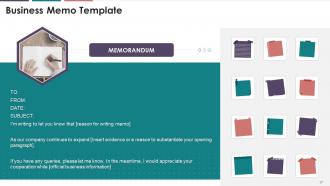
This slide depicts the information regarding business memos. It consists of an easy-to-follow business memo template.
Instructor’s Notes:
Format for Writing Business Memos
- Header: In the header, clearly label "Memorandum" so your readers know what they're getting. Then add "TO," "FROM," "DATE," and "SUBJECT." All this information, such as who you're addressing and why is it essential
- Paragraph one: In the first paragraph, state the purpose of your memo briefly and clearly. You could start your sentence with "I'm writing to inform you..." or "I'm writing to request..."
- Paragraph two: You should provide context or supporting evidence in the second paragraph. For example, the memo informs the company about an internal re-organization. If this is the case, the second paragraph should say something like, "As our company expands, we have decided that it's better to separate our video production team from our content team. This allows those teams to concentrate more on their objectives.“
- Paragraph three: In the third paragraph, include your specific request for each employee. For example, if you're planning a team outing, you might include, "Please RSVP with dietary restrictions," or "Please email me with questions.". Even if you don't expect any specific action from employees, it's a good idea to include how you hope they'll handle the news and whether you expect them to do anything in response to the memo
Slide 18
This slide showcases an exercise on writing business memos for the trainees. It also, mentions instructions for trainees.
Slide 19
This slide illustrates the information regarding business letters. It highlights that a business letter is a formal, professional letter sent from one company to another. These letters can be used for business correspondence with clients, employees, stakeholders, and individuals.
Slide 20
This slide illustrates information regarding the format of writing a business letter. It mentions the steps to write a business letter. The steps are writing sender’s information, date, recipient’s address, the salutation, body, closing, complimentary closing, and signature.
Instructor’s Notes:
The format of writing a business letter
- Step 1: Sender’s Information: In this section, the sender's address, contact number, and email address is included
- Step 2: Date: Instead of using numbers to shorten the date, write it out completely. When writing to American businesses, use the American date format, which puts the month before the day. For instance, on October 20, 2021. If you're sending a letter to the United Kingdom or Australia, put the date first, followed by the month. For instance, on 20 October 2021
- Step 3: Recipient’s Address: This is the address at which your letter will be delivered. Fill in the recipient's name, title (Ms./Mrs./Mr.), and address. It must be as specific as possible to get to the right place
- Step 4: The Salutation: The salutation you use depends on how well you know the person and the context of your letter. If you know the person to whom you're writing, you can address them by their first name. (For instance, Dear Mike.) There are, however, exceptions. If you don't know who you're talking to, always use their title and last name. If the recipient's gender is not known, use their full name. (For instance, Dear Glen Brown.) If you're not sure who you're sending the letter to, use "to whom it may concern.“
- Step 5: The Body: This is an important section of your letter. The body should be composed of a few (usually three) concise paragraphs, each with a clear purpose
- Step 6: Closing: In this section, you'll mention that the recipient can contact you or your team if they have any concerns or questions. You can also thank the recipient for taking the time to read the letter. For example, Don't hesitate to reach me at (your email address) to set up a meeting. Thank you very much!
- Step 7: Complimentary Closing: This is a brief remark at the end of your letter. You have several options here, but select the one that best reflects the formality of your relationship. Formal closings such as "Yours Truly," "Respectfully," or "Sincerely" are recommended. If your letter is less formal, you can use phrases like "All the best," "Thank you," "Regards," or "Best.“
- Step 8: Signature: Sign the letter below the complimentary close. Make sure to leave at least four lines blank to allow for your signature. Then, type out the name that needs to be signed. You can also include your job title after your full name
Slide 21
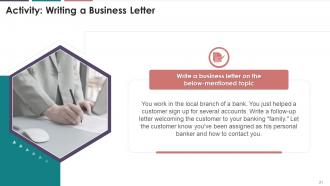
This slide illustrates an activity that can be performed during the training session. The trainees will be required to write a business letter on a given topic.
Slide 22
This slide depicts the summary of writing business email, letters and memos training session.
Principles Templates And Activities For Writing Business Emails Memos And Letters Training Ppt with all 38 slides:
Use our Principles Templates And Activities For Writing Business Emails Memos And Letters Training Ppt to effectively help you save your valuable time. They are readymade to fit into any presentation structure.




















FAQs for Principles Templates And Activities For Writing Business Emails Memos And
Honestly, just be clear and get to the point. I can't tell you how many emails I've gotten that ramble on forever when they could've just said "hey, need this by Friday." Know who you're writing to - don't use fancy words with your team if you normally don't talk like that. Listen more in meetings too, people zone out constantly. Oh, and always tell them what you actually need from them! Like "can you send me the report" instead of just info-dumping. Try it on your next few emails and you'll notice people respond way faster.
Dude, body language is HUGE for presentations. I've watched people with amazing content completely bomb because they looked terrified up there - slouching, no eye contact, fidgeting like crazy. Your audience feels that nervous energy instantly. But when you stand tall and make steady eye contact? Totally different vibe. Confident gestures actually back up what you're saying. Oh and don't rush through everything - speaking too fast screams "I want this over with." Honestly, practice your posture and hand movements just like you'd rehearse your actual talking points. It's weird but it works.
Honestly, active listening is a game changer at work. I used to be terrible at it - always planning what I'd say next instead of actually hearing people out. Big mistake. When you really focus on what someone's saying, you pick up on stuff everyone else misses. Plus people can tell when you're genuinely listening vs just being polite. It builds way better relationships and prevents those confusing moments where nobody remembers what was actually decided. Try this: repeat back what you heard before responding. Sounds weird but it works. Your coworkers will notice the difference pretty quickly.
Honestly, just pick one good tool and stick with it - don't go crazy with like five different apps. Slack's pretty solid for keeping project convos organized instead of drowning in email threads. Video calls are clutch for remote people obviously. Notion or Asana work well for tracking who's doing what without you having to bug everyone constantly. The best part? Everything's searchable later, so you won't have those "wait what did Mike say about the client thing" moments. I'd probably start with whatever feels most natural for your team since getting people to actually use it consistently is half the battle.
Oh man, language barriers are huge obviously. But honestly? The sneaky one is cultural stuff - like being too direct can totally backfire depending on who you're talking to. Bad listening is classic too. Plus people assume everyone has their same background knowledge, which... no. Wrong channels mess things up constantly (that email-vs-call thing is so real). Time zones suck. Audio cutting out on calls. And don't get me started on information dump meetings where nobody walks away knowing what actually matters. Just be super clear about your main point and double-check they got it.
Don't make feedback this separate "thing" you do - just weave it into how you already talk to people. Quick check-ins during projects work great. Maybe throw in a fast survey after big meetings. The trick is creating spaces where people won't get in trouble for being honest (easier said than done, I know). Most feedback programs crash and burn because they feel fake. Start super simple - add "what's working, what sucks" to your weekly calls. Then actually do something with what people tell you, or they'll stop talking.
Honestly, it's all about reading the room and switching up how you talk. With executives? Hit them with the numbers and bottom line first - they don't have time for fluff. Technical people want the nitty-gritty details and all their fancy terminology. I bombed a presentation once by getting super technical with the marketing folks. Awkward silence everywhere! For clients, skip the boring internal stuff and focus on what they'll actually get out of it. Also, figure out if they're email people or bullet-point people. Quick tip: just ask yourself what they actually care about before you start talking.
Honestly, visuals are a game-changer - people remember like 65% more when you pair pictures with talking. Charts are perfect for data stuff, diagrams help explain processes, and good images hit people emotionally. When I'm nervous presenting, having slides to glance at totally saves me from blanking out. Just don't dump paragraphs of text everywhere because that's annoying to read. Each visual should actually back up what you're saying. Oh, and seriously test your setup first! Nothing's worse than wrestling with a projector while everyone watches. Keep slides clean and simple.
Okay so basically - be honest and don't twist facts around. That's like the
-
Making a presentation has never been this easy for me. Thank you SlideTeam for offering a splendid template library.
-
Presentation Design is very nice, good work with the content as well.