


Basic Email Etiquette In Business Communication Training Ppt




Try Before you Buy Download Free Sample Product
 Impress Your
 Audience
 100%
100% Editable
 Save Hours
 of Time


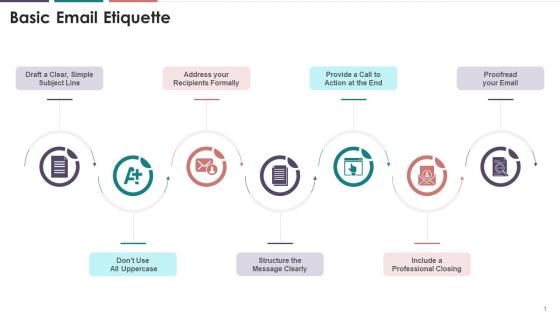
This slide depicts the information regarding basic email etiquette in business communication. The etiquette are drafting clear subject lines, addressing the recipients formally, structuring the message, providing a call to action, and a professional closing, proofreading, etc.
People who downloaded this PowerPoint presentation also viewed the following :
Basic Email Etiquette In Business Communication Training Ppt with all 17 slides:
Use our Basic Email Etiquette In Business Communication Training Ppt to effectively help you save your valuable time. They are readymade to fit into any presentation structure.





FAQs for Basic Email Etiquette In Business
Okay so basically you need four main things: a subject line that actually says something useful (seriously, "Quick question" drives me nuts), then start with "Hi [Name]" or whatever feels right. Get to your point fast in the body - don't write a novel. Then wrap it up with "Best regards" or just "Thanks" and your name. The whole thing should sound professional but not like you swallowed a business textbook, you know? Oh, and make it super easy for them to figure out what you're asking so they'll actually respond. That's honestly half the battle right there.
Honestly, tone is everything in emails - it basically controls how people react to you. When you sound friendly and clear, people actually want to help and get back to you fast. But if you come off cold or pushy? They'll either get defensive or just ignore you completely. I've totally sent emails that sounded way meaner than I intended! Here's the thing though - without seeing your face or hearing your voice, people just guess at your mood. And trust me, they don't always guess nicely. So read your emails out loud before sending them. Catches so much accidental attitude.
So here's what actually works with email subjects - be super specific about what you want. Skip the vague "quick question" nonsense because people delete those immediately. Instead write something like "Need marketing budget approval by Friday" or "Three logo designs ready for review." Mobile phones cut off long subjects anyway, so put the important stuff first. Oh, and if you're asking for something? Just put the request right there in the subject line. Sounds weird but you'll get way faster responses. Don't fake urgency though - people catch on to that pretty quick.
Ugh, this is always awkward! I usually just go with "Hi [First Name]" - honestly, most people don't care about formality anymore. But if you're dealing with someone super senior or it's like a law firm or something, probably safer to do "Dear Mr./Ms. [Last Name]." Quick trick: check their email signature or LinkedIn to see how they introduce themselves. That's usually a dead giveaway. Oh, and "Dear [Full Name]" works too if you're really unsure. Better to be a little too formal than too casual, you know? Most people won't judge you either way though.
Dude, email formatting is everything. People will literally ignore your message if it looks like a wall of text. I always use short paragraphs and bullet points - makes it way easier to scan. Nobody has time to decode paragraphs at 9am, especially on mobile. Bold the important stuff but don't go crazy with it. Oh and stick to normal fonts - Comic Sans isn't doing you any favors. Here's my test: can you get the main point in like 10 seconds of skimming? If not, break it up more. People read diagonally first anyway.
Ugh, group emails can be such a minefield! Hit "reply all" only when everyone actually needs to see your response - otherwise just reply to the sender. Trust me, I learned this the hard way after annoying half my team. Change the subject line if you're switching topics, makes everything way easier to track. Oh, and if you're looping in new people? Give them a quick recap so they're not totally lost. The worst is when email chains go on forever though. Just call a meeting if it's getting messy or people are talking in circles.
Don't put anything in work emails you'd regret seeing forwarded around. Skip the gossip and complaints about coworkers - that stuff always finds its way back somehow. Confidential info doesn't belong there either. Avoid ALL CAPS (you'll look like you're screaming) and honestly, tone down the exclamation points. One per email is plenty. Never reply-all unless literally everyone needs your response, which is rare. Don't attach random files people didn't request. My basic test? If you wouldn't say it out loud in a meeting, probably shouldn't type it either.
Oh this is actually pretty straightforward! Start with subject lines that make sense - none of that cryptic stuff. Break up your text with bullet points and short paragraphs because honestly, nobody wants to read a novel in their inbox. Don't forget alt text for images since screen readers need that. Here's the thing though - avoid using just color to highlight important info, and stick with boring fonts that actually work across devices. High contrast between your text and background helps too. Pro tip: read your email out loud before sending. If it sounds weird spoken, it probably is!
Look, having a professional email signature just makes you look way more legit - like you actually know what you're doing instead of being some rando with a hotmail account (do people still use those?). Throw in your full name, job title, company name, and phone number. LinkedIn too if you want. It's basically your digital business card that shows up automatically. Keep it simple though - nobody wants to scroll through some novel with inspirational quotes every time you email them. Just set it up once in your settings and you're good to go.
Just match their vibe but stay professional. I usually go with "Hi [Name]" - way less stuffy than formal stuff. Write like you're actually talking to them, you know? But don't sound incompetent or anything. Honestly, robot emails are the worst - nobody wants that. Throw in stuff like "Hope this helps" to seem human. Keep it warm for regular things, more serious for big stuff. Oh and definitely read it out loud first! If it sounds like something you'd actually say to their face, you're good. Clear sentences work better than fancy ones anyway.
Oh god, the worst thing you can do is hit "reply all" when you just need to thank someone or ask them a quick question. Seriously drives people nuts with pointless notifications. Never add random people to the chain without warning either - super awkward. If you're having beef with someone, handle that privately instead of letting everyone watch the drama unfold lol. Also check who's actually in the "to" field before sending because I've seen some embarrassing mistakes there. Don't mess with the subject line mid-conversation or it breaks everything. When unsure, just reply directly to whoever sent it.
Honestly, yes - proofreading emails matters way more than people think. I've definitely hit send on stuff that made me cringe later. Typos make you look sloppy, but the real problem is when your message gets confusing. Work emails especially need to be clear or you'll just get follow-up questions anyway. Quick trick that actually works: read it out loud in your head before sending. You'll catch weird phrasing that looked fine when you were typing. Takes like 30 seconds but your coworkers will definitely notice the difference. Clean emails just feel more professional, you know?
Okay so first thing - set up folders and filters to sort emails automatically by sender or whatever makes sense for you. Game changer. If something takes under two minutes, just knock it out right away instead of letting it sit there mocking you. Also, please unsubscribe from all that random stuff you signed up for but never actually read. Check email at set times during the day instead of living in your inbox like some people do (guilty as charged sometimes). Turn notifications OFF. Templates are clutch for responses you send constantly. Trust me, your stress levels will drop significantly.
Dude, seriously - don't email about touchy stuff if you can help it. Call them or meet up instead. Emails just make everything worse because people can't hear your tone, and suddenly you sound way meaner than you meant to. If you're stuck doing it over email though, stick to facts and stay neutral. Also, write the draft then sleep on it before hitting send. Trust me on this one - I've learned the hard way. Maybe even show it to someone else first? They'll catch things you missed. And definitely suggest talking in person afterward to clear the air.
So CC is when you want everyone to see who's getting the email - like looping your boss into a project update or showing teammates who else knows what's up. BCC protects privacy when you're emailing multiple people who don't need each other's info, or when you want to quietly include someone without the main person knowing. I've totally seen people screw up BCC replies and blow everyone's cover though! Quick rule: CC means transparent, BCC means private. If you're not sure, just think about whether people need to know who else is involved.
-
It is my first time working with them and that too on a friend's recommendation. I would say, I am not expecting such a worldly service at this low price.
-
The best and engaging collection of PPTs I’ve seen so far. Great work!