


How To Write A Professional Business Email Training Ppt




Try Before you Buy Download Free Sample Product
 Impress Your
 Audience
 100%
100% Editable
 Save Hours
 of Time


This set of slides covers the strategies to write effective business emails, such as using subject lines, keeping messages clear and brief, checking the tone, etc. It also includes Problem-Agitate-Solve PAS and Attention-Interest-Desire-Action AIDA methods for writing persuasive cold emails.
People who downloaded this PowerPoint presentation also viewed the following :
Content of this Powerpoint Presentation
Slide 1
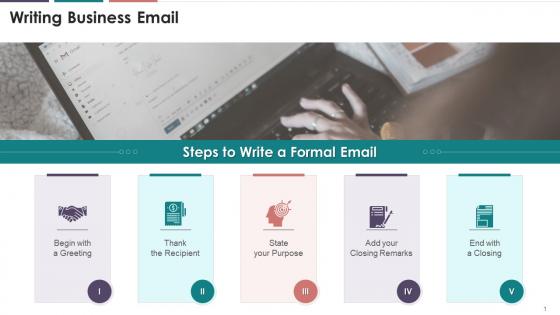
This slide depicts the steps to write a formal email. The steps are: to begin with a greeting, thanking the recipient, stating your purpose, adding closing remarks, and ending with a closing.
Instructor’s Notes:
The steps to write formal email are as follows:
- Begin with a Greeting: Always begin your email with a salutation, such as "Dear Liza." If you have a formal relationship with the reader, use their surname (for example, "Dear Mrs. Pete"). If your relationship is more casual, say, "Hi Kelly." If you don't know who you're writing to, use "To whom it may concern" or "Dear Sir/Madam“
- Thank the recipient: If you're responding to a client's request, you should start by thanking them. "Thank you for contacting ABC Company,". If someone responds to one of your emails, be sure to thank them by saying "Thank you for your prompt response" or "Thank you for getting back to me"
- State your purpose: Make your email's purpose evident from the start, and then continue to the email's main text. For example: "I am writing to inform you about..." or "I am writing about...",
- Add your closing remarks: It's good to thank your reader once more and add some polite ending notes before closing your email. For example: "Thank you for your assistance" could be an excellent place to start, followed by "Please reach out to me in case of any doubts" and "I look forward to hearing from you“
- End with a Closing: The next step is to add an appropriate closure that includes your name. "Best wishes," "Sincerely," and "Thank you" are all formal phrases. Finally, before hitting the send button, double-check and spell-check your email to ensure it's flawless
Slide 2
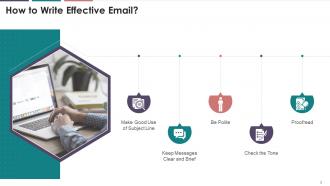
This slide depicts techniques to write an effective email. The techniques are making good use of subject lines, keeping messages clear and brief, checking the tone, proofreading, etc.
Slide 3
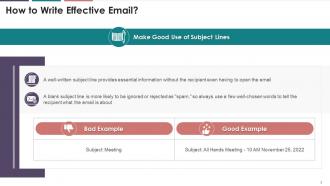
This slide illustrates information regarding the importance of subject line in an email. It highlights that a well-written subject line in an email provides essential information without the recipient even having to open the email. It also highlights a bad and good example of writing a good subject line.
Slide 4
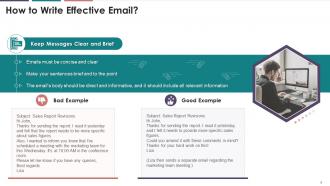
This slide depicts the significance of keeping emails concise and clear. The email's body should be direct and informative, and it should include all relevant information. It also gives an example of a how a bad mail can be turned around into a good one.
Slide 5
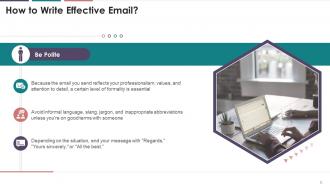
This slide showcases the importance of being polite while writing emails. Since the email reflects professionalism, values, and attention to detail, a certain level of formality is essential.
Slide 6
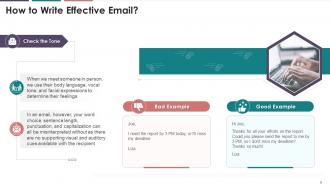
This slide depicts the prominence of checking the tone while writing the email. While writing an email, the word choice, sentence length, punctuation, and capitalization can all be misinterpreted without visual and auditory cues.
Slide 7
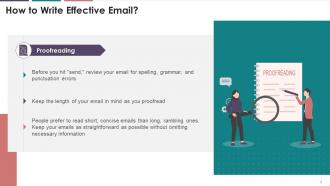
This slide illustrates that before sending an email, it must be reviewed for spelling, grammar, and punctuation errors. It also mentions that people prefer to read short, concise emails than long, rambling ones.
Slide 8
This slide depicts the information regarding basic email etiquette in business communication. The etiquette are: drafting clear subject lines, addressing the recipients formally, structuring the message, providing a call to action, and a professional closing, proofreading, etc.
Instructor’s Notes:
Email etiquette that helps in drafting a polite and professional email for workplace are:
- Draft a Clear, Simple Subject Line: The subject line should not be left blank and it should be short but descriptive
- Not to Use All Uppercase: Not only does this appear like you're shouting at the reader, but it's also much harder to read
- Address your Recipients Formally: “Mr.,” “Ms.” or “Mrs.” must be used to address the recipients unless you know them very well
- Structure the Message Clearly: In case of a long message, use short paragraphs and bulleted or numbered lists to highlight important information
- Provide a Call to Action at the End: An email should be concluded with a clear call to action, informing the recipient what you want them to do next
- Include a Professional Closing: Conclude the email with a short closing, such as “Thank you,” “Best regards,” or “Sincerely.” Include your full name at the bottom, along with your title and essential contact information, such as your phone number
- Proofread your Email: Reread your message before sending. Look for proper punctuation, spelling, and grammar
Slide 9
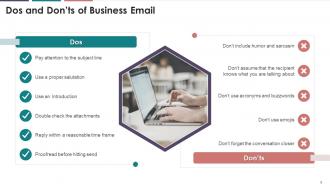
This slide illustrates information regarding the dos and don'ts of business email etiquette. The dos are paying attention to the subject line, using proper salutation, using an introduction, double checking the attachments, proof reading hitting send etc., and the don'ts are using humor and sarcasm, acronyms, emojis, not using conversation closer etc.
Slide 10
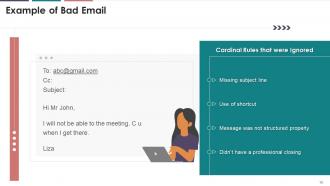
This slide depicts an example of a bad email. It highlights the rules that were broken. The broken rules were missing subject lines, usage of shortcuts, improper structuring of the message, and missing professional closing.
Slide 11
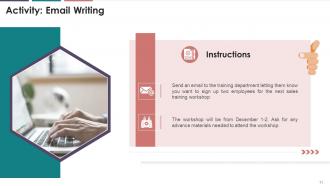
This slide illustrates an exercise for the trainees. A situation has been presented, and the trainees are required to draft an email on the situation.
Slide 12
This slide illustrates information related to cold email. It mentions that a cold email is a message you deliver to someone who has probably never heard of your company or knows very little about it.
Slide 13
This slide depicts the steps the steps to write cold emails. The steps can be categorized as the opening line, proposing the unique value you offer, and ending with a call-to-action.
Instructor’s Notes:
Steps to Write the Perfect Cold Email are as follows:
- Write an Intriguing Subject Line: A cold email subject line can be thought of as the key that unlocks the door to our message. While reading the subject line, our prospects form their first impression of us. A poorly written subject line may influence the addressee's opinion of our email or us. They may choose not to open the email or, worse, mark it as SPAMThe Opening Line: Being specific distinguishes you from the hundreds of emails prospects receive in their inbox. When you start an email with information about the prospect's website or product, it shows that you did your research before contacting them. It also helps in grabbing the reader’s attention
- Propose the Unique Value you Offer: The readers are interested in why they should read your email. So, once you've found an appropriate opening line, get to the point and discuss:
Why you're reaching out to them?
What can you do to assist them?
The advantages of establishing a business relationship with you
Example of how your offering has benefited other businesses - End with a Call to Action: This step is pretty straightforward. What do you want them to do after reading your email. It can be to schedule a meeting, reply to your email, sign up for your product/service, etc.
Slide 14
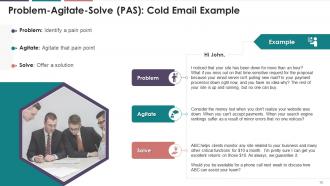
This slide depicts an example of a cold email. The example has been explained using PAS Model (Problem, Agitate, and Solve).
Slide 15
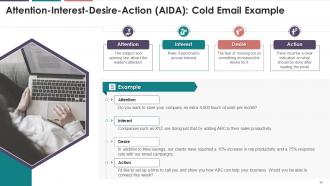
This slide depicts an example of a cold email. The example has been explained using AIDA Model (Attention, Interest, Desire, Action).
How To Write A Professional Business Email Training Ppt with all 31 slides:
Use our How To Write A Professional Business Email Training Ppt to effectively help you save your valuable time. They are readymade to fit into any presentation structure.













FAQs for How To Write A Professional Business
Hey! So first thing - write a subject line that actually tells them what you want. Don't make people guess. Then jump straight into your point after a quick "Hi [Name]." Nobody reads massive paragraphs anymore (honestly, I barely do either), so break everything into bullet points or short chunks. Always tell them exactly what you need them to do - like "please reply by Friday" or whatever. End with something professional but not weird and stiff. And yeah, definitely proofread because typos make you look sloppy. Keep it short and focused, and you'll get way better responses.
Honestly, email tone can totally make or break how people see you at work. Too casual and you look sloppy. Too formal? You sound like you're writing a legal document or something. I've learned the hard way that finding that middle ground is key - be clear and respectful but not robotic. Even tiny word choices matter. Like "please advise" sounds way more demanding than "let me know what you think." Also, I always do this quick gut check before sending: would I actually want to get this email? Saves me from a lot of cringeworthy moments.
Oh man, the worst thing people do is write vague subject lines that tell you nothing. Then they bury what they actually need somewhere in paragraph three! Just say what you want upfront - seriously, we're all drowning in emails. Keep it short too, nobody's reading your dissertation. I always do bullet points for lists because walls of text are brutal. And please proofread! Nothing screams "I don't care" like obvious typos. End with something like "can you get back to me by Friday?" so people know what you're expecting.
Be specific about what you want or what they're getting. Skip the boring "following up" stuff - nobody cares. Try "Need budget approval by Friday" or "Your report is done" instead. Put the important bits first since phones cut off long subject lines. I've found that deadlines and numbers grab attention better than flowery language. Don't be one of those people whose subject line says one thing but the email's about something totally different. Test different styles with your team to see what actually gets opened. Some groups love direct, others need more context.
Honestly, just match whatever vibe your company has. "Dear [Name]" if it's your first time emailing someone or things are super formal, but "Hi [Name]" works for pretty much everything else with coworkers. Oh and please don't ever write "To Whom It May Concern" - that's like the email equivalent of a form letter nobody wants to read. If you're not sure about titles or pronouns, stick with their full name. "Hi team" or "Hi everyone" works perfectly for groups. When you're unsure, go slightly more formal rather than too casual. Just double-check you spelled their name right!
Stop slapping "urgent" on everything - I learned this the hard way lol. Give them the actual reason instead. Like "Can you send that contract by Thursday? Client's board meets Friday and needs time to review it." Way better than "URGENT RESPONSE NEEDED." I used to mark literally everything as time-sensitive until someone called me out on it. Now I just explain what happens if we miss the deadline. Also throw in something like "I know you're crazy busy but..." because honestly, who isn't these days? Focus on the real impact, not how stressed you are.
Oh man, formatting makes such a difference! I swear nobody reads those giant text blocks anymore - we all just skim and miss half the important stuff. Break things up with bullet points and give people some white space to breathe. Keep paragraphs super short, like 2-3 sentences tops. Bold the deadlines so they actually see them (learned that one the hard way). Honestly, I started doing this after getting way too many "wait, what was the deadline again?" responses. Your coworkers will love you for emails they can actually scan quickly instead of dreading to open.
Honestly, just stick to 1-2 images max per email. Nobody wants to wait for huge files to load - compress that stuff first. Put visuals AFTER your main points, not before, so your text does the talking. Simple screenshots or charts work way better than fancy graphics anyway. Skip the logos unless you really need them (I learned this the hard way). Focus on making complex info clearer, not impressing anyone with design skills. Oh, and definitely check how it looks on mobile first since that's where most people read emails these days. Keep it functional over pretty.
Okay so here's what actually works - break stuff down into bullets or lists because nobody wants to read giant walls of text. I always put my main point first, then add the supporting details after. Trust me on this one, I used to write these crazy long emails that made zero sense to anyone! Skip the fancy jargon and just talk normally. White space is your friend - don't cram everything together. When you're covering different topics, throw in some headings so people can follow along. Oh, and before you send anything, read it out loud. Sounds weird but it catches so much stuff you'd miss otherwise.
Oh man, email etiquette gets so weird across cultures! Germans are super direct - they'll just tell you what they need. Meanwhile, Japanese colleagues write these long polite intros before getting to anything important. Americans? We dive straight into business, which honestly can come off as rude to people from cultures that value relationship-building. Response time is another minefield - some cultures expect instant replies, others think that's pushy. My advice? Copy whatever tone your international colleagues use when they email you. When you're not sure, go slightly more formal than casual.
Grammarly's your best bet to start - catches grammar stuff and helps with tone right in your email. Hemingway Editor is clutch for cutting fluff, which busy execs will thank you for. I swear by it for making things tighter. HubSpot has solid free email templates if you need structure help. Oh, and "Smart Brevity" is a good book too, though I haven't finished it yet tbh. Just grab Grammarly first since it works directly in your email client. You can mess around with the others once you figure out what you're struggling with most.
Ugh, bad news emails are the worst. Start with "I have some difficult news to share" so they brace themselves—don't just spring it on them. Be direct but not brutal about it. Honestly, I've watched people write these rambling emails trying to cushion the blow, and it just makes everything more painful. Get to the point, acknowledge how it affects them, then immediately pivot to next steps or solutions if you've got any. Offer a phone call too since email feels cold for heavy stuff. End with what's happening moving forward.
Honestly, stick to 75-150 words for work emails. Anything shorter and you'll sound rude. Go longer and people just skim or ignore it completely. I used to write these massive project updates that nobody bothered reading - total waste of time. Your main points should take maybe 30 seconds to read through. One topic per email works best. Multiple issues? Use bullet points or just send separate emails. The trick is being detailed enough so you don't get five follow-up questions, but short enough that people actually finish reading. Oh, and test this with whatever emails you send most often.
Okay so first thing - make your subject line super specific and reference what you sent before. Quick acknowledgment of the gap, then get straight to what you need in one clear sentence. I've found adding a soft deadline actually helps because it gives them a reason to prioritize responding without seeming demanding. Keep it way shorter than your original email since they clearly didn't have bandwidth for that. End with something they can answer quickly - yes/no or just a sentence. Wait like 3-5 business days between follow-ups, and honestly? Don't feel bad about following up.
Dude, treat work emails like they're gonna end up in court someday - because they actually might. Companies can get sued and boom, your emails become evidence. Don't write anything you wouldn't want a judge reading out loud. So no trash-talking people, making threats, or admitting you screwed something up. Honestly, it's wild how many people forget this stuff lives forever. Confidential info is risky too since emails get forwarded or hacked constantly. Your company probably won't let you delete important messages anyway. Just stick to facts and keep it professional - saves you headaches later.
-
Well-designed and informative templates. Absolutely brilliant!
-
Excellent design and quick turnaround.