


Procurement flow chart purchasing flow chart





Try Before you Buy Download Free Sample Product
 Impress Your
 Audience
 100%
100% Editable
 Save Hours
 of Time


Accelerate your advance with our Procurement Flow Chart Purchasing Flow Chart. They are a great growth engine.
People who downloaded this PowerPoint presentation also viewed the following :
Content of this Powerpoint Presentation
Businesses require purchases and procurement to ensure smooth operations. With technology becoming such a significant enabler, procurement can quickly be taken on a global level, provided you have the scale to do so. For instance, developing world countries routinely invite global tenders for critical infrastructure projects and to procure the needed supplies for these.
Here’s a procurement flow chart for the finance department.
Most countries’ food and agriculture supplies follow a multi-step requisition process before business comes into the picture. In general, a flowchart in business procurement is the answer to ensure that all Yes-No questions are answered when these need to be logically clear, and so on.
Yet, businesses cannot design and execute these purchase flowcharts in isolation. They have to be presented to and explained to stakeholders and their meaning derived, and to do this well, you need professional flowcharts and diagrams.
Find the many types of functional flow charts in this procurement flow chart PPT Template bindles
At SlideTeam, we have carefully curated a range of expert-level diagrams and templates for procurement flowcharts. These templates are designed to be user-friendly, allowing you to save time and money by avoiding the need to design a PPT from scratch. They are also fully editable and customizable, offering a structured starting point that can be tailored to your specific needs.
Let’s explore these templates now!
Template 1 Procurement Flowchart Purchasing Process Flowchart
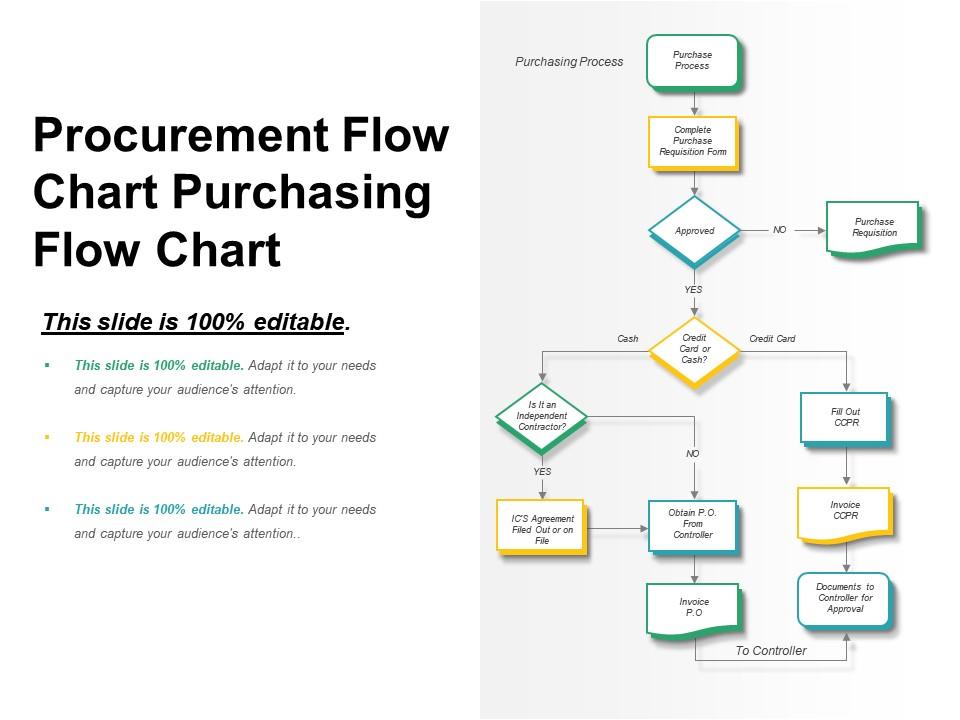
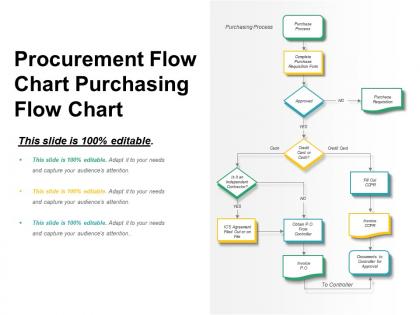
This master PPT Template describes the purchasing process that forms the procurement flow. Step 1 is to complete the purchase requisition form and wait for approval. If the answer to the Approved question is Yes, then the process moves on one of the two paths: cash payment or credit card payment. If the payment is in cash, the next question to answer is whether it is an independent contract. Another Yes, No fork follows this with NO requiring a Pay Order (PO) from the finance controller. In the case of a credit card, the steps involve filling out a customer payment processing form, with these documents going to the contractor for approval. Overall, the result of the flowchart converges with the Invoice Payment Order (PO).
Now, you understand what it takes to actually procure for large business organizations that have to ensure quality, price and adherence to laws.
*****
CRITICAL AND ORDERLY PROCESS NEEDED
Procurement processes have a lot in common with systems that depend on algorithmic accuracy. Especially, when converted into a flowchart, there is no better way to decide a Yes/No answer. It is simply too critical that the right decision be made, and hence it must be ensured that the procurement flowchart is designed after considering every possibility.
PS Find the best flowchart of the purchasing process here.
Procurement flow chart purchasing flow chart with all 5 slides:
Get folks interested in changing with our Procurement Flow Chart Purchasing Flow Chart. Introduce a different approach.
FAQs for Procurement flow chart
So basically you've got five main steps: figure out what you need, find vendors, negotiate (this part's always a pain), sign contracts, then handle delivery and check how it went. Start by nailing down your actual requirements - don't skip this or you'll regret it later. Research suppliers, compare them, then comes the fun part of hammering out terms. Oh, and map out who needs to approve what dollar amounts at your company first. Trust me, knowing those approval thresholds upfront will save you so much headache when you're trying to rush something through.
Honestly, start by writing down every step in your current process - even the awkward stuff where Jim from accounting somehow gets involved. Look for where things get stuck waiting around. Those repetitive tasks like comparing vendors? Automate that nonsense. Don't make someone get executive approval for buying printer paper - set reasonable spending limits. Templates are your friend for common purchases. The game-changer is usually ditching the email/spreadsheet chaos for one central system. Pick whatever's bugging you most and fix that first.
Honestly, tech has completely changed how procurement works. Everything's automated now - requisitions, approvals, vendor stuff. E-procurement platforms handle purchase orders, AI does spend analysis, and digital approval chains save you from those brutal email chains (seriously, such a relief). Cloud systems give real-time visibility into your whole pipeline. Plus automated compliance and contract management. Best part? You can track requests to delivery without endless spreadsheets. I'd say start by looking at where you're still doing things manually - that's where you'll get the biggest wins from automation.
Yeah, regulatory stuff basically forces you to add checkpoints everywhere - approval gates, compliance reviews, vendor checks, all that documentation. Honestly feels clunky at first. What I learned though is you gotta map out which regulations actually hit your industry first, then build those right into your flowchart as must-do steps. Don't try adding compliance later, it's a nightmare. I always color-code the regulatory bits so they jump out when training new people. Makes the whole process way more obvious.
Honestly, the worst thing you can do is overcomplicate it right off the bat. People get excited and try mapping every weird edge case - suddenly your flowchart looks like spaghetti and nobody wants to use it. Start with the basic process first. Skip the fancy internal terms too, because half your team probably interprets them differently anyway (learned that one the hard way). Here's what actually works: grab the people who'll be using this thing daily and involve them from day one. Otherwise you'll miss obvious steps or create something totally disconnected from reality. Build something simple, test it out, then make it better based on real feedback.
So basically, a procurement flowchart is like GPS for managing suppliers - sounds cheesy but it's actually true. You map out everything from picking vendors to renewing contracts, including all those approval steps and checkpoints. Makes it super easy to spot where things get stuck or what you're missing. Your whole team follows the same timeline and criteria, which cuts down on random inconsistencies. Oh and you can see exactly where to add automated reminders (total game changer). I'd start by sketching out whatever messy process you have now, then clean it up from there. Way less headache once it's visual.
Track cycle time from requisition to PO approval first - that's your bread and butter. Supplier response times matter too, plus how much you're actually saving vs your budget targets. Approval bottlenecks are the worst, honestly they always hit at crunch time. Look at your procurement-to-pay cycle and contract compliance rates. Exception rates are huge - basically how often stuff gets bounced back for fixes. Oh, and don't skip supplier performance scores. Make these visible at each step so you can catch delays early. Start small though, maybe 3-4 metrics max or you'll go crazy.
Oh man, this is such a big deal when you're working internationally. Different cultures totally change how you set up your procurement processes. Like in some places, you literally can't jump into business discussions - you need weeks just building relationships first. Hierarchical cultures are the worst though because suddenly your approval chain involves like 10 more people than usual. Communication styles mess with everything too. Some cultures want super direct feedback, others hint around stuff, so your vendor evaluations look completely different. Honestly just map out each region's expectations before you build your flowcharts or you'll be redoing everything later.
So first thing - map out every step from when someone realizes they need something through actually getting the vendor on board. Define who makes decisions at each point and what dollar amounts need special approval. Budget stuff usually runs parallel to this, which honestly trips people up all the time. Your flowchart needs both the normal flow AND what happens when things go sideways (like vendors who suck). Use those standard flowchart symbols so nobody gets confused. Before you call it done though, definitely run it by the actual procurement team, plus whoever requests stuff and approves it. They'll catch things you missed.
Your procurement flowchart needs to actually connect to what your business wants to accomplish - don't just make it a fancy purchasing checklist. Most companies mess this up by building these things in a vacuum, then act shocked when procurement feels totally disconnected from strategy. Look at your approval steps, how you pick vendors, all those metrics you're tracking. Do they actually support your goals this year? Cost cuts, sustainability stuff, supplier diversity - whatever matters to your company. Honestly, just pull up your current flowchart next to your strategic priorities and see where the gaps are. That's your starting point right there.
Visio's your best bet if your company has it - super professional templates and looks polished. Lucidchart works great too, especially since it's web-based and everyone can collaborate on it. There's also draw.io (I think they renamed it to diagrams.net?) which is totally free but honestly feels kind of clunky when you first use it. PowerPoint can even work if you're doing something basic. I'd just start with whatever you already have access to and can figure out quickly. The actual content you put in there matters way more than which tool you pick anyway.
Your procurement flow chart is perfect for mapping out stakeholder involvement at each stage. Add swim lanes so everyone can see exactly where they fit in - from end users during requirements gathering to finance approvals to technical teams evaluating vendors. Honestly, the visual format is clutch for avoiding those awkward "nobody told me about this" conversations that totally derail projects. Each stakeholder will know when they need to review docs or sign off. I learned this the hard way after a few project disasters, but it really does prevent most of those coordination headaches you're probably dealing with.
Build sustainability checks right into your procurement process from the start. Screen vendors early for stuff like carbon footprint, waste practices, and certifications. Lifecycle assessments help too when you're evaluating products. I know it sounds like a lot at first, but honestly you get used to it fast. Track packaging waste and transportation emissions for everything you buy. End-of-life disposal matters too - though that one's easy to forget. The trick is making environmental factors actual weighted criteria in your decisions, not just something you think about later if you remember.
Honestly, flow charts are a game-changer for catching problems before they blow up. You can see the whole process laid out - where suppliers might flake, approvals get stuck, or compliance stuff gets missed. Short sentences work. The visual thing makes it super obvious when you've got dependencies or single failure points that could screw you over. Way easier than trying to keep it all in your head, trust me. I'd check mine every few months or whenever something weird happens that catches you off guard. Oh, and definitely map out backup plans for the sketchy spots.
Walmart cut their procurement time by 40% just by cleaning up their vendor onboarding - pretty nuts. Toyota's supplier flowchart is everywhere now, probably overrated but it works. Unilever did something smart with sustainable sourcing, saved money AND hit green targets. All of them basically mapped out every step and axed the pointless approval layers. Oh and I'd probably start with Walmart's approach since it's easier to copy across different industries. Toyota's great but feels more manufacturing-specific if that makes sense.
-
Commendable slides with attractive designs. Extremely pleased with the fact that they are easy to modify. Great work!
-
The content is very helpful from business point of view.