

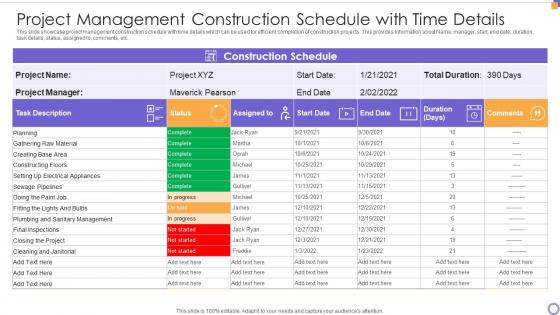
Project Management Construction Schedule With Time Details




Try Before you Buy Download Free Sample Product
 Impress Your
 Audience
 100%
100% Editable
 Save Hours
 of Time


Our Project Management Construction Schedule With Time Details are topically designed to provide an attractive backdrop to any subject. Use them to look like a presentation pro.
People who downloaded this PowerPoint presentation also viewed the following :
Project Management Construction Schedule With Time Details with all 6 slides:
Use our Project Management Construction Schedule With Time Details to effectively help you save your valuable time. They are readymade to fit into any presentation structure.





FAQs for Project Management Construction Schedule
Okay so first figure out your main project phases, then break those down into actual tasks with start/finish dates. Map out which stuff depends on other stuff finishing first - that's your critical path and it'll bite you if those tasks run late. Build in extra time because honestly, things always take longer than you think. Oh and don't forget the boring stuff like permits and material deliveries - those can kill your timeline fast. Track your labor hours and equipment too. Weather's another thing if you're outside. I learned that one the hard way last year.
Ok so work backwards from your deadline - that's honestly the only way to do it right. Map out all your major phases first, then break those down into actual tasks. The tricky part is figuring out what can happen at the same time vs what has to wait for other stuff to finish. Most people totally blow this step. Always pad your timeline because weather will screw you over, permits take forever, and materials show up late. I learned this the hard way on my deck project last year. Use data from similar jobs you've done to estimate how long each task actually takes. Better to be conservative upfront than panic later when you're behind schedule.
Honestly, update that thing every week or you'll regret it. I made that mistake once and it was a nightmare trying to explain delays weeks later. Pick one day - I always did Fridays - and stick to it no matter what. Write down weather issues, change orders, all that stuff right when it happens. Don't wait. Your future self will thank you. Also make sure you're updating those completion dates for everything downstream and actually tell people about changes. I know it sounds obvious but you'd be surprised how many people skip that part.
Ugh, delays are the worst - they mess up everything downstream. Like your electricians literally can't start until framing's done, then painters have to wait for electrical to finish. It's this whole chain reaction that screws your timeline. Plus every extra day costs you more money - crew wages, equipment rentals, sometimes even penalty fees if you blow your deadline. I learned this the hard way on my last project. Best thing you can do? Pad your schedule with buffer time from the start and do weekly check-ins to catch problems before they spiral out of control.
Look, Primavera P6 and Microsoft Project are gonna be your heavy hitters - there's a reason everyone uses them. Procore's really solid too, especially if you want everything in one place. For smaller stuff? Excel honestly works fine, though it turns into a nightmare once things get big. Monday.com and Smartsheet are decent if your team actually likes collaborating (big if, lol). But here's the thing - pick whatever your crew will actually stick with. You can always move up to fancier tools later when projects get crazy complex.
Honestly, padding your critical path is everything - I throw 10-20% extra time on risky stuff like permits or anything weather-dependent. Trust me on that one. Map out what usually goes wrong first though. Like, look at your last few projects and see where you actually got screwed over. Then build backup sequences so when (not if) something delays, you can jump to other work instead of sitting around. Have your big risks written down - material delays, crew shortages, weather - with actual backup plans. Being ahead of problems beats scrambling every time.
So basically resource leveling smooths out those insane spikes where you need 20 people one week, then barely anyone the next. You end up shuffling tasks around to keep staffing more consistent. Way better than constantly hiring and firing people - that's just exhausting for everyone. Sure, you might have to stretch some deadlines or tweak the order of things, but honestly? The cost savings and happier teams make it totally worth it. I'd start by actually looking at your current resource chart first though. Bet it's messier than you think.
Dude, Gantt charts are a game changer for construction timelines. No more messy spreadsheets that make everyone's eyes glaze over. You'll actually see which tasks depend on others and catch scheduling nightmares before they hit. The visual bars make it super obvious when work overlaps or when you're on the critical path. Honestly, I wish I'd started using them earlier - would've saved me so many headaches with confused subcontractors. Just throw one together for your next project and show it in meetings. Everyone gets it instantly.
Honestly, weekly check-ins are a game changer - don't wait around for monthly updates. Build in buffer time because delays are basically guaranteed with subs. Track their material deliveries religiously, that's where most projects go to shit. Get backup contractors lined up early too, someone always bails last minute. Put everything in writing with actual dates and penalties, trust me on this one. Oh, and make a shared calendar everyone can see. Saves so much confusion about who's supposed to be doing what when.
Ugh, weather is honestly the worst when you're trying to nail down construction timelines. Rain stops concrete work dead in its tracks, snow kills any exterior stuff, and crazy heat means shorter work days. Last spring was brutal - saw one project get delayed three weeks just from all the rain we had. You've gotta build cushion time into your schedule, especially for outside work. Check what weather's normally like in your area during construction months. Then add extra days for the inevitable delays. Having backup plans helps too. Trust me, you'll thank yourself later when that random storm hits and you're not completely screwed.
Honestly, you need to watch four main things if you want to stay sane. Schedule variance is huge - basically are you hitting your milestone dates or not? Cost performance matters too since delays usually blow your budget (learned that one the hard way). Keep an eye on whether your crews and equipment are actually busy or just standing around. Critical path stuff is probably most important though - those tasks control everything. Oh, and check this stuff weekly, not monthly. Trust me, waiting a whole month to see problems is asking for trouble.
Honestly, project management software has been a lifesaver for me. Real-time updates mean when something gets delayed, you can adjust everything instantly instead of scrambling. The dependency tracking is huge too - you'll spot bottlenecks way before they screw up your whole timeline. What I love most is everyone stays on the same page. No more confusion about which version of the schedule is current (we've all been there with those messy spreadsheets). Plus the automated reports save hours of admin work each week. I'd start with Procore or Buildertrend - they're pretty user-friendly for testing it out.
Dude, biggest thing is don't be crazy optimistic with your timeline. Weather will screw you over, permits take forever, and materials show up late - I swear it's like Murphy's law for construction. Add at least 10-15% buffer time to everything. Also, talk to your subs BEFORE you make the schedule, not after. So many people mess this up. Make sure you're not scheduling trades that'll just get in each other's way. Oh, and sequence everything properly - you can't do electrical and drywall at the same time, obviously. Start realistic and pad it.
Dude, you absolutely need to stay on top of communication with everyone involved. Seriously, I've watched entire projects fall apart because somebody forgot to tell the inspector about a schedule change. Keep your owners, contractors, and suppliers all updated regularly - it sounds boring but it saves your ass. You'll catch scheduling conflicts way earlier, coordinate deliveries better, and get approvals when you actually need them. The trick is setting up a communication routine right from the start and not abandoning it when everything goes haywire (which it will). Trust me on this one.
So basically CPM shows you which tasks can't be delayed without screwing up your whole timeline - that's your critical path. Before bottlenecks turn into expensive headaches, you'll catch them early. Resource allocation becomes way smarter too since you know exactly where delays will hurt. Honestly? It's a game-changer when clients get pissy about schedule delays because you've got actual data to show them what happened. The visual timeline makes explaining dependencies to subcontractors so much easier. Start with your major milestones, then trace backwards to find those critical sequences.
-
Amazing product with appealing content and design.
-
Design layout is very impressive.