


Promotion Announcement Powerpoint Ppt Template Bundles




Try Before you Buy Download Free Sample Product
 Impress Your
 Audience
 100%
100% Editable
 Save Hours
 of Time


Our Promotion Announcement Powerpoint Ppt Template Bundles are topically designed to provide an attractive backdrop to any subject. Use them to look like a presentation pro.
People who downloaded this PowerPoint presentation also viewed the following :
Promotion Announcement Powerpoint Ppt Template Bundles with all 18 slides:
Use our Promotion Announcement Powerpoint Ppt Template Bundles to effectively help you save your valuable time. They are readymade to fit into any presentation structure.
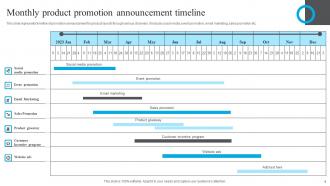
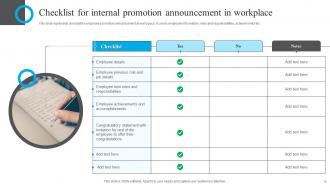
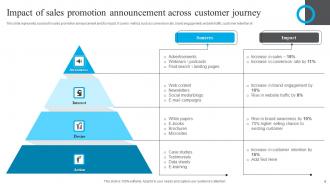
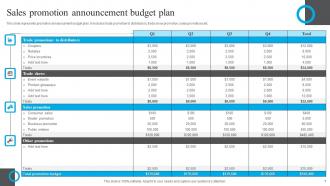





FAQs for Promotion Announcement Powerpoint
Definitely do a before/after thing showing their old role vs new responsibilities. Don't forget the obvious stuff like their actual new title and start date - seriously, people blank on that constantly. A timeline of what they accomplished to get here is solid too. Oh, and add how this changes the team structure if they're managing people now. Photo spot is a must, plus maybe let them add a quote about being excited or whatever. The whole thing should feel celebratory but not so casual that HR gets weird about it being sent company-wide, you know?
Dude, throw in some visuals - people zone out so fast in meetings these days. Before/after org charts work great for showing who's moving where, plus headshots so everyone knows the faces. Maybe add a timeline of their journey? Keep it clean though, don't go crazy with animations or you'll look amateur. One solid visual per main point is perfect. Oh and definitely add some company branding or celebration graphics to make it feel official. Trust me, anything beats just standing there talking at people for ten minutes straight.
Honestly, I'd stick with blues and greens as your main colors - they scream trustworthy and growth-focused without looking like a circus poster. Orange or gold work awesome as accents to give it that celebratory feel. Purple's another solid choice since it hints at achievement. I've watched way too many companies mess this up by going full neon... just looks tacky. Stay away from harsh reds or anything all-black though - comes off intimidating instead of welcoming. Oh, and definitely start with one color then build out from there. Much cleaner that way.
Think of it like telling a story - start with what challenges they faced or goals they were chasing. Then introduce your "hero" and their journey (sounds cheesy but trust me, it works). Share specific wins and how they grew. Build up to the big reveal of their new role. Oh, and definitely connect their past stuff to what they'll crush in this new position. Way better than just rattling off their resume. People actually stay engaged instead of zoning out halfway through.
Look, you want metrics that actually show why they deserved it. Revenue they brought in, projects they crushed, money they saved - that kind of stuff. Performance ratings over time work too. Customer satisfaction scores are solid, especially for people management roles. Honestly, don't bother with generic fluff that could describe anyone. Show the real impact they had on your team or department. I'd skip the vague stuff entirely. Keep everything tied to actual business results so the promotion makes total sense and highlights what they really accomplished.
Match whatever tone your company normally uses - if they're super formal, go with "pleased to announce" and all the official titles. Casual places? You can throw in conversational language, maybe even an emoji or two (but don't get crazy with it). Some companies love the whole backstory - career highlights, previous achievements, all that stuff. Others just want the basics: who's doing what now. Honestly, the trick is making it sound like your leadership team actually wrote it. Nobody wants to read something that screams "template email." Just copy how they usually share news and you'll be fine.
Oh man, typography makes such a difference! People see the visual before they process any words. Make the name and title really pop - bold, bigger font - then keep everything else clean. Honestly, please avoid Comic Sans at all costs lol. Match your company vibe too - sleek sans-serif works for tech, traditional serif for stuffy law firms. Contrast is everything, especially since people read these on their phones now. Stick with one font family and just play with sizes instead of going crazy with different ones.
Don't make it all about you - focus on what it means for the team going forward. People zone out fast in meetings, so keep it short. Skip the whole "here's my career journey" thing because honestly nobody needs your life story right now. You already got the promotion so don't oversell yourself trying to prove you deserve it. Be confident but not cocky about it. What really matters is being clear about next steps - how you'll transition in and what you need from everyone. Oh, and avoid dumping a million details on people. They'll tune out.
Honestly, interactive stuff makes promotion announcements so much better. Live polls work great - ask about team goals or whatever. Q&A sessions are solid too, let people grill the newly promoted person a bit. I've sat through way too many awkward silent announcements that just died. Quick brainstorming about upcoming projects gets people talking, or have everyone drop congratulations in the chat. The whole point is making it feel like an actual conversation instead of some corporate broadcast. Maybe start small with just one interactive thing and see how it goes?
Oh, definitely include their name and new title with the start date. Background stuff and achievements are good too. Who they report to is crucial - I swear half the announcements I see skip this and everyone's confused about the chain of command. Grab a quote from leadership about why they're pumped about the promotion. Their key responsibilities should be in there, plus any big project they're taking on. New contact info if it's changing. Keep it celebratory but informative, and honestly? Run it by HR first because they catch the weirdest things you'd never think of.
Honestly, skip those boring "We're pleased to announce" openings - they're the worst. Jump straight into a quick story about their impact or what they've actually accomplished. Like, what did this person DO that was awesome? People scroll past corporate fluff, but they'll stop for a real achievement or moment that shows why someone earned their promotion. Your intro basically decides if people genuinely celebrate or just skim past. I always think about it like - would I actually want to read this? Start with something specific that makes the team excited instead of another bland update.
Skip the formal headshots - they're boring as hell. Candid shots work way better, like catching them actually doing their job or celebrating with the team. Behind-the-scenes stuff feels real. Warm colors and clean fonts are solid choices too. Honestly, anything that looks too stock-photo-ish just screams fake now. You want people to see their personality shine through. Action shots or moments showing their impact get shared more than those stiff corporate portraits. Keep it simple but make it feel like an actual celebration, you know?
Make it interactive from the start - throw in live polls asking what people are most excited about with the promotion. Pause for Q&A so teams can actually ask questions. Honestly, the best ones I've seen feel more like conversations than formal announcements anyway. Set up anonymous feedback forms beforehand too, in case anyone has concerns about the transition they don't want to voice publicly. Don't forget to give clear next steps at the end. Something like "hit me up with questions by Friday" or schedule follow-ups to talk through how this affects everyone's day-to-day work.
Honestly, recognizing people when they get promoted is such a game-changer for company culture. You're basically showing everyone what actually gets rewarded around there - not just patting someone on the back. People love being celebrated (duh), but it goes deeper than that. Others start seeing a clear path to their own success. Makes the whole team feel like hard work isn't just disappearing into the void, you know? The key thing though - don't just say "congrats on the promotion!" Get specific about what they accomplished. It makes the recognition hit different and gives everyone else concrete examples to aim for.
Make templates with swappable sections - that's the move. Different audiences care about totally different stuff, you know? Employees want to hear about career growth, customers just want to know if their service changes. I usually keep a few tone options ready - formal exec stuff, casual team updates, whatever fits. Build your core message first, then create 2-3 versions. Focus on what each group actually wants to hear. Honestly, the placeholder sections for role-specific details are a lifesaver. Some short sentences work great. Others need more flow to explain department impacts and audience-appropriate language properly.
-
SlideTeam is my one-stop destination for templates. Highly recommended!
-
It saves your time and decrease your efforts in half.