

Quadrant circle sample presentation ppt





Try Before you Buy Download Free Sample Product
 Impress Your
 Audience
 100%
100% Editable
 Save Hours
 of Time


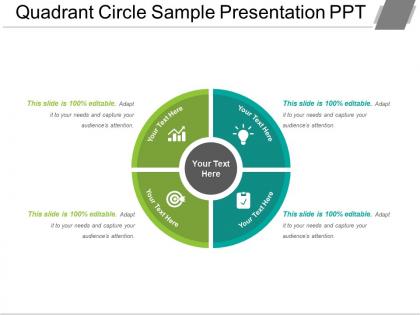
When you want to make an attractive yet professional SWOT analysis presentation, go for the 4 quadrants diagram PPT template. By using quadrant design presentation slideshow, analyze strengths, weaknesses, opportunities, and threats of the business. The quadrant design analysis PowerPoint slide is useful for a variety of purposes and generally useful for giving a presentation related to business planning. An organization improves itself once it identifies the factors that affect them because this brings more productivity which can be discussed through this quadrant circle design slide for PowerPoint. A user can demonstrate awareness aspects to their viewers through this four quadrant cycle diagram PowerPoint presentation template. The four quadrants in our professionally designed cyclic quadrant PPT slideshow displays the limitations of the business and you can define how to conquer such limitations in this cyclic quadrant diagram PowerPoint slide. Our Quadrant Circle Sample Presentation Ppt will give you a different look. Exhibitan air of confidence.
People who downloaded this PowerPoint presentation also viewed the following :
Quadrant circle sample presentation ppt with all 5 slides:
Create an atmosphere of acceptance with our Quadrant Circle Sample Presentation Ppt. Folks become conducive to change.
FAQs for Quadrant circle
So basically it's a circle split into four parts that shows how two different things relate to each other. Picture a scatter plot but way easier to understand at first glance. People use them all the time for stuff like figuring out which projects to tackle first - you know, high impact but easy to do versus nightmare projects that aren't worth it. Works great for employee reviews too, plotting performance against potential. The visual just clicks with people somehow. Just make sure your two measurements actually make sense together, otherwise you're gonna end up with a confusing mess that nobody can read.
Dude, quadrant circles are actually pretty solid for presentations. Instead of those awful bullet point slides, you plot stuff on two axes - like risk vs reward, or urgent vs important tasks. Works great for customer segments too. Honestly, execs love this format because they can see patterns right away. Way stickier than drowning people in spreadsheets (learned that the hard way). Perfect for quarterly reviews - just pick two variables your audience cares about and map your projects on there. You'll look way more organized than you probably are.
So basically you've got two lines that cross and make four boxes. Each line represents something different you're measuring - like how urgent something is versus how important it is. Where stuff lands in each box tells you what category it falls into. Plot whatever you're trying to figure out as dots in the right spots. I always mess up the axes at first, so nail down what each one means before you start throwing things on there. Once you've got that sorted, it's pretty easy to see patterns. Way simpler than it looks, honestly.
Pick metrics that actually fight each other - that's what makes this thing work. Short-term profits vs long-term investment, efficiency vs innovation, stuff like that. Each quadrant needs to represent different stakeholder views or timelines. I swear, most teams just dump random KPIs in there and can't figure out why nobody cares. Your metrics should compete for the same resources or attention. List out your biggest strategic trade-offs first. Then build metrics around those conflicts. The whole point is creating tension that forces real conversations about priorities.
Yeah, totally works! Map your marketing stuff on four squares - like high cost vs low cost, or quick wins vs long-term plays. Each strategy gets plotted as a dot so you can see the whole picture at once. Most teams I know end up cramming everything into one corner without realizing it. Plot what you're doing now first - I bet you'll spot some obvious holes pretty quick. It's honestly just a visual way to make sure you're not putting all your eggs in one basket. Way better than trying to keep track of it all in your head.
Honestly, most people mess this up by jumping straight into filling boxes before they've figured out what their axes actually mean. You'll just create a hot mess that way. Don't cram like 20 items per quadrant either - kinda defeats the point of prioritizing, right? I've watched so many teams do this and then scratch their heads wondering why it's useless. Test your axes with a few sample items first. Make sure they're actually independent criteria, otherwise everything clusters weird. Keep your items specific instead of vague nonsense. Short sentences work better than rambling descriptions.
Definitely color code that thing! Your audience will get it instantly without squinting at tiny labels. I like using warm colors - reds, oranges - for the urgent stuff, then blues and greens for lower priority items. Works like a charm because people's brains already process colors way faster than text. You could also assign colors by department if that makes more sense for your presentation. Just don't go crazy with it - stick to maybe 3 or 4 colors max. Nobody wants their slide looking like a kindergarten art project, you know? It'll help people remember the key points better too.
Honestly, engineering and construction teams get the most use out of them - they're always measuring angles and curved stuff. Manufacturing too, especially with pipes and circular parts. Architects absolutely love quadrant circles for designing arches (my buddy at a firm says they're obsessed). Oh, and aerospace quality control uses them constantly for inspections. If you're doing precise curved measurements or marking quarter-circles regularly, they're totally worth it. Actually saved my team so much time once we started using them properly.
Quadrant Circles are clutch for showing multiple relationships at once - way more intuitive than regular scatter plots. Executives actually get them fast. Bar charts feel flat in comparison, and don't get me started on spreadsheet dumps. The circular layout makes patterns jump out at you naturally. Perfect for competitive analysis or when you're reviewing portfolios and need to show positioning plus relationships simultaneously. Honestly, I probably overuse them now but they work so well for complex data. Try one next time you need the big picture presented quickly - your stakeholders will thank you.
For Quadrant Circles, I'd go with Canva or Lucidchart first - they've got templates ready to go. PowerPoint works too but you'll be dragging shapes around manually. Miro and Figma are solid if you need to collaborate with others. Google Drawings isn't fancy but honestly gets the job done when you're stuck. I made one there last week and it looked fine. Just keep your labels readable and make sure the most important stuff jumps out first. The hierarchy thing really matters - nobody wants to squint at your chart trying to figure out what's what.
So basically you're looking at where your data points land in those four sections. Each quadrant shows a different combo of your two variables - like high-high, high-low, etc. Points closer to the center = weaker relationships, outer edge = stronger ones. Honestly, the cool part is spotting clusters - say most customers end up in "high satisfaction, low cost." That's gold right there. Start with whichever quadrant has the biggest concentration of points and figure out what's driving it. It's kinda like a regular coordinate system but circular, if that makes sense.
So here's the thing - dry data points just don't stick in people's heads, you know? Your Quadrant Circle needs real stories. When you're walking through each section, throw in actual examples about why stuff ended up there. Like instead of just saying "high impact, low effort," tell them about when Sarah's team actually tried it and what went down. Our brains are wired for stories anyway. People need to picture themselves using your framework - that's when the lightbulb goes off. Oh, and prep a few quick examples beforehand so you're not scrambling mid-presentation.
So basically a Quadrant Circle splits your goals into four buckets - personal, work, health, relationships, whatever makes sense for you. Plot where you're at in each one right now. The whole point is catching when you're totally killing it at your job but your friendships are garbage, you know? It's honestly pretty eye-opening once you see it visually laid out like that. I do mine monthly - rate each section 1-10, connect the dots. Makes those weird patterns super obvious. Like last month I realized I was basically ignoring my health completely while obsessing over work stuff.
Definitely try Miro or Mural - people can just drag stuff into quadrants while you're talking, which feels way more natural. Breakout rooms are clutch too. Give each room a quadrant to focus on, then they come back with their thoughts. Quick polls work if you want to vote on priorities fast. Honestly, virtual whiteboards solve that weird "um, should I talk now?" thing since everyone types at once. Oh, and set up your template beforehand so you're not fumbling around with formatting. Makes the whole thing smoother.
Yeah, totally doable! Start broad with your first circle - like overall market opportunities. Then your second one digs into the specifics of whatever looked most promising. I've watched people go crazy with 5 or 6 circles and honestly it's just confusing at that point. Two, maybe three max is the sweet spot. The trick is making sure each one actually builds on the last - don't just randomly throw circles at people. Your transitions matter a ton here. Label how they connect or you'll lose everyone. Oh and make sure the flow makes sense when you're presenting, not just on paper.
-
Illustrative design with editable content. Exceptional value for money. Highly pleased with the product.
-
Great experience, I would definitely use your services further.