


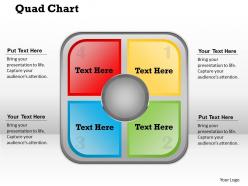
Quad chart powerpoint template slide





Try Before you Buy Download Free Sample Product
 Impress Your
 Audience
 100%
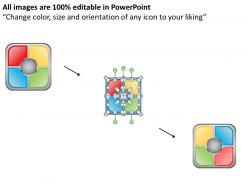
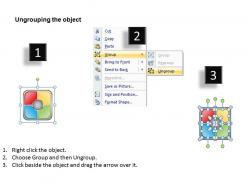
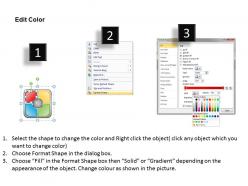
100% Editable
 Save Hours
 of Time


In order to bring your facts to life simply make use of our extremely convincing and vivacious Quad graph PPT design diagram. This presentation layout is unlike those traditional infographics which make the information look complex by adding way too many visual aids with the actual information as our patterns are carefully crafted by the experts to form a professional and interesting looking presentation. Apart from this, latest tools and techniques have been implemented while modelling these illustrations. Moreover, their succinctness enables rapid decision-making which will further save your valuable time. Also, the 4 quadrants in these backgrounds can be utilised for documenting the process of research projects and to propose a brief overview of topics that you wish to discuss with your audience. Overall, to impose an everlasting impact on the viewers and to deliver an accurate and precise message then simply merge these backgrounds with your reports and create wondrous presentations. Our Quad Chart PowerPoint Template Slide bring a lot to the table. Their alluring flavours will make your audience salivate.
People who downloaded this PowerPoint presentation also viewed the following :
Quad chart powerpoint template slide with all 5 slides:
Acquire the best assistance with our Quad Chart PowerPoint Template Slide. They put their excellence at your disposal.
FAQs for Quad chart
So a quad chart is just a one-page thing split into four boxes - super straightforward. Usually you put your problem/goal in the top left, your solution top right, then benefits bottom left and costs/timeline bottom right. Honestly, executives eat this stuff up because they can scan everything in like 30 seconds. Different companies might switch up which info goes where, but whatever. The trick is keeping each box tight and focused - no rambling. I'd start by figuring out your four main points first, then worry about making it look pretty.
Honestly, quad charts are perfect for those brutal exec meetings where you've got like 30 seconds to explain your whole project. I use them all the time for status updates and quarterly reviews. The four boxes force you to organize everything into clean chunks - usually objectives, progress, problems, next steps. Busy leaders can actually absorb the info without their eyes glazing over. My VP loves them because she doesn't have to dig through slides to find what matters. Next time you're prepping a leadership brief, seriously try one. It'll save you from rambling and keep everyone focused on the important stuff.
Dude, quad charts are a lifesaver! You split everything into four sections instead of cramming it all together. Usually it's like problem, solution, where things stand, what's next. Executives love them because they can just glance at whatever part they care about. I used to make these horrible dense slides that nobody wanted to read - learned my lesson there. Four boxes keeps you from rambling too much during the actual presentation. Honestly, the format kind of forces you to get your thoughts organized. You should try it for your next project thing and see how much cleaner everything feels.
Defense companies created quad charts for military briefings, so they're obviously huge there. But tons of other industries use them now - consulting firms, pharma, construction, tech companies. McKinsey probably has like a thousand templates lol. NASA uses them for mission updates too. The thing is, any company where project managers need to brief executives will find them useful. Busy C-suite folks want the highlights fast. They don't have time for 20-slide decks. Short sentences work. If your company does regular project reviews with senior leadership, quad charts are definitely worth trying out.
So the four quadrants usually break down like this: problem/opportunity (top left), solution/approach (top right), benefits/value (bottom left), and implementation/next steps (bottom right). Keep each section punchy with bullet points - I've watched people completely wreck their slides by cramming paragraphs everywhere. Honestly, if you're writing essays in there, you're missing the point. Make your language crisp and hit the most compelling stuff that backs up your story. The real win is when all four sections flow together seamlessly. Oh, and start with whatever quadrant is strongest when you're presenting, then connect the dots from there.
Make your quad chart actually readable - visual hierarchy is everything. Bold your key numbers or main points so they jump out. Each section needs consistent formatting, but honestly? I've watched way too many presentations crash because someone crammed paragraphs into tiny boxes. Short bullets work better. White space is your friend here. Put your most crucial stuff top-left since that's where people look first. Here's a quick test: show it to someone for 30 seconds, then ask what stuck. If they can't tell you the main points, you've got too much clutter going on.
Honestly, people cram way too much stuff into each section - it just looks messy. Also seen tons of roadmaps where the formatting is all over the place, like different fonts everywhere. Your bullet points need to actually mean something too. Generic updates like "working on improvements" tell nobody anything useful. Keep fonts consistent and make sure people can scan it quickly. Timeline-wise? Don't be that person who promises everything in two weeks when you know it'll take months. And seriously, update the damn thing regularly or it becomes useless. Start with your main point, then add the details after.
Honestly, quad charts are a lifesaver for project management. They dump all your critical stuff - scope, schedule, budget, risks - onto one page so you don't have to hunt through a million documents. Leadership meetings become way less painful when everyone can see the big picture instantly. The visual layout makes it obvious when things are getting wonky or when you're trading off one thing for another. Plus, I've found that updating them weekly keeps everyone on the same page - though sometimes I forget and do it every two weeks instead. When you're trying to make big decisions, having everything laid out like that really helps you see how one change ripples through the whole project.
Honestly, quad charts are perfect for this stuff. Basically you track four key things at once - scope, timeline, budget, risks, whatever matters most for your project. Stakeholders love them because they're visual and nobody has to wade through endless spreadsheet rows (thank god). The format keeps you focused too since you can't ramble on about every tiny detail. For your next review, just pick your most critical metrics and stick one in each quadrant. Update it weekly and you're golden. Way better than those marathon status meetings we used to do.
Honestly, just use whatever you already have on your computer. PowerPoint's probably the easiest - drop in a 2x2 table or throw some text boxes together. Google Slides works the same way. If you need something fancier (like for those stakeholders who obsess over how things look), Visio or Lucidchart are solid choices. Excel can work too if you're desperate - just merge cells and make it look decent. I wouldn't bother downloading new software unless you'll be making these regularly. Oh, and draw.io is free if that matters.
Look, start with what they actually need to make a decision - your recommendation, the key numbers, and any major roadblocks. I always think "if they zone out after 30 seconds, what's the one thing from each section they should remember?" That question saves me every time. Skip the fluff that's just interesting but not actionable. Focus on stuff that's timely and connects to what they care about, not what fascinates you. Here's my test: can someone glance at it and immediately get the core issue? If you're cramming too much detail, you've probably lost them already.
Honestly, quad charts are a game changer. Instead of dragging people through 15 slides, you jam everything onto one page - problem, solution, timeline, resources. Done. Your audience sees the whole story instantly without playing connect-the-dots in their heads. Executives eat this stuff up (seriously, I've seen VPs get genuinely excited about quad charts, which is... weird but useful). The beauty is it forces you to cut all the BS filler that normally bloats presentations. People actually understand your project in two minutes flat. I started using them last year and honestly can't imagine going back to those marathon PowerPoints.
Quad charts are actually pretty great for this stuff. Pick two dimensions that matter - like impact vs effort or cost vs reach - then plot your campaigns or ideas across them. The four boxes make it super obvious what's worth doing. You'll see your quick wins (high impact, minimal work), your big strategic moves, and honestly the stuff you should just skip. I always end up surprised by what lands where when I do this exercise. Plot your current ideas on impact vs resources and I bet some clear winners will jump out that you didn't notice before.
Okay so visual hierarchy is huge for quad charts. People's eyes need to know where to look first, right? Use bigger fonts for your key metrics and bold colors for the stuff that matters most. I always put the most important quadrant in the top-left since that's where everyone looks first anyway. Size and positioning are your best friends here - don't make everything the same or it'll just be a mess. Honestly, I've seen way too many charts where nothing stands out and you're just staring at visual chaos. Your audience should get the main story in like 10 seconds max.
Yeah, absolutely! So for executives, stick to the big picture stuff - metrics and outcomes. They don't want to get bogged down in technical details. Technical teams are the opposite though - they'll actually want to see your methodology and all the data points. Color coding is honestly a game changer. Red/yellow/green status indicators make everything way easier to scan quickly. Oh, and you can resize different sections depending on what matters most to whoever you're presenting to. The key thing (and this might sound obvious) is making sure those four quadrants still tell a complete story no matter how you adjust them.
-
Excellent products for quick understanding.
-
Editable templates with innovative design and color combination.