


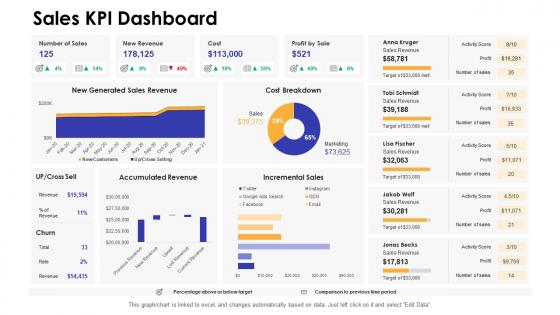
Sales kpi dashboard dashboards by function




Try Before you Buy Download Free Sample Product
 Impress Your
 Audience
 100%
100% Editable
 Save Hours
 of Time


Our Sales Kpi Dashboard Dashboards By Function are topically designed to provide an attractive backdrop to any subject. Use them to look like a presentation pro.
People who downloaded this PowerPoint presentation also viewed the following :
Sales kpi dashboard dashboards by function with all 7 slides:
Use our Sales Kpi Dashboard Dashboards By Function to effectively help you save your valuable time. They are readymade to fit into any presentation structure.





FAQs for Sales kpi dashboard
For your sales dashboard, start with the obvious stuff - total revenue, conversion rates, average deal size. Pipeline metrics are huge too: leads coming in, where opportunities sit in each stage, how long deals actually take to close. I always throw in activity tracking because honestly, sometimes you just need to see if people are picking up the phone! Customer acquisition cost matters a lot, plus lifetime value if you can track it. Those should cover your bases. Then maybe add whatever weird industry-specific thing your boss cares about.
Honestly? Daily updates are the way to go, or real-time if you can swing it. Weekly just doesn't cut it anymore - things move too fast and you'll miss chances to fix problems early. I'd set up those automated refreshes to run overnight so your morning meetings actually have fresh data to look at. Pipeline velocity and conversion rates can change super quickly, so you need that visibility. Plus your team stays way more aligned when everyone's looking at current numbers instead of last week's stuff. Trust me, it makes those daily standups actually useful for once.
Don't cram everything onto one screen - it's just overwhelming. Skip the vanity metrics that look cool but won't actually help anyone make decisions. Make your important KPIs bigger and bolder than the rest. Your sales team probably needs live data, not something that updates once a week (learned that one the hard way). Actually talk to the salespeople before you build anything. They know what they need way better than we do. Start small - maybe 5-7 metrics that directly hit revenue. You can always add more later, but getting the core stuff right first makes everything easier.
Dude, visualization totally changes the game with sales data. Raw spreadsheets are brutal to look at - but charts and graphs? Your brain just gets it immediately. Bar charts show you which regions are tanking, trend lines tell you if things are going up or down. It's honestly night and day compared to staring at rows of numbers. Heat maps are pretty cool too for spotting patterns. I'd start simple though - basic line graphs and bar charts first. You'll be shocked how much easier it becomes to see what your team's actually doing. Way better than drowning in Excel hell.
Honestly, it's like having a crystal ball for your sales strategy. You'll catch trends way earlier - see which products are taking off or where your team's struggling before it becomes a disaster. Real-time data means you can quickly move money from dead zones to markets that are actually performing. Those weekly strategy meetings become so much less awkward when everyone's staring at the same dashboard instead of arguing over different spreadsheets. Track what's working, ditch what isn't, and set goals that aren't completely unrealistic. Oh, and start with metrics that actually matter to your biggest objectives - don't get lost tracking everything.
Honestly, just give people what they actually need to see. Sales reps want their pipeline, conversion rates, and targets right there - no digging around. Managers care about team performance and forecasting stuff. Executives? High-level revenue trends, though some of them secretly love getting into the weeds too. Set up role permissions so everyone sees what matters for their job. I'd start by literally asking each group what decisions they're making every day, then build the views around that. Way easier than guessing what they want.
Honestly, bad data will wreck everything. I've watched entire teams go crazy chasing fake metrics because their dashboard was pulling garbage numbers. You're basically flying blind if the data's wrong - missed opportunities, terrible forecasts, the whole mess. Clean sources are non-negotiable. Set up monthly audits and alerts for when stuff looks weird (trust me on this one). Even the slickest dashboard becomes worthless noise without accurate data. Your decision-making is only as good as what you're looking at.
Honestly, those two metrics are like the backbone of everything else you're tracking. Longer sales cycles kill your pipeline velocity and make forecasting a nightmare. Your conversion rates obviously hit revenue per lead and how healthy your pipeline looks overall. Here's the weird part though - shorter cycles usually boost conversion rates, but not always! I'd definitely segment by deal size and lead source on your dashboard. Otherwise you're just staring at averages that miss the real story. Trust me, those patterns matter way more than the overall numbers.
Tableau and Power BI are probably your best bet - they're powerful but take some time to learn. Google Data Studio is free and works well if you're mostly using Google stuff. Already on Salesforce? Their built-in dashboards might do the trick. Excel works too for small teams, though it gets chaotic pretty quickly (trust me on that one). Honestly, I'd figure out what data sources you need first - that'll basically decide which tool makes the most sense. Some play nicer with certain systems than others.
Definitely grab at least 12-18 months of historical data for your dashboard - you'll need that much to spot real patterns. Rolling averages help smooth things out so you're not chasing every little blip. The seasonal trends are honestly what surprised me most when I first started doing this stuff. Compare year-over-year, monthly, quarterly - whatever timeframe makes sense. Just make sure you're looking at the same territories or product lines so you're not mixing apples and oranges. Short bursts tell one story, long-term data tells another. Both matter.
Honestly, regular revenue metrics won't cut it for subscriptions. MRR is your bread and butter - track that religiously. Churn rate too, even though it's depressing to watch sometimes. Customer acquisition cost matters since you're spending money upfront for long-term payoff. I'd also watch lifetime value and how many trial users actually convert to paying customers. Oh, and expansion revenue from upgrades - that's often easier than finding new customers. Start with these basics, then see what other patterns emerge as you get more data.
Honestly, these dashboards are game-changers for spotting weird patterns. You'll instantly see which reps are crushing it or totally bombing through color coding and visual alerts. Same goes for territories acting strange or products that suddenly drop off a cliff. The coolest part? Set up automated thresholds so you get pinged the second something's off – missed quotas, conversion drops, pipeline jams, whatever. Way better than finding out about problems weeks later during some boring monthly meeting. Oh, and don't sleep on this – configure those alerts ASAP so you're actually ahead of issues instead of always playing catch-up.
So benchmarking is basically your reality check - shows you if your sales numbers actually mean anything. Without it, you're celebrating hitting 85% of quota while everyone else is crushing 110%. Awkward. Add your historical data first - last quarter, same time last year, whatever. External benchmarks are gold if you can get competitor or industry data, but honestly that's harder to find. The whole point is turning random numbers into actual insights. Like, is that dip in leads normal for December or are we screwing something up? Start simple with just comparing to your past performance - you'll immediately see patterns you missed before.
Honestly, just set up push notifications for the stuff that actually matters - like when deals close or if you're behind quota. Don't go crazy with alerts though, you'll end up checking it nonstop. Pick maybe 3-4 metrics max that help you make real decisions. I like using it between meetings to spot trends or prep for calls. The mobile screen's tiny anyway, so cramming everything on there is pointless. But here's the cool part - having real-time numbers during conversations makes you look super prepared. Works great when you're talking to prospects or your manager.
Honestly, less is more with sales dashboards. Put your most important metrics right at the top where people will actually see them. Group similar stuff together and use colors that make sense - I've seen some truly hideous rainbow disasters that hurt my eyes. Make your labels super clear so nobody has to guess what "Conv Rate Q3 YTD" means at 8am. Date ranges are clutch for context. Oh, and test it with a few team members first because I guarantee what seems obvious to you won't be to them. Fast loading times matter too - nothing kills momentum like waiting forever for numbers to populate.
-
Very unique, user-friendly presentation interface.