


Quotes powerpoint slide templates download





Try Before you Buy Download Free Sample Product
 Impress Your
 Audience
 100%
100% Editable
 Save Hours
 of Time


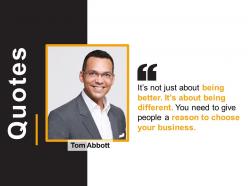
Motivate your employees to increase the sales by using this Quotes PowerPoint Slide Template Download. Ask your customers how you can improve your business by employing this attractive Tom Abbott quote PPT slide. Energize your employees to build a high-performance sales team and achieve targets through this motivational quote PowerPoint infographic. You can explain stages in management thought including the bureaucratic model, scientific management, process management with this effective classical theory PowerPoint layout. Take advantage of this influencing ideas infographic to present various thoughts on leadership such as innovation between leaders and followers amongst others. Showcase the inherent qualities of a good leader with this organization direction visual such as commitment, passion, decision-making, visionary thinking, etc. Moreover, this slide is fully adaptable so you can easily replace your content in a placeholder. Thus inspire to achieve your maximum potential by downloading this sales training PowerPoint presentation.
People who downloaded this PowerPoint presentation also viewed the following :
Quotes powerpoint slide templates download with all 5 slides:
Furnish the facts with our Quotes Powerpoint Slide Templates Download. Describe events as they actually happened.
FAQs for Quotes powerpoint
Honestly, go for clean fonts that won't compete with crazy backgrounds - you want people actually reading the quote, not squinting at it. Make sure there's space for author names too. I'd grab a few different templates since some work better for short punchy quotes while others handle longer ones without looking cramped. The quote should be the main event, not some random graphics everywhere. Oh, and test how they look with your presentation style first - nothing worse than clashing vibes. Some templates get way too extra with the design when simple usually works better.
Here's what I've found works: quotes give people something concrete to remember from your talk. They're like mental bookmarks. Plus honestly, everyone's secretly hoping for a quotable moment they can share later. The emotional punch is real too - a good quote hits different than just explaining concepts. I always make sure mine actually connect to what I'm saying though. Random inspirational quotes just for the sake of it? Nah. And definitely put them on clean slides so they stand out. Your brain needs those little breaks from dense info anyway, so quotes do double duty there.
So motivational speeches need those bold, dramatic templates - big fonts, crazy backgrounds, vibrant colors. Keep text super minimal though. Educational stuff is totally different - cleaner layouts that won't overwhelm people when you've got longer quotes. I swear, some motivational speakers go way too overboard with animations (but whatever). The whole point is energizing vs. staying focused and readable, you know? Search for "inspirational quote templates" for speeches or try "academic quote layouts" for educational presentations. That should get you started.
Honestly, typography contrast is everything - mix a bold sans-serif with something elegant. Don't overcrowd it either, white space makes quotes breathe. I'm kind of obsessed with adding subtle geometric frames around text, but they shouldn't compete with your quote. Colors matter way more than people think - warm tones feel inspiring, blues suggest wisdom. Your background needs to stay simple though. Soft gradients work great. The quote should be huge enough for people in back to read, and emphasize key words with size or weight. Oh, and never let your background fight the text!
Honestly, color choice can totally make or break your quote posts. I always go dark backgrounds with light text when I want something to feel deep or serious - there's just something about that combo that hits different. Bright, cheerful colors work better for uplifting stuff. You'll see people throw neon colors everywhere and wonder why nobody reads past the first word... it's because the colors are fighting with the message. Warm oranges and yellows are perfect for motivational quotes, while business content needs those trustworthy blues or clean grays. Match the vibe, you know?
Hey! SlidesCarnival and SlideModel are my go-to spots - both have solid free quote templates. PresentationGO's decent too. Canva works but honestly their interface is kinda chaotic when you first start using it. For cleaner, minimal stuff I'd check SlidesGo or Template.net. Most sites let you filter by "quotes" or "motivational" which saves time. Oh, and make sure you're downloading the actual PowerPoint files, not just images - learned that the hard way once when I couldn't edit anything!
So basically just swap out their colors for yours and throw your logo on there. Right-click stuff or use the design tab in PowerPoint - super straightforward. The fonts are easy to change too, just match whatever your brand uses. Free templates look kinda bland at first, not gonna lie, but they're actually pretty decent once you customize them. Oh and definitely change up any text so it sounds like your company, not some random template. Save it as your own template after you're done customizing - trust me, you'll thank yourself later when you need another quote and don't have to redo everything.
Make your quote the star - big font, centered, with tons of breathing room around it. Don't cram stuff together! If you're throwing in a photo, keep it subtle so it doesn't fight with your text. Maybe just a soft background or tiny image tucked in a corner? I've literally watched people squint at slides where some random stock photo completely buried the actual quote. Put attribution small in the bottom-right. The whole thing should feel like quote first, everything else is just decoration. Oh, and definitely do the "view from the back of the room" test before you present!
Honestly, font choice can totally make or break your quotes. I made this mistake once using some beautiful script font that looked amazing on my screen but was completely unreadable from the back of the room - embarrassing! Sans-serif fonts like Arial or Calibri are your safest bet for presentations since they stay crisp when projected. Don't go crazy mixing different typefaces either. Your audience will spend more time trying to figure out what they're reading instead of actually listening to you. Stick with one clean font family and just play around with size and weight for emphasis. Oh, and definitely test your slides from across the room first!
Yeah totally! Background music or subtle animations can make quote slides way more engaging. Just don't go overboard - nobody wants some random whoosh sound covering up Maya Angelou, right? Video backgrounds work great for motivational stuff. Gentle effects like floating particles are better for softer, inspirational quotes though. I learned this the hard way after making some cringey slides last year lol. The main thing is making sure whatever you add actually supports the message instead of fighting with it. Try a few different styles and see what clicks!
Ugh, don't go overboard with quote slides - seriously, after like 2-3 people just zone out. Also make your font huge! I once did this presentation where half the room was squinting. Pick quotes that actually relate to what you're saying, not just random inspirational stuff. Those cheesy sunset backgrounds? Hard pass. Short quotes hit way harder than long rambling ones too. Oh and definitely cite your sources or you'll look sketchy. Honestly though, one really solid quote beats cramming in a bunch of mediocre ones just because you have extra slides to fill.
Oh man, you really gotta know your audience with this stuff. I made a huge mistake once using some Western business quote for our Tokyo office - total cringe. Religious quotes can be amazing in some places but will completely turn off secular crowds. Same with historical figures - someone's hero is another person's villain, you know? Honestly, your best move is finding universally respected people or going with industry-neutral stuff about perseverance or innovation. Those human experience themes usually don't backfire on you.
Okay so here's the thing - you gotta match your quotes to who's actually listening. Business people love that leadership and success stuff, while creative types want innovation quotes that spark ideas. Students? They absolutely devour anything about growth and pushing through challenges. Your template should follow the same logic. Go sleek and corporate for business quotes, bright and artsy for creative inspiration. Clean academic vibes work best for educational content. Oh and make sure the visual style actually backs up what you're saying - there's nothing worse than mismatched design killing your message's impact.
Layout totally makes or breaks how people absorb your quote. Center it big if you want that dramatic moment where everyone just sits with the words. Side-by-side works better when you're flowing straight into your own take on it. I've watched presentations where bad quote placement just murdered the whole vibe - it's painful! Match your visual setup to how you actually speak. Building to something huge? Go full-screen for maximum punch. Just need supporting evidence? Those templates with quote + your analysis work great.
Dude, whitespace is everything for quote slides. Give your text tons of room to breathe - I'm talking like 40% empty space minimum. The audience's eye goes straight to what matters instead of getting lost in messy clutter. Honestly? I cringe when I see quotes crammed into busy slides. The impact just... dies. Empty space around your quote creates this visual weight that makes it feel way more profound and memorable. It's weird how that works, but it totally does. Your slides will look so much cleaner and more professional too.
-
Great quality product.
-
Thanks for all your great templates they have saved me lots of time and accelerate my presentations. Great product, keep them up!