


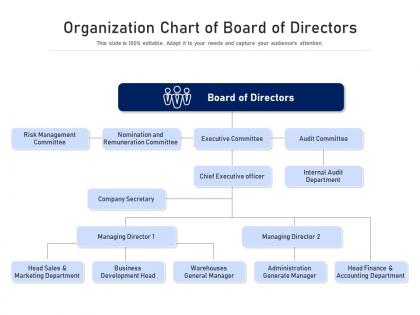
Organization chart of board of directors




Try Before you Buy Download Free Sample Product
 Impress Your
 Audience
 100%
100% Editable
 Save Hours
 of Time


Our Organization Chart Of Board Of Directors are topically designed to provide an attractive backdrop to any subject. Use them to look like a presentation pro.
People who downloaded this PowerPoint presentation also viewed the following :
Organization chart of board of directors with all 2 slides:
Use our Organization Chart Of Board Of Directors to effectively help you save your valuable time. They are readymade to fit into any presentation structure.

FAQs for Organization chart of
Definitely include job titles, names, and who reports to who - that's the basic stuff. Contact info like emails are clutch because nobody wants to spend 20 minutes tracking down the right person. Show your departments too, especially if you're not just a tiny team. Oh, and throw in any open positions you're hiring for since people like knowing what's coming down the pipeline. Honestly, the biggest thing is keeping it current. There's literally nothing worse than finding someone on the org chart only to discover they left three months ago.
Honestly, org charts are lifesavers for avoiding awkward "oops, I went around my boss's boss" situations. They show you exactly who reports to whom, so you can figure out the right person to bug about decisions or approvals. You'll also spot those random connections - like how Janet from accounting is actually the one who handles all vendor stuff (learned that the hard way). Saves you from that whole "wait, who do I even talk to about this?" spiral. Just keep yours updated because nothing's worse than following an old chart. Trust me on that one.
So there are basically four types you'll run into: hierarchical (classic pyramid style), flat (barely any management), matrix (where you report to two different people - fun times), and divisional (split by products or regions). Traditional companies love hierarchical for that clear chain of command. Startups usually go flat since everyone does everything, but honestly it gets chaotic once you hit like 50+ people. Matrix works when you need both a regular boss and a project lead. Divisional makes sense if you've got separate business units. Just pick whatever actually matches how your company works, not what looks pretty in PowerPoint.
Dude, your org chart is gonna be constantly changing - like, every few months honestly. Start with everyone doing a bit of everything when you're tiny. More people means more layers though, and suddenly your jack-of-all-trades folks become specialists. It gets chaotic quick if you're not paying attention! Departments pop up out of nowhere, people start reporting to different managers, and don't even get me started on what happens during acquisitions. Oh, and update it every quarter - HR usually notices these shifts before anyone else does. Trust me on that one.
Honestly? Just use whatever you already have first. PowerPoint works fine for basic stuff. If you need something fancier, Lucidchart is pretty sweet - it's online so everyone can jump in and edit. Visio's the heavyweight option but it's honestly way too much unless you're doing complex stuff. Oh, and there's this free thing called diagrams.net (used to be draw.io) that's decent. I always forget about Google Drawings but that works too in a pinch. Don't overthink it though - most people just need something simple anyway.
Just add little location tags next to names - "Remote," "NYC Office," whatever. Most tools let you do colored badges or different icons too. I've seen some really clever setups, actually. Don't group people by location though - that makes remote folks look like an afterthought. Group by team or function instead so everyone feels equal. Short connections lines work the same for everyone. Oh, and avoid making remote workers smaller or pushed to the edges - honestly that just looks awkward and sends the wrong message about company culture.
Don't overcomplicate it - seriously, I've seen org charts that look like someone threw spaghetti at a wall. Focus on the main roles and departments, not every single person. Also, base it on how work actually gets done, not just who has the fanciest job titles (trust me on this one). Update it when people move around or it becomes totally useless within like three months. Oh, and resist making it look too pretty at the expense of being functional. People need to actually understand the reporting lines without needing a magnifying glass.
Dude, seriously get them an org chart on day one. New people are always lost trying to figure out who's who and what everyone actually does. The chart shows reporting lines and team connections so they won't waste time asking random people basic questions. Plus it helps them spot their manager's boss and figure out which departments they'll need to work with later. Honestly saves everyone from that awkward "wait, who do I even ask about this?" moment. Just make sure it's updated - nothing worse than outdated info when you're already confused.
So here's the thing - your org chart is basically a power map that shows who makes decisions and how info flows around your company. Pull it up whenever you're planning something big and trace through who you'll need on board. It shows which leaders control resources and where the bottlenecks are (trust me, there's always at least one). You can spot gaps in leadership too. Honestly, sometimes I think people underestimate how useful these things are for strategy work. Does your current structure actually support what you're trying to do? The chart will tell you.
Honestly, good visual hierarchy is a game changer for org charts. Make your C-suite boxes bigger and bolder than the regular employee ones - it sounds obvious but you'd be surprised how many people skip this. Different colors help too. Group departments with spacing so related teams sit together visually. I always think consistent rules are what make or break it though. Like, if all directors get blue boxes, stick with that everywhere. Otherwise people get confused trying to figure out who reports to who. Short version: don't make everything look identical or you'll have people squinting at every name just to understand the structure.
Honestly, connecting your org chart to HR systems is a game changer. Everything updates automatically when people get promoted or quit - no more manually fixing a million different spreadsheets. New employees can see exactly where they fit from day one, which is pretty clutch for onboarding. The reporting side gets so much cleaner too. You'll spot gaps faster and actually track headcount properly by department. Oh, and planning for growth becomes way less of a nightmare. I'd start by seeing what your current HR platform can already connect to - most have more integrations than you'd think.
Honestly, just pick someone from HR to own this whole thing - otherwise everyone assumes someone else is handling it. Do quarterly reviews, or whenever big changes happen. The trick is making it automatic by building it into your onboarding/offboarding checklists. Managers should be able to ping updates right when people join or leave too. I learned this the hard way when our chart was basically fiction for like eight months. Way easier to stay on top of it than play catch-up later.
Honestly, color coding is a game changer - different colors for departments makes everything so much clearer. Throw in actual photos instead of just names because let's be real, people want to see faces. I'd stick with consistent shapes and spacing or it'll look like a mess. Oh, and icons are clutch for different roles or office locations. Makes scanning super quick. Keep fonts readable obviously, and maybe make boxes bigger for larger teams? The trick is not going overboard - pick like 2-3 visual elements max and don't deviate. Otherwise you'll end up with something that looks like a PowerPoint from 2003.
Your org chart basically shows you who does what, making skill gaps super obvious. Look for departments loaded with managers but missing technical people - happens more than you'd think. Short staffing in critical areas? That'll jump right out. Plus you can spot knowledge risks if certain people leave. I always pair mine with a skills inventory to see what expertise everyone actually brings. Then boom - you know exactly where to hire or train. It's honestly like viewing your team from way up high, suddenly everything clicks into place.
Yeah so digital stuff is totally reshaping how companies are structured. Middle management is getting squeezed out since teams can just talk directly now. Remote work makes everything messier too - like, who even knows the real reporting lines anymore? Your org chart probably looks nothing like how people actually work together. Everything's more network-y now with tons of cross-department collaboration happening. Honestly, most companies I know are still figuring this out. You might want to map out those project teams and how info really moves around, not just the old pyramid thing. Way more accurate.
-
Wonderful templates design to use in business meetings.
-
Use of different colors is good. It's simple and attractive.
-
I discovered this website through a google search, the services matched my needs perfectly and the pricing was very reasonable. I was thrilled with the product and the customer service. I will definitely use their slides again for my presentations and recommend them to other colleagues.
-
Awesomely designed templates, Easy to understand.