

Quadrant circle template ppt summary




Try Before you Buy Download Free Sample Product
 Impress Your
 Audience
 100%
100% Editable
 Save Hours
 of Time


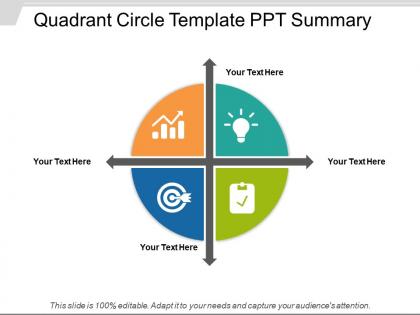
Download our professionally designed quadrant circle PowerPoint slide to draft presentations related to geometry, business, science, finance, marketing, as well as a variety of other topics. The quadrant chart presentation template incorporates a simple quadrant diagram that helps a user to create impressive presentations related to cost of quality business processes, marketing, sales, analysis, more. Moreover, he can use this template for any other presentation that requires a quadrant diagram. The quadrant diagram in the quadrant circle PPT slide consists of four text boxes as well as a simple coordinate. The four quadrants in this readily available 4 quadrant diagram template for PowerPoint helps in displaying the four elements of any subject with its detailed explanation. A user can take the help of the four quadrant model presentation slideshow to describe levels of integration related to different subjects as well as knowledge. A presenter can illustrate any type of topic with the help of this four quadrant model integration PPT slide. The quadrant shape in the four quadrant circle presentation template design is useful for describing four step processes or can represent simple analysis frameworks, such as SWOT analysis and PEST analysis. The 4 quadrant circle template for PowerPoint demonstrates four segments diagram which is very popular to illustrate opposing concepts. Slip in to the role with ease. Our Quadrant Circle Template Ppt Summary will give the right cues.
People who downloaded this PowerPoint presentation also viewed the following :
Quadrant circle template ppt summary with all 5 slides:
Generate innovative ideas with our Quadrant Circle Template Ppt Summary. Improve the functioning of existing appliances.
FAQs for Quadrant circle
Honestly, they're perfect for breaking down complex stuff into four easy chunks that people actually understand. I use them all the time for SWOT analyses or when I'm comparing different options. Your audience won't get overwhelmed since each section focuses on just one thing. They look super professional too - way better than cramming everything into boring bullet points. Different colors for each quadrant make it even clearer. Oh, and they work for basically anything you need to split into four categories. Total game-changer when you've got tons of info to present.
Okay so basically it splits your data into four sections that are way easier to read than boring spreadsheets. Perfect for stuff like market analysis or risk assessment - anything where you're comparing high/low or good/bad scenarios. The circle shape is less scary than traditional charts, honestly. People can instantly see which quadrant their data lands in without squinting at numbers. Oh and it definitely makes presentations look more professional! Just make sure you use different colors for each section and keep labels simple. Otherwise people get confused trying to figure out what goes where.
Oh, those quadrant charts are clutch! I've seen them work great in consulting, tech, marketing - pretty much anywhere you're trying to sort four things visually. Perfect for SWOT analysis or priority stuff. Healthcare and finance teams are obsessed with them for risk assessments. Strategy meetings love these because honestly, executives have short attention spans and need things simple. You'll probably use them for competing priorities or showing how factors influence each other. Your audience won't zone out trying to decode some messy spreadsheet. Trust me, the clarity is worth it.
Quadrants work because they stop people from drowning in info overload. Your brain can actually process four neat sections way better than some jumbled mess of bullet points - trust me on this. Each section feels bite-sized, so nobody's checking out halfway through your presentation. The whole thing looks balanced too, which is honestly half the battle with slide design. People can scan each quadrant super quickly and still see how everything fits together. Oh, and definitely use different colors for each section! Makes the whole layout pop and keeps things interesting.
Honestly, just dig into what your audience actually talks about - their real problems, not corporate buzzword nonsense. Switch out those generic quadrant labels for stuff they'd actually recognize from their day-to-day work. I've watched so many of these templates bomb because they're way too academic! Your examples need to hit close to home for their specific industry. Also think about whether they're tech-savvy or prefer things simple when you're picking colors and layout. Oh, and definitely test it with a few people first - saves you from looking silly later. When it's done right, they'll think you made it just for them.
Yeah, totally works for both! Quantitative data is straightforward - just plot your actual numbers, percentages, sales figures, whatever. Qualitative stuff fits too though. You'd map themes or categories instead of hard numbers. The axes just need to make sense for what you're analyzing. Clear quadrant labels are clutch - people get confused fast otherwise. I actually prefer these templates over regular charts sometimes because they're so flexible. Works whether you're dealing with customer feedback scores or just brainstorming ideas into different buckets.
Honestly? Just use whatever you've already got installed. PowerPoint is my go-to even though it sounds lame - everyone has it and you can make decent quadrant circles pretty fast. Canva's solid for templates if you want something prettier. Draw.io is completely free and way better than it should be. Lucidchart's nice too but costs money. Oh, and Google Drawings actually doesn't suck for basic stuff, which surprised me. Don't overthink the tool choice though. Pick something your team can all access without jumping through hoops. You can always switch later once you figure out what format works best.
Honestly, color choice can make or break your quadrant thing. Red and orange grab attention fast - perfect for urgent stuff. Blues and greens feel calmer, so they work for low-priority items. I've watched people bomb presentations by putting bright yellow on their "ignore this" section. Like, why?? Make sure there's enough contrast so everything doesn't look mushy together. Also - and this might sound obvious - pick colors that actually make sense to your audience. Quick tip: show it to someone else first. You'd be surprised how often what looks clear to you confuses everyone else.
Honestly, these work best when you're comparing stuff that naturally conflicts - like urgent vs important tasks, or high-value customers who are also high-maintenance. Risk assessments are perfect too (probability vs impact). SWOT analyses, obviously. I thought they'd be kinda gimmicky at first, but turns out people love seeing data plotted this way. Makes complex relationships click instantly. Super helpful when you need to show stakeholders where things cluster or when you're weighing competing priorities. Definitely try one next time you're stuck explaining trade-offs - way better than boring spreadsheets.
So it's basically a 2x2 matrix but in circle form - some people just vibe with circles better, I guess? You plot stuff across two criteria at once, like impact vs effort or whatever matters for your situation. Different projects or decisions go in the four sections, and boom - you can see your priorities way clearer. Way better than just winging it on gut feeling. I used this for work planning last month and it actually helped me realize which projects were total time sinks. Try plotting your next batch of ideas by feasibility vs strategic value. Forces you to think through trade-offs systematically.
Oh totally! Don't cram paragraphs of text in there - people zone out when they're reading novels instead of listening to you. Make sure all four sections feel balanced too, or one's gonna look super awkward and random. Honestly the formatting thing drives me nuts when I see presentations - pick fonts/colors and stick with them across all quadrants. Looks way cleaner. Keep it to like 2-3 bullet points per section max, and your labels need to be obvious so people aren't squinting trying to figure out what each part means.
Honestly, typography can totally make or break your quadrant templates. People need to instantly see which section they're looking at, so create clear hierarchy with your font sizes. Sans-serif is your friend here - way more readable when things get small (learned this the hard way after squinting through countless presentations). Make headings obviously bigger than body text. Oh, and consistent spacing is clutch. Don't let your text fight with the quadrant structure itself. Keep everything clean and readable. Pro tip: test it from the back of the room before you present.
So basically, quadrant circles force you to dump all your messy info into four neat buckets instead of having everything scattered everywhere. Way less overwhelming that way. Each section focuses on a different angle of whatever you're analyzing, which makes it super digestible for people. Plus the circular thing actually helps - you can see how all the pieces connect back to your main point and relate to each other. Honestly, I use these all the time now when I'm breaking down complicated stuff for my team or trying to make sense of project chaos myself. You should definitely try it next time you're stuck explaining something multi-layered.
Quadrant templates work really well for breaking down complex stuff. McKinsey's growth-share matrix is probably the most famous one - that's where "cash cow" and "star" products come from. Google uses impact vs effort grids for deciding which features to build next. The Eisenhower matrix (urgent/important) is honestly a game-changer for prioritizing tasks. I've also seen marketing teams nail customer segmentation with these. Something about the visual layout just clicks better than staring at endless spreadsheets, you know? Pick whatever problem is stressing you out most and find a quadrant that fits it.
Dude, multimedia stuff totally transforms those quadrant templates. Icons and color coding work amazing - people get the info so much faster. I'd throw in some charts or maybe short video clips if you're feeling fancy. Interactive elements are clutch too. Honestly, anything beats staring at boring text blocks all day. Visual stuff guides people's eyes to what matters most first. Oh and don't go crazy with it - like 2-3 elements per quadrant max or it'll look like a hot mess. You want engaging, not overwhelming, you know?
-
Enough space for editing and adding your own content.
-
The Designed Graphic are very professional and classic.