

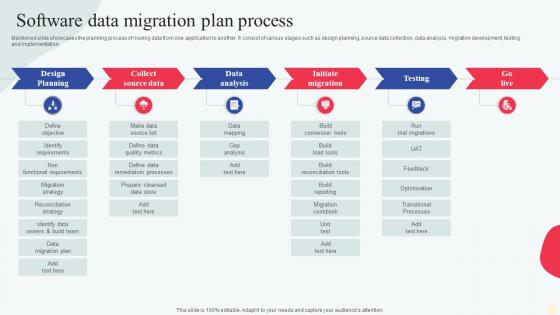
Software Data Migration Plan Process




Try Before you Buy Download Free Sample Product
 Impress Your
 Audience
 100%
100% Editable
 Save Hours
 of Time


Mentioned slide showcases the planning process of moving data from one application to another. It consist of various stages such as design planning, source data collection, data analysis, migration development, testing and implementation.
People who downloaded this PowerPoint presentation also viewed the following :
Software Data Migration Plan Process with all 6 slides:
Use our Software Data Migration Plan Process to effectively help you save your valuable time. They are readymade to fit into any presentation structure.





FAQs for Software Data
So you've got four main steps: planning, assessment, migration, validation. Planning's gonna eat up way more time than you think - trust me on this one. Start by figuring out what data you actually have, then map where it needs to go in the new system. After that, migrate in chunks (never do it all at once). Test everything afterwards to make sure nothing got screwed up. Oh, and definitely have a backup plan ready. Actually, do a tiny test run first with just some sample data. You'll thank yourself later when you catch the weird edge cases early.
First thing - map out what you're moving from and to. Data volume, how complex it is, whether you can afford downtime. That stuff determines if you do everything at once or break it into chunks. Don't make the mistake I see everywhere: jumping straight to picking tools without doing this homework first. Timeline and budget matter too, obviously. Got sensitive data? Deal with compliance stuff early or it'll bite you later. Oh, and if your team's never done this before, maybe factor that in. Start with something small to test your approach - way better than discovering problems halfway through migrating everything.
Honestly, the worst part is always the data being way messier than expected - duplicates everywhere, missing stuff, total inconsistencies. Getting different systems to play nice together is another nightmare when formats don't match. Performance issues will kill your timeline too. Oh, and keeping everything running while you're transferring? Good luck with that. Stakeholders always change their minds halfway through about what they actually want (classic). I learned this the hard way - do a complete data audit upfront and add like 50% more time than you think. Trust me on this one.
Honestly, clean your data first or you'll hate yourself later - garbage in, garbage out is so real it hurts. Set up validation rules and checksums at every step. I'd run both systems side by side for a bit so you can spot issues early. Automated testing scripts are your friend here, they'll keep checking data quality throughout the whole thing. Multiple checkpoints beat crossing your fingers and hoping it works. Oh and definitely start with a small pilot dataset first - learned that one the hard way. Test everything before you go all in.
Honestly, it totally depends on how much data you're moving around. AWS DMS and Azure's migration service work great if you're going to the cloud. Talend and Informatica are clutch for the really messy ETL stuff - though they'll cost you. Apache NiFi is free and way more powerful than you'd expect. Oh, and Fivetran? Total lifesaver for SaaS connections. I wish I'd found it sooner. I'd probably just start with whatever your cloud provider offers first. You can always upgrade later if you need fancier features. Most of the time their basic tools handle more than you think they will.
Okay so first thing - map out all your data dependencies and figure out what'll break if stuff goes wrong. Data quality issues will absolutely destroy you later, so check for corrupted records, missing fields, weird formatting now. Most teams completely forget about rollback plans until everything's on fire, so don't be those people. Think about downtime limits, compliance stuff, whether you can run both systems at once. Oh and seriously, whatever timeline you're thinking for testing? Double it. I learned that one the hard way.
So data mapping is like your GPS for moving info between systems - it shows which fields match up where. You know how some apps put addresses totally different than others? Same deal here. Skip the mapping step and you'll get names showing up in phone fields (trust me, been there). It helps spot what needs changing too, like date formats that don't play nice together. Honestly though? Don't rush this part even if you're eager to get moving. Spending time here saves you from wanting to throw your laptop later when everything's a mess.
Start talking to your teams NOW about what's changing and why - seriously, this can't wait. Figure out which processes get hit and who needs training on the new stuff. The tech side is honestly the easy part compared to getting people actually excited about it (or at least not grumpy). Run practice sessions before you flip the switch so nobody feels lost. Pick some champions in each department to field questions later - trust me on this one. Document everything clearly, and here's the big thing: pad your timeline. People need a few weeks to figure out where their data lives now and how to actually get to it.
Start with data reconciliation - compare record counts and key metrics between source and target systems. Pretty boring stuff but you gotta catch the obvious issues first. Run validation scripts for data types and formats. I'd spot-check some random records manually too, especially anything business-critical. Here's the thing people forget - test your actual apps against the migrated data. Database might look perfect but then users can't log in or whatever. Oh, and definitely monitor things closely those first few weeks after launch.
Dude, learned this the hard way - just be super upfront about timelines and what could go wrong. Stakeholders absolutely hate surprises but they're usually cool with realistic expectations. Build in buffer time for milestones and update them regularly, even when everything's running smooth. Show them exactly what data you're moving and when stuff might go down. Oh, and make a simple dashboard so they can check status themselves instead of bugging you constantly. Get your rollback plan approved before you even start - shows you're not just winging it and honestly gives everyone way more confidence.
Run your old and new systems together while you transition - seriously, this saved my butt once. Break the data migration into smaller chunks instead of doing everything at once. Way less nerve-wracking that way. Blue-green deployments are clutch too - set up your whole new environment, test it like crazy, then switch over. Do it during slow hours if you can. Have a rollback ready because Murphy's law is real. Oh, and migrate your most critical stuff last so your main operations don't tank if things get messy.
Honestly, compliance stuff is gonna be your biggest headache. GDPR, HIPAA, SOX - whatever applies to you needs to be baked into the migration plan from the start, not slapped on later. We're talking encryption, audit trails, data classification, the whole nine yards. Some data might even be stuck in certain geographic regions which is... annoying. Legal will want to review everything at like three different stages too. I learned this the hard way on a project last year - treating compliance as an afterthought cost us weeks of rollbacks. Way better to move slower upfront than deal with that mess.
First thing - check your data accuracy by comparing record counts and running validation checks. Make sure nothing got corrupted in the transfer. Don't forget completeness either, you'd be surprised how easy it is to lose stuff. Performance is obviously key because slow systems drive everyone nuts. Track your downtime during the migration and see how fast people can get back to work. User adoption rates are telling too - are people actually using the new system or just complaining about it? Honestly, set up some kind of dashboard to watch this stuff in real-time. Way easier to fix problems early than deal with disasters later.
Honestly, cloud tools are a game changer for data migration. You can basically rent extra bandwidth and processing power just for the migration, then scale it back down when you're done. AWS DataSync and Azure Data Factory are pretty solid - they automate most of the tedious stuff. What's really nice is you can run multiple transfers at once, which cuts the time way down. Oh, and the monitoring is built right in, so you're not flying blind. Definitely try a small test run first though - better to catch problems early than deal with them when you're moving everything.
Okay so once you're done with the migration, there's a few things you gotta tackle right away. Data validation checks are huge - set those up to run automatically because something always breaks later (learned that the hard way). You'll also need governance rules so people aren't just changing stuff willy-nilly without approval. Document everything now while people actually remember what they did. Oh, and definitely get a solid backup plan going - nobody wants to redo a migration from scratch. Schedule some regular checkups too, keeps everything running smooth.
-
SlideTeam is the best in the business. Their templates are engaging and customizable. You can rely on them.
-
I downloaded some of the presentations for work. They were simple to modify and saved me a lot of time and effort.