

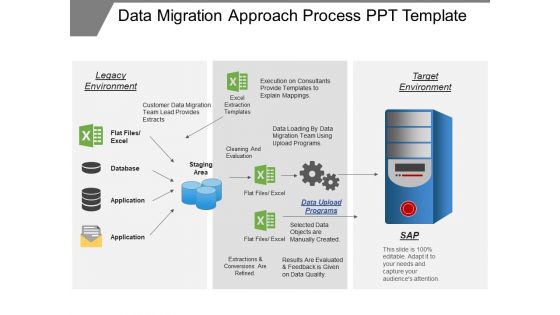
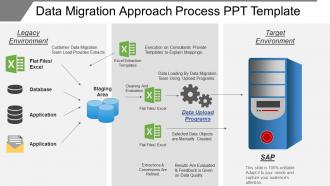
Data migration approach process ppt template




Try Before you Buy Download Free Sample Product
 Impress Your
 Audience
 100%
100% Editable
 Save Hours
 of Time


Data migration is one of the most important technology which is used by many organizations these days. Download our data migration approach process PowerPoint slideshow to represent this topic for in your next business meeting. The data migration process Presentation template has been crafted by our team of experienced designers. Data migration involves moving or copying data from one system to another, or one environment to another, while data integration deals with the flow of data among various applications and systems. Our data migration process PPT visual slide consists of technological cons related to the content in the slide which makes it look even more eye catching. To engage the audience in the presentation, the correct slide design is required, and this is what our slide show is all about. You can also browse through our other data migration process PPT designs and choose the one which best suits your requirements. Create a fitting finale with our Data Migration Approach Process Ppt Template. They excel at generating a celebration.
People who downloaded this PowerPoint presentation also viewed the following :
Data migration approach process ppt template with all 5 slides:
Invest in world class design for your next presentation. Our Data Migration Approach Process Ppt Template give you access to thousands of options.

FAQs for Data migration approach
So basically you've got five main steps: planning, checking your current data quality, mapping everything out, testing, then actually doing the migration. First thing - audit what you have and figure out what goes where. Mapping data fields between systems is honestly the worst part, super boring but you can't half-ass it. Test with just some of your data first to catch problems early. After the real migration, validate everything worked. Oh and definitely have a rollback plan ready! Here's what I learned the hard way - budget like 3x more time for testing than seems reasonable.
Start with data profiling tools to spot duplicates, missing values, and weird inconsistencies between your systems. Check completeness rates and formats - make sure tables actually connect properly. Honestly, I always get sucked into this phase way longer than planned, but trust me it pays off. Build quality reports showing orphaned records and values that are totally out of whack. Document everything you find (future you will thank you). Here's the key though - set your error thresholds upfront. Decide what percentage of messiness you can tolerate so you don't spend forever chasing perfect data.
Honestly, the biggest pain points are always data quality problems, system downtime, and weird mapping issues between your old and new formats. Legacy data is messier than anyone wants to admit - learned that the hard way! Do thorough data profiling first before you migrate anything. Test everything in staging, and definitely have rollback plans ready. I'd go with incremental migration over doing it all at once. You can catch problems early that way. Oh, and build in way more time than you think you need. These things drag on forever. Get everyone to agree on downtime windows upfront or you'll deal with chaos later.
Look at your data first - structured databases vs messy files vs everything mixed together. How much are you moving? Can you handle downtime? Cloud tools like AWS DMS work well for migrations, but old-school ETL handles complex stuff better. Honestly, boring tools usually beat the shiny new ones that'll break on you. Oh, and definitely test on small data first. I learned this the hard way when a "simple" migration turned into a three-day nightmare because of some weird encoding issue nobody caught.
Okay so data mapping is basically your game plan for moving stuff from one system to another. You're matching up which fields go where - like this customer name field maps to that customer name field, you know? Without it you're just winging it and trust me, that never ends well. Your data will end up scattered everywhere or just disappear completely. It also shows you what needs fixing along the way, like if dates are formatted weird or names are smooshed together. Oh and definitely get people to sign off on your mapping before you start the actual move. Save yourself the headache later.
Honestly, I'd go with three approaches that work really well together. First, run both systems side by side - lets you test everything without panicking about breaking stuff. Break it into chunks too, don't try migrating everything at once (learned that the hard way). Real-time sync tools are clutch for keeping data updated across both systems. Oh, and definitely schedule your final switch during slow hours when nobody's really using it. The rollback plan is non-negotiable though - always have an escape route ready.
Dude, encrypt everything - data moving around AND stored data. Set up access controls right away, don't put it off. Figure out what compliance stuff you need (GDPR, HIPAA, whatever fits your industry). The paperwork is honestly such a pain but you'll thank yourself later. Only use secure transfer protocols, obviously. Keep audit logs of who accessed what and when. Never - and I mean never - move production data somewhere that isn't compliant. Oh, and document literally everything because auditors are super picky about having that paper trail. Trust me on this one.
Manual migration is basically doing everything by hand - exports, imports, copy-paste, the whole deal. Automated uses scripts or tools to handle it for you. Sure, manual gives you more control over each piece of data, but honestly? It's slow as hell and you'll make mistakes. Been there, done that, regretted it. Scripts are way faster and don't fat-finger your data like humans do. The catch is you need some tech skills upfront. If you're dealing with more than a few hundred records though, just go automated. Save yourself the headache.
After your migration, definitely do a record count comparison first - catches missing data super fast. Then spot-check some sample records field by field to make sure values actually transferred right. Oh and test your whole business process with the new data! We got burned once by a date format thing that killed our reports. Still annoyed about that tbh. Set up some automated monitoring for like 2-3 weeks after. There's always weird edge cases. Document what you did too so you don't have to figure it out again next time.
Okay so data migration plans are basically your survival guide when moving stuff between systems. Map out your source and target data first. Set up a timeline with actual milestones people can hit. Testing procedures are huge - and yeah, you need a rollback plan because Murphy's Law is real. Document who does what so nobody's pointing fingers later. Risk assessment sounds boring but something unexpected always breaks (usually at 2am). Oh and don't forget your validation rules and any transformations you're doing. Get everyone to agree on the plan before you mess with production data. Start early though - these things take forever.
Honestly, it's mostly about bandwidth and how long you're willing to wait. On-premises stuff is fast since you're moving data around your own network - sometimes you can literally just walk a hard drive over (I know, sounds ancient but it works). Cloud migrations? Way slower since everything goes through the internet. Plus you've got to think about transfer costs and security since your data's traveling outside your walls. Different planning headaches too. Start small though - test with just a chunk of data first so you're not stuck with some nightmare timeline you didn't see coming.
Dude, data mapping is where you'll save or screw yourself - get that locked down first. Legacy systems are basically digital hoarder houses, but you gotta catalog everything anyway. Always have a rollback plan ready. Test small batches before you go crazy with the full migration. Budget like 3x whatever timeline you're thinking. The worst part? Data formats never match between old and new systems. Document all your dependencies upfront and build in buffer time everywhere. Oh, and maybe grab some extra coffee - these things always take forever.
Honestly, don't wait until go-live to train people - that's a disaster waiting to happen. Set up practice environments that match the real system exactly. Your staff needs to actually click through the workflows they'll be doing every day. Make tons of screenshots and step-by-step guides because trust me, everyone blanks out when they're stressed about the new system. Pair newbies with your power users, and pick department champions who can answer questions on the fly. Training can't be a one-and-done thing though. Plan follow-up sessions maybe 2-4 weeks later when the weird edge cases start popping up.
Honestly, culture matters way more than people think for data migrations. Teams that hate change will fight you at every step. Data-driven companies usually nail the planning part, but overly cautious ones? They'll debate forever instead of making decisions. Communication breakdowns between departments kill these projects fast. Here's what I'd do - figure out early who actually wants this to succeed and get them on your side. They'll help push things through when stakeholders start dragging their feet. Oh, and map out the politics beforehand because... yeah, there's always politics involved.
Start with whatever would absolutely destroy your business if it vanished - customer data, financial stuff, core operational records. I always think "what keeps me up at night" when ranking this. High-volume datasets should wait for off-hours so you're not killing performance during busy times. Also consider what other systems depend on each dataset, since those create natural order requirements. Oh, and compliance headaches - some regulated data has weird migration rules that'll slow you down. Map out these buckets for your specific setup and you'll have a decent plan to work from.
-
Excellent Designs.
-
Really like the color and design of the presentation.