


Data migration best practices powerpoint presentation slides




Try Before you Buy Download Free Sample Product
 Impress Your
 Audience
 100%
100% Editable
 Save Hours
 of Time


Select our content ready Data Migration Best Practices PowerPoint Presentation Slides to showcase the process of data transfer in a visual manner. The application migration presentation deck has a comprehensive collection of images & slides with relevant content and suitable graphics such as data migration approach, step by step approach, a simplified illustration of data migration steps, lifecycle, process, data migration on the cloud to name a few. These information migration PPT visuals are designed by our team of expert designers. Besides this, all the slides given in this data transfer PowerPoint presentation are fully editable, can be customized as per specific project needs. Furthermore, the professional-looking data transformation activities PowerPoint complete deck is a systematic presentation that is helpful to present related concepts like data conversion, data curation, data preservation, system migration and so on. So, download our high quality and visually appealing data transfer PowerPoint templates and impress your audiences. Inform folks about jobs with our Data Migration Best Practices Powerpoint Presentation Slides. Increase chances of finding employment.
People who downloaded this PowerPoint presentation also viewed the following :
Content of this Powerpoint Presentation
Slide 1: This slide introduces Data Migration Best Practices. State Your Company Name and begin.
Slide 2: This is an Agenda slide. State your agendas here.
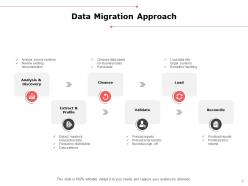
Slide 3: This slide shows Data Migration Approach describing- Analysis & Discovery, Cleanse, Load, Extract & Profile, Validate and Reconcile.
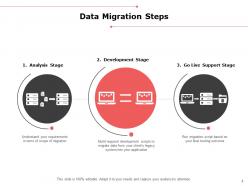
Slide 4: This slide presents Data Migration Steps which includes- Analysis Stage, Development Stage and Go Live Support Stage.
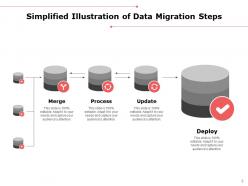
Slide 5: This slide displays Simplified Illustration of Data Migration Steps which includes- Merge, Process, Update and Deploy.
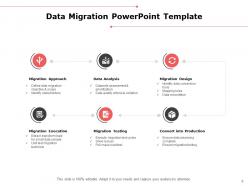
Slide 6: This slide represents Data Migration PowerPoint Template describing- Migration Approach, Data Analysis, Migration Design, Migration Execution, Migration Testing and Convert into Production.
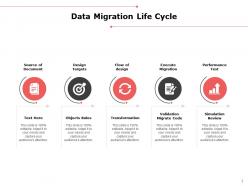
Slide 7: This slide showcases Data Migration Life Cycle describing- Source of Document, Design Targets, Flow of Design, Execute Migration and Performance Test.
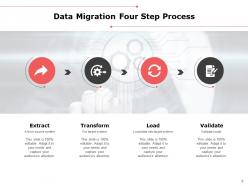
Slide 8: This slide shows Data Migration Four Step Process as- Extract, Transform, Load and Validate.
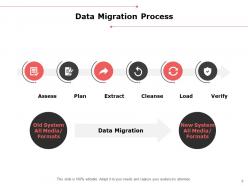
Slide 9: This slide presents Data Migration Process as- Assess, Plan, Extract, Cleanse, Load and Verify.
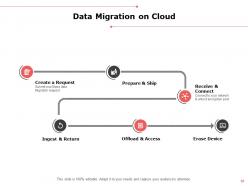
Slide 10: This slide displays Data Migration on Cloud as- Create a Request, Prepare & Ship, Receive & Connect, Ingest & Return, Offload & Access, Erase Device.
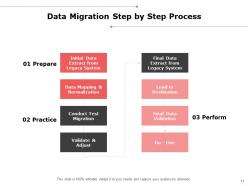
Slide 11: This slide represents Data Migration Step by Step Process as- Initial Data Extract from Legacy System, Data Mapping & Normalization, Conduct Test Migration, Validate & Adjust, Go - Live, Final Data validation, Load to Destination and Final Data Extract from Legacy System.
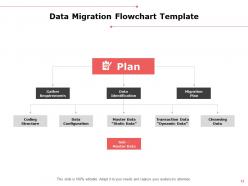
Slide 12: This slide showcases Data Migration Flowchart Template describing- Migration Plan, Gather Requirements, Data Identification, Cleansing Data, Transaction Data “Dynamic Data”, Master Data “Static Data”, Data Configuration, Coding Structure and Sub – Master Data.
Slide 13: This slide displays icons for Data Migration Best Practices.
Slide 14: This slide is titled as Additional Slides for moving forward.
Slide 15: This is Our Mission slide with related imagery and text boxes.
Slide 16: This is About us slide to show company specifications etc.
Slide 17: This is Our Best Team slide with names and designation.
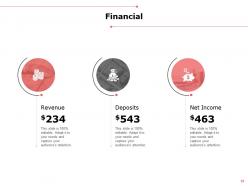
Slide 18: This is a Financial slide. Show your finance related stuff here.
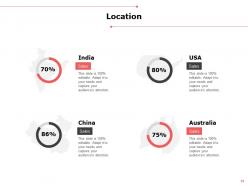
Slide 19: This is a Location slide with map to show data related with different locations.
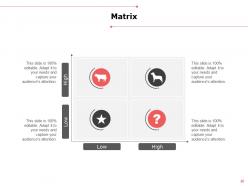
Slide 20: This is a Matrix slide with additional text boxes.
Slide 21: This slide is titled as Post It. Post your important notes here.
Slide 22: This slide shows Mind Map for representing entities.
Slide 23: This is a Thank you slide with address, contact numbers and email address.
Data migration best practices powerpoint presentation slides with all 23 slides:
Use our Data Migration Best Practices Powerpoint Presentation Slides to effectively help you save your valuable time. They are readymade to fit into any presentation structure.






FAQs for Data migration best practices
So you've got six main stages: planning, assessment, design, testing, execution, and validation. First, map out your current data setup and figure out what "done right" looks like for you. Check your data quality, then design your approach with a solid timeline. Testing is absolutely critical - seriously, I've seen too many migrations fail because people rushed this part. When you actually execute, do it in chunks instead of one massive move. Validate everything transferred properly afterward. Oh, and always have a rollback plan because things can get messy fast.
Start with data profiling tools to check completeness and spot duplicates, missing values, format issues - the usual suspects. Honestly, this step always takes forever but saves your butt later. Create reports showing clean vs messy records, then figure out what needs fixing before migration versus after. Set clear thresholds too, like "95% complete customer records minimum" so you know when you're actually ready to go. Trust me, having those go/no-go criteria prevents a lot of headaches down the road.
Ugh, data migration - been there! Your biggest headaches will be messy data, system downtime, and compatibility nightmares between old/new platforms. Seriously, audit and clean your data way before migration day - it's always worse than you expect. Go incremental instead of doing everything at once. That saves you from major downtime disasters. Test absolutely everything in staging first and have your rollback plan ready (trust me on this one). Oh, and map out those data formats early so you're not scrambling later. Keep stakeholders in the loop with realistic timelines or they'll drive you crazy with constant check-ins.
Okay so first thing - encrypt literally everything. In transit, at rest, all of it. SFTP or HTTPS only, never regular FTP (trust me on this one, made that mistake before). Back up your data before you even start because things can go sideways fast. Only give access to people who absolutely need it, and test everything in staging first. You don't want to discover your security setup is broken during the actual migration - been there, not fun. Oh and document who accessed what and when. Sounds boring but auditors eat that stuff up and it'll save your butt later.
Look, data migration strategy is basically your insurance policy against everything going sideways. Map out what data connects to what first - seriously, this saves you later. Set up checkpoints to validate stuff works, plus have rollback plans ready. I know it sounds boring but I've watched people skip this and then panic at 2am when half their system breaks. Oh, and build in extra time because something always goes wrong. Test everything in phases, keep solid backups, and document your current setup before changing anything. Trust me on this one.
Map out everything first - seriously, this step will save your sanity later. Show exactly how each field moves from old system to new system. Data types, field lengths, transformation rules, all that stuff. Business logic changes too. Those random legacy quirks that make zero sense? Document those especially. Figure out what data gets dropped or merged beforehand. I always start with a basic spreadsheet, then run it past both the tech people and business folks. Trust me, finding issues now beats scrambling during go-live when something breaks spectacularly.
Hey! So data migration tools - there's a bunch of good options. Talend and Informatica PowerCenter are solid choices, plus AWS Database Migration Service if you're going cloud. Really depends on your budget though. Native tools work great too - SQL Server Migration Assistant, Oracle Data Pump, stuff like that. Python scripts can handle smaller projects just fine. Oh, and Pentaho's decent for ETL work. I'd honestly start by figuring out what data you're moving and where it's going first. That'll help you pick what actually makes sense for your setup and data volume.
Dude, stakeholder communication will literally make or break your migration project. Data migrations ALWAYS have curveballs - that's just reality. When people don't know what's going on, they freak out at the tiniest hiccup. I've watched entire projects crash because some VP felt left out of the loop during a delay. Send regular updates even when nothing's happening. Be upfront about potential problems from day one. Set up those check-ins religiously. Oh, and figure out your escalation chain early - you'll definitely need it when things go sideways.
Honestly, focus on three main things: completeness (did all your data actually make it over?), accuracy (is it still correct?), and how fast the whole thing ran. Missing data will ruin your day way worse than slow performance, so I'd start there. Compare record counts and checksums between your old and new systems - boring but it works. Oh, and don't forget the business side of things like downtime and how pissed off users get during the migration. Set up some automated scripts to check this stuff continuously. Manual validation sounds fine until you're staring at massive datasets at 2am wondering what you missed.
Break it down in phases - audit everything first to see what you're actually working with. Clean out the obvious garbage (duplicates, wonky formats, corrupted stuff) before you even think about migrating. This part is such a pain and always takes forever, but you can't skip it. Map your old fields to the new system and figure out transformation rules for weird data that doesn't fit. Test everything in small batches using a staging environment first. Oh, and definitely keep your original data backed up somewhere safe until you're totally sure the migration worked right.
Honestly, data migration compliance isn't as scary as it sounds. First thing - figure out what personal data you're actually moving and grab consent if needed. Document literally everything because when regulators come knocking, they want receipts. Your new system needs the same privacy protections as the old one (this part trips up so many people). Encrypt everything - both when it's moving and sitting still. Oh, and update those privacy notices if you're changing how data gets processed. Treat compliance like any other migration task, not something you remember at 2am after everything's already moved.
Check row counts first - seriously, this basic step catches so many problems it's almost embarrassing. Then verify data types and hunt for nulls where they shouldn't be. Business rule validation against your source is crucial too. I always do statistical sampling on the critical stuff like IDs, dates, financial amounts. Set up scripts to auto-flag weird discrepancies. Oh and exception reports are your friend here. Quick tip: validate a small chunk right after migration, then circle back for the full validation once things settle down.
Hit these three main areas: technical training for your migration tools, data governance so people know the quality standards, and workshops with real scenarios they'll actually encounter. Communication training matters too - migrations always go sideways at some point. Build a knowledge base with runbooks and troubleshooting guides from past projects. Honestly, toy examples are useless here - practice with your actual data sets instead. Start everything 4-6 weeks before launch. That timeline sounds aggressive but trust me, you'll need it when people start panicking about edge cases you didn't think of.
Honestly, cloud migration is so much better than the old-school way. You can do it in chunks instead of one massive move, which is way less stressful. The automation tools are actually incredible now - I was skeptical at first but they handle most of the grunt work. What's cool is you're not dropping tons of money upfront on hardware that might not even work for your setup. You can literally test different approaches without going broke. Start by figuring out what's easiest to move first, then let those cloud-native services do the heavy lifting.
Oh man, data migration is no joke - you're literally moving your company's entire nervous system to a new body. Downtime is your biggest enemy here. I've seen businesses lose thousands per hour when customers can't order stuff and employees are locked out of everything they need. Data corruption is another nightmare you definitely don't want to deal with. Here's what actually works: test everything in staging first (seriously, don't skip this), and always have a rollback plan ready. Trust me, you'll sleep better knowing you can undo everything if things go sideways.
-
Topic best represented with attractive design.
-
Innovative and attractive designs.
-
Design layout is very impressive.
-
Designs have enough space to add content.