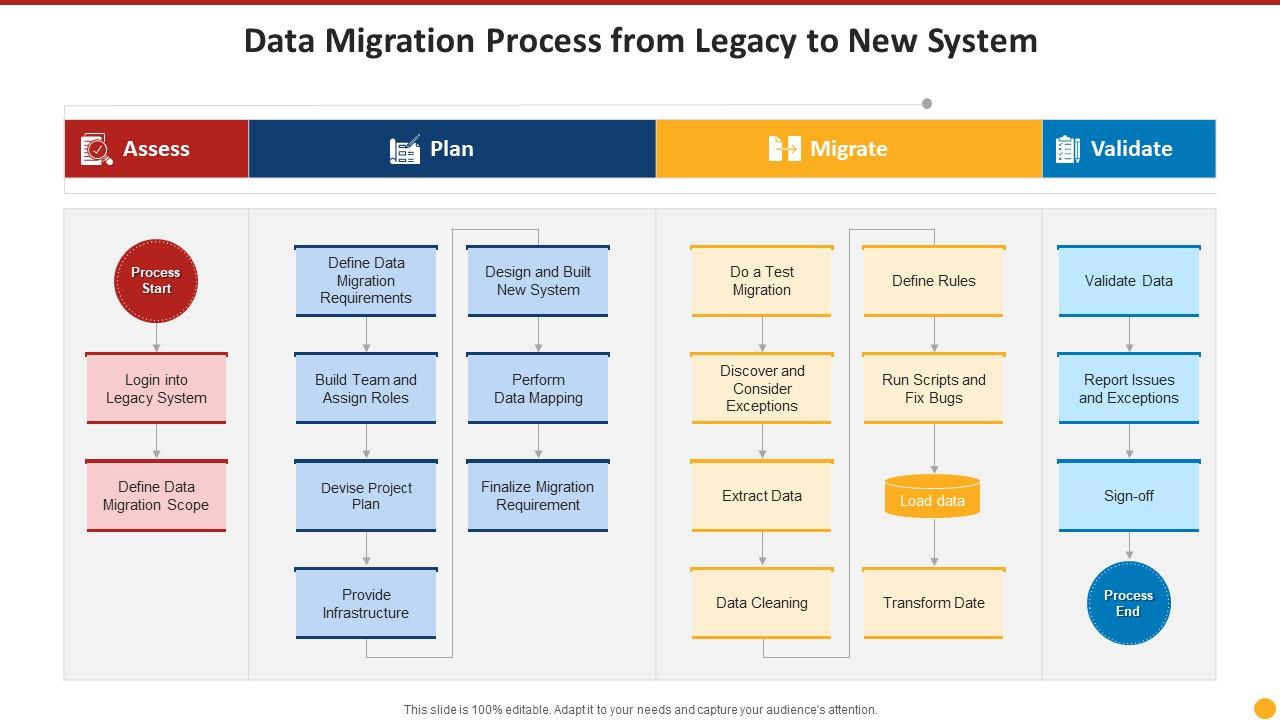
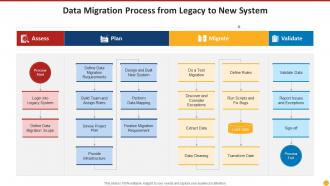
Data migration process from legacy to new system
Try Before you Buy Download Free Sample Product
Audience
Editable
of Time
Our Data Migration Process From Legacy To New System are topically designed to provide an attractive backdrop to any subject. Use them to look like a presentation pro.
People who downloaded this PowerPoint presentation also viewed the following :
Data migration process from legacy to new system with all 2 slides:
Use our Data Migration Process From Legacy To New System to effectively help you save your valuable time. They are readymade to fit into any presentation structure.
FAQs for Data migration process from legacy
Hey! So there's usually a few main reasons companies do this stuff. System upgrades are probably the biggest one - like when your current setup is so old it's basically held together with duct tape lol. Merging databases after acquisitions happens a lot too, or just cleaning up the mess when you've got data scattered everywhere. Cloud migration is huge right now for obvious reasons. Sometimes it's compliance stuff, or honestly just fixing data quality issues - duplicates drive people crazy. Oh, and security improvements obviously. Figure out which one of these fits your situation and that'll help you plan better.
Definitely do the migration in phases - that's been a game changer for me. Run both systems parallel for a bit so you can flip back if things get messy. Start with the less important stuff first. Save your critical data for when traffic's low, like weekends or late nights. Test everything in staging beforehand (learned that one the hard way). Your team will thank you if you give them a heads up about timing. Oh, and seriously - plan for double the time you think it'll take. Murphy's Law is real with migrations. Always have your rollback ready to go.
Honestly, start by figuring out what data you actually have and where it's all sitting - this part sucks but you'll thank yourself later. Clean up the messy stuff first because migrating garbage is just... why would you do that to yourself? Map out your new setup and break the whole thing into chunks. Test everything on small batches first - seriously, don't go big right away. Have a backup plan ready because things will go sideways at some point. Once you're done, double-check everything works and keep an eye on performance. The initial data audit is boring but it prevents so many problems down the road.
Honestly, the data type changes everything about how you'll migrate. Databases and structured stuff? Easy enough - just map your fields and run some ETL tools in batches. But unstructured data is a total pain. You've got random files, emails, documents with zero consistency, so you're basically doing a giant copy-paste job while trying to figure out what the hell you actually have. Oh, and it's usually massive too. My advice? Start by making a list of what types you're dealing with first. Trust me on this one.
So for data migration tools, I'd probably start with ETL platforms - Talend, Informatica, or SSIS work great for complex stuff. Cloud services like AWS DMS or Azure Data Factory are solid if you're going that route. Honestly though? Sometimes simple SQL scripts or CSV exports get the job done just fine, depending on what you're dealing with. Oh, and definitely use data profiling tools first - Collibr or DataCleaner help you figure out what mess you're actually working with. Map out your schemas before you pick anything. Trust me on that one.
Definitely run data profiling before you start - check for dupes, missing stuff, formatting weirdness. Seriously saves you so much headache later. During the migration, set up real-time monitoring that'll actually stop things if error rates get too crazy. I learned that one the hard way on a project last year. After everything's moved, compare record counts and checksums between your old and new systems. Sample some data too just to eyeball it. Then build some dashboards to watch for drift over time because data has this annoying habit of getting messy again.
Oh man, data quality issues are gonna be your worst enemy - stuff's always messier than it looks. Downtime's another pain, especially when you're dealing with huge volumes of data. Compatibility between old and new systems? Yeah, that'll bite you too. Performance tanks, security gets sketchy during transfers, and honestly testing is make-or-break because users will definitely let you know what's broken. Oh, and random thought - I always forget how much longer everything takes than planned. Budget like 30% extra time minimum and have that rollback ready just in case.
Start by mapping out exactly what data you're moving and how sensitive it is - personal stuff, financial records, whatever. Only migrate what you actually need (trust me, most people screw this up by dragging over years of useless files). Document everything, encrypt it all during transfer and storage. If you're crossing borders with personal data, get proper consent first. Your new system better meet the same compliance standards as the old one. Oh, and set up audit logs for the whole process - you'll thank me later when auditors show up asking questions. It's honestly not that complicated if you plan it right.
So data mapping is like your blueprint for moving stuff from one system to another - you're matching up which fields go where. It's basically a translation dictionary between two different databases. Super important to map every single field and figure out any formatting changes you need. Get your stakeholders to look it over early though, because honestly? Fixing mapping screwups after you've already migrated everything is a total pain. Oh, and don't forget to document your business rules too - future you will thank you for that.
Talk to your team early about what's happening and why - nobody likes surprises with work stuff. Get them training time before you flip the switch because new systems freak people out (totally normal btw). Quick reference cards help tons, and pick a few tech-savvy people to be your go-to helpers. You'll definitely need extra support those first couple weeks since everyone will have questions. Oh, and be upfront that things might run slower initially. Having a clear plan for who to call when stuff breaks? Game changer.
Start with data integrity checks - compare row counts and field mappings between your source and target. Automated validation scripts are great, but manual spot-checking catches weird edge cases that scripts totally miss. Test your business-critical queries to make sure they're still producing the same results. I'd honestly set up your rollback plan before you even begin testing, because Murphy's law and all that. Check for data truncation and formatting weirdness too. Don't skip validating referential integrity - that stuff breaks in the most annoying ways.
Corrupted transfers and incomplete migrations are the main culprits, but honestly? Human error gets you way more often. Always backup everything first - sounds obvious but you'd be surprised how many people skip this. Test on smaller datasets before going full scale. Checksums are your friend for checking data integrity afterward. Don't rush the validation step even when deadlines are breathing down your neck. Oh, and actually test your backups work - learned that one the hard way once. Set up monitoring during the process and have a rollback ready just in case things go sideways.
So with on-premises stuff, you're basically just shuffling data around your own servers - total control over everything. Cloud migration though? That's where it gets interesting (and slightly terrifying tbh). You're pushing everything over the internet to someone else's infrastructure. Bandwidth becomes your enemy, transfers take forever, and you'll probably lose some sleep over security. But hey, at least cloud providers throw in migration tools and actual human support. My advice? Test your upload speeds first and double whatever timeline you think it'll take.
Track these four things or you'll regret it later. Data completeness first - did all your records actually make it? Then accuracy by spot-checking sample datasets against the source. Performance is huge too - run the same queries on both systems and compare speed. Downtime during cutover should be your fourth metric (though honestly, there's always more than you plan for). Don't forget user acceptance though. Are people able to get their work done? Set benchmarks early and check weekly so you can fix stuff before it becomes a disaster.
Honestly, start talking to your users way earlier than you think - like 2-3 weeks out minimum. Set up actual training sessions where they can mess around with the new system, don't just send an email and pray. I learned this the hard way lol. Quick reference cards are clutch too. Your support team's gonna get slammed those first few days, so prep them. Oh and definitely pilot it with a small group first - you'll catch so much weird stuff that way. People really won't just "figure it out" on their own, trust me on this one.
-
Designs have enough space to add content.
-
Commendable slides with attractive designs. Extremely pleased with the fact that they are easy to modify. Great work!
-
Awesome presentation, really professional and easy to edit.