


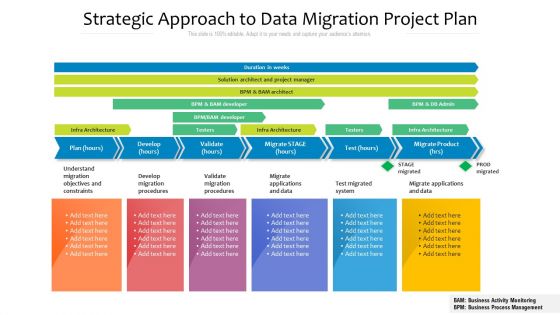
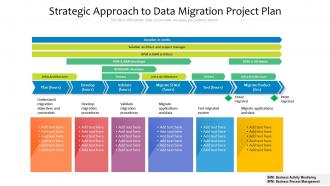
Strategic approach to data migration project plan





Try Before you Buy Download Free Sample Product
 Impress Your
 Audience
 100%
100% Editable
 Save Hours
 of Time


Our Strategic Approach To Data Migration Project Plan are topically designed to provide an attractive backdrop to any subject. Use them to look like a presentation pro.
People who downloaded this PowerPoint presentation also viewed the following :
Strategic approach to data migration project plan with all 2 slides:
Use our Strategic Approach To Data Migration Project Plan to effectively help you save your valuable time. They are readymade to fit into any presentation structure.
FAQs for Strategic approach to data
First thing - map out what data you actually have and where it lives. Then figure out what needs to move vs what you can ditch (there's always legacy junk nobody uses anymore). Look at how everything connects because dependencies will bite you later. Big bang migrations sound exciting but phased approaches save your sanity. Build in tons of validation and testing time. Seriously, budget for things going sideways at least twice. Get your stakeholders involved early or they'll complain about everything after. Oh, and document like crazy - future you will thank present you. Work backwards from your deadline to see if it's even realistic.
First thing - figure out what systems you're ditching, keeping, or mashing together. That's your scope. Then check if your data is actually any good because honestly, nobody wants to spend weeks moving trash from one place to another. Figure out which datasets matter most to the business and what compliance stuff you can't mess up. Downtime tolerance is huge too. Oh, and map out how everything connects - some data depends on other data in weird ways. Pro tip: make a simple grid ranking each source by value vs how painful it'll be to move. Saves you tons of headaches later.
So there's basically three routes you can go. ETL platforms like Informatica and Talend give you tons of control but honestly take forever to set up. Cloud services like AWS DMS are clutch for simple migrations - I've been using them way more lately. Then there's database utilities like Oracle Data Pump which are super fast but only work within the same platform. Really depends on how complex your data is and your timeline. I'd probably just pick whatever matches your current setup and test it on something small first. Way less stressful that way.
Check your data obsessively - before, during, and after the move. Run checksums and count rows to catch any weirdness. Do a complete comparison between old and new systems because finding missing records weeks later is nightmare fuel. Automated scripts help tons for comparing fields, data types, relationships. Don't touch your original data until you're totally sure everything's good. Oh, and definitely test with a small chunk first - learned that one the hard way. It'll save you from wanting to throw your laptop out the window later.
So data mapping is basically your roadmap for moving stuff from one system to another - you're defining how each field matches up. Every single piece of data needs a home, plus any transformations like date formats or whatever. Honestly sounds boring but it'll save your ass later. Trust me, without it you're just guessing where everything goes and that never ends well. Oh and document the hell out of everything! Get people to actually look at your mappings before you hit go. I learned that one the hard way.
Honestly, it comes down to how much risk you can stomach. Big bang is great if you've got a bulletproof rollback plan and can handle some downtime - way faster and cheaper in the end. But if your system is mission-critical or you're dealing with some ancient mainframe that's been frankenstein'd over the years? Go phased, trust me. I'm usually team phased unless leadership is really cocky about how smooth things will go. Also think about your team - big bang means everyone's pulling all-nighters for weeks. Map out what's actually critical first, then pick whatever won't give you panic attacks.
Honestly, the scariest part is losing data or having everything crash for hours while your boss breathes down your neck. I'd definitely profile your data first to see what mess you're dealing with, then back everything up like three times - trust me on this one. Run a test migration on just a tiny piece first. Sounds boring but it'll save your sanity later. Map out how everything connects, have a rollback ready, and do it when nobody's using the system. Oh, and double-check everything works before you celebrate.
Look, data governance frameworks are basically your playbook for not screwing up a migration. They set up rules for who owns what data and how clean it needs to be. You get processes for checking and tracking where everything comes from - trust me, you'll thank yourself later when you're not staring at garbage data wondering what went wrong. Plus they keep you compliant with whatever regulations you're dealing with. My advice? Get this stuff sorted before you start moving anything around. Way easier than fixing it after.
Track your data accuracy first - basically comparing what went in versus what came out. Then measure completeness (how much actually made it over) and speed/downtime. Validation checks are huge for catching integrity issues. Honestly, user acceptance matters most though - can people actually do their jobs with the new data? Set baselines before you start or you'll have nothing to compare against. Oh, and definitely count any rollback incidents if things go sideways. Build a simple dashboard so stakeholders aren't bugging you every five minutes asking for updates.
Oh man, compliance stuff is such a pain but you can't ignore it. GDPR, HIPAA, SOX - they all have different rules for how you move sensitive data around. Map out what regulations apply to your data first, then figure out encryption and audit trails. Cross-border migrations are honestly the worst because every region does things differently. Don't forget you still need to follow retention policies even for old data you're moving. I learned this the hard way - plan your whole migration strategy around compliance from day one. Way easier than trying to fix it after you've already started.
Check three main things: completeness, accuracy, and integrity. Row counts and checksums first - catches the obvious missing data. After that, spot-check your critical fields and test business logic. Automated scripts will save your sanity here since doing it manually sucks. Also test query performance because migrations love to screw up indexing (learned that one the hard way). Make a checklist beforehand and definitely get business users to look at records they know. They'll catch weird stuff you'd never notice.
Dude, you've gotta check your data quality before migrating - it's like insurance for the whole project. Run profiling tools to catch duplicates, missing values, weird formatting, stuff like that. I learned this the hard way watching a team spend forever fixing problems they could've spotted upfront. Clean what you can before moving everything over. The new system will thank you later, and honestly? Your future self will too. Way cheaper than dealing with corrupted data after it's already moved.
Honestly, parallel running is your best friend here - run both systems at once during the switch so you're covered if things go sideways. Database replication is clutch because you can sync everything in real-time before the actual cutover happens. Practice runs are non-negotiable, trust me on this one. I've watched too many migrations blow up because teams thought they could wing it. Blue-green deployment is solid if your infrastructure can handle it. Oh, and figure out your rollback plan first - way before you start moving anything over.
Pick one person to be the main contact - trust me, mixed messages from different team members will drive everyone crazy. Set up weekly check-ins and a dedicated Slack channel right away. Stakeholders freak out when they don't know what's happening, so send them regular updates about what you've migrated and what's coming next. Skip the tech speak and focus on how it affects their work. Also, be upfront about when things might go down or get weird during the migration. Honestly, it's better to over-communicate than leave people guessing.
Ugh, data migration is such a pain. First thing - map out all your fields ahead of time or you'll hate yourself later. Clean your data before moving it too, because migrating garbage just gives you garbage in a new place. Testing is huge - do it thoroughly and then do it again. I've seen so many teams rush this part. Oh and build in rollback plans! Sounds obvious but people forget until they're panicking at 2am. The timeline thing is real too - whatever you think it'll take, double it. Validation after the move is non-negotiable. Trust me on the extra buffer time.
-
Really like the color and design of the presentation.