

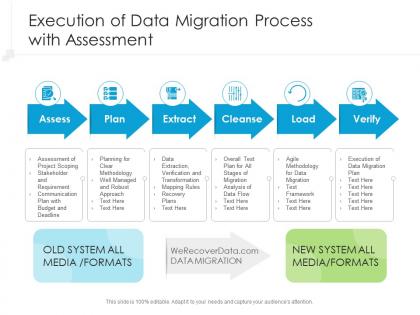
Execution of data migration process with assessment




Try Before you Buy Download Free Sample Product
 Impress Your
 Audience
 100%
100% Editable
 Save Hours
 of Time


Our Execution Of Data Migration Process With Assessment are topically designed to provide an attractive backdrop to any subject. Use them to look like a presentation pro.
People who downloaded this PowerPoint presentation also viewed the following :
Execution of data migration process with assessment with all 2 slides:
Use our Execution Of Data Migration Process With Assessment to effectively help you save your valuable time. They are readymade to fit into any presentation structure.

FAQs for Execution of data migration
So you've got five main phases to think about: planning, extraction, transformation, loading, and validation. Start by mapping your data sources and target schema. Then pull everything from your legacy systems. Transformation is honestly where it gets brutal - you're cleaning data, converting formats, dealing with random edge cases that make no sense. Load it into the new system after that. Here's the thing though - validation is critical even when your boss is breathing down your neck about deadlines. I learned this the hard way on my last project. Build in way more buffer time than you think you'll need because something weird always pops up.
Start by figuring out what data you're actually moving and why. Map out all the systems involved - I learned this the hard way when finance's ancient system almost got forgotten. Decide what's critical vs nice-to-have, then set clear goals like zero data loss or finishing within 48 hours. Get everyone on board early. Trust me on this one. Document everything in a simple scope statement covering timelines, data volumes, business impact, and your rollback plan. Don't touch anything until you've got sign-off from all stakeholders.
For data migration, I'd go with your cloud provider's tools first - they're way easier to set up. Azure Database Migration Service and Google's version handle most of the messy stuff automatically. SSIS is solid if you're already using Microsoft everything (though it takes forever to learn). Talend and Informatica are the big enterprise names everyone talks about. Honestly, for smaller jobs I just write Python scripts - sometimes overkill isn't worth it. AWS Data Migration Service is decent too, but their interface is kinda clunky compared to Azure's.
Dude, you've gotta have multiple backup layers - learned that one the hard way last year when everything went sideways! Full backup before you start, then incremental ones during the actual move. Test everything on just a small chunk first to catch any weirdness. Break it into smaller batches instead of moving everything at once. Way easier to spot problems early that way. Set up some scripts to validate your data between source and target at each step. Oh, and have rollback procedures ready so you can bail quickly if things get messy. Trust me on this one.
Okay so you'll want to check your data at three points. First, profile everything beforehand - find the weird stuff and create checksums. Real-time monitoring during the move is clutch (seriously saves your sanity at 2am). After it's done, run reconciliation reports comparing counts and mappings between old and new systems. Oh, and always test with a small batch first - I can't stress this enough. Have rollback plans ready because Murphy's law is real. Document it all too, otherwise you'll be cursing yourself later when something breaks.
So data mapping is basically your roadmap for getting data from one place to another - you're defining which fields match up between your old system and new one. Skip this step and you'll have data scattered everywhere like a tornado hit it. I learned this the hard way on my first migration project lol. Map out every field relationship and transformation rule before you touch anything else. Seriously, spend like double the time you think you need on mapping. Trust me, you'll thank yourself later when everything actually lands where it's supposed to.
Break it into small chunks with deadlines and clear owners. Map out which systems need to connect first, then work backwards from your launch date. Buffer time is crucial - I can't stress this enough, testing always uncovers weird stuff you didn't expect. Track progress weekly and call out risks immediately instead of crossing your fingers they'll disappear. Oh, and over-communicate with stakeholders constantly so nobody gets blindsided later. A simple red/yellow/green dashboard works great for showing where each piece stands. Trust me, everything takes twice as long as you think it will!
Honestly, data migrations are messier than anyone expects. Your source data will have duplicates, weird formatting, missing chunks that break everything. Production runs are always slower than your tests too - learned that the hard way. Test with realistic data volumes first, not those tiny samples. I'd spend serious time profiling your data upfront, even though it's boring work. Have rollback plans ready because something will go sideways. Buffer time is crucial - I usually double my estimates and I'm still optimistic. Start with a small pilot dataset before you commit to the full nightmare.
First thing - profile your data before you migrate anything, then again after. Compare record counts, data types, and key fields between your source and target systems. Honestly, manual checking is a total pain and you'll definitely miss stuff, so automate whatever you can with scripts. Start with the critical business data like customer records and financial transactions - that's where you can't afford mistakes. If you can swing parallel processing for a bit, users will catch weird issues in real time. Set up checks for completeness and accuracy too. Oh and definitely document everything and have a rollback plan ready.
First thing - get monitoring set up to track performance, data quality, and user feedback for like 30-60 days after you migrate. Automated alerts are your friend here because problems always show up at the worst times. Have that rollback plan sitting there ready to go, document every fix you make, and actually talk to your users regularly. They'll catch stuff you miss. Oh and don't just vanish once it goes live - I've seen too many people do that. Set up a clear escalation process and dedicate someone to support for the first few weeks. Trust me on this one.
Compliance stuff basically controls your whole migration strategy now. Can't just wing it anymore. Map your data flow first, encrypt everything while it's moving, and keep bulletproof audit logs. GDPR, HIPAA, SOX - whatever hits your industry needs specific checkpoints and paperwork. Honestly such a headache but way better than getting slapped with fines later. Figure out which regulations affect your data types first. Then plan your timeline around those compliance hurdles instead of scrambling at the end. Trust me on this one.
Dude, automation will save your sanity with data migration. It handles all the boring stuff - extracting data, transforming it, running quality checks. You can schedule everything to run overnight so it doesn't mess with daily operations. Honestly, the rollback feature alone makes it worth it when things inevitably go sideways. Start small though - pick one simple process first, then expand from there. Your team needs time to figure out the tools. Oh, and it cuts down on those stupid typos that always happen with manual work. Trust me on this one.
Set up weekly check-ins and shared dashboards right away. After each phase, send quick email updates - even just "Phase 2 done, all good." Trust me, people freak out way less when they know what's happening. Figure out who needs to actually approve stuff vs who just wants updates. A basic RACI chart saves tons of headaches later. Oh, and give them a direct line to you because someone will definitely panic at 2am thinking their data vanished. Overcommunicating beats radio silence every time.
Yeah, data migration is a real pain - it'll absolutely bog down your systems. CPU spikes, memory gets eaten up, network gets clogged. Peak hours are the worst for this stuff. Your apps will probably crawl or even time out because everything's fighting for the same database resources. I learned this the hard way once. Best bet is running migrations overnight or weekends when nobody's using the system. Do smaller chunks instead of dumping everything at once. Watch your performance metrics like a hawk and definitely have a backup plan ready to roll back if things go sideways.
So you need to track a few things to know if your migration didn't completely blow up. Data completeness first - did all your stuff actually transfer? Compare your source vs destination records to check accuracy too. Performance matters big time though. If queries are suddenly crawling, users will lose their minds. Also track downtime during cutover and whether you stuck to timeline. User feedback is honestly the real test - they'll know immediately if something's broken. Oh, and set these benchmarks upfront. Trust me, trying to figure out what "success" means after everything's done is a nightmare.
-
Informative presentations that are easily editable.
-
Design layout is very impressive.
-
Best way of representation of the topic.