

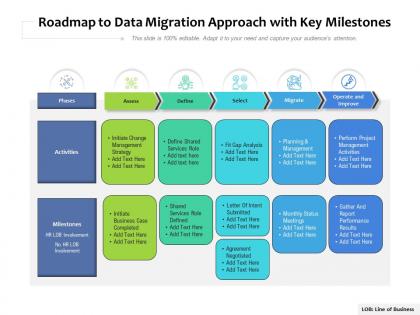
Roadmap to data migration approach with key milestones




Try Before you Buy Download Free Sample Product
 Impress Your
 Audience
 100%
100% Editable
 Save Hours
 of Time


Our Roadmap To Data Migration Approach With Key Milestones are topically designed to provide an attractive backdrop to any subject. Use them to look like a presentation pro.
People who downloaded this PowerPoint presentation also viewed the following :
Roadmap to data migration approach with key milestones with all 2 slides:
Use our Roadmap To Data Migration Approach With Key Milestones to effectively help you save your valuable time. They are readymade to fit into any presentation structure.
FAQs for Roadmap to data migration approach
Okay so data migration basically breaks into five phases. You start with **assessment** - figure out what data you actually have and what needs moving. **Planning** comes next where you map out your strategy and timeline. Then there's **preparation** - getting your target systems ready and testing everything (honestly this part always takes longer than expected). **Execution** is the actual data transfer, and **validation** is checking that nothing got screwed up in the process. Trust me on this one - spend like double the time you think you need on planning. I've seen too many migrations turn into total disasters because people rushed through the prep work.
First thing - run automated scans on all your source systems for completeness, accuracy, and duplicates. Trust me, skipping this step is a disaster waiting to happen (learned that the hard way). Create scorecards for each dataset, but focus on the business-critical fields first since you can't fix everything at once. Check referential integrity between tables too. Document what you find so you can bake fixes into your timeline. Oh, and this whole profiling thing needs to happen before you even think about touching the target system.
Talend and Informatica are pretty solid for data migration - AWS has their Data Migration Service too. Azure's got one if you're already using their stuff. Honestly though, it really comes down to what databases you're working with since some tools play nicer with certain platforms. Apache NiFi is worth checking out if you want something open-source and more customizable. I'd probably test 2-3 options with your actual data first. Nothing worse than picking a tool and then realizing it doesn't handle your weird edge cases well. Do a small proof-of-concept before you commit to anything major.
Definitely encrypt everything - data sitting around AND while it's moving between systems. Lock down access so only the right people can touch sensitive stuff. Document everything too because auditors love that paperwork trail. Honestly, I've seen too many projects crash and burn because they skipped the security basics. Use secure transfer protocols, obviously. Oh, and if you're working with copies in dev environments, mask or anonymize that data first. Set up proper monitoring so you know who's poking around where. Trust me, it's way easier to be paranoid upfront than scramble later.
Honestly, this is where most people mess up - they skip talking to stakeholders early on. You need those business users and IT folks on your side from the start because they know all the weird data quirks and dependencies you'd never think of. I've watched migrations crash and burn just because someone didn't loop in the right people. Get them involved in setting priorities and timelines upfront. Regular check-ins are huge too - keeps everyone informed and they'll catch problems before they blow up. Trust me, map out who you need to talk to and start those conversations now.
Oh man, definitely back up everything first - I know it sounds basic but you'd be shocked how many people skip this step. Testing on a small batch before going all-in is huge too. Don't try migrating everything at once, break it into chunks so you can spot problems early. After each phase, double-check your data didn't get scrambled. Honestly, whatever timeline you're thinking? Double it. I've never seen a migration go as smoothly as planned. Oh and build in extra time for when things inevitably go sideways - trust me on this one.
Map your datasets to actual business outcomes first - what's driving revenue or keeping you compliant? Customer-facing stuff and regulatory data should be top priority. I always make a scoring matrix for business criticality vs migration complexity (that complexity piece bites everyone, trust me). Finance and customer data usually need to move as a unit because of dependencies. Short sentences help here. Don't skip the stakeholder workshop either - half the battle is getting everyone on the same page about what "valuable" actually means to your company. Start there and work backwards.
Definitely start with data validation - compare record counts and check if business rules still work between old and new systems. Automated scripts will save you tons of time here, trust me. Run both systems in parallel for a bit so you can spot any weird discrepancies. Get your actual users involved in testing since they know all the random data quirks better than anyone. I'd keep the old system running read-only for a few weeks just in case. Oh, and don't go full rollout right away - maybe start with 10% of users first? Way less stressful if something breaks.
Start with a solid kickoff meeting - walk everyone through timelines, roles, the whole deal. Weekly check-ins are honestly a game changer when stuff hits the fan (and it will). Skip the fancy project plans that nobody understands. Instead, use simple visual dashboards people can actually follow. Be upfront about problems early - way better than scrambling later. Oh, and definitely set up some kind of shared space where people can drop questions whenever. The trick is ditching jargon and keeping communication super straightforward. Regular updates keep everyone sane.
So you need to watch four main things to see if your migration didn't totally bomb. Data completeness is obvious - did everything actually transfer? Then check accuracy by comparing some records between old and new systems. Performance stuff matters too, like how fast queries run now. Downtime is critical because people will never let you forget if it took forever (learned that one the hard way). Oh, and monitor user adoption after - are people actually using the new system or just complaining? Set up dashboards beforehand so you can spot problems while there's still time to fix them.
Run both systems side by side - seriously, don't even think about shutting down the old one yet. Set up data sync so they're both talking to each other during testing. This saved me so many headaches when weird stuff came up (and trust me, it always does). Test your rollback plan before you need it - learned that one the hard way. Once everything's solid in the new system, then you can kill the old one. Budget at least a month or two of running them together. Worth every penny.
So you're gonna need both technical training and process stuff for your teams. Start with hands-on sessions for your migration tools, data mapping, validation - the whole deal. Business users need training too on new formats and system changes (honestly they get overlooked way too much). Rollback procedures are huge - when stuff breaks, everyone needs to know the drill immediately. Oh and set up dedicated support channels during the migration window. Assign your SMEs as main contacts. Document everything as you go because future you will thank current you for that.
So basically cloud means you're shipping everything to someone else's servers, while on-premise keeps it all in your own data center. Cloud's got those annoying bandwidth limits and sometimes latency gets weird. Plus you'll probably need to reformat your data for their storage systems - such a pain. On-premise gives you way more control over when and how things happen, but man, it eats up so much of your team's time and resources. Either way though, definitely test with just a small chunk of data first. Trust me on that one - I've seen too many people jump straight into full migrations and regret it later.
Trust me, you NEED a solid timeline for data migration or you'll lose your mind. Teams will clash over resources, dependencies get missed, and your boss will bug you every day asking when it's done. Map out what needs to happen first - those critical dependencies are everything. Build in extra time for the complicated parts because something always goes wrong (usually at the worst moment). This way you can actually track if you're making progress or just spinning your wheels. Without it? Good luck explaining why you're three months behind schedule.
Check your data quality super early - like way before you think you need to. Half the migrations I've seen crash because teams hit garbage data midway through and have to start over. Also, whatever timeline you're thinking? Add 30% more time. Legacy systems are black boxes that'll surprise you every time. Oh and run parallel systems way longer than feels necessary. Rolling back is a nightmare you don't want to deal with. I learned that one the hard way lol. Document all the weird stuff you find too - future you will thank you when the next migration comes around. Testing can't be overdone here.
-
Nice and innovative design.