

Data migration checklist powerpoint template





Try Before you Buy Download Free Sample Product
 Impress Your
 Audience
 100%
100% Editable
 Save Hours
 of Time


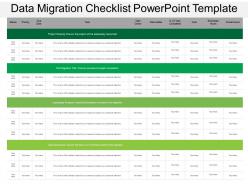
Migrate your essential business information with the help of our technically developed data migration checklist PPT template. It will help in managing as well as securing your business data effectively. Define the process stages of data migration with this database migration checklist PowerPoint image diagram. It will help in ensuring the security of your critical company information. The essential aspects related to this process checklist can be graphically explained through this data migration process PowerPoint Presentation slide. Such as project scoping, data assurance, core migration and more. Even describe the procedure of successfully migrating your organizational data with this ready to use given checklist on the data conversion. You can also use this data transfer Presentation image to describe its benefits for your organization. Such as, it helps in improving your business security and also helps in enhancing your business efficiency and capability level. Therefore, simply tab on the download link now to start working over this data conversion PPT diagram. Bring your campaign to a befitting end with our Data Migration Checklist Powerpoint Template. Experience a grand and fitting finale.
People who downloaded this PowerPoint presentation also viewed the following :
Data migration checklist powerpoint template with all 5 slides:
Inject a feeling of fun with our Data Migration Checklist Powerpoint Template. Convert the grind into an enjoyable experience.



FAQs for Data migration
Okay so the main steps: planning/assessment, data profiling, building migration tools, testing with samples, full migration, then validation after. Honestly, spend forever on the planning part - I've seen so many projects crash because people rushed this. Data profiling is where you figure out all the weird stuff lurking in your data before it screws you over. Don't skip the sample testing runs either, that's where you'll catch most problems. Oh and definitely start with a solid project plan and timeline first. After you go live, double-check everything's actually working right and watch performance like a hawk. Trust me on the planning thing though - it's boring but saves your butt later.
Start with automated profiling tools - trust me, checking millions of records manually will make you want to quit. Run checks for missing values, duplicates, weird outliers, and format issues. Basically hunt for anything that'll blow up later. Sample some key datasets by hand too since the tools aren't perfect. I always create a scorecard to track what's broken and share it with the team. Document everything because you'll need to figure out what to fix before migration versus after. Oh and stakeholders love having actual numbers to look at instead of just "the data's messy."
Oh man, there's so many options it's kinda overwhelming honestly. Database stuff? AWS Database Migration Service is pretty solid, or Azure Data Factory if you're already in that ecosystem. Informatica and Pentaho are great for heavy-duty ETL work but they'll probably cost you an arm and a leg. I've been hearing good things about Apache NiFi and Airbyte lately - both free which is nice. For moving files around, can't go wrong with good old rsync, though ShareGate's worth checking out too. Definitely do a small test run first before you commit to anything pricey.
Do it during off-peak hours for sure - learned that one the hard way! Run both systems side by side first so you're not totally screwed if things go sideways. Test everything in staging that matches production exactly. Oh, and don't dump all your data at once - sync it incrementally leading up to the switch. That massive transfer approach is just asking for trouble. Have your rollback plan ready because Murphy's law is real. Tell everyone the timeline upfront too, saves you from angry emails later.
Okay so first thing - figure out what data you're dealing with and which rules apply (GDPR, HIPAA, whatever). Encrypt everything obviously. Get a compliance person if you can afford it because this stuff will drive you crazy otherwise. Lock down access so random people can't mess with sensitive data during the move. Document everything for audits later - trust me on this one. Run quality checks so you don't accidentally corrupt someone's personal info. Oh, and use fake data for testing environments. Definitely test all your compliance stuff in staging first though.
Focus on business-critical stuff first – customer records, transactions, current inventory. You know, anything that'd break operations if you had to flip the switch tomorrow. Product catalogs and user accounts come next since other systems rely on them. Historical data? Honestly can wait unless compliance is being a pain about it. Also map out dependencies – some datasets are useless without others being there first. I'd make a quick matrix ranking everything by business impact vs how much of a headache it'll be technically. Saves you from migrating in circles later.
Get a migration lead to run the whole thing first. Then grab some data analysts for schema mapping - they love that stuff anyway. Your engineers handle the actual moving parts, obviously. Business people will definitely want input (they always do), so loop them in early. Someone needs to own testing and rollback plans too. Oh, and put one person on performance monitoring during the actual migration because that's usually when everything breaks. The main thing is avoiding chaos - everyone should know their piece and stick to it. Otherwise you'll have five people trying to "help" and nothing gets done.
So first thing - check your row counts between both systems, that's the easy part. Then dig into the actual data by comparing key fields like IDs and dates. I usually do checksums or hash comparisons for this stuff. Honestly the whole process is kind of a pain but you gotta do it. Sample queries help catch weird discrepancies you might miss otherwise. Oh and test edge cases too - null values always mess things up somehow. If you can automate some scripts, definitely do that to save yourself time. Just make sure you document everything so you can actually fix problems before launch.
Dude, data loss and corruption are your biggest enemies here - total nightmare fuel. Back everything up first (like, seriously check it three times). Run a test migration on something small before you go all-in. Performance issues will probably pop up too, so really put your target system through its paces. Have a rollback plan because trust me, you'll need it. Data validation is huge - gotta make sure everything actually moved over right. Honestly, whatever timeline you're thinking? Double it. These things always take longer than expected, and there's always some weird edge case that breaks everything.
Honestly, the size makes a huge difference in how you approach this. Large datasets (think 1TB+) need incremental migration - break everything into chunks and run parallel processes or you'll hate your life during downtime. Test your bandwidth first though, that always bites people. Small datasets? Way easier. You can usually just copy everything over during off-peak hours and call it a day. The big migrations need staging environments and tons of validation checkpoints. Also plan your rollback strategy early because something always goes wrong. Smaller ones are pretty forgiving if you mess up.
Honestly, document everything as you go - don't try to recreate it later (learned that the hard way). Keep your migration plan with timelines, data mapping docs showing what goes where, and validation reports proving nothing got messed up. Backup procedures are clutch - you'll thank yourself if things go sideways. Error logs and performance metrics too. Oh, and document any transformation rules you use. Set up a shared folder so everyone can update stuff in real time. Sounds boring but it'll save your butt.
Start training your team 2-3 weeks before you flip the switch. Hands-on practice sessions work way better than boring presentations - let them mess around with dummy data so they actually know what buttons to click. Document the big changes in how people access stuff and where things live now. Find your power users early because honestly, they'll end up answering half the questions anyway. Quick reference guides are clutch - make them easy to bookmark. Don't skip the follow-up sessions after you're live. That's when people realize what they actually don't know and start panicking. Oh, and just tell everyone upfront there's gonna be a learning curve.
Honestly, it comes down to what your team can handle and how much money you want to spend upfront. On-premises means you're stuck buying hardware and maintaining everything yourself, but you get total control. Cloud's way easier - no server headaches and you can scale fast. The bandwidth thing is huge though, make sure your internet can actually handle moving all that data. Your compliance stuff matters too, obviously. If your team doesn't know cloud well, expect some growing pains. I'd probably map out your budget first, then maybe try a small test migration? That way you're not going in blind.
Honestly, start small with test extractions first - legacy systems are full of weird surprises that'll bite you later. Map out what data you've got buried in there, then build your extraction scripts bit by bit. Those old systems have the most random quirks that nobody documented (because of course they didn't). Running everything in parallel is smart until you're totally sure the migration actually worked. Oh, and definitely have a rollback plan ready. Trust me, don't try moving everything at once - I've seen that go sideways so many times.
Track your data transfer speeds and make sure record counts match up - checksums too if you're being thorough. Downtime duration is obvious but don't forget response times after everything's live. Error rates during the actual migration are huge - seriously, save those logs because something always breaks at 2am. Oh, and user adoption stuff matters way more than people think. The smoothest migration is useless if nobody can figure out the new system. Set up automated monitoring for the first week minimum to catch any weird performance drops. A basic dashboard helps too so you can show everyone it's actually working.
-
Content of slide is easy to understand and edit.
-
Content of slide is easy to understand and edit.