

Data Migration Powerpoint Presentation Slides





Try Before you Buy Download Free Sample Product
 Impress Your
 Audience
 100%
100% Editable
 Save Hours
 of Time


Increase feelings of good cheer with our Data Migration Powerpoint Presentation Slides. Create a bunch of happy faces.
People who downloaded this PowerPoint presentation also viewed the following :
Content of this Powerpoint Presentation
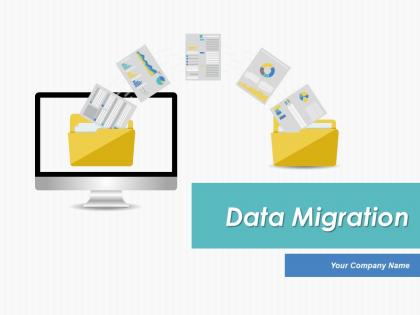
Slide 1: This slide introduces Data Migration. State Your Company Name and get started.
Slide 2: This is Our Agenda slide. State your agendas here.
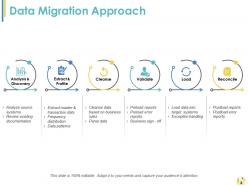
Slide 3: This slide presents Data Migration Approach with the following subheadings- a: Analysis & Discovery (Analyze source systems, Review existing documentation) b: Extract & Profile (Extract master & transaction data, Frequency distribution, Data patterns) c: Cleanse (Cleanse data based on business rules, Parse data) d: Validate (Preload reports Preload error reports Business sign - off) e: Load (Load data into target systems Exception handling) f: Reconcile (Postload reports Postload error reports)
Slide 4: This slide presents Data Migration Steps. The stages are- Analysis Stage (Understand your requirements in terns of scope of migration) Development Stage (Build required development scripts to migrate data from your client's legacy system into your application) Go Live Support Stage (Run migration script based on your final testing outcome)
Slide 5: This slide shows Simplified Illustration of Data Migration- Steps Merge, Process, Update, Deploy.
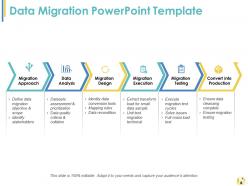
Slide 6: This slide presents a Data Migration PowerPoint Template with the following subheadings- Migration Approach (Define data migration objective & scope Identify stakeholders), DataAnalysis (Datasets assessment & prioritization Data quality criteria & collation), MigrationDesign (Identity data conversion tools Mapping rules Data recondition), MigrationExecution (Extract transform load for small data sample Unit test migration technical), MigrationTesting (Execute migration test cycles, Solve issues, Full mass load test), Convert into Production (Ensure data cleansing complete Ensure migration testing).
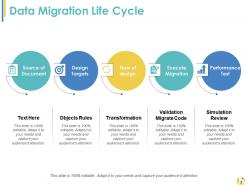
Slide 7: This slide showcases Data Migration Life Cycle with the following subheadings- Source of Document, Design Targets, Flow of design, Execute Migration, Performance Test.
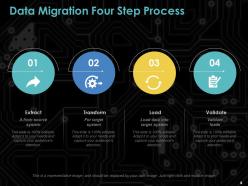
Slide 8: This slide shows Data Migration Four Step Process with the following subheadings- Extract (A from source system) Transform (For target system) Load (Load data into target system) Validate (Validate loads).
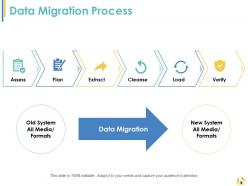
Slide 9: This slide showcases Data Migration Process with the following subheadings- Plan, Assess, Extract, Cleanse, Load, Verify.
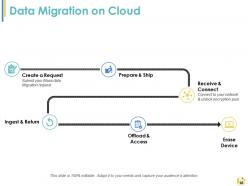
Slide 10: This slide shows Data Migration on Cloud with the following subheadings- Erase Device, Create a Request (Submit your Mass data Migration request), Offload & Access, Ingest & Return, Prepare & Ship, Receive & Connect (Connect to your network & unlock encryption pool).
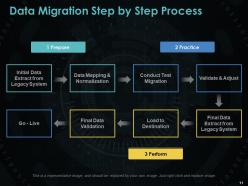
Slide 11: This slide shows Data Migration Step by Step Process.The steps are- 1: Prepare (Initial Data Extract from Legacy System, Data Mapping & Normalization) 2: Practice (Conduct Test Migration, Validate & Adjust) 3: Perform (Final Data Validation,Load to Destination, Final Data Extract from Legacy System- Go - Live).
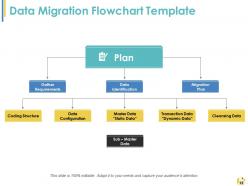
Slide 12: This slide presents a Data Migration Flowchart Template with the following subheadings- Plan: Gathe Requirements, Data Identification, Migration Plan with Data identification divinding into- Coding Structure, Data Configuration, Master Data “Static Data”, Transaction Data “Dynamic Data”, Cleansing Data.
Slide 13: This is a Tea Break slide to halt. You may use image and text of your choice here.
Slide 14: This slide is titled Additional Slides to move forward and proceed.
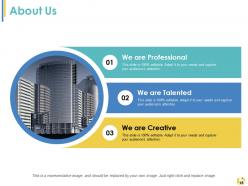
Slide 15: This is an About Us slide. State team/company specifications here.
Slide 16: This is Meet Our Team slide with name, designation and image boxes.
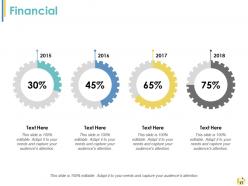
Slide 17: This is a Financial score slide. State financial aspects etc. here.
Slide 18: This is a Puzzle slide. State information, specifications here.
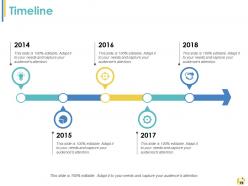
Slide 19: This is a Timeline slide to show growth, milestones etc.
Slide 20: This slide is titled Important Notes. State important events, reminders etc. here.
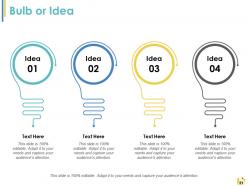
Slide 21: This is a Bulb or Idea slide to show innovative aspects, new ideas etc.
Slide 22: This slide is titled Charts and Graphs to move forward. You can change the slide content as per need.
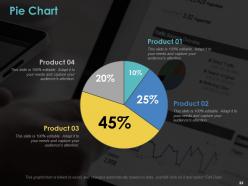
Slide 23: This slide showcases a pie chart image with text boxes for product comparison etc.
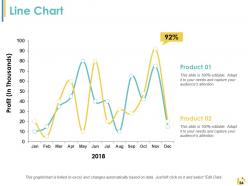
Slide 24: This is a Line Chart slide to show product comparison, specifications etc.
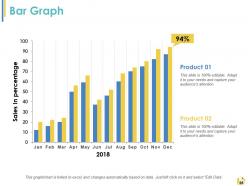
Slide 25: This is a Bar Graph slide to show growth, comparison of two products, entities etc.
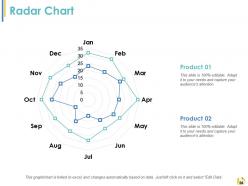
Slide 26: This is a Radar chart slide to show comparison of two products, entities etc.
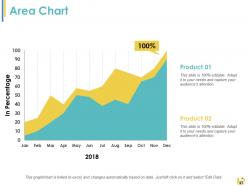
Slide 27: This is an Area chart slide to show comparison of two products, entities etc.
Slide 28: This is a Thank You slide with Address# street number, city, state, Contact Number, Email Address.
Data Migration Powerpoint Presentation Slides with all 28 slides:
Our Data Migration Powerpoint Presentation Slides are akin to a booster dose. You will acquire additional energy.





FAQs for Data Migration
Start with auditing your current data - you're gonna find some real gems that'll make you wonder how anything worked before. Map out how fields translate between systems super clearly. Timeline planning is huge, especially if downtime matters. Test with real data chunks first, not just dummy stuff. Your rollback plan better be bulletproof because migrations love to go sideways at 2am when everyone's tired. Oh and make sure the whole team knows the exact sequence - nothing worse than someone jumping ahead and breaking everything. Data quality checks upfront will save your sanity later.
Start with data profiling to catch duplicates, missing values, and format issues upfront. Seriously saves you so much pain later. Check that business rules and referential integrity work between your tables too. Automated quality checks are your friend - compare record counts, checksums, and field distributions from source to target. Get business users involved to spot-check samples of the important stuff. Oh, and document what you find! Make sure stakeholders agree on quality thresholds before moving anything. Nothing worse than migrating data only to have someone complain about standards you never discussed.
Oh man, you're gonna hit three major pain points: messy data, system downtime when you switch over, and mapping nightmares between the old and new platforms. That "clean" data stakeholders promised? Total lie - it's always a disaster. Start with solid data profiling and map everything out in detail first. Test your migrations like crazy in staging and have a rollback plan ready. Actually, scratch that - test them MORE than you think you need to. Build in tons of extra cleanup time because I swear every single migration finds weird data problems right in the middle of everything.
Honestly, don't try moving everything at once - that's asking for disaster. Break it into chunks and do a phased migration instead. Most successful teams I know use hybrid approaches. You've got three main options: lift-and-shift if you need speed, re-platforming when optimization matters, or full re-architecting (but only if your current system is genuinely terrible). Map out your data dependencies first though. Sounds boring but trust me - you don't want to be frantically debugging broken connections later. Keep both systems running parallel during the transition. Way less stressful that way.
Don't try to do everything at once - that's a recipe for disaster. Run both systems side by side during the switch so people can keep working while data moves in the background. The "just rip it off like a bandaid" thing sounds tempting but it'll bite you later. Do your big transfers when nobody's online if you can. Oh, and definitely test this whole thing in staging first - nothing worse than finding out something's broken when everyone's already freaking out. Have a rollback plan ready too because Murphy's law and all that.
So data mapping is like your translation guide when you're moving stuff between systems. You map "customer_name" from the old database to "full_name" in the new one, that kind of thing. Handle transformations too. Honestly, it's tedious work but trust me - skip this step and you'll hate yourself later. Your data ends up scattered everywhere or just disappears. I learned this the hard way on a project last year, total nightmare. Get your mapping doc done early and make sure the stakeholders actually look at it before you start moving anything around.
Honestly, just think about three things: how much data you're dealing with, how messy it is, and what you can spend. Moving gigabytes vs terabytes changes everything. For basic database transfers, AWS DMS is solid. But if you've got crazy ETL stuff with tons of sources, you'll probably need Talend or Informatica - they're pricey though. Also factor in downtime limits and whether your team can actually handle the tool you pick. Oh, and definitely test with sample data first. Trust me on that one - I've seen too many migrations go sideways because someone skipped testing.
Definitely encrypt everything - both when it's moving and when it's stored. Use SFTP or HTTPS for transfers, and set up proper authentication. Only give access to people who really need it, honestly that's where most breaches happen anyway. Test your backups first because migrations love to go sideways. Set up logging so you know who touched what. Oh, and make a security checklist before you start - trust me on this one. Way better than trying to remember everything when you're already stressed and three hours into troubleshooting.
First thing - check your record counts match between source and target. Sounds super basic but I can't tell you how many migrations I've seen blow up right there. After that, spot-check some actual data values to make sure nothing got mangled during transfer. Checksums work great for critical fields. Honestly, setting up automated scripts saves your sanity because doing this stuff manually will drive you nuts. Test that your business rules still fire correctly too. Oh, and definitely have your rollback plan sorted before you start - learned that one the hard way.
Think of data governance as your game plan before moving - it sets quality standards, figures out who owns what data, and covers all the compliance stuff you can't ignore. Honestly, most companies are shocked by how much useless data they're hoarding. You'll want this framework solid before touching anything, so you can check data quality as you go and stay compliant. Without it? You're basically gambling and will probably end up with a hot mess in your new system. It also helps you decide what actually needs to move versus what you can just archive or trash.
Yeah, cloud services basically do all the grunt work for you - automated tools, tons of bandwidth, validation checks built right in. Most providers have dedicated migration teams that'll move huge amounts of data pretty smoothly. But heads up, those transfer fees get expensive quick. Also, you'll probably have some downtime no matter what they promise about "seamless" transitions. Oh and you're kinda stuck following their timeline once you start. I'd definitely get exact pricing first though - that's where people usually get surprised. Plan for at least a few hours of disruption just in case.
Dude, clean up that messy legacy data first - seriously will save you tons of pain later. Map out all the relationships and hunt for weird dependencies (old systems always have the strangest stuff). Build a solid validation process to catch inconsistencies. You'll need to transform data where formats don't match your new system. Oh and document everything you're changing because you'll forget why you made certain decisions. Test with small batches first - like, don't go crazy and migrate everything at once. That's just asking for trouble.
Okay, so first thing - figure out which regulations hit you. GDPR, HIPAA, SOX, whatever mess applies to your sector. Document your data lineage and who can access what throughout the whole process. Honestly, auditors eat this stuff up, so you'll thank me later. Encrypt everything in transit and at rest. Log who touched what data and when they did it. Oh, and loop in legal and compliance people early - they always spot weird edge cases I'd never think of. Basically, don't treat compliance like something you tack on at the end. Build it into your migration from day one.
So basically, full migration dumps everything at once - your whole database moves during scheduled downtime. Incremental does it bit by bit, just syncing the new changes each time. It's kinda like... okay this is random but imagine packing your entire apartment in one day vs doing it gradually over weeks. Full migration is way faster but you'll have downtime. With incremental, systems stay up but it drags on forever. Honestly? Go full if you've got a smaller dataset or can handle being offline. Pick incremental for massive databases or when you absolutely can't afford downtime.
Start communicating right away and don't let people wonder what's happening. Weekly emails work great, plus set up a Slack channel for quick questions. People get weird when they don't hear from you - I've seen stakeholders spiral after just two weeks of radio silence. Be upfront about problems too, none of that "everything's fine" BS when it's not. Honestly? Just schedule quick check-ins with your main people instead of making them hunt you down. Way less stressful for everyone.
-
Great designs, really helpful.
-
Much better than the original! Thanks for the quick turnaround.