

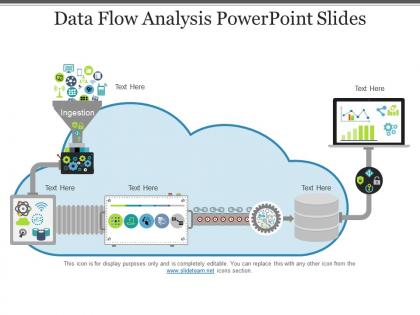
Data flow analysis powerpoint slides




Try Before you Buy Download Free Sample Product
 Impress Your
 Audience
 100%
100% Editable
 Save Hours
 of Time


The data flow PowerPoint template helps an individual to make awesome presentations on data flow diagrams without taking the help of any other software. The data flow diagram presentation slide is useful as a visualization tool and it describes data flow within an organization. The data flow report PPT slide is perfect to demonstrate complex event processing data flow diagram. Moreover, a presenter can craft presentations related to data flow analysis, software development and many more by using the data flow analysis presentation template. The business flow diagram template for PowerPoint presentation is useful to describe the linear development of the business or organization. A user can portray flow of the business development in a unique style with the help of multi-icon PPT slide. The career and professional success is one of the major topics to discuss while giving a presentation on the business flow by using the business flow analysis presentation template. The business flow diagram slide is perfect for giving presentation on business process. The users can download our flow diagram analysis slide for PowerPoint to illustrate phases of project management as well as product development. Give folks an insight into important articles with our Data Flow Analysis Powerpoint Slides. Elaborate on the journal.
People who downloaded this PowerPoint presentation also viewed the following :
Data flow analysis powerpoint slides with all 5 slides:
Enhance your leverage with our Data Flow Analysis Powerpoint Slides. They make for an excellent fulcrum.


FAQs for Data flow
Dude, data flow analysis is honestly a game changer for catching bugs early. It tracks how data moves through your code and spots stuff like uninitialized variables or dead code before you ship. Your compiler gets smarter too - better optimizations based on those insights. Debugging becomes so much less of a headache (seriously, you'll thank me later). Oh and it helps with security by flagging where sensitive data might leak out. Just start with whatever your IDE already has built in, then maybe graduate to fancier static analysis tools once you're comfortable.
So data flow analysis basically tracks how info moves through your code - super useful for catching injection attacks, buffer overflows, that kind of stuff. It follows variables from where they enter (like user forms or APIs) all the way to where they get used. Pretty much like following a trail through your code. When untrusted data hits sensitive operations without being cleaned up first, it'll flag it. Honestly beats manual reviews most of the time since you'll miss things just scanning by eye. I'd start with your input handling functions - that's usually where the sketchy stuff lurks anyway.
Yeah totally doable! Just don't try to do the heavy lifting during runtime - that's asking for trouble with your deadlines. Do most analysis at compile time or when the system boots up instead. For runtime stuff, go lightweight and incremental so it updates as data flows through. Static analyzers are your friend here, they'll catch dependency issues before you deploy. Oh and profile everything because there's nothing worse than your analysis becoming the actual performance problem lol. Start with your critical paths first - you can always expand from there.
Honestly, just start with whatever's built into your IDE - IntelliJ and Visual Studio are surprisingly good for quick checks. SonarQube's probably the most popular dedicated tool, especially for security stuff. Checkmarx and Veracode are solid too if you need serious security analysis. For performance, Valgrind's my go-to (Intel VTune's good but kinda heavy). Clang Static Analyzer works great if you're already using Clang. Oh, and PVS-Studio's decent but costs money. LLVM has built-in passes that researchers love, though that's probably overkill unless you're into that stuff. Start simple with your IDE, then move up to something like SonarQube when you need better coverage.
So control flow analysis is like mapping out all the possible paths your code can take - where can the program jump to next? Data flow is totally different though. It tracks how your actual data moves around and changes as it follows those paths. Picture it like this: control flow maps the roads, data flow watches what's driving on them. Control flow asks "what runs after this line?" Data flow digs into "where'd this variable get its value and where's it headed?" You'll probably need both when you're debugging. Control flow shows you the structure, data flow catches stuff like variables that never got initialized (which honestly trips me up way too often).
So data flow analysis is like your compiler playing detective with your code. It follows how data moves around to find optimization gold mines. Dead code gets spotted and tossed. Variables sitting there doing nothing? Gone. Those calculations running over and over for the same result? The compiler catches that and caches them instead. Honestly, constant propagation and loop optimizations are where things get really interesting - they can make your code fly. Without this analysis happening behind the scenes, you'd miss out on tons of free performance boosts. That's why optimized builds feel so much snappier than debug versions.
So basically data flow analysis tracks where your sensitive info goes and who handles it. GDPR and CCPA? Yeah, they want you to document all that stuff anyway. You'll know exactly where personal data gets processed, stored, or moved around - makes those compliance audits so much easier. Plus you can catch data sitting around too long or ending up where it shouldn't be. Honestly, the best part is having that clear inventory ready when regulators show up. And when people request their data? You can actually find it quickly instead of panicking.
Oof, you're gonna hit some painful walls here. Big codebases just murder traditional analysis tools - memory crashes, processing times that make you want to cry. Dynamic dispatch and reflection (which is literally everywhere) create these incomplete call graphs that are useless. Inter-procedural analysis? Forget about it when thousands of functions are calling each other across modules. Oh, and you'll constantly wrestle with the accuracy vs speed trade-off - can't have both, apparently. My advice: don't try analyzing everything at once. Pick your critical code paths first and work from there.
Static analysis is perfect when you need to check everything without running the code. Great for security audits and code reviews - it hits all possible paths, not just what runs during testing. Way faster on big codebases too since there's no runtime stuff to deal with. Downside is you'll get false positives because it's super conservative. Honestly though, I'd rather deal with extra warnings than miss something serious like a data leak. Oh, and use it early in development, then add dynamic testing later for better coverage overall.
So data flow analysis tracks how data moves through your code, which honestly makes everything way clearer. You'll catch dead code and unused variables that just sit there being useless. It shows you tight coupling between parts of your system too - super helpful when you're trying to figure out where changes might break stuff. The best part? You can refactor without that constant fear of accidentally nuking something important. I always forget to do this during code reviews but when I actually remember, it catches so many maintainability headaches early. It's basically like having x-ray vision for your codebase.
Dude, just plug data flow analysis right into your CI/CD pipeline - runs automatically on every commit. I'd stick it after unit tests but before code review. The tooling's actually gotten pretty solid recently, so there's no real reason to skip this anymore. Train your team to read the output properly though, otherwise they'll just ignore half the warnings. Oh and set clear rules about what's a blocker vs what's just a heads up. Honestly the biggest mistake I see is teams running it but never actually looking at the results. Total waste.
Oh man, data flow analysis is such a headache now with all the cloud/microservices stuff. Instead of tracking through one big app, you've got data bouncing between like 20 different services and APIs. Static analysis tools? Pretty much dead at this point. You really need dynamic tracing - Jaeger, DataDog, that kind of thing. Can't just follow code paths anymore when everything's distributed. The upside is you actually get better real-time visibility than the old monolith days. Definitely set up distributed tracing early though - trust me, you'll thank yourself when data starts vanishing between services.
Okay so data flow analysis gives you some really useful stuff for checking code quality. Uninitialized variables and dead code are the big ones - honestly that uninitialized variable detection has saved my butt so many times. You can also track how long variables stick around (helps with memory issues) and measure coupling between modules. The def-use chain stuff is pretty cool too, shows you how data moves through your code. Oh, and variable lifespans - almost forgot that one. All this feeds into maintainability scores and can even predict where bugs might pop up. I'd start with def-use violations since they're usually easy fixes.
Data flow analysis is a game changer - seriously. Map out how info moves through your company from start to finish. You'll catch bottlenecks where stuff gets stuck and find redundant processes eating up time. The best part? You can actually trace crappy data back to where it started instead of just wondering why your reports look weird. I'd pick one important business process first and follow it end-to-end. Trust me, you'll immediately spot where things fall apart and why decisions aren't getting the right info.
Okay so first thing - only grab the data you actually need for your analysis. I know it's tempting to collect everything, but don't! Be super transparent about where that data goes and who can access it. GDPR and CCPA compliance is obviously non-negotiable. You'll want to look into differential privacy or anonymization if you can swing it. Document your data flows clearly (this saved my butt once when we got audited). Oh, and audit regularly - catching privacy issues early beats dealing with angry users later. Trust me on that one.
-
Unique and attractive product design.
-
Great designs, Easily Editable.
-
Nice and innovative design.
-
Colors used are bright and distinctive.