

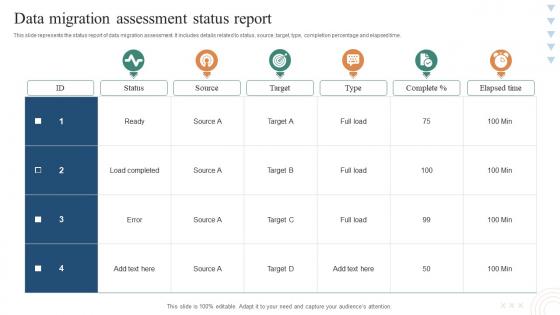
Data Migration Assessment Status Report




Try Before you Buy Download Free Sample Product
 Impress Your
 Audience
 100%
100% Editable
 Save Hours
 of Time


This slide represents the status report of data migration assessment. It includes details related to status, source, target, type, completion percentage and elapsed time.
People who downloaded this PowerPoint presentation also viewed the following :
Data Migration Assessment Status Report with all 6 slides:
Use our Data Migration Assessment Status Report to effectively help you save your valuable time. They are readymade to fit into any presentation structure.





FAQs for Data Migration
Honestly, data migration is all about the prep work. First, audit what you've got - figure out your current data quality and structure mess. Map out how fields translate to the new system. Testing is where people screw up most, so run pilots with small datasets and check everything twice. I learned this the hard way on my last project. Validate integrity at each step and have a rollback plan ready because Murphy's law applies here big time. Oh, and whatever timeline you're thinking? Add 50% more time. These things never go as smooth as planned.
Definitely start with data profiling - you gotta audit what you're working with first. Look for duplicates, missing info, inconsistencies, all that fun stuff. Manual checking is honestly brutal and you'll miss things anyway, so grab some automated tools if you can. Check completeness (missing fields), accuracy (wrong values), consistency across formats, and whether the data actually makes sense. Don't forget referential integrity between your tables either - that one bites people all the time. I'd tackle your most important datasets first, then expand from there. Way less overwhelming that way.
Okay so mapping and transformation are literally the most crucial parts of any migration - they're what make your data actually work in the new system. Mapping shows how fields from your old system match up with the new one. Transformation does the heavy lifting of converting formats, fixing messy data, and applying your business rules. It's kind of like translating between languages with totally different grammar structures. Honestly, I've seen so many projects fail because people skip this step. You'll have unusable data everywhere if you don't do it right. Document your current data structure first though - that's your starting point.
Data quality issues will kill you - that's the big one. Downtime during the switch is rough too, plus compatibility nightmares between systems. Poor data mapping? Total disaster waiting to happen. Start with thorough data profiling to catch problems early. Run both systems parallel during transition so you're not dead in the water. Document everything before moving data around. Oh, and definitely pilot test with a small chunk first - saves your butt later. Build in way more time than you think for testing and rollback plans. Something *always* breaks.
Honestly, cloud migration tools are a game changer - they'll handle most of the grunt work for you. The scaling is automatic so you don't get stuck with those painfully slow transfers we used to deal with. Most providers throw in validation and rollback features too, which is clutch when things inevitably get weird. Testing in sandbox environments before you touch real data is probably the biggest advantage though. I'd start by seeing what free assessment tools your cloud provider has - AWS and Azure both have decent ones that'll map everything out. Way better than trying to wing it on your own.
Start with backing everything up - trust me on this one, I've been burned before. Test your migration on small chunks of data first to spot problems early. Check checksums on whatever you can before and after moving stuff. Count records, verify data types match, make sure relationships didn't break between your source and destination. Here's what I always do: set up your rollback plan BEFORE you start the actual migration. Oh and never, ever delete the original data until users have been happily working in the new system for several days without complaining.
So here's what worked for me - run your heavy stuff during off-peak hours and break the migration into chunks instead of doing it all at once. Set up the new system parallel to your old one, then move data bit by bit while everything keeps running. Honestly, testing is everything here. Test twice because last-minute surprises will ruin your day (and probably your weekend). Do incremental syncs to keep data fresh between systems, then just one final quick sync during maintenance. Oh, and always have a rollback plan ready. Trust me on this one.
So for data migration, check out Talend, Informatica PowerCenter, or AWS Database Migration Service - depends what you're working with. SSIS is pretty decent if you're already in Microsoft land. But honestly? There's no magic bullet here. Volume, complexity, and budget all matter way more than whatever's trending. Python with pandas actually works great for smaller stuff (I've been surprised how far that combo can take you). My take - map out your data first, figure out where it's all going, then pick whatever actually fits instead of the shiniest tool.
Dude, compliance will totally shape how you handle the whole migration. Can't just wing it anymore. Map out your data classification first, keep everything encrypted while moving it, and document literally everything for audit trails. GDPR, HIPAA, SOX - whatever hits your industry needs specific procedures. Honestly such a headache but way better than dealing with violations later. I learned this the hard way on a project last year. Build those compliance checkpoints right into your timeline from the start. Don't try adding them after - you'll be scrambling and probably miss stuff.
Look, a rollback plan is just your backup when migrations go sideways - and they will. You want clear steps ready to restore your old data and get systems back up fast. Test this stuff ahead of time though, because scrambling to figure it out during an actual disaster is the worst. I learned this the hard way on a project last year. Short version: document how to revert everything, practice it once or twice, then pray you don't need it. Way better than crossing your fingers and hoping nothing breaks.
Honestly, don't make it feel like you're shoving change down their throats. Train them beforehand, sure, but people really figure things out by just diving in - so have tons of help available those first couple weeks. Quick reference cards work great, maybe throw together some short videos too. Focus on selling the wins: faster reports, smoother processes, whatever actually makes their day easier. Oh, and definitely set up a way for them to complain when stuff goes wrong (because it will). Your early adopters who get excited? Those are your secret weapon for convincing everyone else.
Honestly, focus on these four things: did all your data actually make it over (completeness), is it still accurate, are you hitting your timeline, and how's the system running now? Downtime matters too - users get cranky fast when they can't work. I'd definitely set up some automated scripts to check this stuff continuously instead of doing it manually like I did once (never again lol). The tricky part is data relationships often break during transfers, so double-check those connections. Perfect migration means nothing if people hate using the new system afterward.
Look, security can't be an afterthought - build it into each migration phase from the start. First, classify your data by sensitivity and figure out what encryption/access controls you need. The transfer part is honestly the scariest bit since your data's most exposed then. Use encrypted channels and have solid backup processes ready. Oh, and always audit your target environment first - learned that one the hard way. Rolling back sucks but having a plan saves your sanity. Don't skip the compliance mapping either if that applies to you.
So with manual data migration, you're basically writing your own scripts and mapping everything field by field. Takes forever but you control every detail. Automated tools do the grunt work for you - way faster and fewer mistakes, though they can get weird with complex data structures. Honestly? If your data's pretty straightforward and you're pressed for time, go automated. But for really tricky or sensitive stuff where you need that fine-grained control, manual might be worth the headache. I learned this the hard way on a project last year.
Don't wait until after the migration to train people - start during the planning phase. Different teams need different training though, like finance vs data analysts. Honestly, hands-on practice beats death-by-PowerPoint every time. Set up a sandbox where people can click around and not worry about breaking stuff. Find your tech-savvy people early and make them "super users" to help everyone else later. Oh, and don't treat training like a one-and-done thing. You'll want at least 2-3 follow-up sessions after go-live because that's when the real questions come up.
-
“There is so much choice. At first, it seems like there isn't but you have to just keep looking, there are endless amounts to explore.”
-
“I really like the convenient operation and professionalism I saw on the SlideTeam website. I want to express my regards and appreciation to the team.”