

Solution approach editable powerpoint template




Try Before you Buy Download Free Sample Product
 Impress Your
 Audience
 100%
100% Editable
 Save Hours
 of Time


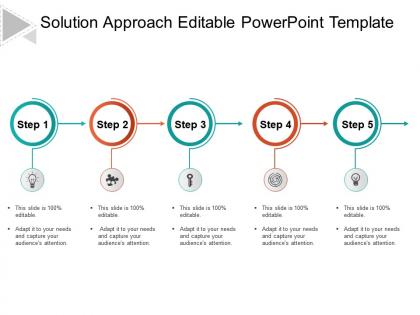
Create stunning presentation on Solution Approach with our Solution Approach editable Powerpoint Template. Every organization comes across various problems and issues time and again. Every problem needs to be considered and a solution needs to be taken out. Using this PPT, you can convey your solution approach to your team and can implement accordingly. This presentation shows a 5 step solution approach visually with 5 icons. These icons consists of cliparts which convey different meanings. A bulb in step one shows innovative thinking to the problem. Second icon shows a puzzle piece which means trying to fit the puzzle or the problem with different ideas.Third one shows a correct key to the solution. Fourth step shows implementation. Fifth step shows light from the bulb which means the problem is solved. This PPT overcomes the mundane text representation and inherits an interesting way to think about solving an issue.The PPT can be used in every domain of work.It will surely help to fix a problem in the shortest possible time. Halt erosion of faith with our Solution Approach Editable Powerpoint Template. Give folks the courage to conquer their doubts.
People who downloaded this PowerPoint presentation also viewed the following :
Solution approach editable powerpoint template with all 5 slides:
Identify the actual circumstances with our Solution Approach Editable Powerpoint Template. Enable folks to make accurate inferences.
FAQs for Solution approach
Honestly, templates are a game changer - you'll save so much time instead of building everything from zero. Just drop your content in and boom, you're done. Your presentations will look way more polished too, even if design isn't your thing. What I really love is how they keep everything looking consistent when you're presenting to important people. The spacing and fonts are already figured out for you, which is honestly one less thing to stress about. Find one that fits your company vibe, customize it once, then you can basically reuse it forever. Trust me on this one.
Dude, templates are seriously a game changer. You're not wasting hours messing around with colors and fonts when you should be working on your actual content. The design stuff is already handled – professional looking slides, consistent branding, all that jazz. I used to be one of those people who'd start every presentation completely from scratch (why did I torture myself like that?). Now I just drop my content into a template and boom, I'm basically done. Trust me, grab a template next time and you'll cut your prep time in half easy.
Honestly, templates are game-changers because you can match them to whoever's in your audience. Way better than those boring generic slides everyone's seen a million times. I always tweak the colors and fonts to fit the vibe - makes you look so much more professional. The cool part? You can throw in polls or Q&A sections to actually get people talking instead of zoning out. Oh, and switching up the layout for different groups keeps things feeling fresh. Takes like 10 minutes but totally worth it.
Looking for a PowerPoint template? You want consistent fonts and colors throughout - nothing worse than slides that look like a hot mess. Get one with different layouts already set up: title slides, content ones, comparison charts, whatever. Most templates I've seen are stuck in the early 2000s honestly, so hunt for something that doesn't scream "corporate dinosaur." Make sure there's placeholder text you can actually swap out fast, plus spots for charts and images. The real deal? Try replacing content - if it breaks or looks wonky, keep searching.
Honestly, specialized templates are a game changer because they're already built for your specific field. Healthcare ones come with medical icons and patient flow stuff, while tech templates focus on roadmaps and data viz. You're not reinventing the wheel every single time. Your presentations automatically look way more professional to your audience too. I always grab a few in my industry and just swap in my own brand colors and fonts - saves me hours of design headaches. Way better than those generic templates everyone uses.
Oh man, don't go crazy changing everything at once - that's how you wreck the whole look. Those master slide layouts? Leave them alone unless you actually know what you're doing. Trust me on this one. Keep it simple with maybe 2 fonts tops and stick with their colors. I see people go wild with like 15 different fonts and it looks awful. Also, hunt down any leftover placeholder text because nothing screams "I didn't finish this" like Lorem ipsum still hanging around. Just swap your logo and text first, then see how it feels.
Start with the master slides - View > Slide Master is where you'll update colors, fonts, and your logo. Seriously saves so much hassle later because it automatically applies to everything. I learned this the hard way after spending hours fixing slides one by one. Don't forget to replace those generic stock photos with something that actually fits your brand. Once it looks good, save it as a .potx file. That way your team can use the same template for future stuff instead of starting from scratch every time.
So you'll mostly find editable PowerPoint templates as .pptx files - that's the standard format everyone uses now. Sometimes they come as .potx files too, which are specifically template files. You might see some old .ppt ones floating around, but those are getting harder to find. Oh, and some designers throw in Keynote versions for Mac people or Google Slides formats as a bonus. Honestly, stick with .pptx if you can. It works great with newer PowerPoint versions and won't mess up your animations or fonts. Just double-check your PowerPoint version first so you don't run into any weird compatibility issues!
Honestly? First figure out who you're presenting to and what type of content it is - pitch deck, training stuff, whatever. Then hunt for templates that actually match that vibe. I always make sure there's enough different slide layouts because cramming your content into random formats sucks. Color scheme should work with your brand too. Oh, and be real about your design skills - some templates are way too fancy if you're not great with that stuff. I usually download like 3-4 options and test them with my actual slides before picking one. Trust me, your content should pick the template, not the other way around!
Honestly, master slides are your best friend here - they'll let you swap colors and fonts across everything instantly. Find templates with auto-resizing placeholders so your text doesn't get all wonky when you add stuff. Smart guides are clutch too, saves you from manually aligning everything like it's 2005. Make sure there's more than just basic title slides - you want variety. Good ones come with icon libraries and image spots that won't stretch weird. Oh, and definitely test-drive it first! Edit a couple slides to see if the formatting actually holds up when you start messing with it.
Yeah, colors totally mess with people's heads in presentations! Blues and greens make you seem trustworthy and chill. Red and orange? Pure energy but can backfire big time. I watched this guy bomb a financial presentation because he went crazy with red templates - everyone looked uncomfortable, like he was screaming about losses or something. When you're showing growth stats, green just feels right. Makes sense, right? But honestly, just think about what vibe you want. Don't pick colors that fight against your message.
Delete all that placeholder text instead of just typing over it - trust me, the formatting gets wonky. Stick with the template's fonts and colors, don't add random design stuff that clashes. I swear some people think more colors = better presentation lol. Use the built-in layouts rather than fighting them, and keep things short. Oh, and duplicate slides before you mess with them too much. That way you can always go back to the original if you screw something up. Learned that one the hard way!
Honestly, editable PowerPoint templates are total lifesavers for teams. Everyone starts with the same format so you don't end up with those nightmare presentations where every slide looks different. You can split up sections between people and nobody has to guess what fonts to use or whatever. The best part? You'll actually spend time on content instead of trying to make everything match up later. Oh, and the comment/track changes thing works way better when you're all using the same base template. Set up a shared folder with different templates for different presentation types – trust me on this one.
Go for clean, minimalist stuff with lots of white space. Bold sans-serif fonts work best, and stick to 2-3 colors max or it gets messy. Dark mode templates are actually pretty sweet - way easier on the eyes than I expected. Your template needs solid layouts for charts and data viz since everyone's doing infographics now. Oh, and make sure the icons match each other stylistically. Nothing worse than mixing different icon sets. Pick something that doesn't look like those terrible 2015 stock photos. Mobile compatibility is huge too since people are viewing presentations on their phones constantly.
Look for templates with tons of layout options - makes switching between styles super easy. Storytelling slides have big image spots and minimal text, while data ones focus on charts and comparison grids. I'm totally obsessed with the data layouts because they make messy info look actually readable. You can mix different slide types in the same template too, which is clutch. Oh, and pro tip - just match your slide layout to whatever content you're showing. Keeps everything looking put-together without much effort.
-
Excellent work done on template design and graphics.
-
Helpful product design for delivering presentation.
-
Use of different colors is good. It's simple and attractive.
-
Innovative and attractive designs.