

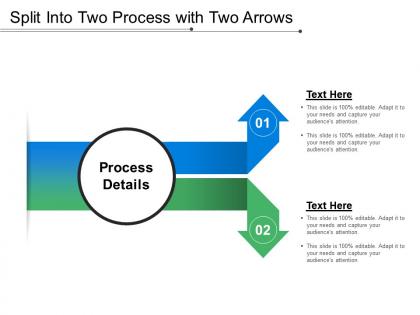
Split into two process with two arrows





Try Before you Buy Download Free Sample Product
 Impress Your
 Audience
 100%
100% Editable
 Save Hours
 of Time


Brighten up your next great idea. Split Into Two Process With Two Arrows on hand to make your next presentation shine.
People who downloaded this PowerPoint presentation also viewed the following :
Split into two process with two arrows with all 5 slides:
Circumstances demand practical solutions. Our Split Into Two Process With Two Arrows generate the answers.

FAQs for Split into two process
So you've got four main steps here. First, figure out what actually needs splitting and why - could be a project, teams, whatever. Planning comes next, and honestly this is where people screw up the most because they get impatient. Take your time here! Then you do the actual split, making sure everyone knows their new stuff. Last bit is checking how it's going and tweaking things. Oh, and write everything down during planning - I know it's boring but trust me, people will forget what they agreed to like two weeks later. Been there.
Honestly, split processes are a game changer - you're basically running stuff at the same time instead of making everything wait in a boring queue. Map out what you're doing now and find steps that don't actually need each other to finish first. Those are perfect for splitting up between different people or systems. It's like having multiple grocery store lanes instead of one massive line (which we've all suffered through). You'll spot bottlenecks way easier too since you can see exactly what's dragging everything down. Way less time wasted overall.
So split processes are huge in chemical manufacturing - they're basically running distillation columns 24/7 to separate compounds and purify stuff. Oil refineries do this constantly too, turning crude into gasoline, diesel, all that. Food processing uses it everywhere, like separating cream from milk or getting oils out of seeds. Honestly, any industry dealing with mixtures that need separating probably uses some version of this. If they care about purity or need to isolate specific components for their final product, they're doing splits somehow.
Honestly, the biggest win is fault tolerance - when one process crashes, your whole app doesn't die with it. Resource isolation is huge too. Security gets better since everything runs in separate memory spaces, and you can scale just the parts that need it instead of the entire thing. Yeah, it's more complex upfront (more pieces to manage), but debugging becomes way easier when you can pinpoint exactly which process is acting up. The stability gains are totally worth the extra setup hassle. I'd start simple though - just pull out your most CPU-heavy stuff first and see how it feels.
Honestly, flowcharts are a game-changer for this stuff. When processes split into different paths, people get so confused trying to follow written instructions - I've watched entire teams just give up halfway through. But with a visual template? You can actually see where things branch off, what happens in each direction, and where they come back together. Plus everyone knows exactly what their part is. I'd start simple with a basic flowchart, then throw in swim lanes if you've got multiple departments involved. Way less headache than trying to decode some massive text document.
Honestly depends what you're splitting. Excel or Google Sheets work fine for basic stuff - I'm always in Sheets anyway so that's usually my go-to. Splitwise is clutch if you're dealing with expenses and need to track who owes what. For bigger data splits, SQL is probably your friend but that's getting into more technical territory. Oh, and don't sleep on project management tools like Asana or Trello - they're surprisingly good at dividing up workflows. I'd just use whatever your team's already comfortable with first. No point learning something new if what you have works.
Map out your current process first - you'll spot the obvious breaking points pretty quickly. Look for places where work just sits there waiting, or where you need totally different skills. Decision points work great too. I've found that wherever different teams or systems touch the process, that's usually a natural split. But here's the thing - don't create more coordination nightmares than you solve. Some splits sound good on paper but are terrible in practice. The bottlenecks will jump out at you once everything's visual. Test small batches first though, because what looks logical doesn't always improve flow.
Track conversion rates at each step, plus time-to-completion and drop-off rates. Most people get obsessed with conversions but totally ignore timing - huge mistake if you ask me. Sure, users might convert better, but if they're taking forever, you're just creating friction somewhere else. Also check user satisfaction scores and support tickets (learned this the hard way). Those tell you if you're actually fixing problems or just moving them around. Set your baselines first, then monitor weekly for at least a month. Oh, and don't forget error rates - they'll spike if something's broken.
Honestly, communication is gonna make or break this whole thing. Start with daily check-ins between teams - don't let people go dark for days. Set up shared dashboards so everyone can see what's actually happening in real time. Pick someone from each team to be the main contact person, otherwise you'll have chaos. Weekly meetings catch problems before they explode (learned this the hard way). Map out who needs updates and when. Standardized handoffs are clutch - can't have stuff falling through cracks when work moves between teams. Oh, and overcommunicate everything. Seriously, people assume way more than they should.
Don't overcomplicate your first split - seriously, I've seen people create these elaborate decision trees that become impossible to manage. Start simple and test everything before adding more conditions. You'll definitely need a rollback plan because something always breaks (learned this the hard way). Focus on metrics that actually matter, not just the fancy dashboard numbers that look good in meetings. Oh, and write down your decision logic clearly - future you will thank you when you're trying to figure out why traffic is splitting 60/40 instead of 50/50. Test your basic setup first. Once that's solid, then you can get creative with the complexity.
Yeah, you can definitely make split processes work remotely! Google Workspace or Notion are solid for letting people work on their parts at the same time. The tricky part is you can't just tap someone on the shoulder anymore, so you need way clearer handoff points. Regular video check-ins help a ton - honestly more than I expected when we first went remote. Make sure everyone can see the full timeline and knows what depends on what. Project management tools become your best friend for tracking who's doing what. It's just about being more deliberate with communication than when you're all in the same room.
You really need feedback to know if your split process is actually working. I'd set up regular check-ins to measure performance and get user input - trust me, bottlenecks always pop up where you least expect them. Track your KPIs from both sides of the split, otherwise you're just guessing if things are improving or getting messier. The whole point is seeing whether you're hitting your goals or just adding unnecessary complexity (which honestly happens more than people admit). Act on what the data shows you. Without that feedback loop, your process will probably drift away from what you originally intended.
Honestly, case studies are your best friend here because they show actual numbers instead of just promises. You'll find real metrics - like how much processing time dropped or accuracy improved. The cost savings data can be wild when companies nail the implementation. Plus they'll show you what NOT to do, which is honestly just as valuable. Try to find ones that match your company size though, since a Fortune 500 case study won't help much if you're running a small operation. I'd grab 2-3 solid examples to show your stakeholders. Nothing beats concrete proof when you're trying to get buy-in.
Definitely do hands-on workshops where people practice with real scenarios - way better than just talking at them. Have your experienced folks mentor the new people, and make some simple visual guides they can look at while they're figuring it out. Most people learn by actually doing this stuff anyway, not reading about it. Oh, and do regular check-ins the first couple weeks to catch problems early. The whole thing shouldn't feel overwhelming, you know? I'd probably start with small groups first, then expand once you've got the training process down. That way you can fix any issues before rolling it out to everyone.
You're totally right to think about splits with Agile - they work great together! Breaking stuff down into smaller pieces means you can iterate faster and get feedback sooner. Think of each split as a mini-MVP that actually delivers value instead of waiting months for some huge release. Honestly, I've seen too many teams get stuck on massive user stories that never seem to finish. Next time you're in sprint planning, grab your biggest, most intimidating story and chop it into 2-3 smaller chunks. It's way less scary and you'll ship faster.
-
The Designed Graphic are very professional and classic.
-
Great designs, really helpful.