

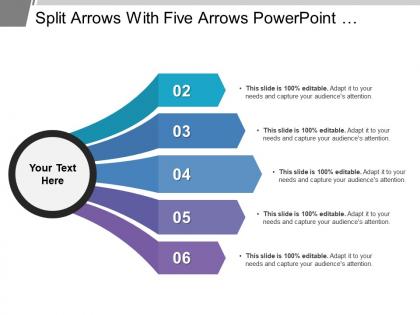
Split arrows with five arrows




Try Before you Buy Download Free Sample Product
 Impress Your
 Audience
 100%
100% Editable
 Save Hours
 of Time


Insist on folks indulging in honest deals with our Split Arrows With Five Arrows. Institute an ethical code.
People who downloaded this PowerPoint presentation also viewed the following :
Split arrows with five arrows with all 5 slides:
Insist on jolly good care with our Split Arrows With Five Arrows. Introduce guidelines for individual attention.
FAQs for Split arrows
Okay so split arrows are actually super helpful for showing different paths from one starting point. Like when you're mapping out "what if" scenarios or decision trees. Way better than cramming everything into bullet points (which I totally used to do). Your audience can follow each branch without getting lost in some confusing text wall. The visual flow just works better than those clunky old flowcharts. Oh and pro tip - use different colors for each path if you really want to make it pop. Makes the whole thing look cleaner and people won't zone out halfway through.
Split arrows work great when your process goes in multiple directions - like showing decision points or parallel tasks happening at once. I throw them into sprint planning docs constantly, they're super helpful for project stuff. Just make sure you label each branch clearly so people actually know what's going on. Different colors for each split makes it way easier to follow. Oh, and if your processes meet back up later, definitely rejoin those arrows - looks way cleaner that way. Otherwise you'll have random arrow branches just hanging out there.
Split arrows are perfect for cause-and-effect stuff or when you're breaking down processes step-by-step. I use them all the time in strategy presentations and project timelines. They're honestly a lifesaver for "what if" scenarios - like showing different ways to enter a market or handle risks. Works great when one decision splits into multiple outcomes instead of just going A to B to C. People really get it when you're explaining choices and what happens next. Makes those crazy decision trees actually make sense, you know? Way better than trying to explain branching paths with bullet points.
Hey! So for split arrows, high contrast is your best friend - navy/light blue, dark gray/bright green, black/white combos work great. Each section needs to pop so people can tell them apart instantly. Gradients look tempting but they'll mess with readability (learned that one the hard way lol). Stick with bold, solid colors instead. Oh and keep your line weights the same throughout - it looks way cleaner. If you're adding text, skip the fancy fonts. Here's a quick test: squint at your design. Can't tell where sections divide? You need more contrast. I always check mine in grayscale first.
Split arrows are pretty flexible - start with colors that match your brand and adjust the thickness depending if you want something bold or more subtle. The actual arrow style matters way more than you'd think though. Sharp angular splits look totally different from curved ones, and gradients can add a nice touch if that's your thing. Play around with how wide the split is and the spacing between parts too. Oh, and definitely keep whatever style you pick consistent across everything or it'll look messy. Takes some experimenting but you'll find what works.
Don't cram too many branches into one arrow - it gets messy and people lose track. Use different colors or line weights so each path stands out. Label everything clearly! I've sat through presentations where arrows split but nobody knows what they mean. Super annoying. Keep text short on each branch. Make the flow logical left to right. Here's what I always do - have someone else trace the paths first. If they're confused, you need to simplify. The whole point is clarity, right? Also space things out properly so it doesn't look cramped.
Okay so split arrows are actually super useful for breaking down complicated stuff without frying people's brains. You know how everyone zones out when you throw a massive flowchart at them? This fixes that. Show one branch at a time instead of everything at once. Works great for decision trees or when you're walking through cause-and-effect scenarios. People can actually follow along instead of getting overwhelmed. I started doing this maybe six months ago and honestly, it's made such a difference in keeping people engaged. Just reveal each split as you go - way better than dumping it all on them.
Adobe Illustrator's your best bet if you want total control over the curves and split effects. Figma works great too, especially if you're collaborating with others. PowerPoint's arrow tools are actually way better than they used to be - kind of blew my mind when I tried them recently. You can customize their presets pretty easily. Canva's good for quick templates when you're in a rush. Oh, and whatever you pick, export as SVG or high-res PNG so they don't look pixelated when you resize them.
Look, split arrows are super focused - they just show one thing breaking into parts. Flowcharts? Way more complicated. They map out entire processes with decisions, loops, all that stuff. So like, if you need to show your whole approval process, go with a flowchart. But if you're just showing how a budget divides into four categories, split arrows are perfect. They're cleaner and won't overwhelm people. Honestly, I always pick split arrows when I don't need all the bells and whistles of a full workflow diagram.
Basically use split arrows when you're showing how things connect or flow into each other. Regular bullets are fine for like grocery lists or whatever, but they're just... there. Split arrows actually move your eye along - perfect for customer journeys, project steps, that kind of stuff. They make it super obvious how one thing leads to another. Honestly, once you start using them for processes, regular bullets feel kind of boring. Save them for when you need to show relationships between ideas, not just random lists.
Okay so split arrows are basically lifesavers when you've got too much info crammed together. They show how one big idea breaks into smaller pieces - like branches on a tree, you know? Super helpful for processes or when you're explaining how A leads to B leads to C. I swear, whenever I'm building slides and notice I'm going bullet-point crazy, I switch to split arrows instead. Way cleaner flow. Your audience can actually follow along without their eyes glazing over. Honestly beats those messy text walls every time.
Okay so with split arrows, don't animate everything at once - your audience will get lost. Have the main arrow show up first, then each branch comes in with like 0.2-0.3 second delays between them. I'm boring and usually stick with "Wipe" or "Fly In" because they look clean. Bounce effects are kinda cheesy unless that's what you're going for? Keep the timing the same across all branches though. Oh and definitely click through it yourself a few times to see if it matches how fast you actually talk. I always forget to do this and end up rushing through my presentation.
So I'd start by making those split arrows as vectors - way easier to scale them without losing quality. Digital's pretty straightforward, you can add hover effects or whatever. Print's more annoying though. Your arrow lines need to be thick enough, like 1pt minimum, or they'll look terrible when printed. Those dividing lines between sections? Test print them first, trust me. I learned this the hard way on a project last year. Always make separate versions for each format. Oh, and design for print first since it's pickier, then scale up for digital.
Split arrows work really well when you're showing choices or how one thing branches out into multiple paths. Perfect for decision trees or breaking down a main idea into subcategories. I use them all the time in strategy presentations - honestly they're kind of addictive once you start! The trick is labeling each branch clearly so people can follow the logic. They're clutch for "if this, then that" scenarios. Short version: anytime you want to show multiple outcomes or options stemming from one starting point, split arrows are your friend. Just don't go overboard with them.
Dude, split arrows mean totally different things depending on where you're from. Western cultures usually see them as choices or branching paths. Indigenous traditions? Way more complex - could be balance, spiritual stuff, duality. I find Eastern interpretations fascinating since they focus on harmony between opposites, like yin-yang vibes. Don't just assume everyone reads your design the same way. Research your audience first, especially if you're dealing with global teams. Trust me, a little cultural homework saves you from awkward misunderstandings later.
-
Visually stunning presentation, love the content.
-
Topic best represented with attractive design.