

System development lifecycle waterfall model ppt sample




Try Before you Buy Download Free Sample Product
 Impress Your
 Audience
 100%
100% Editable
 Save Hours
 of Time


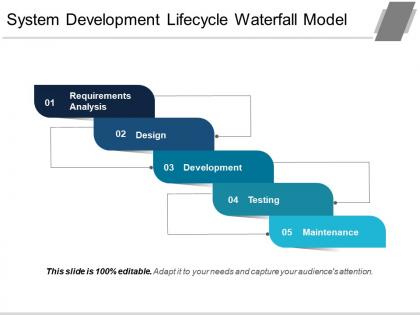
Engage your teammates and viewers for system development matters through our, We have shown a high-quality design with staircase design and six stages to show a system development process. Six stages shown here are, requirement analysis, design, development, testing, and maintenance. Enhance your business working patterns and show key elements for an enduring system through this system development framework. Include your key points and get your ideas across through the help of a PowerPoint template by editing the layout/elements shown. The text area below each icon can be used to describe your business planning and actions needed to be taken in order to achieve desired goals. We have shown engaging color patterns and icons here to make this PPT design more interactive. Get started with all new experiences with our system development lifecycle waterfall model PPT sample. Just download and get started. Generate a feeling of ecstasy with our System Development Lifecycle Waterfall Model Ppt Sample. Give folks an intense experience.
People who downloaded this PowerPoint presentation also viewed the following :
System development lifecycle waterfall model ppt sample with all 5 slides:
Our System Development Lifecycle Waterfall Model Ppt Sample keep your eyes on the goal. Don't allow attention to be diverted.
FAQs for System development lifecycle waterfall
So basically there are six phases you go through in order: Requirements Analysis, System Design, Implementation, Testing, Deployment, and Maintenance. Once you finish one, you move to the next - no skipping around or going backwards. It's super rigid like that. Everything gets documented heavily at each step. Here's the kicker though - if you mess up early requirements and need to fix them later? That'll cost you big time. I learned this the hard way on a project last year. That's why everyone obsesses over getting requirements perfect upfront before any actual coding happens.
So basically the Waterfall Model makes you document EVERYTHING before moving on - no exceptions. You need stakeholder sign-off on requirements specs, design docs, test plans, the whole nine yards. Can't move to the next phase without approval. Super rigid? Yeah, but that's kinda the whole point. Creates this massive paper trail so you always know exactly what you're building and why. Downside is it feels bureaucratic as hell sometimes. But honestly, it beats having those "wait what are we even doing" moments six months in. Figure out what docs your company actually needs for each phase first.
Look, Waterfall's main thing is being super straightforward - you've got clear phases and know exactly what you're getting at each step. Makes budgeting way less of a headache since everything's mapped out linearly. Documentation can be overkill sometimes but honestly, you'll appreciate it later. Works great when requirements are solid and won't shift around much. Stakeholders dig it because they can track progress easily. Oh and if you're dealing with compliance stuff or really rigid requirements, it's probably your safest choice. Not glamorous but it gets the job done.
Waterfall's perfect for stuff with rock-solid requirements that won't change. Government projects, compliance work - you know, when everything's locked down from the start. New teams actually do well with it since there's clear steps to follow. Yeah, it gets trashed a lot but honestly? Some stakeholders just want zero surprises and fixed budgets. Don't even think about it for experimental features though - you'll hate your life. Works when you need predictability over being able to pivot. Oh, and finance departments love it because they can actually plan ahead.
Look, waterfall is super linear - you can't move forward until each phase is totally done. Requirements first, then design, then coding, whatever. Agile's the opposite though. Short sprints where you're constantly building stuff and getting feedback. With waterfall, stakeholders wait months to see anything working. Kind of brutal honestly. Agile lets you demo something every couple weeks, which people love. If your requirements won't change (rare!), waterfall's fine. But most projects? You'll want that flexibility agile gives you when things inevitably shift.
Ugh, Waterfall's main problem? You can't go backwards once you hit the next phase. So when requirements change (and they WILL change, trust me), you're basically screwed. Stakeholders don't see anything working until the very end either - cue the inevitable "wait, this isn't what we had in mind" drama. The whole linear thing just kills flexibility. I mean, late feedback is a nightmare too since you've already built half the thing. Only go with Waterfall if your requirements are absolutely set in stone and won't budge. Otherwise you'll hate your life.
Ugh, Waterfall and changing requirements are like oil and water. The whole thing assumes you nailed down every detail upfront - which, let's be real, almost never happens. Once you're past the requirements phase and into design or coding, going backward gets messy fast. Think of it like renovating your kitchen halfway through building the house. Every change ripples through the other phases, delays pile up, and your budget starts bleeding. Short bursts, some longer explanations that actually flow naturally. If there's any chance your requirements might shift (and there usually is), you'll probably want to look at Agile methodologies instead.
Dude, with Waterfall you're totally stuck once dev starts - no takebacks like Agile. Get ALL your stakeholder feedback during requirements or you're screwed. I learned this the hard way on a project that went completely sideways because we didn't nail down what people actually wanted upfront. Any changes later? Crazy expensive to fix. Do tons of interviews and workshops before design kicks off. Yeah it's tedious, but document everything and get those sign-offs. Trust me on this one - future you will be grateful when things don't blow up halfway through.
Honestly, the planning phase is make-or-break here - once you lock in those phases, you're stuck with whatever you decided. I'd spend way more time on requirements than feels comfortable because rushing that part always bites you later. Break everything down into detailed work structures and add buffers (like 15-20% minimum, trust me on this). Something will definitely go wrong. Track progress hardcore at each gate and don't let scope creep slip in without proper change control. The hardest part? Not caving when stakeholders want you to skip ahead before a phase is actually done.
So with Waterfall, testing happens in these set phases that you can't really skip around. First you do unit testing while coding, then integration when you're connecting stuff together. System testing comes next - honestly this part can be brutal if the earlier stages missed things. User acceptance testing wraps it up with real stakeholders testing everything. Each phase builds on the last one, which sounds neat in theory but means going backwards requires massive rework. My advice? Nail down those test plans early because you're stuck with them for the whole project.
Waterfall's terrible at handling risks tbh. You do all your risk planning upfront, then you're basically locked in until the project ends. New problems always pop up during development, but there's no good way to pivot or adapt. The whole thing is too rigid - you can't go back and fix issues as they come up. Instead you get stuck doing tons of documentation and approvals at every stage, which honestly feels like busywork half the time. If you're forced to use Waterfall, spend way more time on that initial risk assessment than you think you need. Trust me, you won't get another shot.
So for Waterfall stuff, Microsoft Project and Gantt charts are your best friends for tracking those sequential phases. Documentation is everything - Confluence, SharePoint, or honestly just solid Word templates work fine for requirements and design docs. You'll need Git for version control, plus testing tools like Selenium when you hit that phase. Here's the thing though - the actual tools don't matter as much as having your processes locked down. Waterfall lives and dies by that paper trail, so whatever you pick needs to handle documentation and traceability well. I'd map out what each phase actually needs first, then work backwards to choose tools. Way easier than trying to force tools into a process that doesn't fit.
Build quality checks right into each phase from the start - you can't really go back and fix stuff easily later. Testing becomes super critical (honestly it's make-or-break), so don't rush that part. Get stakeholders to actually sign off on deliverables before moving ahead - this stops scope creep and those annoying miscommunications. Review everything thoroughly at each stage gate. Document your standards early and stick to them. Oh, and loop your QA team in from day one, not just at the end when everything's already built.
Don't flip everything at once - that's how teams implode. Instead, try mini-reviews every couple weeks and break your big requirements into bite-sized pieces. Get stakeholders involved while you're still building, not after everything's done. The hardest part? Learning to roll with changing requirements mid-project. Honestly, it feels chaotic at first but you get used to it. I'd test this stuff on a smaller project that won't tank if things get weird. Mix your old process with some Agile pieces - like bringing end users in earlier. You'll figure out what clicks for your team.
Honestly, Waterfall kind of sucks for collaboration. Teams work in these rigid phases where they just pass stuff along and barely talk to each other after that. So your devs finish coding, hand it off to QA, then it's like "see ya later." Pretty different from Agile where everyone's constantly chatting. The whole thing relies heavily on formal docs instead of actual conversations - which I guess works for some massive, complicated projects? But you'll definitely get those annoying silos where nobody knows what the other teams are doing. If you're stuck using it, at least schedule regular meetups between teams. Trust me, those communication gaps will come back to haunt you otherwise.
-
Informative presentations that are easily editable.
-
Great quality slides in rapid time.