

TOPTAL Investor Funding Elevator Pitch Deck ppt template




Try Before you Buy Download Free Sample Product
 Impress Your
 Audience
 100%
100% Editable
 Save Hours
 of Time


Check out our professionally designed TOPTAL Investor Funding Elevator Pitch Deck. This Investor Deck covers the Global Talent Network Platform Elevator Pitch Deck. Moreover, the Freelancer Recruitment Platform PPT involves a problem statement and the companys critical solutions to help freelancers find jobs and businesses to identify the right talent. In addition, the Funding Deck involves products and services, key facts, unique selling points, significant milestones achieved, client testimonials, business models, revenue streams, competitive analysis, financial performance, projections, and an investment ask-for investor funding pitch deck. Lastly, an Investor Pitch Deck involves exit strategy, the team involved in the company, the organizational structure, and the companys shareholding pattern after getting funding from potential investors. Get access to this powerful template now.
People who downloaded this PowerPoint presentation also viewed the following :
Content of this Powerpoint Presentation
Slide 1: The slide introduces TOPTAL Investor Funding Elevator Pitch Deck.
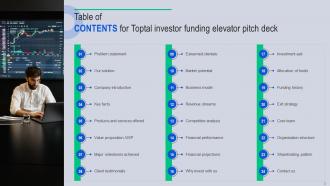
Slide 2: The slide displays Table of CONTENTS for presentation.
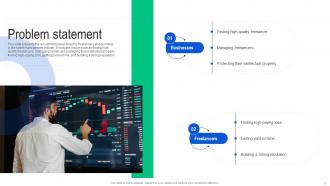
Slide 3: This slide presents the recruitment issues faced by freelancers and business in the talent management industry.
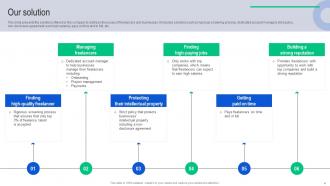
Slide 4: This slide highlights the solutions offered by the company to address the issues of freelancers and businesses.
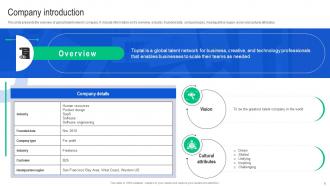
Slide 5: This slide gives the overview of global talent network company.
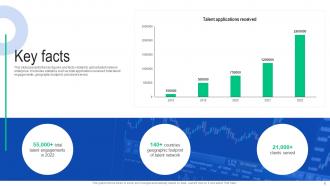
Slide 6: This slide renders the key figures and facts related to global talent network enterprise.
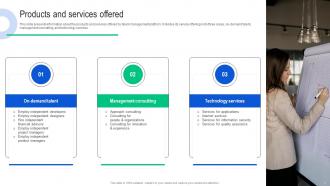
Slide 7: This slide gives information about the products and services offered by talent management platform.
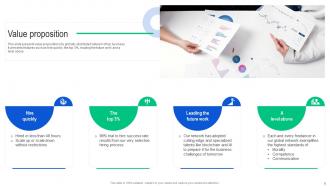
Slide 8: This slide demonstrates value proposition of a globally-distributed network of top business.
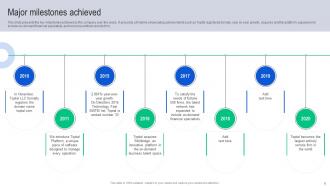
Slide 9: This slide depicts the key milestones achieved by the company over the years.
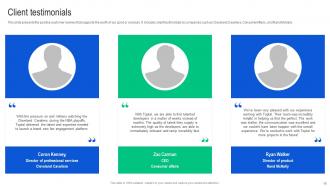
Slide 10: This slide presents the positive customer reviews that supports the worth of our good or services.
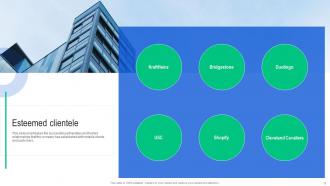
Slide 11: This slide emphasizes the successful partnerships and trusted relationships that the company has established with notable clients and customers.
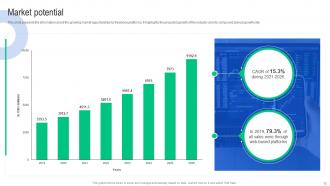
Slide 12: This slide represents the information about the growing market opportunities for freelance platforms.
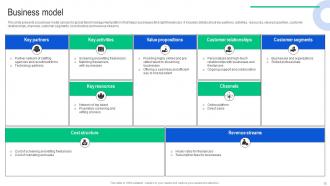
Slide 13: This slide briefs about a business model canvas for global talent management platform that helps businesses find right freelancers.
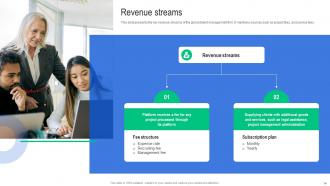
Slide 14: This slide highlights the key revenue streams of the global talent management firm.
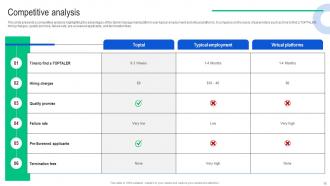
Slide 15: This slide represents a competitive analysis highlighting the advantages of the talent management platform over typical employment and virtual platforms.
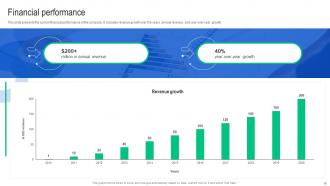
Slide 16: This slide demonstrates the current financial performance of the company.
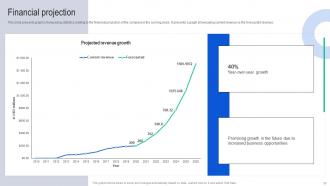
Slide 17: This slide presents graphs showcasing statistics relating to the financial projection of the company in the coming years.
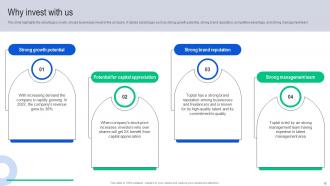
Slide 18: This slide highlights the advantages on why should businesses invest in the company.
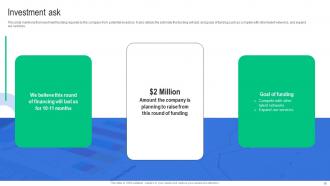
Slide 19: This slide mentions the investment funding required by the company from potential investors.
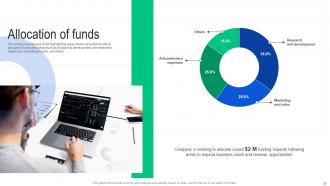
Slide 20: This slide showcases a pie chart highlighting areas where raised funds will be allocated.
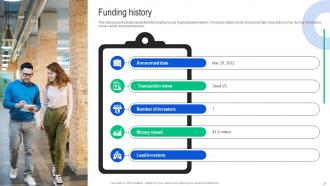
Slide 21: This slide highlights details about the total funding rounds of global talent network.
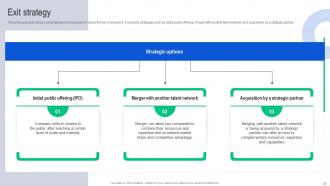
Slide 22: This slide depicts various exit strategies for business to reduce the risk of investors.
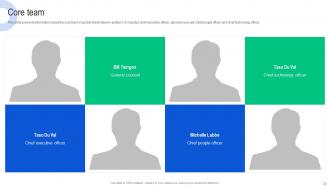
Slide 23: This slide shows information about the core team of global talent network platform.
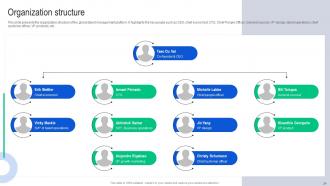
Slide 24: This slide highlights the organization structure of the global talent management platform.
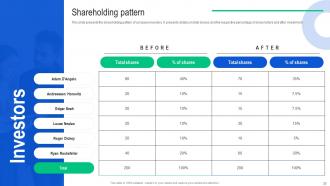
Slide 25: This slide represents the shareholding pattern of company investors.
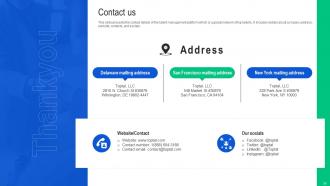
Slide 26: This is a Thank You slide with address, contact numbers and email address.
Slide 27: This slide shows all the icons included in the presentation.
Slide 28: This slide is titled as Additional Slides for moving forward.
Slide 29: This is About Us slide to show company specifications etc.
Slide 30: This is Our Mission slide with related imagery and text.
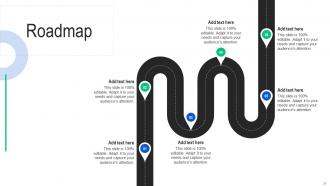
Slide 31: This slide presents Roadmap with additional textboxes.
Slide 32: This slide shows Post It Notes. Post your important notes here.
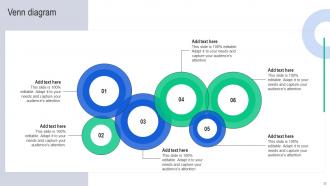
Slide 33: This slide depicts Venn diagram with text boxes.
TOPTAL Investor Funding Elevator Pitch Deck ppt template with all 41 slides:
Use our TOPTAL Investor Funding Elevator Pitch Deck ppt template to effectively help you save your valuable time. They are readymade to fit into any presentation structure.









FAQs for TOPTAL Investor Funding Elevator Pitch
Dude, Toptal's templates are actually pretty solid for consulting stuff. They handle technical content way better than most - like when you're throwing in code snippets or messy data charts, everything still looks clean. Generic templates usually just... fall apart with that kind of thing. Plus they've got all the sections you actually need built in - timelines, team bios, pricing breakdowns. The colors are super muted too, which I love because your actual work stands out instead of some random design elements. Honestly? Grab a couple and just tweak them for your go-to decks. You'll thank me later.
Dude, Toptal templates are actually pretty solid. Clean layouts that don't mess with your story flow - which is huge because I've definitely been there with templates that just fight you the entire time. You can focus on your actual content instead of wrestling with formatting. The visual hierarchy guides people's eyes naturally from point to point, plus it looks professional without trying too hard. I'd say pick one that matches your vibe first, then build your story within that framework. Way less headache than starting from scratch, honestly.
Dude, tech companies and consulting firms absolutely crush it with these templates - they're always dealing with messy, complex stuff that needs to look clean. Finance and marketing agencies love them too since they're pitching constantly. The templates are honestly pretty sweet, they do all the design work so you just dump in your content. Oh, and healthcare/education folks use them for research presentations and data dumps. I mean, if you're trying to convince people with charts and graphs (which, let's be real, most of us are), just grab one. You'll save like 3 hours of wrestling with PowerPoint formatting.
Yeah, Toptal templates are way more flexible than you'd think! They've got formal business layouts with clean lines if you need that conservative look. But there's also creative options with bold fonts and vibrant graphics - honestly caught me off guard how customizable they are. You can tweak fonts, colors, visual elements, whatever matches your audience. Corporate board meeting? Go conservative. Startup pitch? Get creative with it. I'd browse through different categories first though, find what fits your style. Way easier than starting from scratch, trust me.
Nah, Toptal doesn't have those kinds of templates - they're more about hooking you up with freelancers than being a template library. I'd skip looking there honestly. Canva's got way better options for remote work stuff, or even just use PowerPoint's built-in ones. They're not terrible anymore. If you're already working with a Toptal designer though, they could totally whip up something custom for you. Otherwise I'd just grab any decent business template and tweak it for your remote work content. Way easier than hunting around for something super specific.
Yeah, Toptal's templates are actually pretty customizable! Colors and fonts are super easy to change - honestly their default blue gets old fast. You can mess around with layouts, throw in your own branding stuff, and rearrange slides however you want. The template editor lets you modify text styles and add custom graphics too. One thing though - definitely save your changes as a new template when you're done. That way you won't have to redo everything next time. Pretty handy for client work since you can tweak things to match their vibe.
Don't just slap your logo on those Toptal templates and call it good - that's honestly such a waste. The real value comes from customizing everything to match what your audience actually wants to see. Change up the visual hierarchy, rewrite the messaging, test different headlines and CTAs. I always start with whatever template performs best in my category, then go from there. Your audience data should guide those decisions, not just what looks pretty. Oh and definitely A/B test the color schemes too - sometimes the weirdest combinations work. The templates are decent bones but you've got to add the meat.
Yeah they work fine with both! Most Toptal templates come as PPTX files, so PowerPoint handles them no problem. Google Slides is pretty good too - just upload and it converts automatically. Sometimes the fonts get weird though, especially if it's something fancy. Actually happened to me last week with this cool template that had custom fonts. The layouts stay intact most of the time. I'd grab one template first and test it out before you buy a whole bunch. Better safe than sorry, you know?
Toptal's visuals really work because they're clean without being boring. The templates hit this sweet spot - professional but not distracting from your actual content. Charts and graphics enhance what you're saying instead of competing with it. They've got great contrast ratios too, so everything looks crisp whether you're screen sharing or presenting in person. What I love most is how they include spots for code snippets and architecture diagrams. Honestly, the visual hierarchy does most of the work for you. Just don't cram too much onto one slide - it ruins the whole effect.
Hey, I think you might be confusing Toptal with something else - they don't actually have presentation templates. They're more of a freelance marketplace where you can hire top developers and designers. Pretty pricey though, from what I've heard. If you just need templates, try Canva or Slide Carnival instead. Way easier. PowerPoint has decent built-in ones too if you're already using it. But if you want something totally custom and have the budget, then yeah, hiring a Toptal designer could work.
Honestly, people seem pretty happy with Toptal's templates. They cut down setup time big time and keep everything looking professional. The design ones are solid - detailed but you can still tweak them how you want. Yeah, some devs whined at first about being "boxed in" (shocking, I know), but they got over it once they realized how much faster they shipped. Main gripe is there aren't enough options for weird niche projects. I'd test drive their popular ones first - see if they vibe with how you work before getting fancy with the specialized stuff.
So Toptal actually tests their templates with real users, which is pretty smart. They get feedback during the whole design process and focus on clean layouts that make sense. No confusing menus or weird navigation stuff. Honestly, they seem to understand that everyone's swamped these days - nobody wants to figure out some overcomplicated tool. The templates have good defaults built in too, like fonts and colors that actually work for business stuff. I'd just start with their popular ones since those have been tweaked based on what tons of people said worked best.
Yeah, they've got templates for all that stuff - conferences, webinars, workshops, networking events. Check the "Events" section in their template library, it's organized pretty well. Each one comes with the usual suspects: speaker bios, schedules, registration forms, sponsor areas. Saves you from building everything yourself, which is nice. Their webinar ones are actually really good since they have Q&A sections and live chat built in. Oh and definitely look through a few different layouts first before you start tweaking anything - I made that mistake once and had to redo everything.
Yeah, so Toptal has a help center with guides and tutorials that's actually pretty useful. I'd start there first - most of the common template issues are covered with step-by-step fixes. If that doesn't work, you can email or chat with their support team directly. Response times aren't bad from what I've experienced. Oh, and they've got a community forum too where people share tips for customization stuff. I think I spent way too much time browsing that forum once, but honestly found some good solutions there. Technical glitches and formatting problems usually get sorted pretty quick if you know where to look.
Yeah, Toptal's actually pretty solid with accessibility stuff. Their templates come with high contrast colors and readable fonts built in. Screen readers work well with them too since they use proper heading structures and semantic markup. There's even alt text placeholders for images - which honestly more companies should do. You can navigate everything with just your keyboard, and they meet WCAG 2.1 AA standards. Just don't mess with the contrast ratios when you're customizing, and remember to fill in those alt text spots they've marked.
-
I came across many PowerPoint presentations with excellent creatives and I believe they would be beneficial to my work.
-
Incredibly beautiful designs that will help you get noticed! These eye-catching templates are perfect for corporate presentations that can be altered to fit any occasion or taste.