

Airtable Investor Funding Elevator Pitch Deck Ppt Template





Try Before you Buy Download Free Sample Product
 Impress Your
 Audience
 100%
100% Editable
 Save Hours
 of Time


Check out our professionally designed Airtable Investor Funding Elevator Pitch Deck. This Investor deck PPT covers an investor funding pitch deck for a cloud database software company. Moreover, in the Cloud database platform Powerpoint, the company deals in creating and sharing relational databases and offers seamless integration to enhance operational efficiency. Also, Data structure presentation involves details such as products and services provided, key facts, unique selling points, and many more investment ask-for-investor funding pitch decks. Lastly, the Funding deck involves the exit strategy, the team involved in the company, the organizational structure, and the shareholding pattern of the company after getting funding from potential investors. Download our 100 percent editable and customizable deck to know more in detail.
People who downloaded this PowerPoint presentation also viewed the following :
Content of this Powerpoint Presentation
Slide 1: The slide introduces AIRTABLE Investor Funding Elevator Pitch Deck.
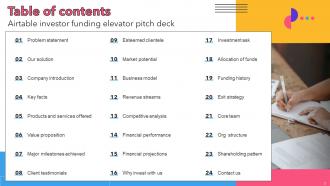
Slide 2: The slide displays table of contents.
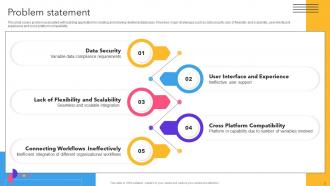
Slide 3: This slide covers problem associated with building application for creating and sharing relational databases.
Slide 4: This slide highlights key solutions offered by cloud based software company.
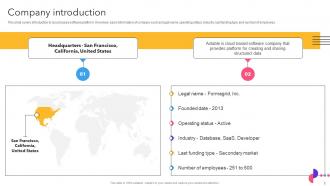
Slide 5: This slide represents introduction to cloud based software platform.
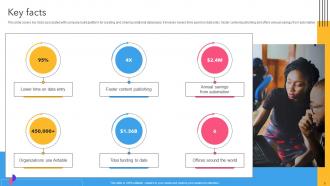
Slide 6: This slide shows key facts associated with company build platform for creating and sharing relational databases.
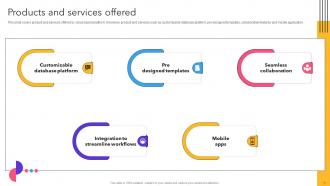
Slide 7: This slide displays product and services offered by cloud based platform.
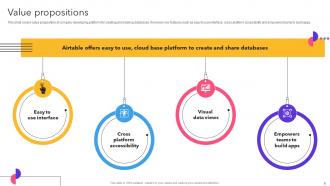
Slide 8: This slide depicts value proposition of company developing platform for creating and sharing databases.
Slide 9: This slide covers major milestones achieved by cloud database software company.
Slide 10: This slide shows client testimonials of company offered platform for creating ands sharing structural database.
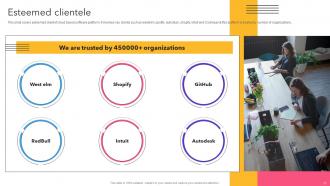
Slide 11: This slide renders esteemed client of cloud based software platform.
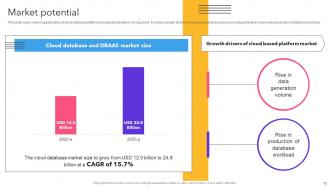
Slide 12: This slide illustrates market opportunities of cloud database platform and expected growth in coming years.
Slide 13: This slide depicts business model canvas of cloud database platform.
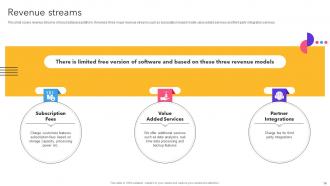
Slide 14: This slide showcases revenue streams of cloud database platform.
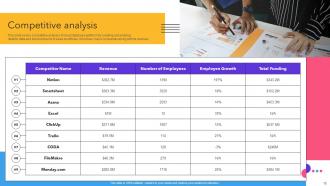
Slide 15: This slide demonstrates competitive analysis of cloud database platform.
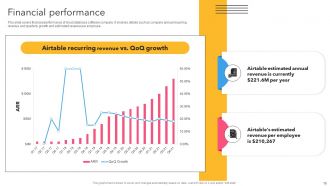
Slide 16: This slide covers financial performance of cloud database software company.
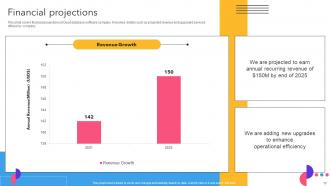
Slide 17: This slide describes financial projections of cloud database software company.
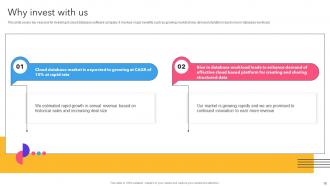
Slide 18: This slide covers key reasons for investing in cloud database software company.
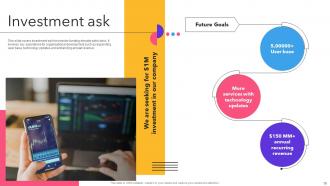
Slide 19: This slide displays investment ask for investor funding elevator pitch deck.
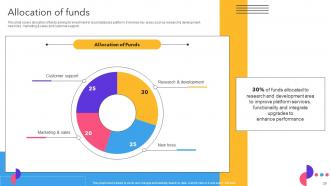
Slide 20: This slide covers allocation of funds asking for investment in cloud database platform.
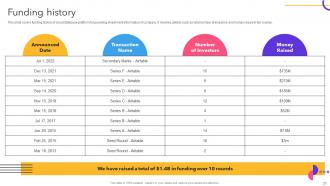
Slide 21: This slide presents funding history of cloud database platform for providing investment information of company.
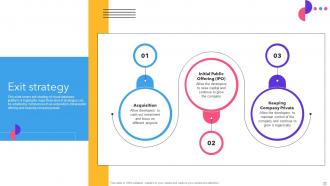
Slide 22: This slide exhibits exit strategy of cloud database platform.
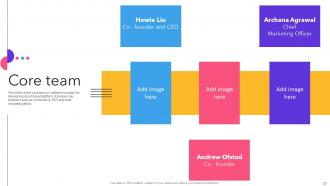
Slide 23: This slide covers core team of software company for developing cloud based platform.
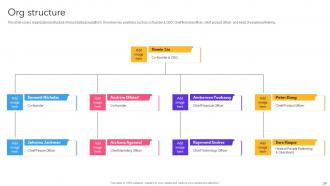
Slide 24: This slide highlights organizational structure of cloud database platform.
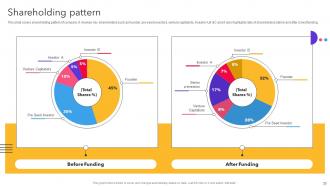
Slide 25: This slide contains shareholding pattern of company.
Slide 26: This slide renders basic contact information of cloud database software company.
Slide 27: This slide shows all the icons included in the presentation.
Slide 28: This slide is titled as Additional Slides for moving forward.
Slide 29: This is About Us slide to show company specifications etc.
Slide 30: This is Our Mission slide with related imagery and text.
Slide 31: This slide shows Post It Notes. Post your important notes here.
Slide 32: This is Our Target slide. State your targets here.
Slide 33: This slide shows SWOT describing- Strength, Weakness, Opportunity, and Threat
Slide 34: This slide provides 30 60 90 Days Plan with text boxes.
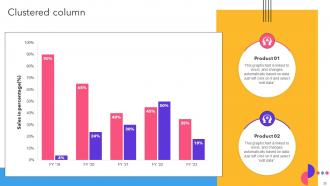
Slide 35: This slide provides Clustered Column chart with two products comparison.
Airtable Investor Funding Elevator Pitch Deck Ppt Template with all 40 slides:
Use our Airtable Investor Funding Elevator Pitch Deck Ppt Template to effectively help you save your valuable time. They are readymade to fit into any presentation structure.












FAQs for Airtable Investor Funding Elevator Pitch
Honestly, Airtable's pretty sweet because it's like Excel but actually useful for organizing stuff. You can switch between different views - grid, calendar, kanban boards, whatever works. But the real magic happens when you link tables together instead of copy-pasting the same info everywhere (which I used to do constantly). Field types are way better too - proper checkboxes, dropdowns, file attachments that don't break. Real-time collaboration actually works without wanting to throw your laptop. I'd mess around with one of their project tracker templates first. Once you see how the linking connects everything, it makes total sense.
Yeah, Airtable works great for project management - honestly way more flexible than most people realize. Just map out your current workflow first, then build around that instead of using some boring template. Marketing teams love it for campaign tracking, construction folks use it for contractor schedules, nonprofits for events. The custom fields are where it gets good though - status dropdowns, budgets, priority levels, whatever you need. I've seen people build everything from film schedules to restaurant opening lists in there. Don't overthink it - start simple and add stuff as you go.
Yeah, Airtable plays really well with other apps. Slack, Gmail, Google Calendar, Salesforce - all the usual suspects connect pretty smoothly. Zapier's where things get crazy though - like 3,000+ apps you can hook up. Their API's solid too if you want to get fancy with custom stuff. I'd honestly just browse their marketplace first. Search for whatever tools your team's already obsessed with and see what pops up. Most of the native integrations work better than I expected, especially with project management apps like Asana. Way less janky than some platforms.
It's like Excel but actually makes sense, you know? Drag-and-drop everything, color-coded fields, attachments right there in the cells. What blew my mind was switching between views – one second you're looking at a spreadsheet, next it's a kanban board or calendar. Same data, totally different layout. No coding needed either. Honestly the templates are your best friend when starting out – way better than staring at a blank screen trying to figure out what the hell to build first.
Plan your table relationships first - treat each table like one thing (Contacts, Projects, Tasks) and connect them instead of shoving everything into one giant mess. Field names should be consistent and descriptive, but honestly don't go crazy with a million field types right away. Views are your friend for slicing data differently without duplicating stuff everywhere. Get automations running early for repetitive tasks, and always throw a Status field in your main tables. Oh, and test everything with real data before you build complex formulas on top - learned that one the hard way!
Honestly, Airtable's a game-changer for remote work. Everyone can jump in and edit stuff in real-time, so no more "wait, which version are we using?" moments. The views thing is clutch - designers love the gallery setup while PMs live in calendar view. Oh, and the @mentions actually work way better than Slack sometimes (controversial opinion, I know). You can have whole conversations right where the work is instead of digging through email threads. Just start simple - make a basic project tracker with owners and deadlines. Once people see how clean it keeps everything, they'll be hooked.
Honestly, Airtable's been a game changer for my marketing stuff. Way better than Excel - I can actually track campaign performance and organize all my leads without wanting to throw my laptop out the window. The dashboard feature is clutch for monitoring ROI across different channels. Plus you can collaborate with your team on assets and set up automated follow-ups based on where leads are in your funnel. It syncs with Mailchimp and HubSpot too, which saves me so much manual work. I'd start with their campaign tracker template and just tweak it as you figure out what metrics actually matter.
So it's like having different ways to look at the same stuff. Grid view is just your basic spreadsheet setup - super handy for editing a bunch of records at once or when you need that row/column data feel. For anything with dates, calendar view is honestly a lifesaver. Project deadlines, events, whatever. Then there's Kanban boards which are perfect for dragging tasks through stages like "To Do" and "Done" - I'm obsessed with those for workflows. The cool thing is you can jump between them depending on what you're doing or how your brain works that day.
Honestly, Airtable is perfect if you're running a small team. Their free tier is solid, and even the $20/month plan covers most of what you'll need. But man, enterprise pricing gets rough quick - you're looking at thousands per month once you factor in per-seat costs and all the advanced features big companies actually need. Small businesses basically get the sweet deal here, spending maybe $100-200 total while enterprises are dropping serious cash. I'd definitely shop around for alternatives if you're scaling up big. For small teams though? It's honestly a no-brainer.
Airtable's automation feature is seriously underrated - I wish I'd discovered it sooner. Start with basic triggers like "when a record gets created" or "field changes," then add actions for emails, record updates, whatever. The setup feels like making simple if-then rules, nothing too complicated. For fancier stuff, Zapier connects it to tons of other apps (though honestly their free tier is pretty limited now). I'd suggest starting small - maybe auto-assign tasks when your project status changes. Once you see how much time it saves, you'll start automating everything.
Honestly, you'll run into record limits first - Pro caps at 50k per base which sounds like a lot but isn't. Performance gets sluggish with complex formulas, and don't even get me started on multiple people editing at once. Total chaos. Automations start timing out too, which is incredibly frustrating. Around 30k records, organizing becomes a nightmare - your bases turn into these sprawling messes. The worst part? Cross-base relationships are pretty weak, so when you need proper data connections you're kinda stuck. Plan your structure early or you'll be migrating to a real database later.
So basically Airtable's REST API lets you connect your bases to other apps through HTTP requests. You'll need either an API key or OAuth to get started - just grab the key from your account settings first. Then you can pull data from your bases, push updates, sync with your CRM, whatever. Their docs are actually way better than most APIs I've messed with (looking at you, Facebook). Perfect for automating stuff or building custom dashboards on top of your data. Start simple with a GET request to fetch some records and see how it works.
Honestly, Airtable's been a game-changer for nonprofits I know. It's like if Excel had a baby with a proper database - way less intimidating though. You can throw everything in there: donor info, volunteer schedules, event planning, program tracking. The cool part is creating different views so your fundraising people see donor stuff while program folks focus on participants. Oh, and the automation saves tons of time on repetitive tasks. I'd say start small with just donor management first. Once you get the hang of it, you'll probably want to migrate everything over. Way better than juggling five different spreadsheets.
Honestly, start with Airtable's help center - their beginner stuff is pretty decent. YouTube's where I'd spend most of my time though, especially channels like Learn with Shopify. They break it down way better than most tutorials. Check out Airtable Universe too since you can steal templates from other people (legally lol) and see how they set things up. Their community forum's actually active if you get stuck. But here's what worked for me - just pick something simple you're already doing and try rebuilding it in Airtable. You'll learn faster by messing around than watching endless videos.
So Airtable's basically the sweet spot between Notion and Google Tables. Google Tables is pretty meh honestly - super basic compared to the other two. Notion tries to do databases but kinda falls short on the technical stuff. Airtable actually nails proper data types and filtering, plus the different views (kanban, calendar, etc.) are genuinely useful. Oh and their API doesn't suck if you need that later. Here's how I'd think about it: serious data stuff? Go Airtable. Want one tool for everything? Notion's probably your best bet even with its database quirks.
-
My team has been relying on SlideTeam’s professional PPT designs for a while now. It has greatly sped up quality work at my organization. So thanks!
-
Wow! The design and quality of templates on SlideTeam are simply the best.