


Databricks Investor Funding Elevator Pitch Deck Ppt Template




Try Before you Buy Download Free Sample Product
 Impress Your
 Audience
 100%
100% Editable
 Save Hours
 of Time


Check out our professionally designed Databricks Investor Funding Elevator Pitch Deck PowerPoint Presentation. Databricks is a software platform to streamline analytics integration across various business sectors, including data science and engineering. Its Unified Analytics Platform facilitates collaboration among data science teams, data engineering, and lines of business for building data products. This pitch deck addresses pivotal challenges managing complex data, analyzing meaningful insights, and ensuring data reliability. The proposed solutions encompass enabling efficient data inputs and integration, leveraging Delta Lake software, and providing integral notebooks. Additionally, the investors deck presents comprehensive company details, including introductions, key facts, offered products and services, unique selling propositions USP, notable milestones achieved, business and revenue models, competitors, and an evaluation of market potential. Lastly, the Funding Deck highlights vital aspects, including investment requisites, fund allocation strategies, funding history, the core team, exit strategies, and the shareholding pattern. Get access to this 100 percentage editable template now.
People who downloaded this PowerPoint presentation also viewed the following :
Content of this Powerpoint Presentation
Slide 1: This slide introduces Databricks Investor Funding Elevator Pitch Deck. State your company name and begin.
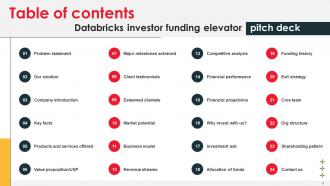
Slide 2: This slide shows Table of Content for the presentation.
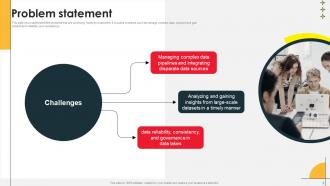
Slide 3: This slide showcases identified problems that are commonly faced by customers. It includes problems such as manage complex data, analyze and gain insights.
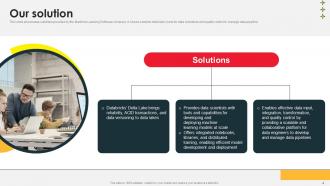
Slide 4: This slide displays solutions provided by the Machine Learning Software company.
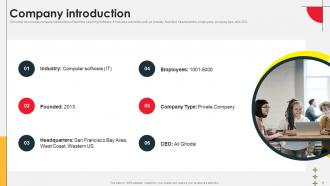
Slide 5: This slide presents company introduction of Machine Learning Software. It includes elements such as industry, founded, headquarters, employees, company type and CEO.
Slide 6: This slide showcases the key facts and figures of Machine Learning Software.
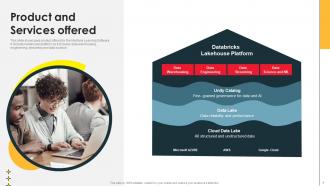
Slide 7: This slide presents product offered by the Machine Learning Software. It includes lakehouse platform as it includes data warehousing etc.
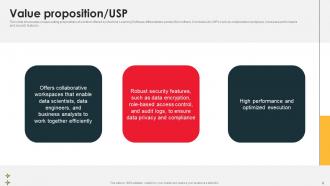
Slide 8: This slide showcases unique selling propositions of solution offered by Machine Learning Software differentiates product from others.
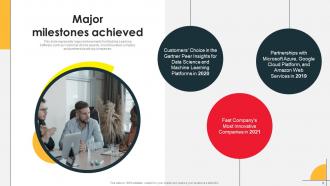
Slide 9: This slide represents major achievements for Machine Learning Software such as Customer choice awards, most innovative company and partnership wit big companies.
Slide 10: THIS slide showcases the perceptive of customers that use products and services provided by a machine learning software company.
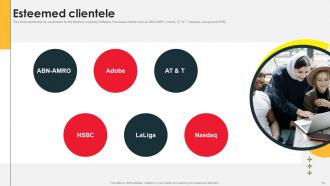
Slide 11: This slide represents key customers for the Machine Learning Software. It includes clients such as ABN-AMRO, Adobe, AT & T, Nasdaq, LaLiga and HSBC.
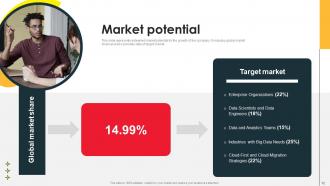
Slide 12: This slide displays esteemed market potential for the growth of the company. It includes global market share and also provides data of target market.
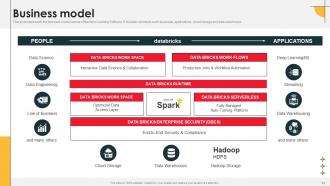
Slide 13: This slide represents the business model canvas of Machine Learning Software. It includes elements such as people, applications , cloud storage and data warehouse.
Slide 14: This slide displays revenue sources for Machine Learning Software. It shows three revenue streams.
Slide 15: This slide represents competitor analysis Machine Learning Software's showcasing founding date, partners, revenue and number of employees.
Slide 16: This slide showcases the financial performance of the Machine Learning Software. It include graph that shows yearly revenue of the organization.
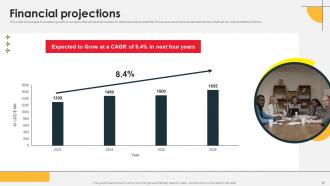
Slide 17: This slide displays forecasted growth of company that will assist investors to determine future potential of business and make investment decision.
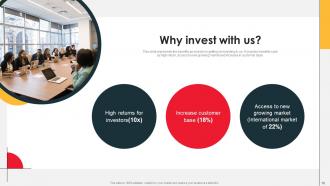
Slide 18: This slide represents the benefits an investor is getting on investing in us. It includes benefits such as high return, access to new growing market.
Slide 19: This slide displays information about the funding requirement for the Machine Learning Software for technology infrastructure, content development etc.
Slide 20: This slide represents the usage of funds raised by Machine Learning Software in activities such as technology infrastructure, content development etc.
Slide 21: This slide displays the funding history of Machine Learning Software company. It includes elements such as date, funding rounds, money raised etc.
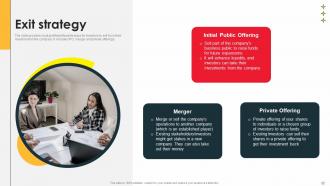
Slide 22: The slide provides most profitable/feasible ways for investors to exit from their investment in the company. It includes IPO, merger and private offerings.
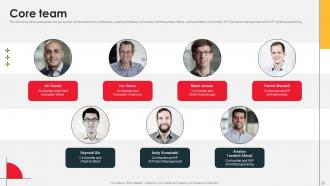
Slide 23: This slide showcases key personnel of executive team of Machine Learning Software.
Slide 24: This slide displays the organization structure of an Machine Learning Software. It includes Chief executive officer, chief operating officer etc.
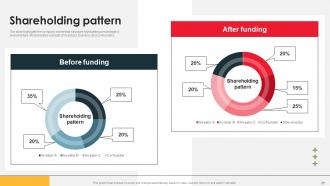
Slide 25: The slide highlights the company ownership structure highlighting percentage of shareholders. Shareholders consists of investors, founders and co-founders.
Slide 26: This is a Contact Us slide to show company's contact information.
Slide 27: This slide shows all the icons included in the presentation.
Slide 28: This slide is titled as Additional Slides for moving forward.
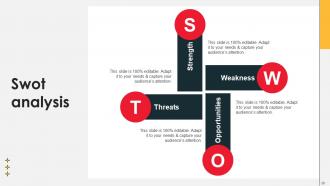
Slide 29: This slide shows SWOT analysis describing- Strength, Weakness, Opportunity, and Threat.
Slide 30: This slide depicts Venn diagram with text boxes.
Slide 31: This is a financial slide. Show your finance related stuff here.
Slide 32: This is a Timeline slide. Show data related to time intervals here.
Slide 33: This slide shows Post It Notes for reminders and deadlines. Post your important notes here.
Slide 34: This slide presents Roadmap with additional textboxes.
Slide 35: This slide provides 30 60 90 Days Plan with text boxes.
Slide 36: This is a Thank You slide with address, contact numbers and email address.
Databricks Investor Funding Elevator Pitch Deck Ppt Template with all 44 slides:
Use our Databricks Investor Funding Elevator Pitch Deck Ppt Template to effectively help you save your valuable time. They are readymade to fit into any presentation structure.





















FAQs for Databricks Investor Funding Elevator Pitch
So Databricks is pretty solid because everything's in one place - data engineering, ML, analytics, all of it. No more switching between a million different tools. The notebooks work like Google Docs but for data stuff, which is actually super convenient when you're collaborating. Auto-scaling is clutch too, so you won't blow your budget or sit around waiting forever. Oh and Delta Lake gives you proper ACID transactions on data lakes, which honestly most platforms totally mess up. Handles batch and streaming without being weird about it. I'd mess around with their free community version first though - see if you vibe with the workflow before committing.
Yeah, Databricks works really well with AWS and Azure since it's built right on top of them. You can just plug into your existing S3 buckets or Azure storage without having to migrate anything - which honestly saved me so much headache. Your current security stuff stays put too. It connects to Redshift, Synapse, all that good stuff through standard connectors. Setup was surprisingly painless when I tried it last year. Just map out where your data lives first though - trust me on that one. Otherwise you'll be scrambling around trying to remember which bucket has what.
So Databricks runs on Spark - that's the engine doing all the heavy lifting when you're crunching data. Pretty much everything you do there, from notebooks to ML stuff, gets handled by Spark clusters running in the background. The nice thing is you don't have to mess around with setting up infrastructure or dealing with cluster configs like you would normally. Honestly way less of a headache than managing Spark yourself. You still get all the performance benefits though, which is clutch. Oh and definitely try their free community edition first - good way to test things out without committing.
So Databricks charges you for what you actually use - it's like your electric bill but for computing power. You pay hourly for the clusters running your stuff, plus whatever AWS/Azure costs. Honestly, it's pretty nice because you can fire up huge clusters for big jobs, then shut them down when you're done. No buying servers upfront or anything. Just watch your usage like a hawk and set up auto-shutoffs so you don't accidentally leave clusters running overnight (learned that one the hard way). Start small and grow from there.
Yeah Databricks is actually pretty great for ML stuff. MLflow integration handles your experiment tracking and model management, which honestly beats switching between a bunch of different tools. The notebooks are solid for team collaboration too. Hyperopt does automated hyperparameter tuning, and you can deploy models as REST endpoints or run batch jobs. What's nice is everything lives in one workspace - your data prep, ML workflows, all of it. Oh and definitely check out their ML quickstart tutorials first. They'll get you up to speed way faster than figuring it out yourself.
Cluster sizing is huge for performance - get that right first. Delta Lake format is your friend, and partition data smartly. Cache the stuff you use all the time. Small files will absolutely wreck you, so avoid those at all costs. Auto-scaling saves money but adds some latency (trade-off depending on your workload). Broadcast joins work great for small tables. Z-ordering helps with data skipping too. Once you start obsessing over the Spark UI, there's no going back lol. But seriously, first check if you're reading way more data than needed - that's usually the culprit.
So Databricks does real-time stuff through Delta Live Tables and Structured Streaming. Basically data flows in and gets processed continuously - no waiting around. It's built on Spark's streaming engine, which handles all the fault tolerance headaches for you. Pretty neat setup honestly. You can run ML inference on the streaming data too, which is clutch for fraud detection and that kind of thing. The streaming pipelines just automatically kick in when new data shows up in your lakehouse. Oh and definitely check out their quickstart tutorial first - way easier than figuring it out from scratch.
So Databricks actually has decent security out of the box. They encrypt everything - data sitting around and data moving between systems. Role-based access is there too, so you won't have random people poking around sensitive stuff. Network isolation through VPCs is standard, plus they log everything for compliance (which honestly saved my butt once during an audit). It plays nice with Azure AD and AWS IAM if you're already using those. Unity Catalog is where it gets interesting - super granular permissions across your whole data setup. I'd tackle access controls first, then mess with encryption settings. Way easier to debug that way.
Oh yeah, Databricks is pretty solid for team stuff. You can share notebooks, datasets, clusters - the whole nine yards. The coolest part is real-time editing like Google Docs but for code. Super handy when you're debugging with someone. Permission controls let you decide who sees what, and there's version control so nobody can completely wreck your work (thank god). Honestly, the commenting feature is underrated - you can just drop notes right in the code. I'd say start with a shared workspace and maybe agree on some naming system beforehand. Trust me, it saves headaches later.
Honestly, just start with the built-in charts in Databricks - they're way better than you'd expect. Run your query, click the chart button, boom. Bar charts, scatter plots, maps, whatever you need. If your team's already married to Tableau or Power BI, those connect pretty easily too. Python folks can go wild with matplotlib or plotly for custom stuff, but that's probably overkill at first. I always forget how decent the native tools are until I actually use them again. Zero setup headaches, which is nice for a change.
Honestly, Delta Lake is pretty sweet - you get ACID transactions which saves you from so many data quality nightmares. The time travel thing is clutch too. Made a bad write? Just roll it back. Need data from last week? Easy. Schema enforcement stops garbage data from getting in your tables, and queries run way faster than regular Parquet. Oh, and it handles streaming and batch in the same table which is nice I guess. Just convert one existing table to Delta format first. You'll see the speed boost right away.
So Databricks has two main tools that'll save your life here - Auto Loader and Delta Live Tables. Auto Loader watches your cloud storage and processes new files automatically as they show up. No more manual batch jobs. For real-time stuff, structured streaming works great with Kafka or event hubs. Delta Live Tables is where you build your ETL pipelines declaratively - honestly beats writing tons of custom code. The whole thing scales out horizontally so you won't hit compute walls. Oh, and Auto Loader handles schema changes automatically which is clutch. I'd start there if you're dealing with files.
So you'll mainly need to worry about data formats, costs, and getting your team up to speed. Most of your ETL stuff will need tweaking since Databricks runs on Spark - but honestly that's usually a blessing in disguise for cleaning up old messy code. Check how your current workflows translate to their notebook setup first. Their pricing is weird compared to traditional platforms, so definitely run some numbers early or you might get sticker shock later. I'd start small with one pilot project. Gets everyone comfortable with the interface before you go all-in on migrating everything.
So Databricks uses Unity Catalog for governance - that's where all the magic happens. You get centralized control over who can access what data, plus it tracks lineage and creates audit trails automatically. Permissions are super granular too, like you can lock down specific columns or even rows. Honestly, the audit logs are pretty solid - they catch everything from queries to model deployments. It'll hook into your existing stuff like Azure AD or AWS IAM, which is nice since you won't have to redo your whole security setup. Just make sure Unity Catalog is turned on first.
So Databricks works across pretty much every industry you can think of. Banks use it for catching fraud and risk stuff. Healthcare companies are doing patient analytics and drug research with it. Retail is where it gets really interesting though - the recommendation engines they build are honestly kind of scary good now. Manufacturing does predictive maintenance, media companies handle content recommendations. Oh, and supply chain optimization is huge too. Most of these use cases boil down to either crunching massive amounts of data or building ML models that actually scale. It's pretty much everywhere at this point.
-
I was mind-blown by the services that SlideTeam provided me. Thanks a ton!
-
Loved the fact that SlideTeam provides clean, high-definition, and professional PowerPoint products.