

UI Path Web Automation Powerpoint Ppt Template Bundles




Try Before you Buy Download Free Sample Product
 Impress Your
Audience
 100%
Editable
 Save Hours
of Time


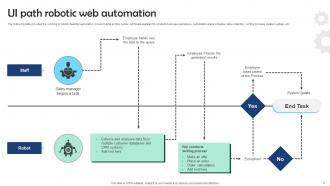
Introducing our powerful UI Path Web Automation PowerPoint PPT presentation, designed to revolutionize your digital workflows. Unlock the potential of Web Automation, streamlining repetitive tasks and processes, saving time, and boosting productivity. Embrace the efficiency of Desktop Automation, empowering seamless interactions between applications and systems, eliminating manual errors. Witness the ease and scalability of Cloud Automation, enabling effortless access to resources and data, enhancing collaboration across teams. This comprehensive PPT showcases how UI Path empowers organizations to automate and optimize operations, increase efficiency, and drive digital transformation. Stay ahead in the competitive landscape with this visionary presentation, harnessing the power of UI Path Web Automation for a more agile and innovative future.
People who downloaded this PowerPoint presentation also viewed the following :
UI Path Web Automation Powerpoint Ppt Template Bundles with all 18 slides:
Use our UI Path Web Automation Powerpoint Ppt Template Bundles to effectively help you save your valuable time. They are readymade to fit into any presentation structure.









FAQs for UI Path Web Automation Powerpoint
So UiPath's web automation is actually pretty sweet - you just point and click on stuff instead of coding everything from scratch. The browser activities handle all the basic things automatically, like filling forms and clicking buttons. When regular selectors get wonky (which happens more than you'd think), the computer vision feature usually saves the day. Recording your manual actions is super handy too - it basically turns what you're doing into workflows instantly. I'd start with simple form stuff first, then move to data extraction once you get the hang of it. The error handling is solid, and it deals with changing content pretty well.
So UiPath has this smart selector thing that adjusts when web elements change - pretty neat actually. Throw wildcards (*) into your selectors for the parts that keep shifting around. Find Element activity is solid too, it'll wait for stuff to load and handles small changes on its own. When elements keep jumping around, anchors are your friend - they find things relative to stable nearby elements. Oh and definitely test your selectors in UI Explorer first, then try them on different page states. Trust me, you'll save yourself headaches later when things inevitably break.
So data scraping in UiPath is for pulling structured stuff - like rows from tables or product lists on websites. Screen scraping just grabs whatever text you see on screen, no matter how messy it is. Honestly, screen scraping can be a pain because it doesn't get the underlying format at all. I'd go with data scraping first if you're working with websites - way cleaner results and you won't hate yourself later when you're trying to organize everything. It's just more reliable overall.
Dude, skip those idx and tableRow selectors - they're garbage and break the second someone tweaks the page layout. Always wrap your workflows in Try Catch blocks with decent timeouts. I can't tell you how many times I've watched bots crash because people skipped this step... it's painful. Dynamic selectors with wildcards are your friend here. Build reusable components for stuff like logins too. Oh, and test across different browsers first! Screen resolution changes will mess you up if you don't check. Maybe add a retry mechanism for those annoying elements that randomly fail.
So UiPath actually does security pretty well - they encrypt your credentials and store them in Orchestrator's vault, plus everything runs over HTTPS. You can hook it into your SSO too, which is nice. The credential management is way better than the sketchy stuff most teams used to do honestly. Oh, and definitely create separate bot accounts with minimal permissions instead of giving them admin access everywhere. That's just asking for trouble. Don't forget to rotate those credentials regularly and keep an eye on what sites your bots are actually accessing.
Dude, AI totally transforms UiPath web automation. Those selectors that constantly break when sites update? Gone. AI-powered object identification just rolls with UI changes automatically. Document Understanding is where things get really cool - it uses machine learning to pull data from messy web forms and documents, even when layouts are all over the place. Plus you get smart OCR for grabbing text from images and PDFs. Honestly, I was skeptical at first, but the AI Computer Vision activities are legit game-changers. Try them in your next project and you'll see what I mean.
Check your selectors first - they break constantly when sites update. UI Explorer will show you what's actually happening on the page. Your delays might be too short too, some pages load painfully slow these days. Honestly, switching to computer vision sometimes saves more headaches than debugging selectors forever. Just make sure you're testing in the exact same browser your bot uses - Chrome vs Edge can act totally different. Turn on logging and screenshots so you can see exactly where it fails. Makes debugging way less painful.
Ugh, yeah UiPath gets really annoying with complex web apps. Dynamic elements are the worst - they keep changing IDs and your selectors just break constantly. SPAs like React apps? Total pain because everything loads weird and UiPath tries clicking stuff before it's even there. I swear I've wasted entire afternoons on timing issues alone. Iframes will mess you up too, and don't get me started on shadow DOM stuff. Oh and those random popups that show up whenever they feel like it. Build in tons of wait activities from day one - trust me on this. Also beef up your error handling early or you'll regret it later.
UiPath's actually pretty solid for cloud web automation. Works the same as local stuff - uses selectors to grab web elements no matter where they're hosted. You get UI automation (buttons, forms, all that) plus API connections for the fancy integrations. Oh and UiPath runs in the cloud now too, so your bots can be fully cloud-based if you want. Honestly, the Web Activities package is your best bet to start. Just test those selectors like crazy because cloud apps love changing their elements on you. Super annoying but that's how it goes.
Web scraping is huge - pulling contact info, competitor prices, financial data from portals. Form filling automation saves tons of time too. Healthcare companies use it for patient portals and insurance stuff. Banks do loan processing through web interfaces. Report generation is another big one. Honestly? Any repetitive browser work is perfect for this. I'd look at whatever boring copy-paste tasks eat up your day first - those are usually the easiest wins. Lead generation companies go crazy for this stuff since it beats doing everything manually.
UiPath's web automation is actually pretty good - way better than Automation Anywhere in my experience. The Chrome extensions rarely give me headaches, which is more than I can say for some other tools I've tried. Dynamic content still trips it up sometimes (honestly, what doesn't?), but the selector options are solid and debugging web elements is way less painful. Modern SPAs work fine too. I'd definitely stick with it unless you've got some weird integration requirement that forces you to switch platforms. The visual identification just feels more reliable overall.
UiPath basically does all that clicking and scrolling for you automatically. Instead of spending hours copying data manually, it'll knock out hundreds of records in minutes. The coolest part? It can work across multiple browser tabs at once and dump everything straight into Excel. I'd start small though - maybe just scraping some product prices first to see how it works. Once you get the hang of it, you can set these things to run while you're at lunch or whatever. Honestly beats staring at endless spreadsheets all day!
Honestly, GDPR changed everything for web scraping with UiPath bots. You can't just grab whatever data you want anymore - there's actual legal risk now. Only automate stuff where you've got proper consent or legit business reasons for handling personal info. Keep it minimal too, just collect what you actually need. Your workflows need to handle deletion requests, which is kind of a pain but whatever. Oh, and definitely do a privacy impact assessment before you deploy anything touching customer data. Trust me on that one.
So UiPath has these HTTP Request activities that make API stuff pretty easy. Just call REST APIs directly in your workflows and handle all the JSON responses. There's also this Invoke Web Service thing - honestly saved my butt on a project last month. For trickier auth stuff like OAuth, grab the UiPath.WebAPI.Activities package. What's neat is mixing API calls with regular automation, so you're hitting databases while clicking buttons at the same time. Start with HTTP Request though - handles like 90% of what you'll need.
So UiPath is getting way smarter with AI - their bots can actually adapt when UIs change now, which is pretty cool. Cloud stuff is massive too since everything's moving to web apps that need different handling than old desktop automation. The low-code tools are everywhere (honestly makes our work more fun, not scary). APIs are becoming standard, so you'll probably want to mix direct API calls with your usual web scraping approach. Oh, and definitely mess around with UiPath's AI features now - better to learn it before everyone else catches up.
-
Fantastic collection of visually appealing PowerPoint templates. They certainly uplift the look of the presentation.
-
This visual representation is stunning and easy to understand. I like how organized it is and informative it is.