

Use Of Technology And AI To Improve HR Operations Powerpoint Presentation Slides





Try Before you Buy Download Free Sample Product
 Impress Your
Audience
 100%
Editable
 Save Hours
of Time


HR Operations or HR Ops are services that human resource departments and professionals provide during the entire employee lifecycle to assist in daily tasks. This Use of Technology and AI to Improve HR Operations PPT evaluates the working of present HR operations via analysis of current challenges, gap analysis, and impact of the same on company performance and profitability to rectify loopholes by introducing technological initiatives. This complete deck may help organizations get an overview of technological initiatives, namely chatbots, virtual reality, software tools, and robotic process automation, amongst others, for operations such as recruitment, payroll administration, employee benefits, training, and development with performance management. Furthermore, these PPT slides provide insights into the evolving technological trends reshaping the HR department, such as HR 3.0, Blockchain, Artificial Intelligence, and ChatGPT. Lastly, these slides analyze the team roles, budget, and impact of implementing technological initiatives to improve employee productivity.
People who downloaded this PowerPoint presentation also viewed the following :
Content of this Powerpoint Presentation
Slide 1: This slide showcase title Use of Technology and AI to Improve HR Operations. State Your Company Name
Slide 2: This slide showcase Agenda.
Slide 3: This slide exhibit Table of content.
Slide 4: This slide exhibit Table of content that is to be discuss further.
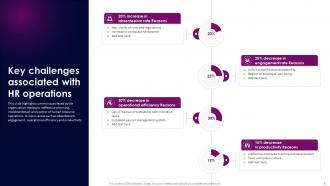
Slide 5: This slide highlights current issues faced by the organization leading to ineffective planning, implementation and control of human resource operations.
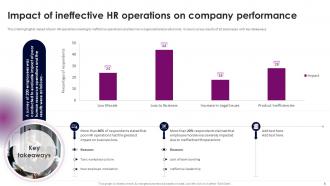
Slide 6: This slide highlights impact of poor HR operations leading to ineffective operations and decline in organizational productivity.
Slide 7: This slide provides an overview of gap analysis for present situation of HR operations aimed at addressing the underlying issues to improve productivity and efficiency.
Slide 8: This slide provides key drivers aimed at implying the need to improve HR operations to increase organizational efficiency.
Slide 9: This slide exhibit Table of content that is to be discuss further.
Slide 10: This slide provides an introduction to HR operations aimed at helping businesses manage employees throughout their lifecycle.
Slide 11: This slide establishes a comparison between people and HR operations aimed at helping businesses understand the demarcation between these two concepts.
Slide 12: This slide outlines an architectural framework aimed at helping organisations understand its usability for long term efficiency.
Slide 13: This slide outlines major responsibilities undertaken by HROps aimed at helping businesses focus on specific business segments.
Slide 14: This slide highlights key objectives of HROps aimed at helping businesses maintain their HR processes.
Slide 15: This slide exhibit Table of content that is to be discuss further.
Slide 16: This slide provides an overview of major HR operations aimed at handling administrative tasks to keep business running.
Slide 17: This slide exhibit Table of content that is to be discuss further.
Slide 18: This slide provides an overview of chatbots and virtual assistants aimed at streamlining activities of recruitment.
Slide 19: This slide provides an overview of onboarding using virtual reality aimed at streamlining activities of recruitment.
Slide 20: This slide provides an overview of social media recruiting strategy aimed at streamlining activities of recruitment.
Slide 21: This slide provides a comparative analysis of virtual interviewing tools aimed at optimizing recruitment process.
Slide 22: This slide exhibit Table of content that is to be discuss further.
Slide 23: This slide provides an overview of robotic process automation benefits aimed at streamlining activities of payroll management.
Slide 24: This slide provides an overview of integrating cryptocurrencies aimed at streamlining activities of payroll management.
Slide 25: This slide provides a comparative analysis of virtual interviewing tools aimed at optimizing payroll management process.
Slide 26: This slide exhibit Table of content that is to be discuss further.
Slide 27: This slide provides an overview of integrating wearable devices aimed at improving employee well being using real time feedback and statistics.
Slide 28: This slide provides an overview of integrating virtual reality aimed at improving employee wellness to create healthier and productive environment.
Slide 29: This slide provides a comparative analysis of benefits administration tools aimed at employee benefit process.
Slide 30: This slide exhibit Table of content that is to be discuss further.
Slide 31: This slide provides an overview of integrating virtual reality aimed at improving employee wellness to create healthier and productive environment.
Slide 32: This slide provides an overview of integrating gamification strategy aimed at improving corporate training to optimize employee productivity.
Slide 33: This slide provides an overview of integrating microlearning aimed at improving corporate training to optimize employee productivity.
Slide 34: This slide exhibit Table of content that is to be discuss further.
Slide 35: This slide provides an overview of performance management system aimed at improving employee productivity.
Slide 36: This slide provides a comparative analysis of employee experience software tools aimed at employee benefit process.
Slide 37: This slide exhibit Table of content that is to be discuss further.
Slide 38: This slide provides an overview of HR 3.0 aimed at optimizing human resource operational activities to ensure organizational efficiency.
Slide 39: This slide provides an overview of blockchain technology aimed at improving human resource operations to optimize organisational efficiency.
Slide 40: This slide provides an overview of artificial intelligence aimed at improving human resource operations to optimize organisational efficiency.
Slide 41: This slide provides an overview of artificial intelligence aimed at optimizing human resource operations to improve overall organisational efficiency.
Slide 42: This slide highlights use cases highlighting application of ChatGPT tool to optimize and streamline recruitment and hiring process.
Slide 43: This slide highlights use cases highlighting application of ChatGPT tool to optimize and streamline employee training and development.
Slide 44: This slide highlights use cases highlighting application of ChatGPT tool to optimize and streamline employee onboarding process.
Slide 45: This slide highlights use cases highlighting application of ChatGPT tool to optimize and streamline employee performance management.
Slide 46: This slide exhibit Table of content that is to be discuss further.
Slide 47: This slide provides a timeline highlighting implementation process of operation activities to make HR processes more streamlined.
Slide 48: This slide exhibit Table of content that is to be discuss further.
Slide 49: This slide outlines roles and responsibilities of human resource team aimed at undertaking strategies for improving operations to maintain brand value.
Slide 50: This slide outlines roles and responsibilities of human resource team aimed at undertaking strategies for improving operations to maintain brand value.
Slide 51: This slide outlines training plan aimed at helping human resource members unlock full potential of their respective roles to maintain organizational discipline.
Slide 52: This slide exhibit Table of content that is to be discuss further.
Slide 53: This slide highlights quarterly budget allocation of HR strategies aimed at increasing organizational productivity and efficiency.
Slide 54: This slide exhibit Table of content that is to be discuss further.
Slide 55: This slide highlights impact of technological strategies on operational issues of HR that are improved via effective planning, implementation and control of activities.
Slide 56: This slide shows all the icons included in the presentation.
Slide 57: This slide is titled as Additional Slides for moving forward.
Slide 58: This slide shows Post It Notes for reminders and deadlines. Post your important notes here.
Slide 59: This slide displays Mind Map with related imagery.
Slide 60: This slide depicts Venn diagram with text boxes.
Slide 61: This is an Idea Generation slide to state a new idea or highlight information, specifications etc.
Slide 62: This slide presents Roadmap with additional textboxes. It can be used to present different series of events.
Slide 63: This is an Idea Generation slide to state a new idea or highlight information, specifications etc.
Slide 64: This slide showcase Line graph for different products.
Slide 65: This is a Thank You slide with address, contact numbers and email address.
Use Of Technology And AI To Improve HR Operations Powerpoint Presentation Slides with all 73 slides:
Use our Use Of Technology And AI To Improve HR Operations Powerpoint Presentation Slides to effectively help you save your valuable time. They are readymade to fit into any presentation structure.











FAQs for Use Of Technology And AI To Improve HR Operations
Honestly, AI makes HR so much easier. Resume screening becomes lightning fast - we're talking half the time you'd normally spend. Predictive analytics can actually tell you who's about to quit before they do (pretty wild). Those boring employee questions that drain your energy? Chatbots handle them now. What really surprised me though is how much it cuts down on hiring bias - turns out algorithms are way more fair than we are. You'll have tons more time for the big picture stuff that actually matters. I'd say start with screening candidates first, see how it goes, then branch out. Don't try to overhaul everything at once.
Dude, start with resume screening tools - they're super easy to set up and you'll save tons of time immediately. No more drowning in applications! AI can also help write job descriptions that actually attract good people, plus it cuts down on unconscious bias during initial reviews. Some tools even do basic video interviews through chatbots, though that feels a bit weird to me personally. The predictive stuff is cool too - it can guess which candidates might actually stick around and do well. Honestly, just the screening alone will change your life. Way better than manually reading through hundreds of resumes.
Hey! So the big three things are bias, transparency, and privacy. Your AI tools can totally screw over certain groups if you're not watching for it - like, this stuff loves to amplify whatever biases already exist. Tell people when you're using AI for hiring or reviews, don't be sneaky about it. Protect their data obviously. Oh and audit your systems regularly because this isn't a set-it-and-forget-it thing. Honestly, I'd start with checking whatever AI you're already using for bias issues. That's probably where you'll find the most problems lurking.
Honestly, AI completely changes how you handle retention because you're working with real data instead of just guessing. It spots people who might quit by analyzing survey responses, Slack conversations, even performance trends - the pattern recognition is actually pretty impressive. Your team gets personalized development too, like AI matching them with the right mentors or projects based on what they want. The automated pulse surveys are clutch since you get constant feedback without annoying everyone. I'd probably start with just running predictive analytics on your existing turnover data though.
So machine learning digs through all your employee data and finds patterns you'd miss completely. Which candidates will actually work out? Who's about to quit? What training does each person need? It pulls this stuff from performance reviews, surveys, whatever data you've got. The algorithms learn your company's quirks over time too, which is honestly pretty cool. I'd say test it on something simple first - maybe predicting who might leave. See if it's actually right before you go all-in on other areas.
So AI actually helps cut through all that subjective BS in performance reviews. You'll get real data instead of just remembering what happened last week - stuff like email collaboration patterns, how fast people finish projects, sentiment analysis from peer feedback (which honestly blows my mind). It spots things you'd totally miss and suggests specific development plans for each person. But here's the thing - don't let it do the thinking for you. The actual face-to-face conversation? That's still what matters most.
Honestly, your biggest headache will be people freaking out about AI making hiring calls. Change management is huge here. Also, your data's probably a mess - mine was way worse than I expected and AI needs everything squeaky clean. Budget's another pain point since decent tools cost real money. Oh, and compliance stuff with bias regulations? Total nightmare. Your HRIS integration might make you want to pull your hair out too. Here's what worked for me though - pick one small thing, nail it, then slowly add more. Don't try to boil the ocean right away.
So predictive analytics is like having a heads up on workforce stuff before it hits you. You can spot who's likely to quit, figure out when departments will need more people, that kind of thing. It digs through employee data to catch patterns you'd totally miss otherwise. Honestly, the performance prediction part is probably the most useful - catching issues early is way better than scrambling later. I'd start by checking if your HR system already has features you're not using. Most people don't realize half the tools are already there. Then focus on whatever's causing you the biggest headaches right now.
AI's gonna completely transform how companies do training. Each employee gets their own custom learning path based on what they actually need to work on - pretty sick, honestly. Your L&D team won't be stuck doing tedious progress tracking anymore since AI handles that automatically. They can focus on the bigger picture stuff instead. Real-time coaching through chatbots is already happening, and you get instant feedback on whether training actually works. Oh, and different learning styles? AI figures that out too. Definitely worth exploring AI learning platforms now before everyone else catches on.
Honestly? Pick one annoying thing first - maybe resume screening or those repetitive employee questions that drive your HR team nuts. Don't try to revolutionize everything overnight (I've watched companies crash and burn doing that). Hunt for cheap SaaS tools that'll play nice with what you already have instead of building from scratch. Target the boring, time-sucking stuff your team hates dealing with. Oh, and skip the shiny features that look amazing in demos but you'll never actually use. Test it with a small group first before unleashing it on everyone - way less messy that way.
Oh man, there's so much out there right now. HireVue and Pymetrics are solid for recruiting - they screen candidates and test skills automatically. Culture Amp and Glint help with employee feedback stuff, analyzing all those survey responses you'd never have time to dig through yourself. Performance management tools like Lattice and 15Five spot patterns in reviews too. Honestly though, half these companies just slapped "AI" on their existing software and called it a day. My advice? Pick whatever's driving you crazy first - recruiting, reviews, whatever - and try a couple options there before going nuts with everything at once.
So AI can scan your job posts for sketchy language that might turn off certain candidates - that's usually where bias sneaks in first. It tracks diversity numbers throughout your whole hiring funnel too, from initial applications to who actually gets promoted. The tech can spot patterns in resume screening that unfairly weed people out. Pretty neat, right? There's also predictive stuff that flags which teams might have retention problems based on survey responses and demographics. Honestly, I'd start with the job posting tools since that's the easiest win.
Honestly, the scariest part is how much personal stuff these HR systems hoover up - performance reviews, salary data, even biometric info if you're using recruiting tools. Data breaches are obviously a huge risk, but algorithmic bias is what really keeps me up at night. Your AI might be making discriminatory hiring decisions without you realizing it. Employees usually have no clue what you're collecting either, which is... not great. Oh, and definitely audit your tools regularly - I learned that one the hard way. Just be upfront about what data you're using and how.
Dude, this stuff is a lifesaver for compliance work. No more drowning in spreadsheets tracking certifications and policy updates - the AI handles all that boring grunt work automatically. Reports are probably the best part though, pulls everything from different systems so you don't have to manually piece together those regulatory filings. Honestly feels like cheating compared to how we used to do it! Just make sure your data sources are clean from the start or you'll get garbage results. Would've saved me so many late nights if we'd had this tech earlier.
You'll definitely need some tech basics - like understanding data and privacy rules. Don't worry, you won't be coding anything, but knowing how algorithms work helps a ton. Communication skills matter just as much though, since you'll constantly explain AI decisions to confused (or straight-up suspicious) employees. Change management becomes your life because honestly? People freak out when robots start making career calls. Critical thinking is huge too - question everything the AI spits out and watch for bias. I'd start with a basic data course, then practice breaking down tech stuff into normal human language.
-
You know what? I'm so glad I opted for this PPT design. It has been a total game-changer for me and my presentations. Thank you!
-
Delighted to see unique and eye-catching PowerPoint designs that are so easy to customize.