

User persona behavior ppt powerpoint presentation pictures professional





Try Before you Buy Download Free Sample Product
 Impress Your
 Audience
 100%
100% Editable
 Save Hours
 of Time


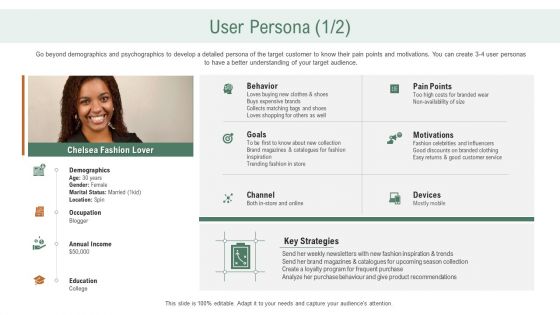
Go beyond demographics and psychographics to develop a detailed persona of the target customer to know their pain points and motivations. You can create 3 4 user personas to have a better understanding of your target audience.
People who downloaded this PowerPoint presentation also viewed the following :
User persona behavior ppt powerpoint presentation pictures professional with all 2 slides:
Use our User Persona Behavior Ppt Powerpoint Presentation Pictures Professional to effectively help you save your valuable time. They are readymade to fit into any presentation structure.
FAQs for User persona behavior ppt powerpoint
Your template users are mostly busy professionals who present a lot - consultants, sales people, marketers, that crowd. They want to look polished but don't have time to mess around with design from scratch. Most aren't design pros anyway (I mean, who is?). They're presenting to clients or bosses, so it needs to look credible. Clean templates work best - something they can quickly customize without breaking it. Honestly, think "makes me look good when I'm finishing slides at midnight." They'll use the same template across different topics, so consistency matters more than flashy effects.
User personas are honestly everything when it comes to template design. I made this mistake once - spent weeks on these beautiful slides that literally no one touched because I didn't think about who'd actually use them. Your C-suite folks want clean layouts with tons of data, while creative teams need way more visual options. Tech comfort matters too - some people freak out over anything complex. Before you design anything, just grab coffee with a few users and ask what drives them crazy about presentations. Trust me, their pain points will tell you exactly what to build. Context is huge as well.
Oh man, the worst part is definitely time pressure mixed with choice overload. You'll scroll through like 300 templates that basically look identical, then waste hours trying to make layouts work with your actual content. Preview images are so misleading too - they never show how it looks with real data instead of their perfect placeholder stuff. Brand colors are another nightmare when they clash with the template design. Most assume you already have amazing photos ready to go (yeah right). Honestly? Filter by your specific use case first, not what looks prettiest. Way more efficient.
Dude, personas are game-changers for template marketing. Your buyers have totally different motivations, so why treat them the same? A startup founder needs "investor pitch decks that close deals" while teachers want "classroom-ready presentation kits." The busy exec just wants something polished and fast. Creative freelancers? They're all about customization options. I learned this the hard way - used to do generic campaigns and got nowhere. Now I map specific personas to different template collections. It's honestly night and day for conversion rates. Way better than that spray-and-pray approach most people use.
So here's the thing - track what people actually customize most and make those options super accessible. User behavior shows you what matters vs. what just looks nice. Where do they get stuck? What three things does everyone always tweak? Those should be front and center. Industry patterns are gold too - you'll notice certain presentation types or preferences that help you set better defaults. Honestly, the biggest win is avoiding choice overload. Nobody wants fifty font options when they just need the basics. Start with your most-used customization features and expand from there. Way more effective than guessing what looks good.
Demographics totally matter for presentation templates. Age affects whether people want sleek modern stuff or traditional layouts. Industry matters too - finance folks need heavy data charts while marketing teams want creative storytelling formats. Income determines if they'll pay for premium templates or hunt for freebies (honestly, who doesn't love free stuff?). Don't forget geographic location influences color choices and cultural design preferences. I'd start by figuring out your main demographic groups first. Then you can build personas around what they actually need and what frustrates them most.
Honestly, it's wild how predictable people get with template choices once you start paying attention. Finance teams always go for those clean, data-heavy layouts with tons of charts. Marketing wants the flashy stuff with bold colors and room to get creative. Lawyers? They're all about formal, text-heavy slides that look super professional - probably worried about credibility or whatever. Sales folks need those punchy, conversion-focused templates that actually help them close deals. Even academics have totally different taste than consultants do. When you're picking templates for your team, just think about what they actually do all day instead of what catches your eye.
Honestly, it comes down to who you're presenting to. External stuff like client pitches or investor meetings? You kinda need that visual wow factor to make a good first impression. Design agencies and marketing teams are obsessed with this - they think slick visuals equal credibility. Sometimes you're stuck following company brand guidelines even when they make things harder to use (which is annoying but whatever). Internal presentations are different though. Your team cares way more about whether something actually works. It's all about reading the room and knowing what matters most to your audience in that moment.
Corporate people just want something polished fast - they grab templates and barely customize because deadlines are crazy. Teachers though? Totally different story. They actually play around with colors, try different layouts, save like 5 versions for future classes. It's pretty interesting how different they are. Business slides are all about cramming in data, while educators want more visual storytelling stuff. Oh and if you're making templates for both groups, definitely include those one-click professional looks but don't forget the deeper customization tools for the educators who actually use them.
Honestly, user personas are like your crystal ball for design trends. Track how different groups react to various styles and you'll spot patterns way before everyone else catches on. Say your tech-savvy millennials keep gravitating toward interactive stuff or clean layouts - boom, that's probably the next big thing. I'd start documenting monthly which visual approaches click with each persona. The beauty is you can tell real trends from those flash-in-the-pan fads that disappear after two weeks. Once you've got a few months of data, predicting what's coming becomes pretty straightforward.
Here's how I'd approach it - start with user interviews and surveys to check if your assumptions are actually right. Analytics data is gold because it shows what people really do vs what you think they'll do. A/B testing different approaches based on your personas can be eye-opening too. Customer support tickets are honestly underrated for this stuff - people complain about real problems there. Heat mapping shows where users actually click around. I'd probably set up quarterly reviews where you compare your persona guesses against the real data and tweak things. Sometimes you'll be completely wrong and that's fine!
Yeah, so the platform you pick totally changes how people actually use their personas. PowerPoint folks make these super polished ones for big meetings, but then nobody ever updates them because it's such a hassle. Google Slides people? They're constantly tweaking and collaborating in real-time. I've literally watched teams create gorgeous PowerPoint personas that just... sit there gathering digital dust. With Google Slides, your personas actually stay alive and evolve as you learn more. Just go with whatever matches your team's vibe - heavy collaboration means Google, fancy stakeholder decks means PowerPoint.
Definitely start by figuring out your different user types first. Your power users love getting exclusive stuff - early access, beta features, that kind of thing. Casual users though? They need way more hand-holding with simple onboarding and maybe some fun elements to keep them hooked. If money's tight for some segments, throw loyalty discounts their way. Honestly, the biggest mistake is sending identical messages to everyone - I've seen so many companies mess this up. Map out your main 3-4 user groups and what actually motivates each one. Then test different approaches for each segment instead of hoping one size fits all.
Personas are seriously your best bet for finding those super specific pain points that generic templates completely miss. Interview like 3-5 people from whatever industry you're targeting - they'll tell you exactly what jargon, compliance stuff, and weird process quirks actually matter to them. A vet clinic needs totally different fields than a law office, obviously. Map out their daily workflows and you'll spot the template elements they can't live without. Honestly, most mainstream solutions just ignore these details, which is exactly why there's such a huge opportunity here if you dig deep enough.
Check your engagement rates and conversion stuff first - that's the obvious data. Download rates tell you if people actually want your templates. Then look at how much they're customizing them - honestly, if everyone's completely redoing your designs, your persona is probably way off. Survey your users too. Compare what you thought they'd want versus what they actually prefer. Demographics from your analytics help verify if you're hitting the right age groups and industries. Completion rates are huge - shows if people follow through or bail halfway. Time spent on templates matters more than you'd think.
-
Good
-
Great designs, Easily Editable.
-
Good research work and creative work done on every template.
-
Very well designed and informative templates.