


0814 network diagram of a client server behind a firewall but connected to the internet ppt slides




Try Before you Buy Download Free Sample Product
 Impress Your
 Audience
 100%
100% Editable
 Save Hours
 of Time


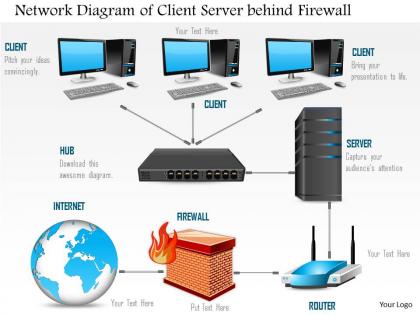
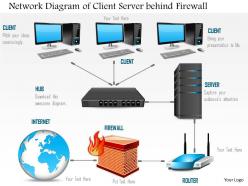
Empower your idea on entrepreneurship and employability while designing this network diagram of a client server behind a firewall but connected to the internet Ppt slides. This PowerPoint image slide has been designed with the graphic of client server in a network. In this PPT slide firewall graphic is also used to display the connectivity with the internet. This PPT slide is well suited for cloud computing and networking concepts. The beauty of this slide lies in the high quality, graphic design of the process flow chart. Moreover, the unique framework of this diagram allows you to add the objectives and mission to support the vision, initiating, clarity of the values to the audience. You can add the valuable information about the process being used here in the various text boxes we have alongside the big icons we have in the diagram. Cloud computing, networking, internet technology, servers etc are the prime aspects here. Give a fillip to your argument with this design. They endow you with greater credibility. Put your thoughts in the correct frame. Our 0814 Network Diagram Of A Client Server Behind A Firewall But Connected To The Internet Ppt Slides give them the best appearance.
People who downloaded this PowerPoint presentation also viewed the following :
0814 network diagram of a client server behind a firewall but connected to the internet ppt slides with all 6 slides:
Engrave your ideas in the minds of your audience. Chisel them in with our 0814 Network Diagram Of A Client Server Behind A Firewall But Connected To The Internet Ppt Slides.


FAQs for 0814 network diagram of a client server behind a firewall but connected to the
Phishing emails are still the worst - people just can't help clicking sketchy links, myself included honestly. Ransomware's another big one that locks up all your files until you pay. Then there's credential theft where they grab weak passwords and try them everywhere. Malware infections happen constantly too. Oh, and social engineering where scammers just call up pretending to be IT or whatever. Pretty sneaky stuff. Two things that actually work: train everyone about email red flags and force multi-factor authentication on everything. Sounds annoying but it stops most attacks cold.
So basically you want layers of security - firewalls around the edges, antivirus stuff on your computers, and separate your important systems from everything else. Kind of like how you wouldn't just have a front door lock and call it good, you know? Add some cameras, maybe lock certain rooms, check things regularly. If hackers get through one thing, there's still other stuff blocking them. Oh and monitoring tools help too - I learned that the hard way at my last job. Start by figuring out what you've already got, then fix the biggest weak spots first.
Dude, your employees are literally your first line of defense against hackers. I can't stress this enough - they'll either save your ass or completely screw you over. Seen way too many companies with top-tier firewalls get destroyed because someone clicked a sketchy email. You need regular training sessions, maybe quarterly? Run fake phishing tests to see who's still falling for obvious scams. Teach them proper passwords (none of that "password123" garbage) and make sure they know how to report weird stuff. Even the best security software is useless if your team doesn't know what they're doing.
So basically your firewall is like the bouncer - it blocks obvious bad stuff right at the entrance based on your rules. But sneaky threats that look legit? That's where IDS comes in. It's watching everything that gets through, spotting weird patterns and sketchy behavior. Kind of like having security cameras inside after the bouncer checks IDs. When your IDS catches something new, it can actually tell your firewall "hey, block this type of traffic too." Pretty cool how they work together - you'll want to set that feedback loop up if you can.
So encryption is like putting your data in a locked box before sending it anywhere. Even if hackers grab it, they can't actually read what's inside without the key. Your passwords, bank info, all that stuff would just be sitting there in plain text otherwise - yikes. AES-256 is the gold standard these days, super strong. I always double-check that sites have the little lock icon (HTTPS). Also make sure your work uses encrypted stuff for anything sensitive. It's honestly crazy how much personal data flies around unprotected on sketchy networks.
Monthly scans are your baseline - don't go less than that. Critical stuff needs weekly checks though. I get it sounds excessive but honestly, hackers don't wait around. Finance and healthcare folks usually need continuous monitoring since regulations are brutal. Full audits? Do those quarterly if you can swing it. Here's the thing - consistency beats perfection every time. Better to nail a simple monthly scan than skip that fancy quarterly review again. Automate what you can and actually check the results. Think of it as your canary in the coal mine situation.
Zero-trust is the big one right now - don't trust anything until it proves itself. IoT devices are honestly a nightmare security-wise (half still ship with "admin/password" as defaults, I swear). Network segmentation helps contain the damage when things go sideways. AI-powered threat detection is getting pretty solid too. Edge computing security and automated responses are growing fast since nobody can manually babysit thousands of devices anymore. Oh, and device identity management - that's becoming critical. Start with an audit of what IoT stuff you actually have running, then look into micro-segmentation. You'd be shocked what random smart devices are hiding on your network.
Look, you've got to layer this stuff - tech plus people watching. Give employees the bare minimum access they actually need for their jobs. Set up good monitoring so weird behavior gets flagged fast. Training helps a ton since most insider problems are just people screwing up, not being evil on purpose. When someone quits? Kill their access that same day - I've seen companies get burned on this one. Oh, and do regular permission audits because access creeps up over time. People end up with way more than they should have.
Honestly, get a password manager first - Bitwarden or 1Password are both solid. Game changer for real. Make every password unique and complex (the manager does this automatically). Turn on two-factor auth everywhere you can. Oh, and don't sleep on service accounts - attackers love those because everyone forgets about them. Train your people on phishing too since that's how most companies actually get hit. I'd audit your current setup first though. Figure out which accounts would hurt most if compromised and start there with rotating passwords regularly.
Look, regulations basically make you build security stuff you'd probably put off otherwise. GDPR forces encryption for EU data, access controls, breach notifications - your network needs monitoring and segmentation. HIPAA's the same deal but for health records, requiring audit logs and secure transmission. Here's the thing though - I actually like having these requirements because they make it way easier to get budget approval for security projects. My advice? Map out which regulations hit your data types first, then see where your current network falls short. It's annoying but honestly saves you from having to justify every security expense.
Start with something like SolarWinds or PRTG for basic network monitoring - they'll show you what's actually happening on your infrastructure. SIEM tools are where it gets interesting though. Splunk's expensive but amazing, or you could go with ELK Stack if budget's tight. Both will make you feel like you're drowning at first, not gonna lie. Wireshark's perfect for digging into packets when weird stuff happens. Oh, and grab a flow analyzer like NetFlow for traffic patterns. Honestly? Pick one good monitoring tool first, then build from there. Don't try to do everything at once or you'll hate your life.
Honestly, you really need this stuff figured out beforehand. When something bad happens (and it will), your team can't just wing it - that's how small problems become massive headaches. Good planning cuts your response time way down and helps you save evidence for later investigation. Your reputation stays more intact too. Most compliance rules require it anyway, so there's that. Figure out what assets matter most first. Give everyone clear roles so they're not stepping on each other. Oh, and actually practice the procedures - you'd be surprised how many companies skip this part. Regular drills make all the difference when everything's on fire.
Honestly, cloud stuff completely changes how you think about security. That whole "build a wall around everything" mindset? Totally dead now that your data's everywhere. Zero-trust is where it's at - basically don't trust anything by default. The tricky part is figuring out what your cloud provider actually protects vs what you're still responsible for. I learned this the hard way, but do that gap analysis first. Your attack surface gets way bigger too with all these new endpoints floating around. Map out who handles what security-wise and you'll save yourself tons of stress later.
Dude, AI and ML are game-changers for threat detection. They spot weird patterns in network traffic that would totally fly under the radar otherwise. Your system learns what normal looks like, then immediately flags anything suspicious - strange logins, unusual data transfers, that kind of stuff. False positives drop way down too, which honestly is a huge relief for security teams. Unlike traditional signature-based detection that only catches known threats, ML actually identifies zero-day attacks and insider threats as they're happening. I'd start with ML-powered SIEM tools - they'll completely change how fast you can respond to incidents.
Honestly, remote work security is a nightmare. You've got people using their neighbor's sketchy wifi and routers from like 2010 - it's chaos. Personal devices are mixing with work stuff constantly, and good luck getting visibility into what's happening on everyone's laptops. Shadow IT is everywhere because remote workers just download whatever app gets the job done. The whole idea of network perimeter security? Yeah, that's dead now. Zero-trust is basically your only shot, and you need endpoint detection on everything. Can't protect what you can't see, right? Start there and work backwards.
-
Best way of representation of the topic.
-
I discovered this website through a google search, the services matched my needs perfectly and the pricing was very reasonable. I was thrilled with the product and the customer service. I will definitely use their slides again for my presentations and recommend them to other colleagues.