

0914 computer network mesh devices behind firewall cloud computing image ppt slide




Try Before you Buy Download Free Sample Product
 Impress Your
 Audience
 100%
100% Editable
 Save Hours
 of Time


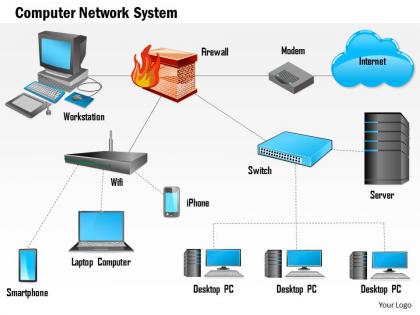
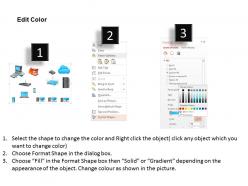
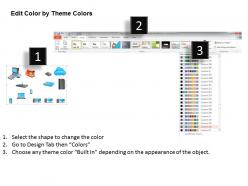
Present an introduction to the ideas of how mesh networks work and how do they differentiate from other networks with our 0914 Computer network mesh devices behind firewall cloud computing Image PPT Slide. This presentation slide of computer network devices has been designed by our professional team members and will help you create understanding mesh networking ideas for designing your network. This can also be used to display for connecting with people in your neighborhood who may want to get the support or be involved with your project. Our computer network system PPT slideshow has been designed with graphics of cloud, servers, router, computers and firewall icon to discuss the ideas related to network, different properties of networks and different network structures. This wireless network layout allows you to explore different networks structures to think about network design and how different designs are useful in different situations. Download this PPT slide and display controls connections and traffic on the network. Bounce off your ideas with our 0914 Computer Network Mesh Devices Behind Firewall Cloud Computing Image Ppt Slide. The audience will certainly echo your views.
People who downloaded this PowerPoint presentation also viewed the following :
0914 computer network mesh devices behind firewall cloud computing image ppt slide with all 6 slides:
Be the destination of choice with our 0914 Computer Network Mesh Devices Behind Firewall Cloud Computing Image Ppt Slide. Customers will always be at your doors.
FAQs for 0914 computer network mesh devices behind firewall cloud computing
So mesh networks are pretty cool - every device connects to several others instead of just one main router. Data can take different paths if something breaks. Your internet won't die if one node craps out, which honestly happens more than it should. Picture having like 5 different routes to drive somewhere instead of being stuck on one road. Coverage gets way better too since devices boost each other's signals. I set one up at my place last year and the dead zone in my bedroom finally disappeared. If you're having connectivity issues, definitely look into it.
Honestly, mesh networks are a game changer for coverage issues. They automatically route around dead zones when buildings block signals - happens constantly in cities. Each node extends your network without new cables, which saves you serious money on infrastructure. The self-healing thing is pretty sweet too, means way less maintenance drama. I'd start by mapping where your current dead spots are, then figure out strategic places to drop mesh nodes. Works especially well in high-density areas where regular connectivity sucks.
So basically when a node craps out, the mesh just finds another route automatically. No need to mess with anything manually - your data keeps flowing even if several connection points die. The whole thing monitors itself constantly which is actually pretty cool. Traditional networks usually have that one weak link that kills everything, but mesh networks don't really have that problem. Way better uptime overall. I mean, I've seen people lose internet because one router died and that's just not gonna happen here. Just make sure your nodes overlap enough coverage-wise and you'll be good.
Honestly, mesh networks are perfect when you can't have stuff going down - like emergency teams or military situations. They're solid for weird spaces too. You know those big warehouses with all the metal shelving? That junk destroys regular WiFi, but mesh handles it fine. If one piece breaks, everything just routes around it automatically - pretty cool actually. I'd go mesh anytime you need bulletproof connectivity or you're dealing with a tricky environment. Remote sites love them since there's no single failure point to worry about.
Honestly, mesh networks are a pain to set up - way more complex than regular networks. You'll need tons more hardware and planning upfront. Data bounces between nodes so latency gets worse, and managing all those connected devices? Total headache. Power usage goes through the roof too. The worst part is troubleshooting when something breaks - could be any of dozens of failure points. Performance actually drops as you add more nodes because of interference (which seems backwards, right?). Definitely test a small area first before going all-in.
Dude, mesh networks are clutch for IoT stuff. Your devices can chat directly with each other instead of everything going through one central point. One device craps out? No problem - the network just finds another path. Coverage gets way better too since each device basically becomes a signal booster. I set one up last year and honestly wish I'd done it sooner. The whole thing fixes itself when there's issues, which saves me from constantly troubleshooting random connection drops. Try a small setup first - you'll be shocked how much smoother everything runs.
Dude, you absolutely need solid security on your mesh network or you're gonna regret it. Without proper encryption and authentication, every node becomes another way for hackers to get in. It's like having multiple unlocked doors around your house - not smart. WPA3 encryption is your friend here, plus keep those firmware updates current. Only let authorized devices connect to your nodes. I learned this the hard way when my neighbor accidentally connected to mine last year (awkward conversation). Trust me, spending time on security upfront beats dealing with breaches later. Your mesh should protect you, not expose you.
Honestly, it's all about where you put your nodes and what jobs they're doing. Yeah, more nodes usually gives you better coverage and backup options, but you can definitely overdo it - too many in one spot just creates interference. I learned this the hard way lol. Each hop between nodes adds delay, so you want enough to avoid failures but not so many that data's bouncing around forever. Put your beefiest nodes where the heavy traffic actually flows, then use simpler ones at the edges. Map out your data patterns first though - that's the real game changer for placement.
So mesh networks mostly use Wi-Fi (like Wi-Fi 6), Zigbee, Z-Wave, or Bluetooth mesh. Your Eero or Nest setup at home? That's Wi-Fi mesh. For smart home stuff, Zigbee and Z-Wave are everywhere since they don't drain batteries and connect really well between sensors and lights. Bluetooth mesh is catching on too, especially for IoT things. Here's the cool part - devices can talk directly and route around dead spots. One node dies? Network keeps humming along. Just match whatever you pick to how much power and range you actually need.
So Zigbee and Z-Wave are like the languages your smart home gadgets use to chat with each other. They create these mesh networks that automatically heal themselves - if one device craps out, everything just reroutes around it. Pretty neat actually. Z-Wave has better range but caps out at fewer devices, while Zigbee can handle tons more but sometimes gets interference issues. I learned this the hard way with my old setup. Your hub will support one or the other, so check that before you go buying a bunch of new stuff. Most of the time you won't even think about it - devices just find each other and work.
Yeah so walls, furniture, and metal stuff will definitely weaken the signal between your nodes. Other wireless devices mess with it too - I've noticed this especially with microwaves running nearby. Rain and humidity can screw with outdoor setups as well. Temperature swings aren't ideal for the hardware either. But honestly, mesh networks handle these issues pretty well since they'll just route your traffic through different paths automatically. You just need enough nodes scattered around so there's always backup connections when some links start acting up.
Dude, mesh networks are honestly brilliant for disasters. Each node can route traffic through different paths, so when cell towers get destroyed or cables snap, your network just keeps going. Think of it like - oh wait, you know how GPS reroutes you when there's an accident? Same concept but for data. You can drop portable nodes into disaster zones and they'll find each other automatically. Pretty cool tech. First responders get instant communication without waiting around for the power company to fix everything. Way better than being stuck with no comms for days.
Yeah so mesh networks cost more upfront - you're buying multiple nodes instead of just one router. Installation gets expensive too if you're covering a big area. But honestly? The long-term savings are worth it. You won't have those nightmare scenarios where one thing breaks and kills your entire network. Way less maintenance headaches since the thing basically fixes itself. Also scales pretty easily when you need to expand. I'd definitely run the numbers over like 5 years to see which option makes sense for your situation.
Honestly, the Wi-Fi 7 stuff is where things get exciting - mesh networks are getting crazy smart about handling traffic and interference. AI optimization is finally becoming real, not just marketing BS. Your mesh nodes can actually process data locally now instead of bouncing everything to the cloud, which is pretty cool. Oh, and Matter protocol support is everywhere finally (took long enough). Smart home devices actually talk to each other properly now regardless of brand. Rural folks are getting hybrid satellite-mesh options too. If you're thinking about upgrading, maybe hold off until more Wi-Fi 7 systems drop next year?
Dude, mesh networks are perfect for rural areas. Basically they create backup routes for your data - one node goes down? No problem, it just finds another path. Way more reliable than hoping that single cell tower works. Each node acts like a mini tower too, so you get better coverage everywhere. The cool thing is you don't need to build everything at once - start with a few nodes and add more later. I've heard good things about Ubiquiti gear, though it's probably pricier than you'd want. Cambium Networks has decent options too.
-
Graphics are very appealing to eyes.
-
Unique and attractive product design.