

0514 network topology template powerpoint presentation




Try Before you Buy Download Free Sample Product
 Impress Your
 Audience
 100%
100% Editable
 Save Hours
 of Time


Make an emphatic gesture with our 0514 network topology template Powerpoint Presentation. They exhort complete belief.
People who downloaded this PowerPoint presentation also viewed the following :
0514 network topology template powerpoint presentation with all 5 slides:
Our 0514 network topology template Powerpoint Presentation enhance growth. Chances of achievement become far greater.
FAQs for 0514 network topology
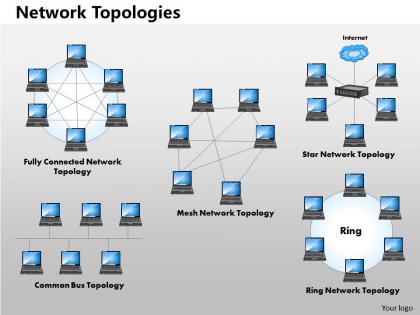
Okay so basically it's all about how stuff connects and what happens when things break. Star topology hooks everything to one central hub - super easy to fix problems, but if that hub crashes you're screwed. Bus is the cheap option where devices share one cable, though honestly it's kinda outdated now. Ring sends data in a circle which sounds cool but one bad connection kills everything. The single point of failure thing is real with bus and ring. Star's your best bet these days since troubleshooting doesn't make you want to pull your hair out.
So physical topology is basically how your cables and devices are actually wired up - like the real hardware layout. Logical topology? That's how data moves around, which can be totally different from the physical setup. Picture it like this: roads vs how traffic actually flows. You might wire everything to a central switch (physical star), but the data could still act like it's on one shared bus. Pretty weird when you first think about it. Definitely map out both when you're planning stuff - they'll mess with your performance and troubleshooting in different ways.
Budget's probably your biggest headache right off the bat. How many people will actually use this thing? What apps are they running - just email or heavy stuff? Some buildings are absolute nightmares for cable runs, trust me on that one. Can you handle downtime or do you need everything up 24/7? Security's massive too depending on what data you're protecting. Growth plans matter since adding locations later can get messy. Honestly, just make a list of what you absolutely need vs what would be nice, then see which topology fits best.
Hybrid's perfect when different parts of your network need different things. Like, you might want super fast connections between buildings but just basic star setups for each office. Honestly it's way more flexible than trying to force everything into one structure. Large companies do this all the time - universities with multiple buildings, or places mixing high-performance server stuff with regular office networks. Yeah it gets more complex to manage, but when you've got mixed needs across your whole setup, hybrid lets you optimize each piece instead of settling for one-size-fits-all.
Think of network topology like roads for your data. Star setups are usually your best bet - everything connects straight to a central hub, so it's fast. Ring and bus can be a pain because data has to hop through multiple spots before reaching its destination. Mesh is great if you need backup routes (honestly saved my butt once during a server crash), but wow does it cost more. Distance between your nodes matters too. I'd start by sketching out what you have now and see where things are getting jammed up.
So redundancy is basically having backup paths for when stuff breaks - and trust me, it will break at the worst possible time. You want multiple routes between your critical network areas. That way if a switch dies or a cable gets unplugged, traffic just flows through the backup connection instead. It's like having alternate routes to work when there's construction on your usual highway. Build in extra switches and links for anything mission-critical. Maybe even get a second internet provider if you can swing it budget-wise. Really depends on how much downtime you can handle before people start panicking.
So here's the thing - your network setup basically decides how secure you can actually be. Flat networks are terrible because once someone gets in, they can pretty much go anywhere. You want segmentation with VLANs or subnets to box threats in. Star topologies work great since everything goes through central points, making monitoring way easier. I learned this the hard way at my last job. The trick is building security zones into your design from day one instead of trying to patch things up later. Traffic flow matters too - control where data can actually go between different parts of your infrastructure.
For network diagrams, I'd start with Lucidchart or Visio - both have all the network symbols you'll need. Draw.io is solid if you want something free (it's actually called diagrams.net now but whatever). Mac user? Omnigraffle works great. There's also fancy stuff like SolarWinds that'll automatically map your actual network, which is pretty cool but probably overkill. I've honestly seen people make decent ones in PowerPoint, though that gets messy fast with complex setups. Most of these have free trials so you can mess around and see what clicks. Start with whatever you already have access to first.
Dude, mesh topology is clutch for big networks. Multiple paths between every node means if something breaks, traffic just finds another route automatically. No single point of failure, which honestly saved my ass at my last job more than once. Performance is solid too - data takes the fastest path instead of getting stuck going through some central chokepoint. Sure, it costs more upfront with all those extra connections, but the reliability boost is insane. You can push way more traffic through without things getting backed up. For anything mission-critical, it's totally worth the investment.
Dude, topology changes will mess with your network big time. Traffic flow gets wonky, latency spikes, bandwidth goes haywire. Your monitoring tools? Yeah, they'll probably break too - such a pain to reconfigure everything. Documentation becomes outdated overnight. Staff needs retraining on new paths. Troubleshooting procedures might need a complete overhaul. Honestly, I've seen people skip the lab testing part and regret it instantly. Always test changes in a safe environment first. Have your rollback plan ready because Murphy's law is real in networking. Trust me on this one.
Honestly, the big pain points are usually scalability hitting walls, single failure points screwing everything up, and costs spiraling out of control. Star setups get pricey quick when you scale. Mesh networks? Total config headache - spent way too many late nights debugging those things. One bad node in a ring can kill your whole setup. You'll also deal with bandwidth limits and latency depending what you pick. Oh, and always plan for like 50% more growth than you think. Build redundancy from the start instead of trying to hack it in later - learned that one the hard way.
Honestly, cloud stuff is making us ditch those old hub-and-spoke setups. Your network can't just live in one building anymore - you need multiple connection points to AWS, Azure, wherever your apps actually run. That whole "route everything through our main datacenter" approach? Total nightmare when half your services are in the cloud. I'd look at mesh designs that handle direct cloud connections. SD-WAN's pretty slick for this too, though maybe overkill depending on your setup. Here's what worked for us: figure out where your workloads really live first, then build around that.
Honestly, just pick a standard and stick with it - same symbols, colors, labels across your whole team. Document both logical and physical layouts since you'll need different info for different problems. Can't tell you how many times I've seen "official" diagrams that are like 6 months old and completely worthless when stuff breaks. Toss in IP ranges, VLANs, device specs, connection types. Central storage that's accessible but locked down. Here's the kicker though - make updating part of your change process or it'll never happen. Trust me, 2 AM you will be grateful.
Templates are basically pre-made network designs you can tweak instead of building everything from zero. Huge time saver honestly - why recreate star or mesh setups when someone already figured it out? The consistency thing is nice too since you're not making random mistakes with the basic structure. I've been building up my own collection over the years and it's probably saved me hours of work. Oh and they're already tested so less chance of screwing something up. Just grab whatever matches your usual setup and modify from there.
Honestly, SDN and intent-based networking are huge right now - everything's way more programmable than it used to be. Edge computing is pushing data centers closer to users, so you're dealing with distributed setups everywhere. Container orchestration is pretty much standard now too. Zero-trust is completely changing network segmentation (way more secure but yeah, definitely more complex). Oh and if you haven't messed around with SDN controllers in a lab yet, you should probably start - feels like everyone expects you to know that stuff these days. It's wild how fast things are moving.
-
Designs have enough space to add content.
-
Great product with highly impressive and engaging designs.