


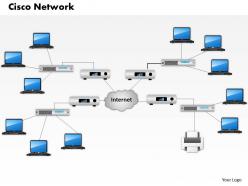
0514 cisco network diagram template powerpoint presentation





Try Before you Buy Download Free Sample Product
 Impress Your
 Audience
 100%
100% Editable
 Save Hours
 of Time


Concentrate your thoughts on the road ahead. Our 0514 Cisco Network Diagram Template Powerpoint Presentation will Keep you on track.
People who downloaded this PowerPoint presentation also viewed the following :
0514 cisco network diagram template powerpoint presentation with all 5 slides:
Our 0514 Cisco Network Diagram Template Powerpoint Presentation are completely captivating. They bring about a dramatic experience.

FAQs for 0514 cisco network diagram
So Cisco templates usually have all the basics - routers, switches, firewalls, access points, plus your end devices like PCs and servers. WAN connections and VLANs get mapped out with proper IP schemes too. Everything uses those standard Cisco icons which honestly makes life so much easier when you're trying to explain stuff to other people. Oh and there's always cloud symbols everywhere now because apparently that's mandatory. The whole point is showing your network segments and security boundaries clearly so when something breaks (and it will), anyone can look at the diagram and actually understand what's going on.
So basically, these diagrams show your IT folks how all the network stuff connects - routers, switches, firewalls, you know. Makes troubleshooting way easier since you can actually see where data flows instead of guessing. Honestly saved my butt so many times when planning upgrades because you won't accidentally kill something critical. Think of it like having a map of your whole setup. Security gaps become super obvious too when you can visualize everything. I'd start simple - just map your main infrastructure first. Trust me, it'll click once you see it all laid out. Way better than keeping it all in your head.
Honestly, these templates are lifesavers when you're setting up new networks or trying to figure out why something's broken. Documentation for compliance stuff too - nobody wants to dig through messy notes during an audit. The visual aspect is huge when you're pitching ideas to non-tech people; they glaze over at spreadsheets but actually get diagrams. I always use them before expansions or migrations since you can catch bottlenecks early (way cheaper than fixing disasters later). Just grab a basic template and tweak it for your setup. Trust me, it'll save you headaches down the road.
Honestly, Packet Tracer is perfect if you're doing anything educational - it's free and has all the Cisco stuff built right in. Lucidchart though? That's what I'd go with for professional work. Web-based, tons of templates, easy sharing. Visio works too if your company already pays for it, but man the interface feels dated now. Oh and Draw.io is surprisingly decent for quick stuff and won't cost you anything. I'd probably mess around with Lucidchart's free trial first - see if it clicks before spending money on licenses.
Look, using those standard Cisco icons is honestly a game-changer for your diagrams. Everyone on your team instantly knows what they're looking at - routers, switches, firewalls, whatever. No more confusion between the network guy and your PM about what that random shape means. It's like having a shared language that actually works (rare in IT, tbh). Your troubleshooting gets way faster, handoffs don't suck as much, and you'll avoid those nightmare miscommunications. Trust me, grab the official Cisco icon library for your next diagram. Team discussions become so much clearer.
Dude, first thing - ditch those generic device boxes and use the actual models you've got. Trust me, when you're troubleshooting some weird issue at midnight, you'll thank yourself for having the right switch icons. Your VLAN setups and IP schemes need to match reality too. Cable types matter more than people think, especially for performance stuff. Honestly, the whole point is making it detailed enough that if I walked into your server room tomorrow, I'd know exactly what plugs into what without having to trace a million cables.
Honestly, the worst thing you can do is mix old and new Cisco icons - looks super unprofessional. Don't try cramming every single cable and VLAN into one diagram either, it gets messy fast. Keep your physical and logical layouts separate, that's like networking 101. Always label connections clearly cause nobody wants to guess what goes where. Include IP schemes when they matter. Oh and seriously, update your legend - I've seen so many templates where the symbols don't even match what's actually used. Start simple first, then add complexity. Trust me on this one.
So templates are basically your best friend when the network changes. You don't have to rebuild everything from zero - just update what's different. Swap components, throw in new segments, tweak configs. The layout and symbols are already sitting there waiting. My team uses the same templates so we all know where stuff goes, which honestly saves so much time on documentation. Oh and when you're planning that next upgrade? Just grab your template and only mess with what actually needs changing. Way easier than staring at a blank page.
Dude, color coding is a lifesaver for Cisco diagrams. I usually do blue for switches, red for routers, green for access points - keeps everything organized. Trust me, when you're debugging some weird network issue at midnight, you'll thank yourself for making VLANs and security zones visually distinct. Your coworkers won't have to squint at tiny labels anymore. Works great for presentations too since management can actually follow along without getting lost in the technical weeds. Just don't go crazy with it - stick to maybe 3-4 colors tops and use the same scheme everywhere.
Dude, network diagrams are lifesavers for troubleshooting. You get this visual map of everything, so instead of digging through configs blindly, you can actually trace where stuff breaks. Honestly, I probably spend way too much time making mine look pretty, but whatever. Point is, you'll spot routing issues way faster when you can see the whole topology laid out. Document your IP schemes and how devices connect - use a standard format so your teammates aren't totally lost. Just keep it current or it becomes useless real quick.
Name your devices consistently - something like "SW01-Core" or "RTR-Branch-NY" works great. Label both ends of connections with interface numbers (Gi0/1 to Gi0/3) and throw in IP addresses or VLAN info if it matters for what you're documenting. Honestly, you'll be so grateful for this when you're debugging stuff at weird hours. Don't make fonts microscopic or cram every little detail in there. Oh, and create that naming standard doc first - then actually stick to it across everything. I've seen too many networks where half the gear follows one convention and half follows another. Total mess.
Oh man, cloud diagrams are a whole different beast! You've got to show all these connections going way outside your data center now - AWS icons, Azure stuff, VPN tunnels, direct connects. SD-WAN overlays too if you're using those. Honestly gets pretty chaotic looking with all the different line types everywhere. I always try to clearly separate what's on-prem vs cloud resources. Don't forget the security boundaries between everything - that's usually what bites people. Also document your bandwidth needs and backup paths since losing cloud connectivity basically kills everything.
Add VPN endpoints and cloud connections first - that's your foundation. Wireless access points are huge now since everyone's working from random places. BYOD security zones matter way more than they used to, honestly. Don't forget bandwidth management because remote workers can absolutely crush your network. SD-WAN and MDM components should go in there too if you're running them. The whole point is showing secure traffic flow from home offices back to corporate. I'd start by mapping where people actually connect from now, then build your template around those real patterns.
Honestly, I'd just throw your Cisco templates into something like Lucidchart or Draw.io - way easier than you'd think. Your whole team can jump in and edit simultaneously, which is pretty sweet when you're dealing with those massive enterprise setups. The commenting feature is clutch for flagging specific equipment issues, plus you get version history so nobody accidentally breaks everything. Oh, and most of these sync with Slack or Teams if your company's into that. Just upload the template, send invites with editing permissions, and you're good to go. Draw.io is free too if budget's tight.
Look, documentation is super critical for keeping those Cisco diagrams accurate. Without it you're basically flying blind. Make it part of your change management process - like every time someone adds devices or tweaks configs, they've gotta update the diagrams too. Can't tell you how many times I've walked into a "mystery network" where half the equipment is just... there, and nobody remembers why lol. Set up regular review cycles so things don't get stale. Trust me, diagrams become useless fast if you don't stay on top of this stuff.
-
Designs have enough space to add content.
-
Informative design.