


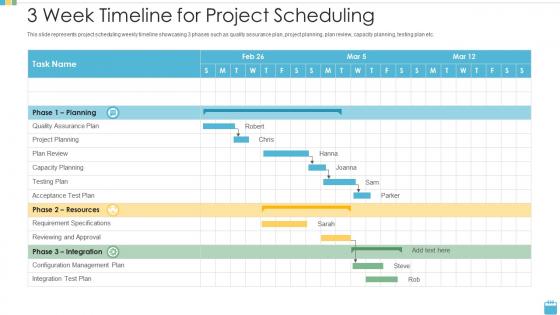
3 week timeline for project scheduling




Try Before you Buy Download Free Sample Product
 Impress Your
 Audience
 100%
100% Editable
 Save Hours
 of Time


Our 3 Week Timeline For Project Scheduling are topically designed to provide an attractive backdrop to any subject. Use them to look like a presentation pro.
People who downloaded this PowerPoint presentation also viewed the following :
3 week timeline for project scheduling with all 9 slides:
Use our 3 Week Timeline For Project Scheduling to effectively help you save your valuable time. They are readymade to fit into any presentation structure.








FAQs for 3 week timeline
Start with breaking down your tasks - that's your foundation. Then get realistic about timing (we all suck at this initially). Map out what depends on what, figure out who's doing each piece, and for the love of god, build in buffer time. I can't tell you how many projects I've seen crash because someone thought everything would go perfectly. Track with milestones so you're not flying blind. Oh, and identify your critical path - those are the delays that'll actually wreck your timeline. The "who's responsible for what" part saves so many headaches later.
Gantt charts are seriously a game-changer for project timelines. Map out your critical path first, then throw in your milestones and deadlines. The whole team can see what's due when and which tasks are holding everything else up. No more digging through messy spreadsheets to figure out where things stand. I always update mine weekly - otherwise it just becomes another useless document collecting digital dust. Your stakeholders will actually understand what's happening for once. Plus you'll spot bottlenecks way earlier than you normally would.
So critical path analysis? It's basically mapping out which tasks absolutely can't be delayed without screwing your whole timeline. You list all your tasks and dependencies first - that part's pretty straightforward. Then you find the longest chain of activities with zero buffer time. That's your critical path, and honestly it usually ends up being way more tasks than you'd expect. Any delay there = project delay. If you need things done faster, focus only on shortening those critical tasks. Don't waste time speeding up random stuff that has wiggle room.
Think of dependencies as dominoes - when one falls behind, everything after it gets pushed back too. The tricky part? Critical paths are usually way longer than you'd expect at first glance. But here's the thing - tasks that aren't dependent on anything else can soak up delays without messing up your deadline. I always tell people to map this stuff out early because you'll spot problems before they bite you. Then you can move people around or adjust things. Tasks running parallel are your best friend honestly, since they don't create those annoying bottlenecks.
For project scheduling, I'd check out Smartsheet and Asana first - both have solid free trials. Microsoft Project is the beast if you're dealing with crazy complex dependencies, but it's honestly way too much for most stuff. Smartsheet feels like Excel but with actual scheduling power. Asana's where it's at for team collab though, super clean interface. I mean, you could probably get away with a good Excel template for smaller projects too. Just don't overthink it - try Smartsheet and Asana's free versions and see what doesn't make you want to throw your laptop out the window.
Start by checking when everyone's actually free - sounds obvious but you'd be surprised how many people skip this step. Find your critical path tasks first (the stuff that'll tank your deadline if delayed). Resource leveling helps smooth out those insane weeks where everyone's drowning while other periods are dead quiet. Hunt for tasks with float time that can shift around without screwing up your timeline. Cross-training saves your butt when only one person knows the magic process. Run a utilization report to see where bottlenecks actually happen instead of guessing.
Ugh, delays are the worst. So first thing - figure out what's actually broken vs what just looks messy. You can crash your schedule by throwing more people at critical stuff, or try fast-tracking where you run things parallel instead of one after another. Pull people off less important work if you have to. Here's the thing though - don't try to fix this solo like some hero. Talk to your stakeholders now about what you might need to cut or spend more on. I swear, every PM thinks they can just work magic in the background. Start with a real honest look at your timeline and see what's salvageable.
Honestly, you can't make realistic schedules without talking to people first. Figure out who's available when and what they actually need from you - otherwise you're just making stuff up. Get everyone on the same page about deadlines during planning, not after. I learned this the hard way lol. Set up regular check-ins so you can catch problems before they blow up your timeline. When things change (and they will), tell people immediately. Those "wait, what happened to the deadline?" conversations are the worst. Map out who needs to be involved in each phase and schedule those touchpoints from the start.
Break your project into smaller chunks with deadlines and assign owners for each piece. Weekly check-ins are a lifesaver - catches problems before they blow up. I swear by tools like Asana or Monday because you can actually see what's happening instead of guessing. Always add buffer time though, because Murphy's law is real and something will definitely go sideways. Oh, and overcommunicate with everyone. Sounds annoying but it's way better than surprised faces when you're behind schedule.
Here's what's worked for me - build buffers around your hard deadlines but keep those client dates sacred. Like, literally don't touch those. I got burned on this exact thing last quarter when everything imploded at once. Map out your critical path stuff that absolutely cannot slip, then be way more flexible with the rest. Rolling wave planning is clutch here - plan the next 2-3 weeks in detail, keep everything else looser. Your team needs to know what's set in stone vs what can move around. Honestly, the padding between milestones is where you'll save yourself from going insane when things inevitably go sideways.
Honestly, the worst mistake is thinking everything will go perfectly to plan. Spoiler: it won't. Always pad your estimates by like 20% because random stuff WILL come up. Don't pack critical tasks right next to each other either - give yourself breathing room. I learned this the hard way when three "quick" tasks all ran long simultaneously. Also check that your team isn't double-booked and map out which tasks depend on others finishing first. Oh, and holidays exist! Figure out your critical path early so you know which delays actually matter vs. which ones are just annoying.
So instead of planning everything upfront like a crazy person, agile breaks things into 1-4 week chunks. You tackle the most important stuff first, then adjust based on what you learn. Way less stressful once you get the hang of it - though my team definitely struggled at first. Your timeline becomes flexible instead of some rigid thing you're stuck with. The whole point is rolling with changes rather than fighting them. Try breaking your next project into smaller pieces and you'll see how much easier it gets to actually manage everything.
Definitely start with schedule variance - that's just comparing what you planned vs what actually happened. Critical path delays are huge too, trust me on that one. I've seen projects completely derail because nobody was watching those dependencies. For the numbers side, track your schedule performance index (SPI) and milestone completion rates. Resource utilization is worth monitoring but maybe add that later? Honestly, I'd pick just 2-3 metrics at first based on whatever keeps you up at night about this project. You can always layer on more once you get the hang of it.
Honestly, get yourself a master calendar where you can see everything at once - I'm obsessed with Monday.com but even color-coding in Google Calendar works. Map out all your current projects visually first, then look for where deadlines overlap or you'll need the same people/resources. That's where things usually go sideways. Do a weekly check-in to reprioritize since stuff always changes. Oh, and tell everyone immediately when timelines shift - don't wait until the last minute hoping you'll catch up (we both know how that ends). Start mapping everything out this week if you can.
Honestly, the right tech makes scheduling so much easier. Apps like Asana automatically adjust your timelines when stuff gets pushed around - no more manual updates every time something changes. AI tools can actually predict delays by looking at your past projects, which is pretty cool. Resource management platforms save you from those "oh crap, Mike's out that week" disasters by showing everyone's availability upfront. Time tracking gives you real numbers instead of just guessing how long things take. Just make sure whatever tools you pick actually work together - otherwise you'll waste more time updating everything than managing the actual project.
-
Qualitative and comprehensive slides.
-
Informative presentations that are easily editable.
-
Great experience, I would definitely use your services further.
-
Excellent template with unique design.