


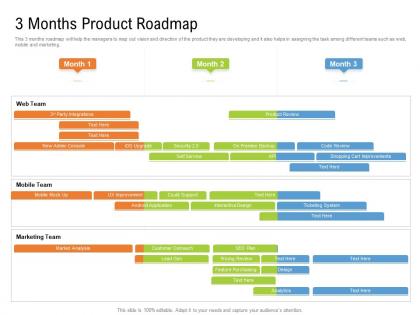
3 months product roadmap timeline powerpoint template




Try Before you Buy Download Free Sample Product
 Impress Your
 Audience
 100%
100% Editable
 Save Hours
 of Time


Our 3 Months Product Roadmap Timeline Powerpoint Template are topically designed to provide an attractive backdrop to any subject. Use them to look like a presentation pro.
People who downloaded this PowerPoint presentation also viewed the following :
3 months product roadmap timeline powerpoint template with all 2 slides:
Use our 3 Months Product Roadmap Timeline Powerpoint Template to effectively help you save your valuable time. They are readymade to fit into any presentation structure.
FAQs for 3 months product roadmap
Your roadmap template needs timelines, strategic goals, specific features, and priority levels - that's the core stuff. Don't forget success metrics and resource allocation. Dependencies are huge too, trust me on this one. Stakeholder info is clutch so people know who's responsible for what. You want that sweet spot between high-level strategy and enough detail that teams can actually do something with it. Honestly, just start simple and build from there. Once your team gets the hang of it, you can add more bells and whistles.
Look, roadmap templates are actually pretty clutch for getting teams aligned. Engineering, marketing, sales - they all see the same visual format and instantly get what's happening with timelines and dependencies. No more confused faces in meetings when someone asks about priorities. Plus it forces you to think through trade-offs upfront, which honestly saves so much drama later. I'd definitely put yours somewhere central where everyone can access and drop comments - maybe Notion or whatever you guys use. You'll notice way better coordination almost right away. Trust me on this one.
Color coding is honestly a game changer - pick different colors for themes, status levels, whatever makes sense for your setup. Swimlanes work great too for organizing by team or priority. Don't sleep on timeline markers either (quarters, months) since everyone always wants to know "when." I'm weirdly passionate about using icons for feature types and milestones - people overlook them but they're clutch. Mix up your font sizes so important stuff stands out. Just don't go overboard with the visual elements or you'll end up with a hot mess. Start simple with colors and swimlanes, then build from there.
So basically you want the scoring section of the template - it's got columns for impact, effort, and strategic alignment. Rate everything 1-5 based on customer value, how much work it takes, and if it matches your business goals. Honestly, effort estimates are always wrong because devs are way too optimistic about timelines lol. After scoring, just divide impact by effort (or whatever formula your team likes) to get priority scores. Sort by highest numbers and there's your roadmap order. Simple but it actually works pretty well.
Honestly, timeline views are clutch for seeing everything at once. You'll spot when deadlines crash into each other and figure out which features depend on what. Great for catching when your team's drowning during certain weeks too. Execs absolutely love these things - they get the "when" without reading through a million details. Makes explaining delays way less painful. I always use timeline for stakeholder meetings but switch back to kanban when we're actually planning sprints. Way more practical that way.
Honestly? Every quarter at minimum, but it really depends on your industry. AI or fintech moves crazy fast - you might need monthly check-ins. More stable markets can get away with quarterly updates. The main thing is keeping it connected to what's actually going down in your market. Nothing's more useless than a roadmap that feels totally out of touch. Set a calendar reminder so you don't forget (I always forget otherwise). And yeah, don't hesitate to tweak things if something big happens between reviews. Keep it flexible - static roadmaps are basically paperweights.
Add some columns to your roadmap for "User Impact" and where the feedback came from. I score stuff as high/medium/low based on how much users actually want it. Also throw in actual quotes from surveys or support tickets - honestly, stakeholders eat that up when you're fighting for priorities. The trick is making all this feedback super visible so it doesn't get lost in random meeting notes. Oh, and don't try to track everything at once. Pick like 2-3 solid feedback sources first and build from there.
Honestly, just start with whatever your team already uses for collaboration - adoption is literally half the battle. Google Sheets or Excel are perfect for basic roadmaps that everyone can access. Want something more visual? Miro and Figma are great options. PowerPoint actually doesn't suck for stakeholder presentations, despite what people say. If you've got budget for dedicated tools, ProductPlan and Aha! have nice built-in templates that'll save you time. The key thing is picking something that won't be a pain to update and share. Otherwise you'll build this beautiful roadmap that just sits there gathering digital dust while everyone goes back to Slack conversations.
So basically, every industry tweaks these templates differently. Tech companies are all about sprints and feature drops. Manufacturing? They're tracking supply chains and production deadlines. Healthcare gets the worst deal though - those regulatory approval phases drag on forever. Financial services companies load theirs up with compliance checks and risk stuff. You'll want to customize based on what actually matters in your space. Think about your regulatory hoops, development cycles, how customers give feedback. Grab a basic template first, then swap out the phases and milestones for things that make sense for your business.
Honestly, the worst thing you can do is get super detailed way too early - like mapping out features for next summer when you're still figuring out this quarter. Huge waste of time. Also don't just throw everyone's pet requests on there to make them happy. That's how roadmaps turn into hot messes nobody believes in anymore. I'd focus on bigger themes instead of specific features. Never promise dates beyond maybe 2 quarters out because everything will change anyway. Oh, and update it often so your team doesn't get blindsided by pivots.
Honestly, the best roadmap templates tie every feature directly to business goals and actual metrics you can track. Like, don't just say "improve user experience" - connect it to retention rates or revenue targets. Way too many roadmaps I've seen are basically just feature wishlists with zero strategy behind them. Your template needs sections for the business objective each feature supports, plus which KPIs you'll measure. That way when executives inevitably ask "why're we building this random thing?", you've got concrete business impact to point to. Makes those conversations so much easier.
Honestly, market research is what stops you from building stuff nobody wants. I learned this the hard way at my last job - we spent months on features that flopped because we never asked customers what they actually needed. Research shows you their real pain points and how they're solving problems now. Plus you get intel on competitors, which is clutch for positioning. Don't touch your roadmap until you figure out your key customer segments first. Otherwise you're just guessing and hoping it works out. Short sentences work. But this longer explanation helps you understand why skipping research usually backfires spectacularly.
Honestly, roadmap templates work great with agile - way better than people think. You get that big picture view without getting stuck in rigid timelines. Structure it around themes or quarterly goals instead of specific dates. Your sprints can work toward those bigger chunks while you pivot the details as needed. I've found it really helps during standups when people start wondering why we're building random features. The roadmap keeps everyone pointed in the same direction. Just don't forget to update it regularly or it'll become one of those dusty documents nobody looks at. Been there, done that.
Honestly, it comes down to how detailed you get and your timeline. Short-term roadmaps are like 3-6 months out - you're mapping specific features and sprint goals you can actually deliver on. Long-term stuff? That's 6+ months of strategic themes and rough feature buckets. Your short-term roadmap tells the team what they're coding next week. The long-term one is basically your best guess at product direction for stakeholders (and let's be real, it'll probably change). My advice? Start with the big picture vision first, then drill down into a detailed quarterly plan. Works way better than doing it backwards.
Honestly, just turn your roadmap into the main place everyone goes for updates. I share mine during sprint reviews and those monthly stakeholder meetings - way better than drowning people in email updates. The visual aspect is huge because nobody wants to read paragraphs about what's coming next. Keep it fresh though, like actually update the thing regularly or people stop trusting it. Monthly walkthrough sessions work really well too. Let people ask questions and throw in their two cents. Makes them feel involved instead of just... informed, you know? Oh and definitely encourage feedback during reviews - stakeholders love feeling heard.
-
Helpful product design for delivering presentation.
-
Informative design.
-
Designs have enough space to add content.
-
Attractive design and informative presentation.
-
Professional and unique presentations.
-
Unique design & color.
-
The content is very helpful from business point of view.
-
I discovered this website through a google search, the services matched my needs perfectly and the pricing was very reasonable. I was thrilled with the product and the customer service. I will definitely use their slides again for my presentations and recommend them to other colleagues.
-
Editable templates with innovative design and color combination.
-
It saves your time and decrease your efforts in half.
-
Page:
- You're currently reading page 1
- Page 2
-
