


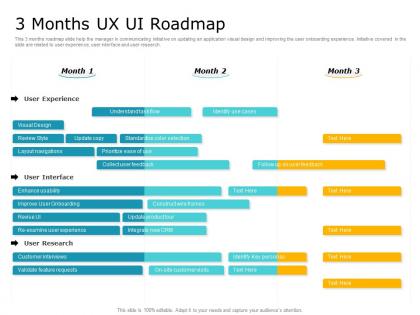
3 months ux ui roadmap timeline powerpoint template




Try Before you Buy Download Free Sample Product
 Impress Your
 Audience
 100%
100% Editable
 Save Hours
 of Time


Our 3 Months UX UI Roadmap Timeline Powerpoint Template are topically designed to provide an attractive backdrop to any subject. Use them to look like a presentation pro.
People who downloaded this PowerPoint presentation also viewed the following :
3 months ux ui roadmap timeline powerpoint template with all 2 slides:
Use our 3 Months UX UI Roadmap Timeline Powerpoint Template to effectively help you save your valuable time. They are readymade to fit into any presentation structure.
FAQs for 3 months ux ui roadmap
A 3-month UX UI roadmap should include user research and persona development, wireframing and prototyping, design system creation, usability testing phases, and final design implementation. These milestones enable teams to systematically validate user needs, iterate on designs, and deliver cohesive interfaces, with many organizations finding that structured timelines enhance collaboration between designers and developers while ensuring user-centered outcomes.
The timeline should structure design phases chronologically with discovery and research in month one, prototyping and wireframing in month two, and high-fidelity design with final testing in month three. Incorporating dedicated user testing sessions after each phase enables teams to validate assumptions, refine user experiences, and demonstrate iterative progress to stakeholders, ultimately delivering more user-centered products.
PowerPoint's built-in design tools, Canva, Adobe Creative Suite, Figma, and SlideTeam's professional templates offer comprehensive solutions for creating compelling UX UI roadmap presentations. These platforms streamline design workflows by providing customizable layouts, consistent color schemes, and interactive elements, with many design teams finding that professional template libraries significantly reduce creation time while delivering polished, stakeholder-ready presentations that enhance project communication.
Feedback loops can be incorporated through scheduled user testing sessions, stakeholder review checkpoints, design critique meetings, and iterative prototype evaluations at key milestones throughout the roadmap. These structured touchpoints enable teams to gather insights from users, stakeholders, and cross-functional teams, allowing for continuous refinement and validation of design decisions, ultimately delivering more user-centered products and reducing costly late-stage revisions.
**Month 1** should highlight user research, competitive analysis, persona development, and information architecture wireframes, while **Month 2** focuses on interactive prototypes, usability testing results, and design system components. **Month 3** delivers final UI designs, developer handoffs, and implementation guidelines, with many organizations finding this structured approach streamlines development cycles and enhances cross-team collaboration.
Designers can ensure stakeholder alignment using this roadmap by establishing clear communication checkpoints, defining measurable milestones with specific deliverables, and incorporating regular feedback loops throughout the three-month timeline. The template enables teams to visualize progress, track dependencies, and maintain transparency across design phases, with many organizations finding that structured roadmaps reduce miscommunication while ultimately delivering faster approvals and stronger project outcomes.
Key metrics include user engagement rates, task completion times, conversion rates, user satisfaction scores, and usability testing feedback throughout the roadmap period. These measurements enable teams to assess design effectiveness by tracking behavioral changes, identifying pain points, and optimizing user experiences, with many organizations finding that consistent metric monitoring delivers improved retention and measurable business growth.
UX UI roadmaps should be updated bi-weekly or monthly to maintain alignment with evolving user feedback, business priorities, and market conditions. Through regular review cycles, design teams can incorporate usability insights, stakeholder requirements, and competitive developments while maintaining project momentum, with many organizations finding that consistent updates enhance collaboration, reduce scope creep, and ultimately deliver more user-centered products.
User-centered design, accessibility, iterative testing, information architecture, and visual hierarchy form the essential UX principles guiding roadmap timelines. These principles streamline development by prioritizing user needs, ensuring inclusive experiences, and maintaining design consistency, with many organizations finding that systematic application ultimately delivers faster product launches and enhanced user satisfaction across all touchpoints.
The template accommodates agile methodologies by incorporating iterative sprint cycles, flexible milestone markers, and adaptive timeline structures that allow for continuous user feedback integration and design pivots. Through modular design phases and built-in review checkpoints, UX UI teams can seamlessly adjust project scope, reallocate resources based on testing outcomes, and maintain stakeholder alignment while delivering responsive user experiences that evolve with changing requirements.
Common pitfalls include overcommitting to unrealistic timelines, skipping user research phases, neglecting stakeholder alignment, and underestimating design iteration cycles. These roadmap challenges can be minimized by building buffer time for testing, maintaining regular cross-functional communication, and prioritizing high-impact features first, ultimately delivering more user-centered products within strategic business timelines.
Integrating user personas into your UX UI roadmap involves embedding persona-specific features, pain points, and user journey touchpoints directly into each milestone and sprint planning phase. This strategic approach ensures design decisions remain user-centered throughout development, with many product teams finding that persona-driven roadmaps deliver more targeted solutions, reduce feature scope creep, and ultimately enhance user satisfaction and product-market fit.
Collaboration plays a critical role by ensuring alignment across design teams, developers, stakeholders, and product managers through regular feedback loops, shared timelines, and coordinated handoffs. Effective cross-functional collaboration streamlines decision-making, minimizes revision cycles, and accelerates project velocity, with many organizations finding that structured communication frameworks ultimately deliver faster product launches and enhanced user experiences within compressed timeframes.
Balancing short-term goals with long-term UX UI vision requires strategic prioritization through iterative design sprints, user feedback integration, and phased feature releases that align with broader product objectives. This approach enables teams to deliver immediate user value while building toward comprehensive experience goals, with many organizations finding that quarterly milestones create sustainable progress without compromising the overarching design strategy.
User-friendly roadmap templates incorporate clear visual hierarchies, intuitive navigation structures, predefined content sections with helpful prompts, and flexible customization options that accommodate different skill levels. These elements streamline collaboration by providing guided frameworks, drag-and-drop functionality, and standardized formatting, with many design teams finding that well-structured templates ultimately enhance productivity and ensure consistent deliverables across projects.
-
Excellent design and quick turnaround.
-
Informative presentations that are easily editable.
-
Topic best represented with attractive design.
-
Commendable slides with attractive designs. Extremely pleased with the fact that they are easy to modify. Great work!
-
Nice and innovative design.
-
Great designs, Easily Editable.
-
Awesome use of colors and designs in product templates.
-
Easy to edit slides with easy to understand instructions.